Gifting de Influencers: Envíe Productos y Monitoree los Entregables de Creators

February 20, 2026
|
Publicado

October 6, 2026
|
Actualizada

13 Min
|
Lectura

Curso de marketing de resultados para influencers | Cupón: IMC100

Malena Garcia
| Author

Impulse el ROI con Influencers

Base de datos global de influencers
Plataforma TODO EN UNO
CRM, afiliados, UGC y más
Regalos de Influencer: Envía Productos y Realiza un Seguimiento de los Entregables del Creador
Los regalos de influencer en Influencer Hero están diseñados para ayudar a las marcas a enviar productos a creadores y realizar un seguimiento de lo que sucede después—desde la entrega hasta la publicación de contenido—dentro de un único sistema.
Esta función se encuentra dentro del CRM de Influencer y los flujos de trabajo de campañas, y se conecta directamente con Shopify y otras integraciones de comercio electrónico. Permite a los equipos enviar productos gratuitos a creadores, crear automáticamente pedidos de $0, realizar un seguimiento del estado de envío y entrega, y vincular cada envío a una etapa de trato específica y al perfil del creador.
En este artículo, le mostraremos cómo funcionan los regalos de influencer en Influencer Hero, dónde se administran en la plataforma y cómo se conectan con las etapas de trato, las reglas de automatización y los entregables del creador—para que pueda ver claramente qué sucede después de que se envía un producto y cómo mantener las campañas organizadas a escala.
Cómo Funcionan los Regalos de Influencer en Influencer Hero
Piense en la función de Regalos de Influencer como una forma sencilla de enviar productos y realizar un seguimiento de lo que sucede después, sin salir de su flujo de trabajo de influencer. Está diseñado para ser directo y familiar, especialmente si ya está usando el CRM y las herramientas de campañas de Influencer Hero.
Paso 1: Acceder a Regalos Desde el Trato de un Creador
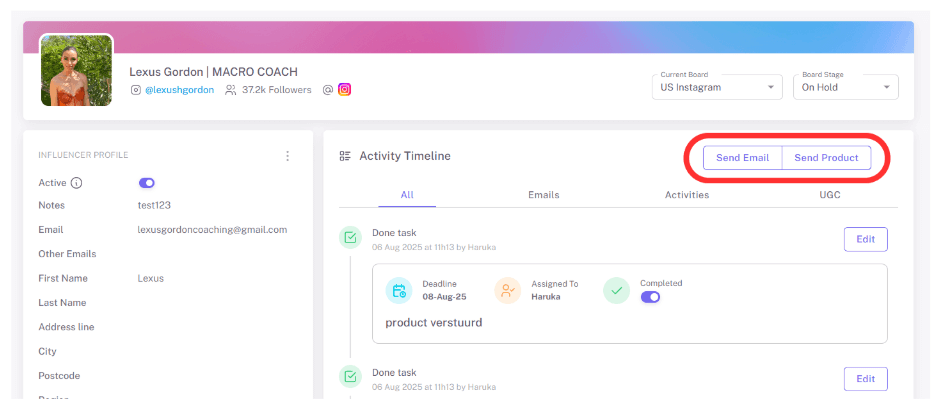
Los regalos de influencer se encuentran directamente dentro de la página de trato del creador. Una vez que agrega un creador a una campaña, puede administrar todo lo relacionado con esa colaboración—comunicación, etapas y envío de productos—desde un solo lugar.
Desde la página de trato, verá una opción de Enviar Producto. Este es el punto de partida para regalar y está disponible tan pronto como el perfil del creador esté configurado.
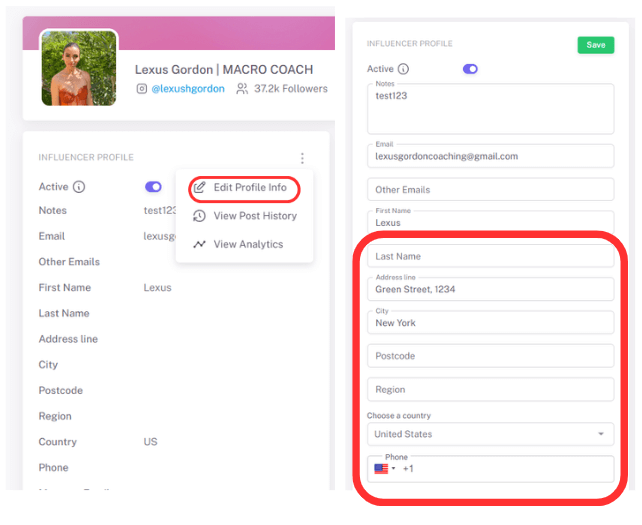
Paso 2: Agregar Detalles de Envío una Sola Vez
Antes de enviar el producto, simplemente tiene que verificar la información. Tenga en cuenta que una vez que el influencer comparte su dirección de correo electrónico, su información de envío se agrega automáticamente a la sección de Dirección de su perfil de influencer (lado izquierdo en el CRM).
No es necesario copiar y pegar manualmente ni volver a ingresar los detalles—todo se sincroniza directamente con el perfil del creador y se puede reutilizar para envíos futuros.
Paso 3: Seleccionar y Enviar Productos
Después de hacer clic en Enviar Producto, puede buscar en su tienda conectada, seleccionar uno o varios productos y ajustar las cantidades si es necesario.
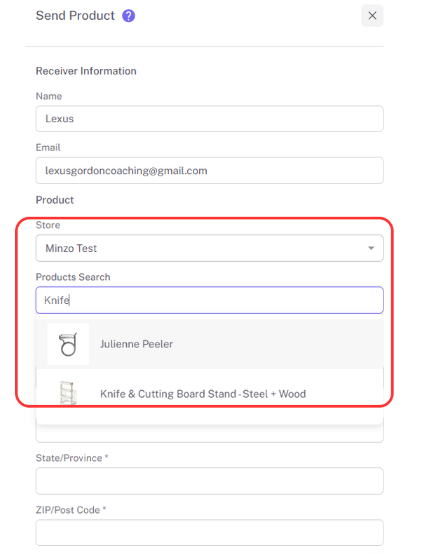
Cuando confirma, Influencer Hero crea un pedido de $0 en su tienda y lo vincula al trato del creador. Desde su perspectiva, el producto se envía en solo unos pocos clics.
Paso 4: Realizar un Seguimiento de la Entrega Automáticamente
Una vez que se envía un producto, Influencer Hero crea una tarea de seguimiento vinculada a ese creador. Puede ver actualizaciones de envío, acceder a enlaces de seguimiento y saber cuándo se ha entregado un producto.
Esto facilita el tiempo de los seguimientos y evita adivinar si un creador ha recibido realmente el producto.
Paso 5: Avanzar con los Entregables
Una vez que el producto se ha enviado, el creador se mueve automáticamente a la columna "Esperando Publicación" en el flujo de trabajo de su campaña.
Al mismo tiempo, el seguimiento de publicaciones se habilita automáticamente, lo que le permite monitorear el rendimiento del contenido tan pronto como se publique—sin cambios de etapa manual ni configuración adicional requerida.
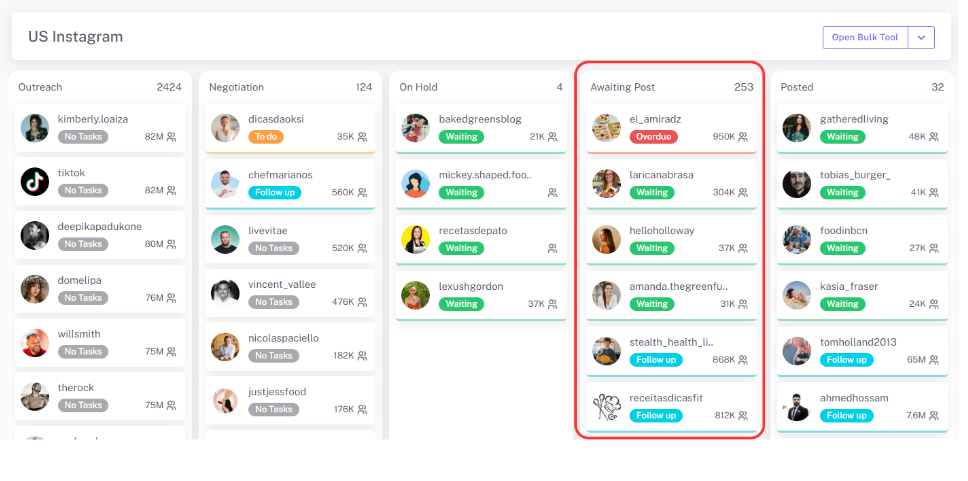
Debido a que todo permanece conectado al mismo acuerdo, el envío de productos no se siente como una tarea separada, sino simplemente como un paso en un proceso claro y rastreable de colaboración con creadores.
Qué Puede Hacer Con la Función de Envío de Productos de Influencer Hero
La función de envío de productos está diseñada para manejar el flujo completo de envío de productos dentro de Influencer Hero, desde la preparación de envíos hasta el seguimiento del seguimiento de los creadores. A continuación se explica cómo funciona en la práctica.
1. Envíe Productos Directamente Desde Su Tienda
Una vez que los detalles de envío de un creador se guardan en su perfil, puede enviar productos directamente desde la página de su acuerdo. Puede seleccionar uno o varios productos de su tienda conectada, ajustar cantidades y enviarlos en una sola acción. Esto crea un pedido de $0 en su plataforma de comercio electrónico y lo vincula automáticamente al acuerdo del creador.
2. Asigne el Envío de Productos a la Etapa de Campaña Correcta
Cada producto enviado está vinculado a una etapa de acuerdo en el CRM, como Envío de Productos o Esperando Publicación. Esto deja claro qué creadores ya han recibido productos, cuáles están esperando entrega y cuáles se espera que publiquen contenido a continuación, sin depender de notas manuales u hojas de cálculo.
3. Realice Seguimiento del Envío, la Entrega y los Seguimientos
Después de enviar un producto, Influencer Hero crea automáticamente una tarea de seguimiento vinculada al acuerdo. El enlace de seguimiento también se agrega directamente al acuerdo, para que pueda acceder fácilmente a los detalles del envío, monitorear el estado de entrega y saber exactamente cuándo llega el producto, lo que facilita el seguimiento a los creadores en el momento adecuado.
4. Envíe Productos en Lote
Para campañas de distribución de productos a gran escala, los productos se pueden enviar en lote usando filtros y selecciones del CRM. Por ejemplo, puede seleccionar creadores según la campaña, la etapa del acuerdo, y enviar productos a varios creadores a la vez, mientras mantiene cada envío conectado a un acuerdo individual.
5. Conecte el Envío de Productos con Reglas de Automatización
Las acciones de envío de productos pueden desencadenar o ser desencadenadas por reglas de automatización.
Los ejemplos incluyen:
- Crear códigos de descuento o enlaces de afiliados una vez completado el envío de productos
- Habilitar el seguimiento de publicaciones solo después de que se haya entregado un producto
Esto reduce el trabajo manual mientras mantiene las campañas estructuradas.
6. Mantenga el Envío de Productos Alineado Con el Alcance y la Presentación de Informes
Toda la actividad de envío de productos se encuentra dentro del registro del CRM del creador, junto con correos electrónicos de alcance, contratos, publicaciones y datos de rendimiento. Esto significa que los envíos de productos son visibles en el mismo lugar que el historial de comunicación e informes, lo que facilita entender cómo el envío de productos impacta el comportamiento de publicación y los resultados en las campañas.
En conjunto, estas capacidades permiten que los equipos envíen productos, rastreen entregas y gestionen los entregables de los creadores sin interrumpir los flujos de trabajo ni cambiar de herramientas.
Cuándo los Equipos Usan el Envío de Productos de Influencer Hero
La función de envío de productos se usa cuando los equipos quieren enviar productos de manera eficiente y mantener el control sobre lo que sucede después de la entrega. A continuación se presentan escenarios comunes donde el envío de productos se convierte en una parte central del flujo de trabajo.
Cuando Ejecutan Campañas de Distribución de Productos de Alto Volumen
Las marcas usan el envío de productos de influencers cuando necesitan enviar productos a decenas o cientos de creadores a la vez sin perder visibilidad. En lugar de manejar el envío en hojas de cálculo o backend de tiendas, los equipos pueden enviar productos directamente desde el CRM, realizar seguimiento del estado de entrega y ver claramente qué creadores se espera que publiquen a continuación.
Esto es especialmente útil para lanzamientos, campañas estacionales o programas de distribución siempre activos.
Cuando Prueba el Marketing de Influencers Como un Nuevo Canal de Crecimiento
Algunos equipos comienzan con marketing de influencers mediante envío de productos antes de comprometerse con colaboraciones pagadas. En estos casos, el envío de productos permite a las marcas validar la compatibilidad del creador, la calidad del contenido y el comportamiento de publicación antes de escalar el gasto.
Los productos se envían, se realiza seguimiento de la entrega y la producción del creador se puede revisar en un solo lugar, lo que facilita decidir con quién volver a comprometerse.
Cuando Combina el Envío de Productos Con Modelos Basados en Afiliados o Rendimiento
El regalo de influencers a menudo se combina con seguimiento de afiliados para mantener los costos iniciales bajos. Los equipos envían productos primero, luego rastrean qué creadores realmente publican e impulsan el engagement o las ventas. Los que tienen mejor desempeño pueden moverse posteriormente a programas pagados o de embajadores.
Este enfoque permite que las marcas conecten el regalo de productos directamente con los resultados en lugar de tratarlo como un costo hundido.
Cuando se escala el marketing de influencers con personal limitado (Ejemplo Olivida)
Olivida utilizó el regalo de influencers para añadir marketing de influencers a su mezcla existente de anuncios pagados y SEO después de luchar por lograr resultados rentables con Meta paid social. En lugar de depender de colaboraciones pagadas desde el principio, combinaron outreach automatizado de influencers, regalo de productos a gran escala, compensación basada en afiliados y recopilación de contenido automatizada para mantener los costos controlados mientras probaban el desempeño de influencers.
Al usar los flujos de trabajo de regalo de Influencer Hero, Olivida pudo enviar productos a influencers relevantes de belleza y cuidado de la piel, rastrear entregas y ver claramente quién publicó y tuvo desempeño.
Esto les permitió identificar siete creadores de mayor desempeño y moverlos a asociaciones de embajadores de marca a largo plazo, lo que resultó en un ROAS de 7,2×, una reducción de más del 150% en CAC promedio y un aumento en Meta cold acquisition ROAS de 1,1× a 2,6× mediante la reutilización de contenido generado por influencers.
Cómo el regalo de influencers se conecta con otras funciones de Influencer Hero
El regalo de influencers en Influencer Hero está diseñado para funcionar como parte de un flujo de trabajo conectado, no como una herramienta independiente de envío de productos. Cada vez que se envía un producto, esa acción se vincula con otras partes de la plataforma que ayudan a los equipos a gestionar seguimientos, entregables y resultados.
Regalos + CRM de influencers
Cada producto enviado está vinculado a un perfil de creador y trato específico. Esto mantiene los detalles de envío, historial de productos, comunicación y entregables en un solo lugar, lo que facilita ver qué se envió, cuándo se entregó y qué contenido se espera a continuación.
Regalos + Automatización
El envío de productos es un evento de sistema rastreado que puede desencadenar acciones automatizadas. Por ejemplo, enviar un producto puede mover automáticamente a un creador a una etapa de Esperando publicación, habilitar el seguimiento de publicaciones o crear códigos de descuento y enlaces de afiliados, reduciendo pasos manuales después del regalo.
Regalos + Seguimiento de publicaciones y entregables
Una vez que se entrega un producto, Influencer Hero puede rastrear si un creador publica contenido relacionado con el producto regalado. Esto ayuda a los equipos a conectar la actividad de regalo con la salida real del creador y garantiza que las campañas de siembra de productos no se detengan en el envío.
Regalos + Integraciones de eCommerce
El regalo se conecta directamente a Shopify a través de integraciones nativas. Los productos se envían como pedidos de $0, el estado de cumplimiento y entrega se rastrean y los datos del pedido permanecen vinculados al registro del creador, sin necesidad de gestionar regalos por separado en el backend de la tienda.
Regalos + Reportes
La actividad de regalo es completamente visible en los reportes junto con el desempeño de publicaciones y datos de ventas. Puede ver qué creadores regalados publicaron contenido, generaron engagement o impulsaron referencias, todo dentro del mismo sistema de reportes que ya utiliza para campañas.
Además, los reportes le permiten rastrear cuántos productos se enviaron y el costo total de regalo dentro de un período de tiempo específico, lo que proporciona a su equipo visibilidad clara sobre el gasto en productos y el ROI.
Al conectar regalos a datos de CRM, automatización, integraciones y reportes, Influencer Hero convierte la siembra de productos en un proceso estructurado y medible en lugar de una tarea manual manejada fuera de la plataforma.
Regalos + Vitrinas
Los creadores regalados también pueden conectarse a una Vitrina de Influencer Hero, donde sus enlaces de afiliados, códigos de descuento y colecciones de productos curados se muestran en una página de marca única. Esto facilita convertir productos regalados en oportunidades de ventas rastreables, permitiendo que las marcas vean cómo la siembra de productos se traduce en clics, conversiones e ingresos de cada vitrina del creador.
Reflexiones finales
El regalo de influencers en Influencer Hero está diseñado para ser simple, estructurado y fácil de gestionar a escala. Desde enviar productos y rastrear entregas hasta hacer seguimiento de publicaciones de creadores y desempeño, todo sucede dentro de un flujo de trabajo conectado, sin depender de hojas de cálculo o herramientas desconectadas.
Si desea ver cómo el gifting de influencers se ajusta a sus flujos de trabajo más amplios de influencers, afiliados y contenido, puede explorar la función en un recorrido en directo. Reserve una demostración con Influencer Hero para ver nuestro Influencer Gifting y otras funciones principales en acción.
Resumen
Este es un texto dentro de un bloque div.
Este es un texto dentro de un bloque div.
Precios/mes
Reseñas de Shopify
Este es un texto dentro de un bloque div.
Este es un texto dentro de un bloque div.
Este es un texto dentro de un bloque div.
Este es un texto dentro de un bloque div.
Este es un texto dentro de un bloque div.
Este es un texto dentro de un bloque div.
Este es un texto dentro de un bloque div.
Este es un texto dentro de un bloque div.
Este es un texto dentro de un bloque div.
Este es un texto dentro de un bloque div.
Este es un texto dentro de un bloque div.
Este es un texto dentro de un bloque div.
Este es un texto dentro de un bloque div.
Este es un texto dentro de un bloque div.
Este es un texto dentro de un bloque div.
Este es un texto dentro de un bloque div.
Este es un texto dentro de un bloque div.
Este es un texto dentro de un bloque div.
Este es un texto dentro de un bloque div.
Este es un texto dentro de un bloque div.
Este es un texto dentro de un bloque div.
Leer más

Preguntas frecuentes
¿Puedo enviar productos gratuitos a influencers directamente desde Influencer Hero?

Sí. Influencer Hero le permite enviar productos directamente desde su tienda de eCommerce conectada, como Shopify. Cuando se envía un producto, la plataforma crea un pedido de $0, lo vincula al acuerdo del creador y realiza un seguimiento automático del estado de entrega.
¿Necesito volver a ingresar los detalles de envío cada vez que envío un producto?
No. Los detalles de envío se guardan en el perfil del creator dentro del CRM. Una vez añadidos, esos detalles se pueden reutilizar para futuros regalos, haciendo que los envíos repetidos sean rápidos y consistentes.
¿Qué sucede después de que se envía un producto a un creador?
Después de enviar un producto, Influencer Hero crea una tarea de seguimiento vinculada al acuerdo del creador. Puede monitorear el progreso del envío, ver cuándo se entrega el producto y hacer seguimiento en el momento adecuado para la publicación de contenido o los próximos pasos.
¿Se puede automatizar el envío de regalos a influencers?
Sí. El gifting puede conectarse a reglas de automatización. Por ejemplo, enviar un producto puede mover automáticamente a un creator a una etapa "Awaiting Post", habilitar el seguimiento de publicaciones o desencadenar la creación de códigos de descuento y enlaces de afiliados.
¿Está el gifting de influencers conectado a la generación de informes y el seguimiento del rendimiento?
Sí. La actividad de gifting está vinculada a los registros de creadores y campañas, lo que permite a los equipos ver qué creadores que recibieron regalos publicaron contenido, generaron engagement o impulsaron ventas utilizando las mismas herramientas de reporting utilizadas para el desempeño de influencers y afiliados.









Blogs más populares


¿Estás listo para lograr un ROI de más de 10 veces?
Programa una demostración con uno de nuestros expertos en medios a continuación.