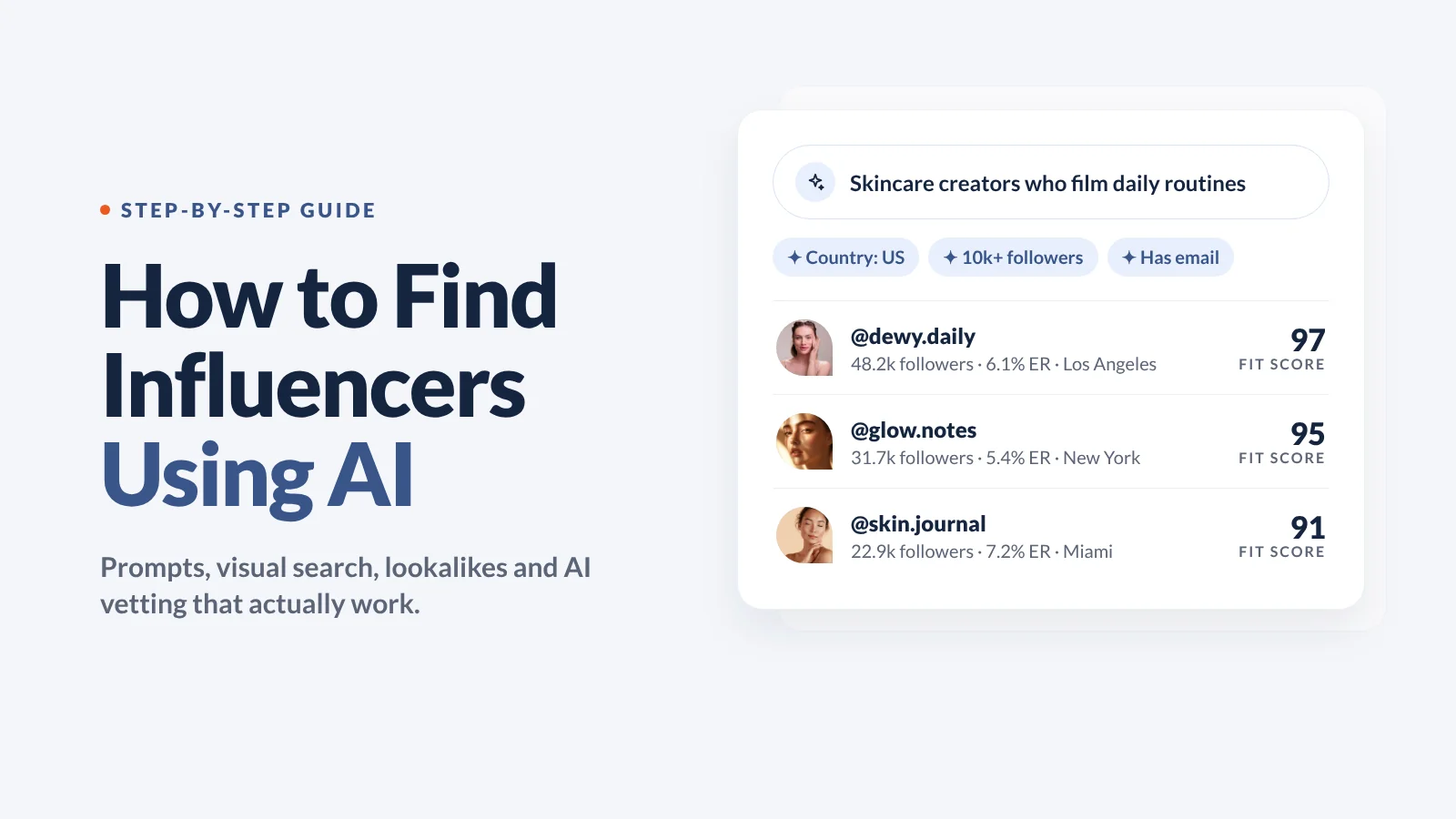
How to Find Influencers Using AI: A Step-by-Step Guide (2027)

November 19, 2026
|
Publicado

November 19, 2026
|
Atualizado

18 minutes
|
Leitura

Curso de Marketing de Performance com Influencers | VOUCHER: IMC100
Gabriela Molina
I Author

Impulsione ROI Com Influencers

Banco de Dados Global de Influencers
Plataforma TUDO EM UM
CRM, Afiliados, UGC e Muito Mais
How to Find Influencers Using AI: A Step-by-Step Guide (2027)
Finding influencers used to mean typing a keyword, scrolling through hundreds of profiles and opening each one to check whether the creator actually fits. That manual review is the slow, expensive part, and it's exactly where AI helps most.
Modern AI influencer search doesn't just match keywords in a bio. It reads what creators actually post (captions, profile details and images) and matches that against a brief you write in plain English. Some tools go further and vet every profile for you, then score it.
The short answer: to find influencers using AI, write a specific brief (niche, market, content style and exclusions), run a natural-language AI search, use visual search when the brief is about a look, expand your best matches with lookalike search, and let an AI research agent vet and score the list. Then check authenticity metrics before you start outreach.
This guide walks through each step with prompt examples, the settings that matter and the mistakes that waste budget. We use Influencer Hero's AI tools as the working example, but the method applies to whatever tool you use.
Key Takeaways
- AI search matches creators on what they post, not only on keywords in their bio.
- Your brief is the biggest lever. A specific niche, content style and list of exclusions beats a broad category every time.
- Use the right method for the job: plain-language search for niches, visual search for aesthetics, lookalikes for scale and deep research for vetted, scored lists.
- AI speeds up discovery and vetting, but you still check fake followers, audience location and engagement before you pay a creator or ship product.
- With an MCP connection, you can search for creators and run campaign actions straight from ChatGPT, Claude or Gemini.
What Does It Mean to Find Influencers Using AI?
Traditional influencer search tools turn your search into keywords and look for them in bios and captions. Search for "vegan trainer" and you get anyone with "vegan" in their bio, including people who never post a single workout.
AI influencer search works differently. Before you even search, every creator profile has already been reviewed by AI: the bio, profile details and recent posts, with vision enabled so it can understand images. When you type a request, the AI splits it into two parts:
- Hard filters it can set directly, like follower count, country or whether the creator has a contact email.
- Semantic meaning it matches against content, like "personal trainers who are also vegan."
The result: you find creators whose content fits your brand even when their bio doesn't say so, and you skip the ones whose bio says the right thing but whose feed doesn't.
The 5 AI Methods for Finding Influencers (and When to Use Each)
There isn't one "AI search." There are several methods, and each one solves a different problem. Here's how they compare:
In Influencer Hero, the first four live inside the Influencer Finder, which runs on a proprietary search engine that indexes around 450 million profiles.
You don't need to use all five on every campaign. Most teams start with one, then layer in the others as the brief gets more specific. The steps below follow that natural order.
Before You Start: What You Need
AI tools are fast, but they can only be as precise as the input. Before you open any search tool, have these four things ready:
- A clear goal. Awareness, UGC, affiliate sales or product launches each need different creator sizes and content styles.
- Hard requirements. Country, follower range, language and whether you need a contact email.
- Deal-breakers. Creators who own a competing brand, content that's off-brand, or anything that's a brand-safety risk for you.
- 3 to 5 reference creators you already like, if you have them. They're the fastest way to show AI what "good" looks like.
Step 1: Write a Brief the AI Can Actually Use
The single biggest difference between a great AI search and a useless one is the prompt. Write it the way you'd brief a junior researcher: niche, market, content style, must-haves and deal-breakers.
Here's what that looks like in practice:
Four rules that make prompts work:
- Be specific about the niche. "Hyrox athletes" beats "fitness influencers."
- Describe format, tone and setting. "Films in-person reviews" tells the AI what the content looks like.
- Say what to exclude. "Not restaurant reviews" removes a whole category of near-misses.
- Leave the numbers to filters. Country, follower range and email are cleaner as filters than as words in a sentence.
Step 2: Run an AI Profile Search in Plain Language
AI Profile Search is the core search mode in Influencer Hero's Influencer Finder. You describe the creator you want, and the AI matches that description against creators' bios, posts and images.
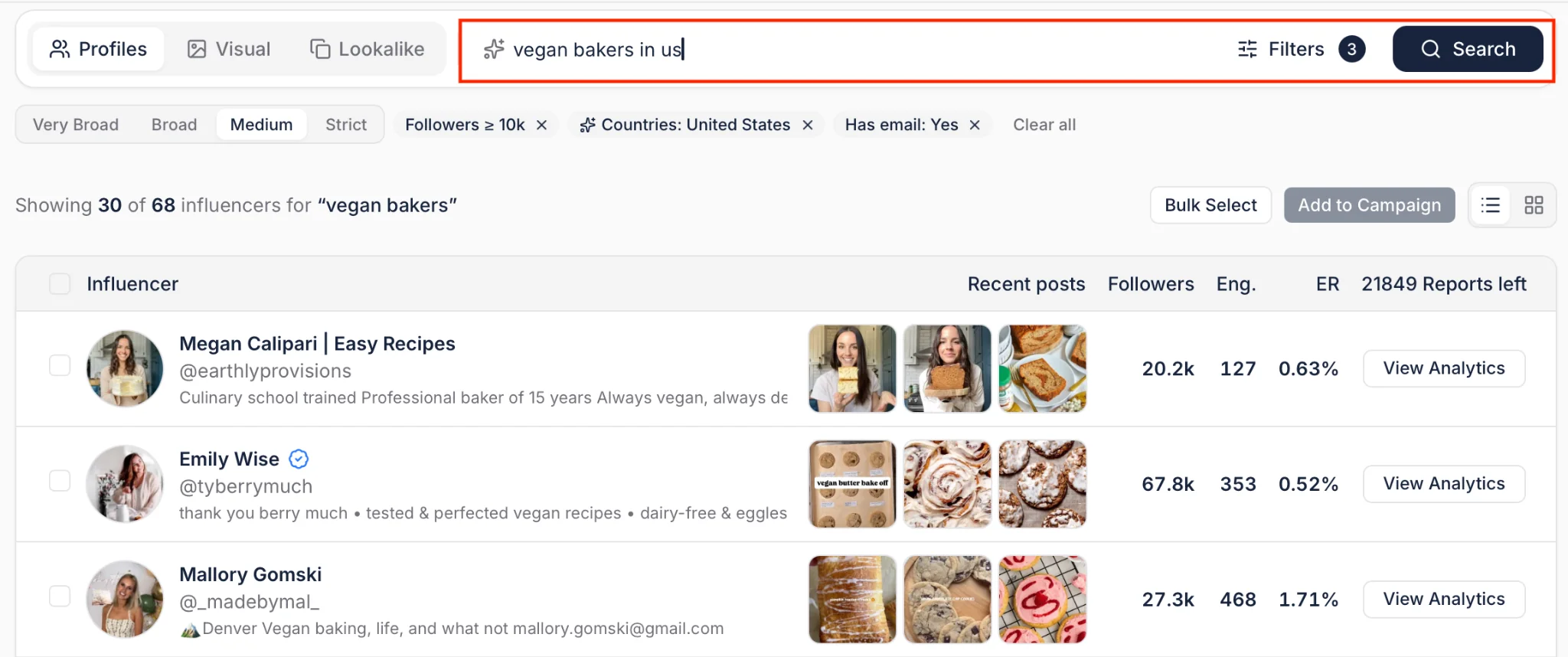
How to run it
- Type your brief. For example: "personal trainers who are also vegan, based in the US, with more than 25k followers."
- Check the AI filters. The filters the AI sets from your prompt show up above the results as chips with a sparkle icon. Review them and remove any you don't want.
- Know the defaults. If you don't mention followers, the search defaults to 10k+. If you don't mention contact details, it only shows creators with an email address.
- Set the match strictness. Choose very broad, broad, medium or strict (more on this below).
- Review without leaving the results. Open a creator preview to see bio, followers, engagement rate, median engagement and views, growth, country and posts.
One detail that saves a lot of time: each creator's recent posts are re-ordered so the most relevant ones show first. You see why a creator matched in a few seconds instead of scrolling their whole feed.
Pick the right strictness level
- Strict: only the closest matches. Best for very specific briefs.
- Medium (default): only creators who clearly match the brief.
- Broad: a wider list, with some less relevant results likely.
- Very broad: the longest list, including adjacent creators.
Many tools default to broad matching, which looks impressive (big list!) but means more manual cleanup. Start at medium and only widen if the list is too short.
Combine AI search with keywords and brand tags
- Unlimited keywords with include and exclude logic. Instead of running twenty separate searches for related cooking terms, you run one.
- Tagged-in filter. Add a brand name to find creators who've tagged that brand, and see the exact posts. Try "Hyrox athletes" plus a sportswear competitor's name to find creators already working in your category. If the brand hasn't been searched recently, the Finder pulls live data and lets you know the results are on the way.
Step 3: Use Visual Search When the Brief Is About a Look
Some briefs are almost impossible to put into keywords. "Dark, moody gym content." "Product shown in hand, natural light." "The same vibe as our best-performing post." That's where Visual Search comes in. It finds creators by what their posts look like, not by what their bio or captions say.
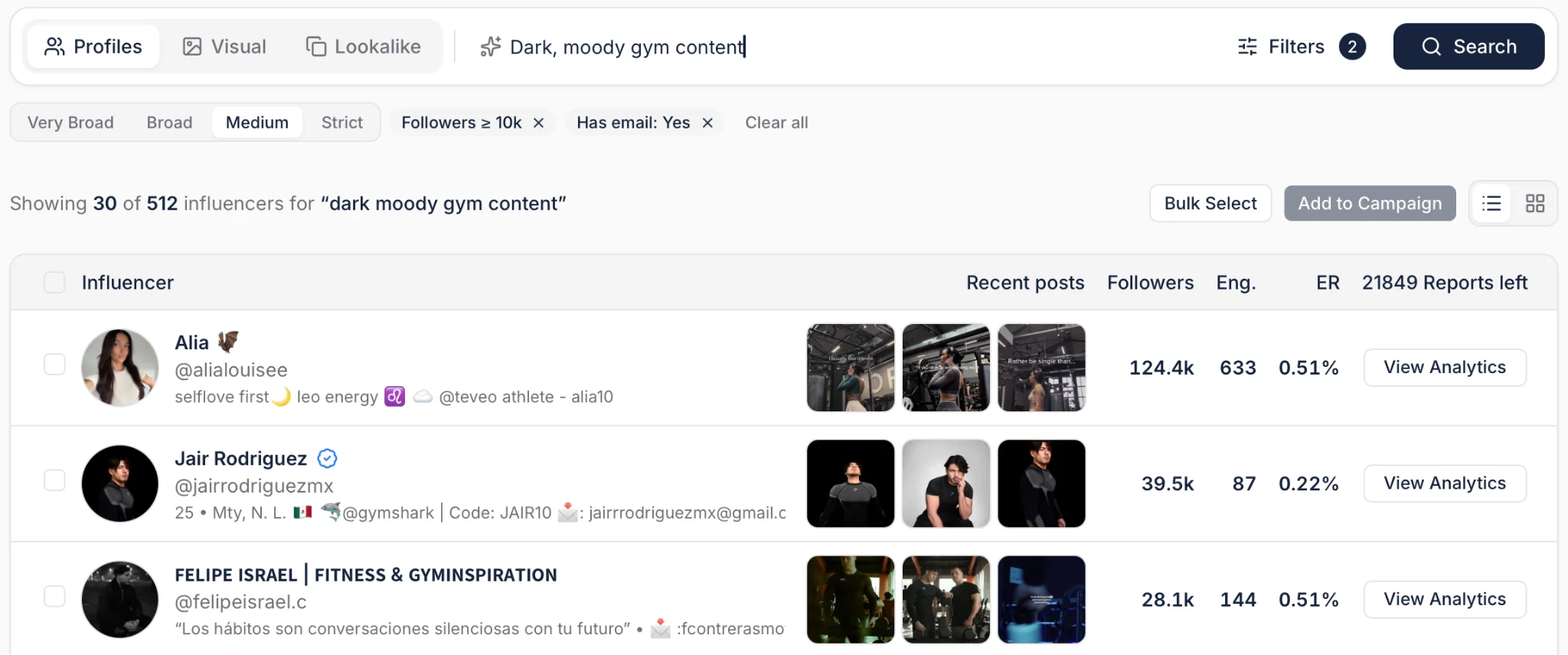
How to run it
- Open "Search by image or description" in the Influencer Finder.
- Describe a scene or upload an image. Write something like "woman in a blue dress on a boat," or drag in a top-performing post, a moodboard shot or a competitor's campaign image.
- Let the AI match it. Image searches match more than the main subject: scene, lighting, layout and clothing style all count.
- Narrow with filters. Country, follower range and "has email" work the same as in other searches. Adding a country filter also speeds up the search.
Get more specific to get better matches
Visual descriptions work like a zoom lens. "Person making sushi" returns anyone making sushi. "Chef making sushi" narrows it to professional chefs. "Japanese chef making sushi" narrows it further.
Bonus: if the exact image you upload is indexed, Visual Search will often surface the creator who posted it.
Keep in mind: Visual Search scans images, so it takes a bit longer than other searches. It's built for niche searches where fit matters more than volume. If you need hundreds of creators, use AI Profile Search or lookalikes for volume, and Visual Search for precision.
Step 4: Scale Your Best Matches with Lookalike Search
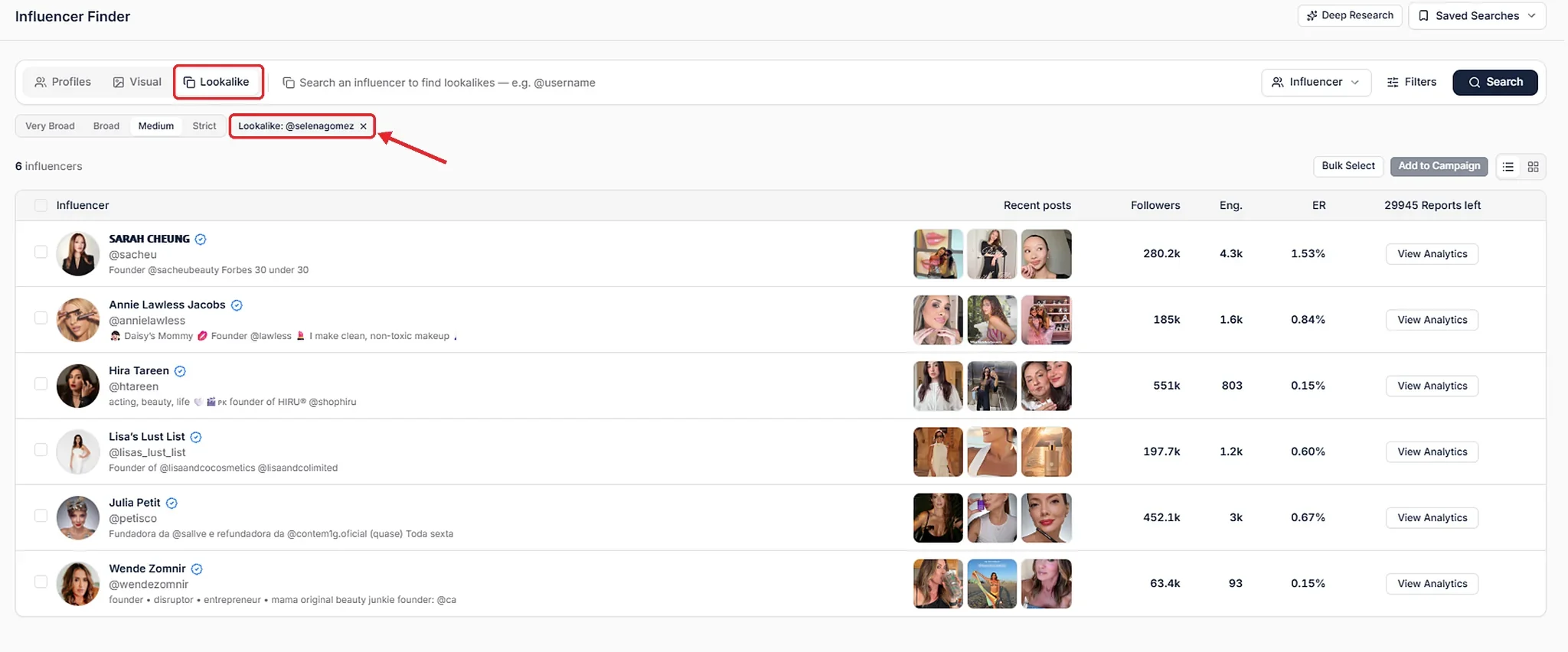
Once you've found a few creators who fit, the fastest way to find more is Lookalike Search. You give the AI one or more reference creators and it finds others who post similar content.
How to run it
- Choose your source. Enter exact @usernames in the Lookalike tab, pick a creator from a search preview, or use an entire campaign. There's no limit on the number of reference profiles.
- Choose a mode. Expand or Refine (see below).
- Set strictness. Medium is the default and returns only clear matches.
- Review and add the best matches to your campaign.
Expand vs. Refine: which one to use
- Expand finds lookalikes for each reference creator and combines the results. Creators who look like several of your references rank higher. Use it to build a big longlist.
- Refine works out what your references have in common and only returns creators who match that shared theme. Say you pick three Hyrox athletes, but one also posts yoga, one posts vegan recipes and one posts their dog. Refine ignores the noise and gives you Hyrox creators.
The campaign lookalike loop
This is where lookalikes get really powerful:
- Find 3 to 5 creators you like, using any search method.
- Add them to a campaign.
- Run a lookalike search on the whole campaign.
- Add the best matches back to the campaign and repeat.
A campaign with 300 approved creators can be the source for 300 more similar ones. For micro-influencer programs, keep your follower filter on (for example 10k to 100k) so the lookalikes stay in the right tier.
Step 5: Let Deep Research Build and Vet the List
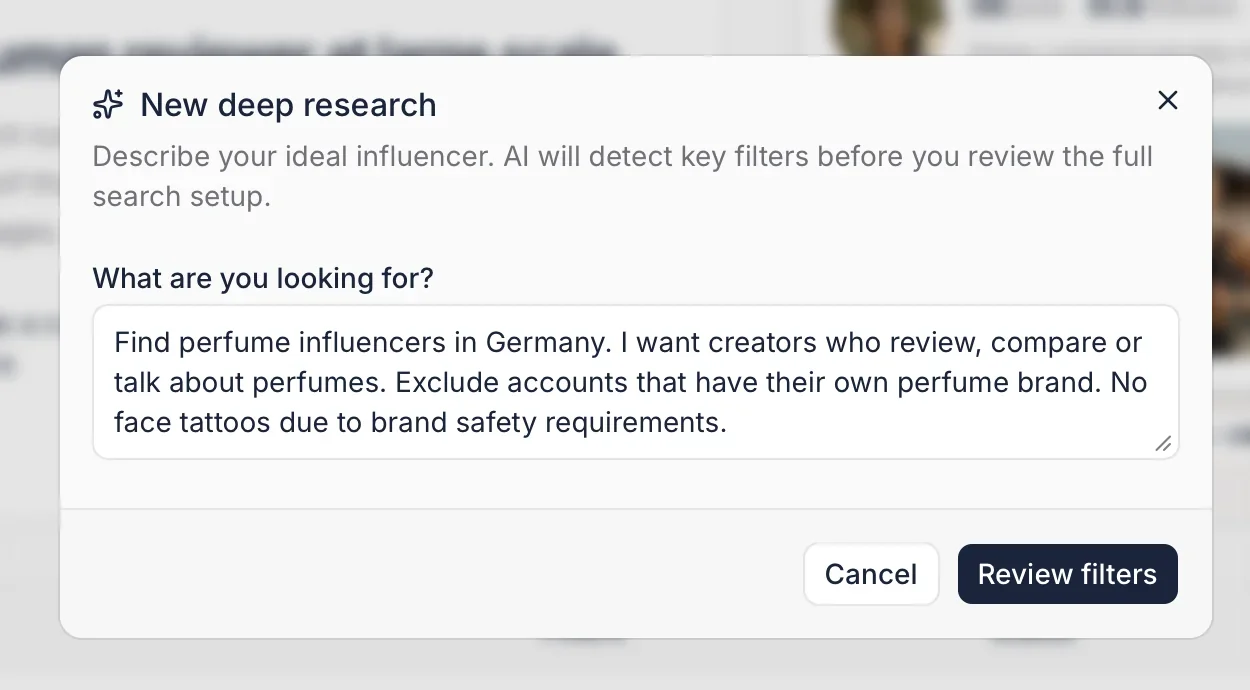
The steps so far help you find creators faster. Deep Research also does the vetting. It works a lot like Deep Research in ChatGPT, but for creators: you write a brief and it returns a vetted list where every creator has a fit score from 1 to 100 and a short written match assessment.
How it works
- Write the brief. Cover niche, market, content style and exclusions. The more specific, the better.
- Set filters, strictness and depth. Hard filters (like country) are set automatically from your brief, plus defaults like follower range and "has email." Keep them loose and only set what's truly required. Then choose a search depth: Quick reviews 2,000 profiles for 0.5 credits, and Full reviews 10,000 profiles for 1 credit.
- Let it scout. The AI turns your brief into 10 to 20 searches: AI profile searches, keyword searches (including translations for the market), lookalike searches in both Expand and Refine modes, and visual searches. The first round of sample creators shows up in about 2 to 3 minutes.
- Give feedback. Mark each sample creator as a fit or not, and say why. A reason teaches the AI much more than a plain "no."
- Get the vetted list. The AI reviews every profile's picture, bio and recent posts against your brief and feedback. This runs in the background and usually takes under an hour (up to 1 to 2 hours for big markets).
What it looks like in practice
Here's a real brief: perfume influencers in Germany who review or compare perfumes, excluding creators who own a perfume brand and creators with face tattoos (a brand-safety requirement).
- Searches run: 12
- Profiles found: 2.2k
- Duplicates removed: 776
- Profiles rated by AI: 1.4k
- Creators accepted: 32, with top scores of 95 to 97
That's 1.4k profiles reviewed against a detailed brief, which would take days to do manually, boiled down to a shortlist of 32 creators, each with a written reason.
How to use the scores
- Sort by score and work down. Stop when fit drops below your threshold. A creator who reviews niche German perfumes every week scores in the 90s. A beauty creator with one perfume post last month scores much lower.
- Switch strictness after the results. The list updates instantly, so you can test a broader cut without re-running the research.
- Check the declined list in small niches. If near-misses would work for you, switch to broad.
- Export the list or add filters, and see every search the AI ran (queries, keywords, translations and lookalikes).
Keep in mind: Deep Research won't invent creators. If a niche is small in a market, you'll get a small list, and that's an accurate answer, not a failure.
Step 6: Vet Authenticity and Performance (AI Doesn't Skip This)
AI tells you whether a creator's content fits your brief. It doesn't replace checking whether their audience is real and in the right place. Before you send product or money, check:
- Fake followers. Fraud detection flags fake, bot and mass followers so you can judge real reach.
- Audience location. A US creator with a mostly non-US audience won't drive US sales. Check down to city level if your market is local.
- Engagement rate and audience growth. Both matter more than raw follower count.
- Past sponsored posts. Look at how their recent brand collabs actually performed.
Influencer Hero's analysis of 10K+ commercial influencer posts points to five metrics that best predict ROI:
- Audience growth rate: the strongest single correlation with conversion.
- Engagement rate: both the rate and total engagements correlate with performance.
- Audience size: creators above the 75th percentile (96K+ followers) performed better on conversions.
- Fake followers: a higher share of bot and mass accounts correlates negatively with performance.
- Verified accounts: a useful extra signal when you allocate budget.
If you want a quick check on a single creator, Influencer Hero's free Chrome extension runs an audit on any profile.
Step 7: Find Influencers from ChatGPT, Claude or Gemini with an MCP
If your team already works in an AI assistant, you don't have to switch tabs to find creators. An MCP (Model Context Protocol) is an open standard that connects your AI assistant to another tool. The Influencer Hero MCP connects Claude, ChatGPT or Gemini to your Influencer Hero account, with no API key, developer or code needed.
[SCREENSHOT — Influencer Hero MCP in an AI assistant]
[ALT: Influencer Hero MCP Influencer Search Tool]
How to set it up
- Add Influencer Hero as a connector in your AI assistant (the Help Center has steps for each one).
- Sign in with your Influencer Hero login and approve the connection.
- Start prompting.
What you can do with it
Through the MCP, you can search Instagram, TikTok and YouTube by niche, followers, location and audience location, find lookalikes, and pull audience reports and emails. Then you can act on the results in the same chat: add creators to campaigns, start outreach flows, send products, create discount codes and pull reports.
Example prompts:
- "Find TikTok creators in the US with 10k to 100k followers who post about home fitness."
- "Find lookalikes of @[creator] and add the ones with an email to my Spring Launch campaign."
- "Move everyone in Outreach who never replied to On Hold."
- "Create a 15% discount code for @anna and set her commission to 10%."
This is worth checking when you evaluate any influencer marketing MCP: can it only read data, or can it act on it? Many MCPs in this space are limited to reporting. Influencer Hero's is built with a large set of endpoints so you can run large-scale actions, not just pull numbers.
What stays in your control
- Reading boards, creators and reports is instant.
- Sending emails and flows, sending products, requesting payouts and spending credits all need your approval first.
- New automations are saved inactive until you approve them.
- The MCP can't delete deals or creators, and it only sees the brands and boards your login already has.
- Searches cost the same credits as in the app, and the assistant warns you before spending them.
For a deeper look at prompts and workflows, read our guide to influencer marketing MCPs.
Bonus: Check Who Already Knows Your Brand
Before you search the open market, look at your own audience. Roughly 1 to 3% of a brand's customers are creators, and creators who already know your brand are 8x more likely to collaborate.
You can surface them from three places:
- Instagram: creators who follow your page.
- Klaviyo: creators who signed up for your newsletter.
- Shopify: creators who've bought from you.
Use these as your reference creators for lookalike searches, and you start from people who already like your product.
Example Workflow: From Brief to Vetted Shortlist
Here's how the steps fit together for a D2C activewear brand looking for Hyrox creators in Germany:
- AI Profile Search: "Hyrox athletes in Germany," plus the tagged-in filter with a competitor sportswear brand to see who's already working in the category.
- Shortlist: pick the 5 strongest creators and add them to a campaign.
- Lookalike Search (Refine): run it on the campaign to find more Hyrox-focused creators without the lifestyle noise.
- Visual Search: upload your best-performing campaign image to find creators with the same look.
- Deep Research: run the full brief, give feedback on the samples, and work down the scored list until fit drops below your threshold.
- Vet: check fake followers, audience location and growth on the final list.
- Act: start gifting outreach from the campaign, or from ChatGPT or Claude through the MCP.
Common Mistakes When Finding Influencers with AI
- Prompting with a category. "Fitness influencers" gives you a list as broad as the internet. Describe the niche, content style and exclusions.
- Defaulting to broad matches. Longer lists feel productive, but every irrelevant creator is manual review time, wasted outreach and wasted gifting.
- Over-tightening hard filters. Only set filters that are true requirements, like country. Let the AI handle the rest.
- Rejecting samples without a reason. In Deep Research, the "why" is what teaches the AI where your line is.
- Using Visual Search for volume. It's built for precision. Use profile search or lookalikes when you need hundreds of creators.
- Trusting fit without checking authenticity. A perfect content match with a bot-heavy audience is still a bad deal.
Where Humans Still Matter
AI handles the scouting and the first round of vetting. People still decide brand fit, write the outreach, negotiate and build the relationships that turn a one-off post into a long-term partnership.
That's also why Influencer Hero pairs its AI search with people: brands on managed plans get 24/7 support from a human account manager, who can also help you write better briefs and prompts.
Final Thoughts
Finding influencers with AI comes down to a simple sequence: write a specific brief, search in plain language, use visuals when the brief is about a look, scale with lookalikes, let AI vet and score the list, then check authenticity before you reach out.
Get the brief right and the tools do the heavy lifting. Get it wrong and you just get a bigger list of the wrong creators, faster.
Want to see these search methods run on your own brief? Explore the Influencer Finder or book a demo.
Resumo
Este é um texto dentro de um bloco div.
Este é um texto dentro de um bloco div.
Preço/Mês
Avaliações Shopify
Este é um texto dentro de um bloco div.
Este é um texto dentro de um bloco div.
Este é um texto dentro de um bloco div.
Este é um texto dentro de um bloco div.
Este é um texto dentro de um bloco div.
Este é um texto dentro de um bloco div.
Este é um texto dentro de um bloco div.
Este é um texto dentro de um bloco div.
Este é um texto dentro de um bloco div.
Este é um texto dentro de um bloco div.
Este é um texto dentro de um bloco div.
Este é um texto dentro de um bloco div.
Este é um texto dentro de um bloco div.
Este é um texto dentro de um bloco div.
Este é um texto dentro de um bloco div.
Este é um texto dentro de um bloco div.
Este é um texto dentro de um bloco div.
Este é um texto dentro de um bloco div.
Este é um texto dentro de um bloco div.
Este é um texto dentro de um bloco div.
Este é um texto dentro de um bloco div.
Leia Mais

Perguntas frequentes


Blogs Mais Populares


Maximize o ROI com Marketing de Influencers
Junte-se a mais de 1.200 marcas e 150+ agências que estão escalando programas com creators usando Influencer Hero.