New AI Profile Search: Find Influencers by What They Actually Post

October 16, 2026
|
Published

October 17, 2026
|
Updated

7 minutes
|
Reading

Influencer Performance Marketing Course | VOUCHER: IMC100

Malena Garcia

Table of Contents
- New AI Profile Search
- What's New
- How AI Profile Search Works
- Your Prompt Sets the Filters for You
- The Most Relevant Posts Show Up First
- Check Creators Without Leaving the Search
- Unlimited Keywords
- See Who Already Tagged a Brand
- Control How Strict the Matching Is
- How to Write a Search Prompt
- Why This Matters
- Find the Right Creators in Minutes
- FAQs
Drive ROI With Influencers

Global Influencer Database
ALL-IN-ONE platform
CRM, Affiliate, UGC & More
New AI Profile Search: Find Influencers by What They Actually Post
Most influencer searches still work like it's 2018. You type a keyword, the tool matches it against bios, and you spend the next hour opening profiles to check if they actually post about what you need.
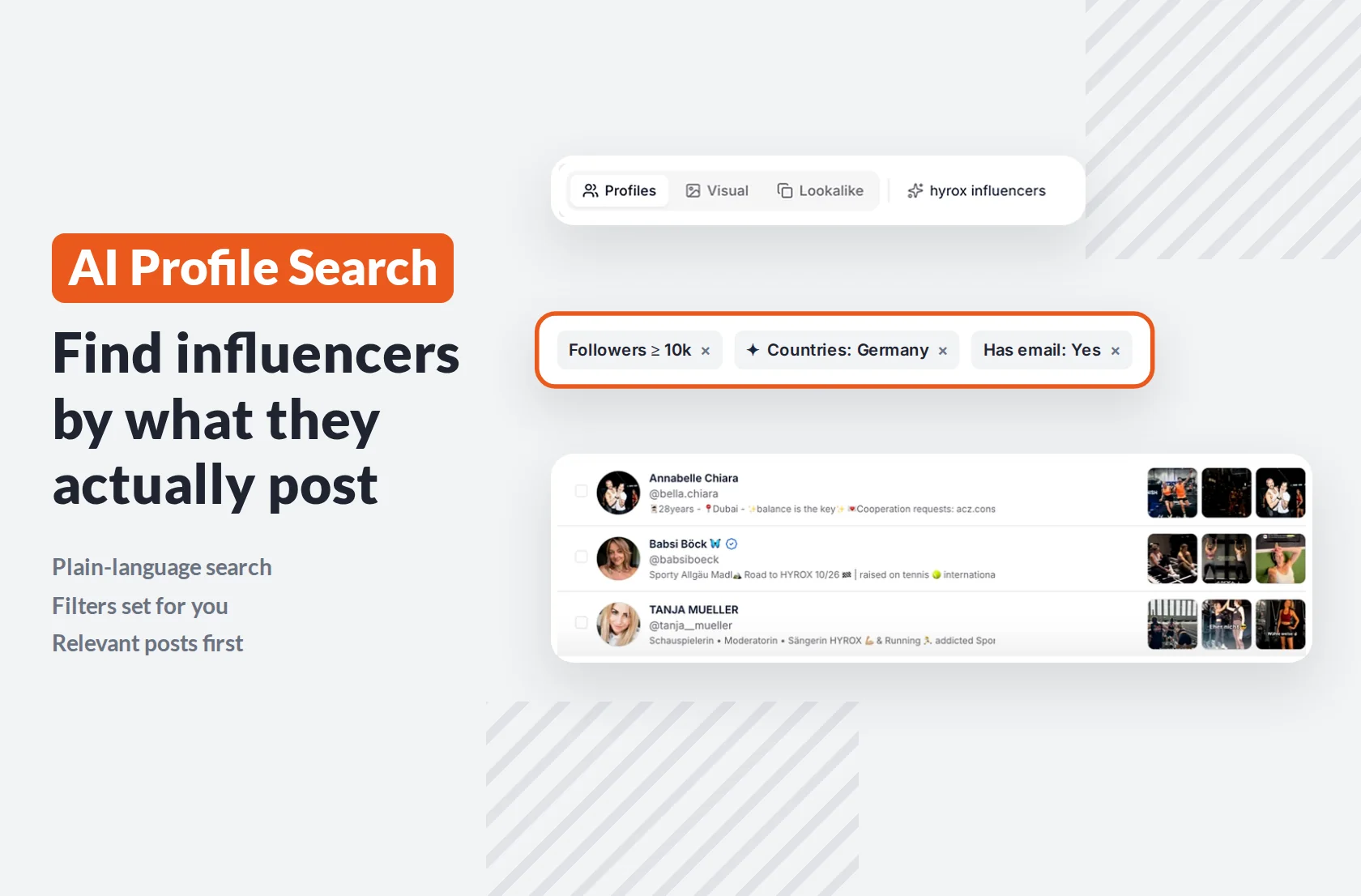
AI Profile Search fixes that. It’s the core search mode of the new Influencer Finder, and it lets you describe the creator you’re looking for in plain language. The AI matches your description against what creators actually post, sets your filters for you and shows each creator’s most relevant content first. It’s available for Instagram creators.
What's New
- Search in plain language, like you'd brief a teammate
- Matching based on bios, posts and images, not just bio keywords
- Hard filters like followers and country set automatically from your prompt
- Each creator's most relevant posts shown first, based on your search
- A creator preview with key metrics, without leaving the search
- Unlimited keywords with include and exclude logic
- A tagged-in filter to see which creators tagged a specific brand
- Four strictness levels to control how close the matches are
How AI Profile Search Works

Every creator in Influencer Hero's database has already been reviewed by AI, including their bio, profile details and recent posts, with vision enabled. That means the AI doesn't just read what creators say about themselves. It sees what they actually post.
When you search, your prompt is matched directly against that understanding of each profile. Older tools translate your search into a handful of bio keywords, which is why "vegan trainer" used to return anyone with "vegan" somewhere in their bio. Now it returns trainers whose content is actually about plant-based fitness.
Your Prompt Sets the Filters for You
You don't need to open the filters panel for the basics. Write "personal trainers who are also vegan, based in the US, with more than 25k followers" and the AI splits it in two:
- Hard filters it can set directly: followers above 25k, country United States
- The meaning it matches against content: vegan personal trainers
Filters the AI adds show up as chips above your results, marked with a sparkle icon, so you can see exactly what it applied and remove anything you don't want. If your prompt doesn't mention followers or contact details, it defaults to 10k+ followers and creators with an email address, so every result is someone you can actually reach.
If you're comparing platforms, our roundup of discovery tools shows how most still rely on bio keywords alone.
The Most Relevant Posts Show Up First
No creator posts about one thing only. A Hyrox athlete also posts lifestyle content, travel and the occasional brunch. In most tools, you scroll through all of it to confirm they're a fit.
AI Profile Search reorders each creator's recent posts based on your query. Search for Hyrox athletes and the post thumbnails on every result show their Hyrox content first. Search for running creators and the same profile shows their running posts instead. Hover over any thumbnail to see it full size.
The posts are still recent ones, just sorted by relevance. When you're reviewing 200 profiles in an hour, being able to confirm a fit at a glance is what makes that possible.
Check Creators Without Leaving the Search
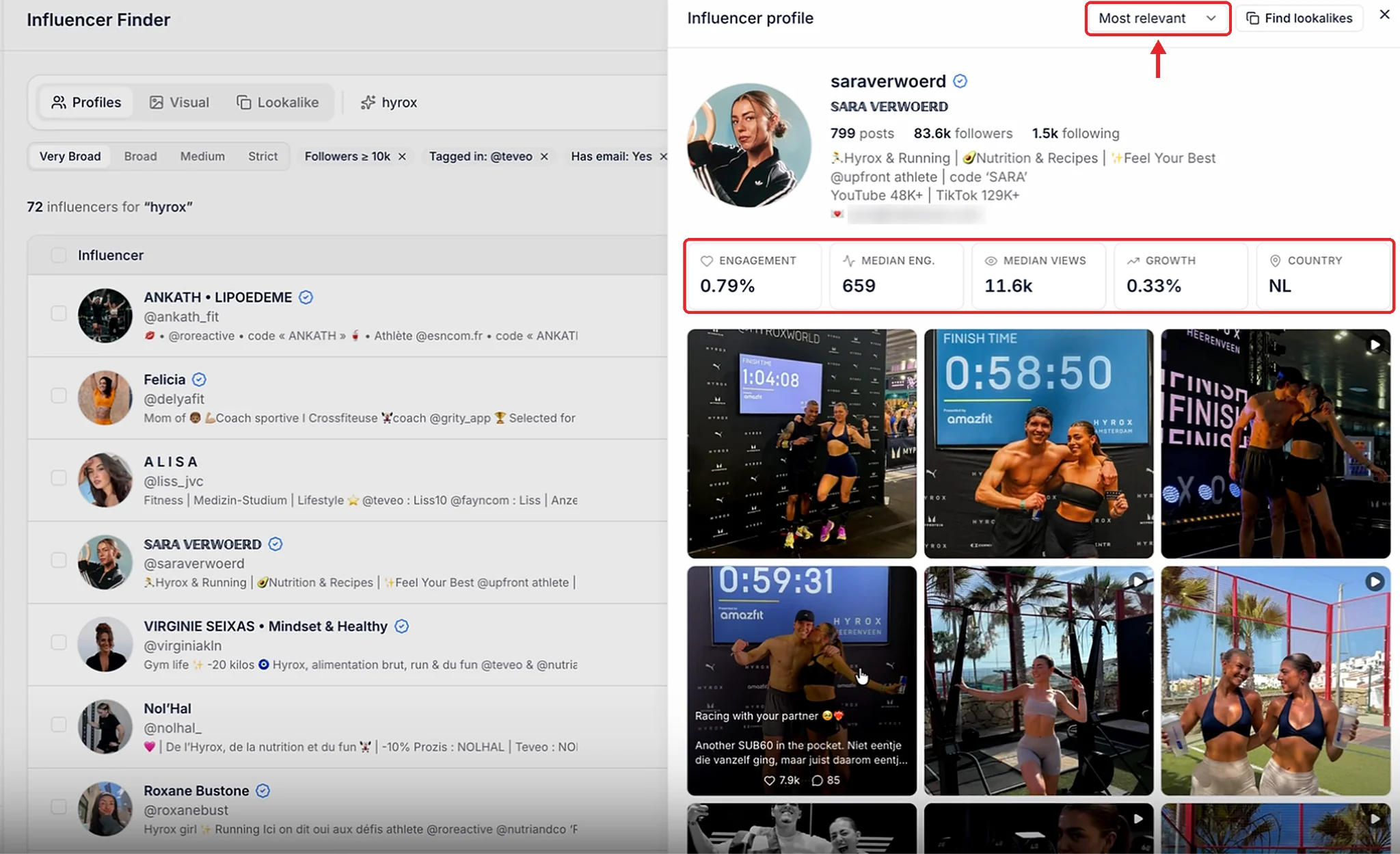
Click any creator to open a quick preview next to your results. You get their bio, follower count, engagement rate, median engagement, median views, growth and country, plus their posts.
The posts can be sorted by most relevant to your search or by most recent, so you can see both how well they match and what they're posting right now. If a creator is a perfect fit, click to find lookalikes and use our new Lookalike Search to find more creators like them.
Unlimited Keywords, With Include and Exclude

Sometimes you need exact terms on top of the AI search. The old Finder allowed only one keyword per search, so finding cooking creators meant separate searches for cooking, recipes, kitchen and meal prep.
Now you can add as many keywords as you want in one search. Choose whether results should match any of them, or exclude terms you don't want, like a competitor's name or a content type that doesn't fit your brand. One search instead of twenty.
See Who Already Tagged a Brand
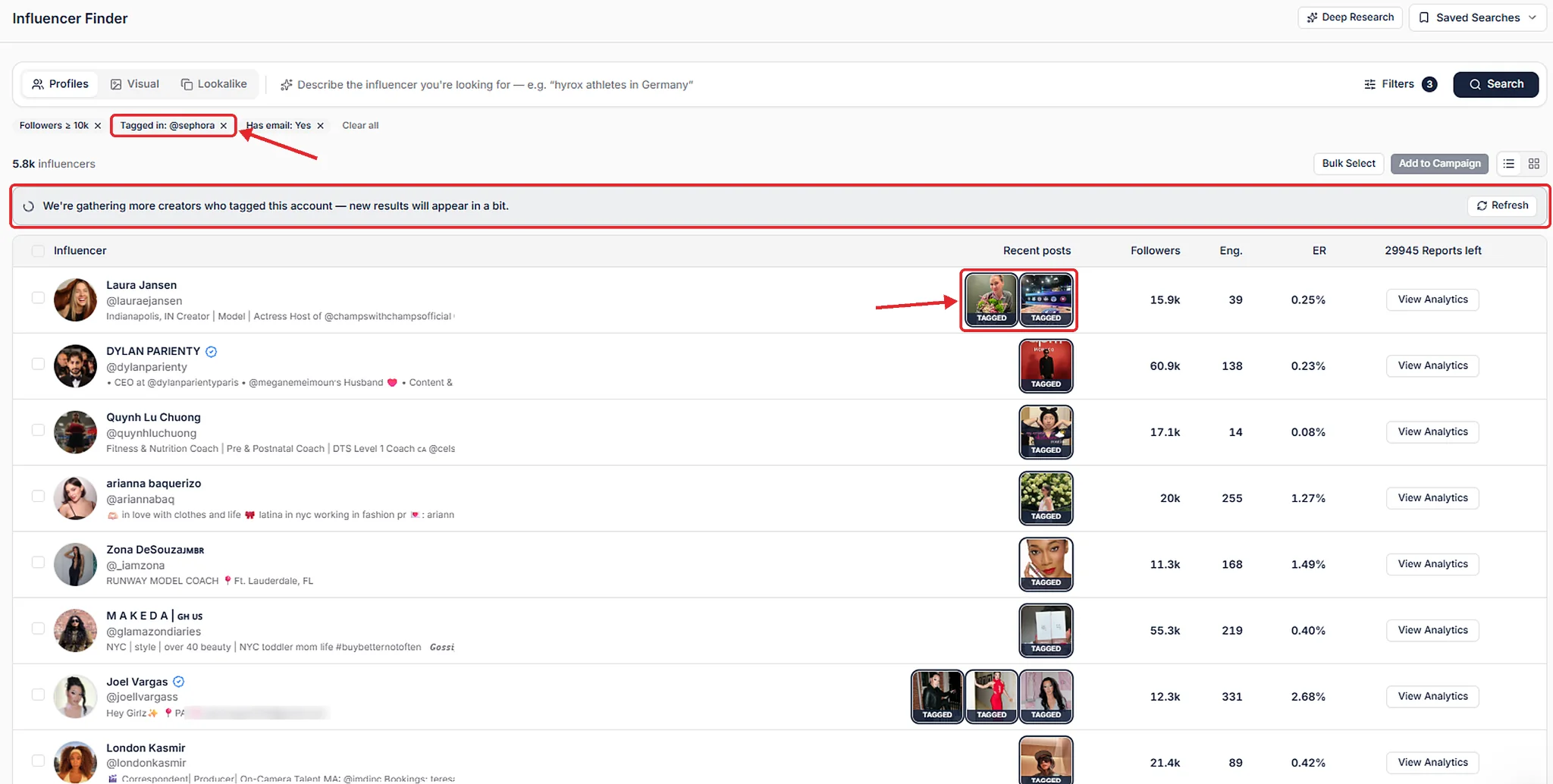
The tagged-in filter shows which creators have tagged a specific brand, along with the exact posts where they did it. It's one of the fastest ways to build a list:
- Competitor research: see which creators already work with brands in your category
- Category fit: creators who tag similar brands are used to creating content for them
- Combined searches: add an AI prompt on top, like "Hyrox athletes" plus tagged-in a sportswear brand
If a brand hasn't been searched recently, the Finder pulls the data live and lets you know new results will appear shortly. Once you have your list, add the best creators to a campaign in your campaign manager.
Control How Strict the Matching Is
Above your results, you can set how lenient the AI should be: very broad, broad, medium or strict.
The default is medium, which only includes creators who are clearly a good match. Many databases default to broad, which gives you a longer list where a big chunk isn't relevant. Start with medium, then widen to broad or very broad if you need volume or are open to adjacent creators, like lifestyle creators who post fitness content now and then.
How to Write a Search Prompt That Works
The AI is powerful, but it isn't magic. The quality of your results depends on the quality of your prompt. Treat it like a brief you'd hand a new team member.
A few more rules of thumb:
- Be specific about the niche. The narrower the description, the stronger the matches.
- Describe the content, not just the topic. Format, tone and setting all count.
- Say what you don't want. Restaurant reviews, giveaways, a type of content that clashes with your brand.
- Leave the numbers to filters. Country, followers and email work best as hard filters, set by the AI or by you.
Why This Matters
Search quality decides everything that comes after it. A weak list means more outreach for fewer replies, more products gifted to the wrong creators and more time cleaning data instead of running campaigns.
AI Profile Search gives you:
- Results based on what creators actually post, not what their bio says
- Faster reviews, with the most relevant content shown first
- Fewer manual filters, because the AI sets them from your prompt
- More precise lists with unlimited keywords and tagged-in data
- A list you can trust by default, with the option to go broader
Once your list is ready, use bulk actions to add creators to campaigns and start outreach in a few clicks. Our guide to outreach tools covers what to look for in that next step.
And while the AI does the heavy lifting, you're not on your own. Influencer Hero comes with human account management, available 24/7, to help you write better prompts and get the most out of every search. Every creator you find can go straight into your influencer CRM.
Find the Right Creators in Minutes
Describe the creator you need, and let the AI find them across Instagram, TikTok and YouTube. No more keyword guessing, no more endless scrolling.
Book a demo and see the new AI Profile Search in action.
Summary
This is some text inside of a div block.
This is some text inside of a div block.
Pricing/Month
Shopify Reviews
This is some text inside of a div block.
This is some text inside of a div block.
This is some text inside of a div block.
This is some text inside of a div block.
This is some text inside of a div block.
This is some text inside of a div block.
This is some text inside of a div block.
This is some text inside of a div block.
This is some text inside of a div block.
This is some text inside of a div block.
This is some text inside of a div block.
This is some text inside of a div block.
This is some text inside of a div block.
This is some text inside of a div block.
This is some text inside of a div block.
This is some text inside of a div block.
This is some text inside of a div block.
This is some text inside of a div block.
This is some text inside of a div block.
This is some text inside of a div block.
This is some text inside of a div block.
Read More

FAQs




Most Popular Blogs


Drive ROI With Influencer Marketing
Join 1,200+ brands and 150+ agencies scaling creator programs with Influencer Hero.