Invoice Workflows in Influencer Hero: Collect, Review and Approve Creator Invoices

October 8, 2026
|
Published

October 8, 2026
|
Updated

6 minutes
|
Reading

Influencer Performance Marketing Course | VOUCHER: IMC100

Malena Garcia

Drive ROI With Influencers

Global Influencer Database
ALL-IN-ONE platform
CRM, Affiliate, UGC & More
Invoice Workflows in Influencer Hero: Collect, Review and Approve Creator Invoices
Chasing creator invoices over email is one of those jobs nobody signed up for, and it gets worse the more creators you work with.
Influencer Hero now handles the whole cycle. Request the invoice, let the creator upload it, review it, approve it, and pay. You can also block any payout from going out until an accepted invoice exists, which is the part your accounting team will care about most.
What's New
- Require an accepted invoice before any payout can be processed
- Automatically request an invoice on every payout request
- Set your own invoice instructions for creators
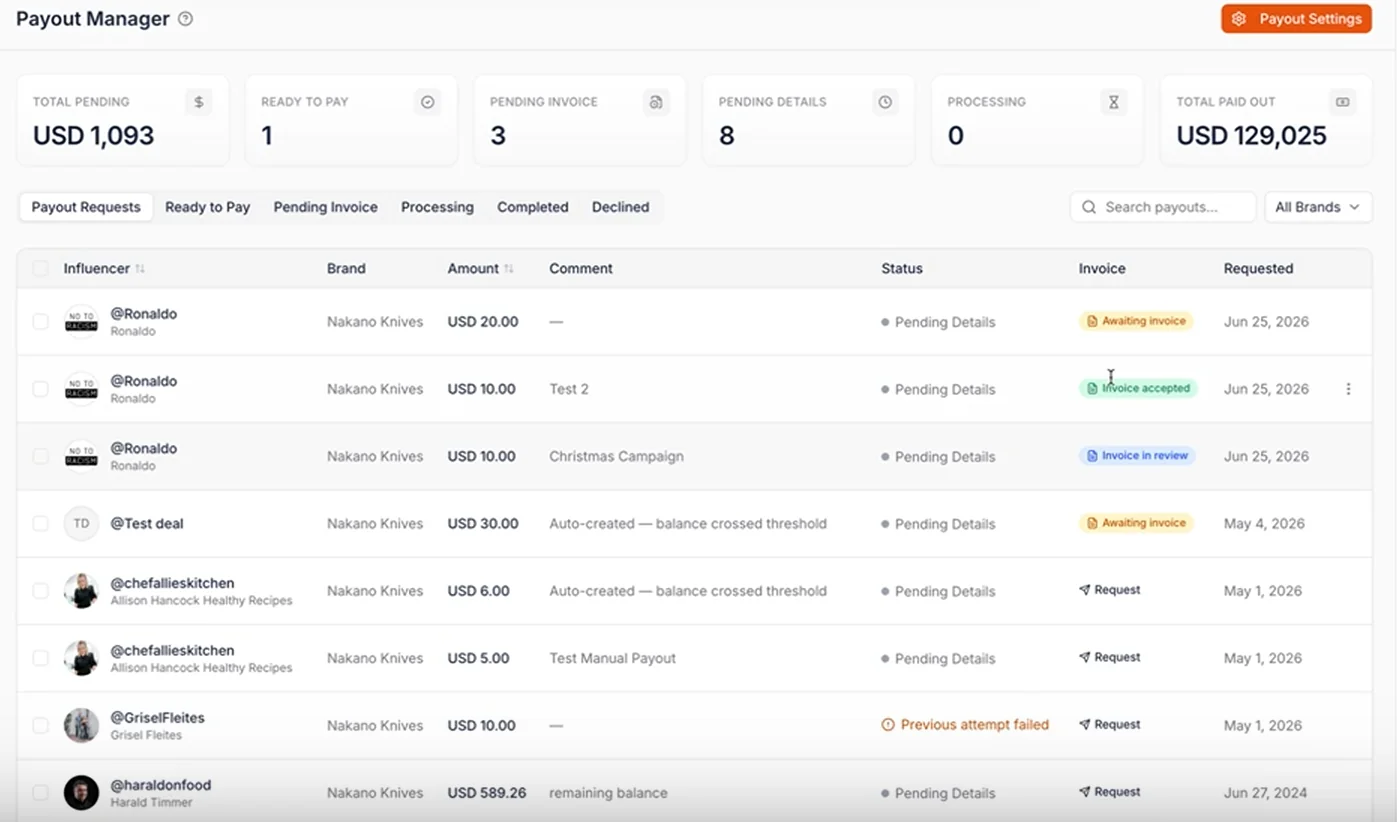
- Track four invoice statuses in the payout manager
- Review, accept or reject invoices without leaving the platform
- Trigger automations from every invoice action
It runs inside the payout manager you already use, so nothing about your existing payment process changes.
Setting Your Invoice Requirements
Head to payout settings. Three controls decide how invoicing works across your account:
Require invoice before payout. With this on, a payout cannot be processed until an invoice has been accepted. This is the control that guarantees a full payout to invoice match rate.
Request invoices on payout requests. Every time a payout is requested, an invoice request goes to the creator automatically. No remembering to tick a box each time.
Invoice instructions. Free text shown to the creator when you ask for the invoice. Use it for tax details, required reference numbers, billing entity, whatever your accounting team needs on the document.
Set these once and they apply across your program, in the same way account level rules work everywhere else in your influencer CRM.
The Four Invoice Statuses
The payouts page now shows a colored badge for each stage, so you can see where every invoice sits at a glance:
- Request. Nothing has been asked for yet. Click to send the invoice request.
- Awaiting invoice. The request went out and you are waiting on the creator.
- Invoice in review. The creator uploaded a document and it needs your approval.
- Invoice accepted. Approved and unlocked for payout.
For teams running hundreds of collaborations, this is the difference between knowing your invoice position instantly and reconstructing it from an inbox. It works the same way bulk actions do: status visible at scale rather than deal by deal.
What the Creator Sees
When you send a request, the creator gets a Creator Hero styled email, similar in feel to a creator dashboard invitation but asking for an invoice instead.
They do not need a Creator Hero account. The email carries two links: one to upload with an account, and one public link for creators who would rather not sign up. That second option matters more than it sounds, because account creation is where invoice collection usually stalls.
Your invoice instructions appear prominently in the email and in the creator dashboard, so the requirements are visible at the moment they upload rather than buried in a previous message. It is the same principle behind clear affiliate payments: give creators the information where they act on it.
Reviewing, Accepting and Rejecting
Once an invoice comes in, the status flips to invoice in review and you can open the document directly.
From there:
- Accept and unlock, which moves it to invoice accepted and clears the payout
- Reject, if something is missing, such as tax details your accounting team needs
- Resend, to nudge a creator who has not uploaded yet
- Download, to pass the document straight to finance
Everything is mirrored on the deal page. Requesting a payout now shows "request invoice from influencer," and if you enabled the automatic setting it is already ticked, with the same review controls available from the campaign manager side of the workflow.
Invoice Triggers in Automations
This is the part worth building on.
Every invoice action is now available as an automation trigger:
- Invoice requested
- Influencer submitted invoice
- Invoice accepted
- Invoice rejected
Which means you can build a real chase sequence instead of doing it manually. Send a reminder three days after a request goes unanswered. Notify your finance channel the moment an invoice is accepted. Email the creator an explanation automatically when one gets rejected. Move a deal to a different board when the invoice clears.
Combined with the rest of your automations, the invoicing side of your program can run with almost no manual follow up.
Why This Matters
Invoice collection is quietly one of the biggest operational drags in a scaled creator program. It is not hard work, it is just constant, and it lands on whoever is closest to the payment.
Invoice workflows give you:
- A guaranteed payout to invoice match rate when the requirement is enabled
- Invoice status visible across every collaboration at once
- Creators who can submit without creating an account
- Requirements communicated up front instead of after a rejection
- Automated chasing instead of manual reminders
- A finance team that stops asking you for documents
Keep Payouts and Accounting in Sync
Paying creators quickly and keeping your accounting clean usually pull against each other. Invoice workflows remove that tension by making the document part of the payout flow rather than a separate task running alongside it.
It sits alongside everything else in the platform, from campaign automations through to the payment tools your program already runs on.
Book a demo and see how invoice workflows fit into your influencer program.
Summary
This is some text inside of a div block.
This is some text inside of a div block.
Pricing/Month
Shopify Reviews
This is some text inside of a div block.
This is some text inside of a div block.
This is some text inside of a div block.
This is some text inside of a div block.
This is some text inside of a div block.
This is some text inside of a div block.
This is some text inside of a div block.
This is some text inside of a div block.
This is some text inside of a div block.
This is some text inside of a div block.
This is some text inside of a div block.
This is some text inside of a div block.
This is some text inside of a div block.
This is some text inside of a div block.
This is some text inside of a div block.
This is some text inside of a div block.
This is some text inside of a div block.
This is some text inside of a div block.
This is some text inside of a div block.
This is some text inside of a div block.
This is some text inside of a div block.
Read More

FAQs






Most Popular Blogs


Drive ROI With Influencer Marketing
Join 1,200+ brands and 150+ agencies scaling creator programs with Influencer Hero.