Influencer CRM & Campaign Management: Organize Deals, Creators, and Campaigns

March 5, 2026
|
Published

October 12, 2026
|
Updated

13 Min
|
Reading

Influencer Performance Marketing Course | VOUCHER: IMC100

Gabriela Molina
| Author

Drive ROI With Influencers

Global Influencer Database
ALL-IN-ONE platform
CRM, Affiliate, UGC & More
Influencer CRM & Campaign Management: Organize Deals, Creators, and Campaigns
Whether you’re managing a small group of creators or running campaigns at scale, your influencer operation needs structure. The Influencer Hero CRM is where that structure lives.
This article is designed to show you exactly how the CRM works inside Influencer Hero and how you can use it to manage influencers from first discovery to tracked revenue.
The CRM acts as your central command center. Every influencer you work with has a dedicated profile that stores their contact information, social metrics, communication history, deal terms, gifted products, affiliate links, storefront performance, and campaign participation.
Because Influencer Hero is built as an all-in-one influencer marketing software, the CRM connects directly to Discovery, outreach automation, gifting, storefronts, and reporting. Once a creator enters your system, every action and performance update stays connected in one place.
How the Influencer Hero CRM Works
The Influencer Hero CRM is designed as a connected system made up of three core layers:
- Campaign Manager – where campaigns are created
- Campaign Boards – where collaborations are organized and executed
- Deal Pages – where all influencer data and performance live
Each layer has a specific role. Together, they form the infrastructure that powers your entire influencer program.
1. Campaign Manager: Where Campaigns Begin
Every influencer workflow starts in the Campaign Manager.
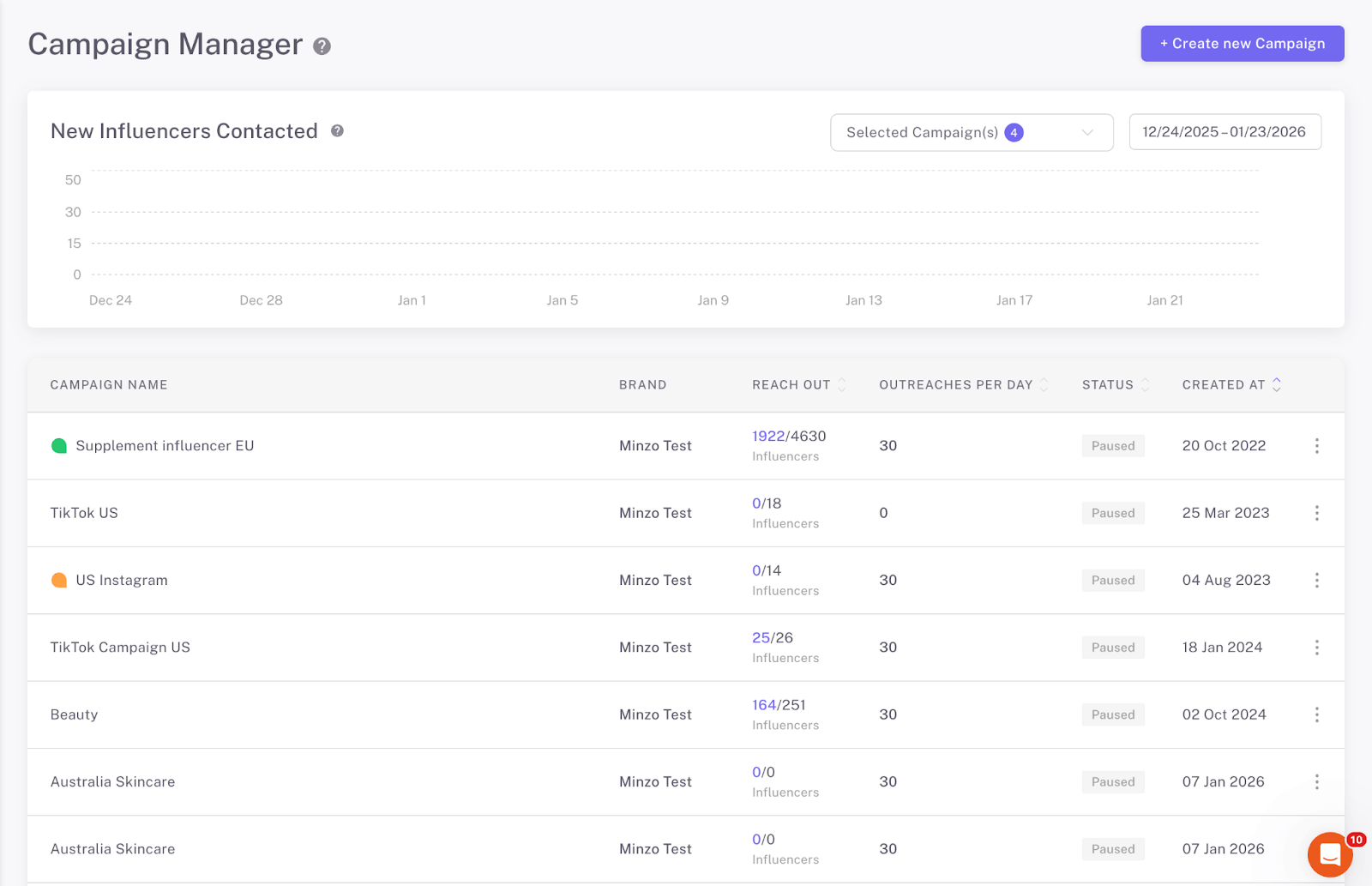
This is where you define the structure of a campaign:
- The campaign name
- Brand
- Outreach per day: Define how many new influencers you want to contact daily
- Email flow: select and existing flow or create one later
- Email address: the email account (s) used to contact influencers
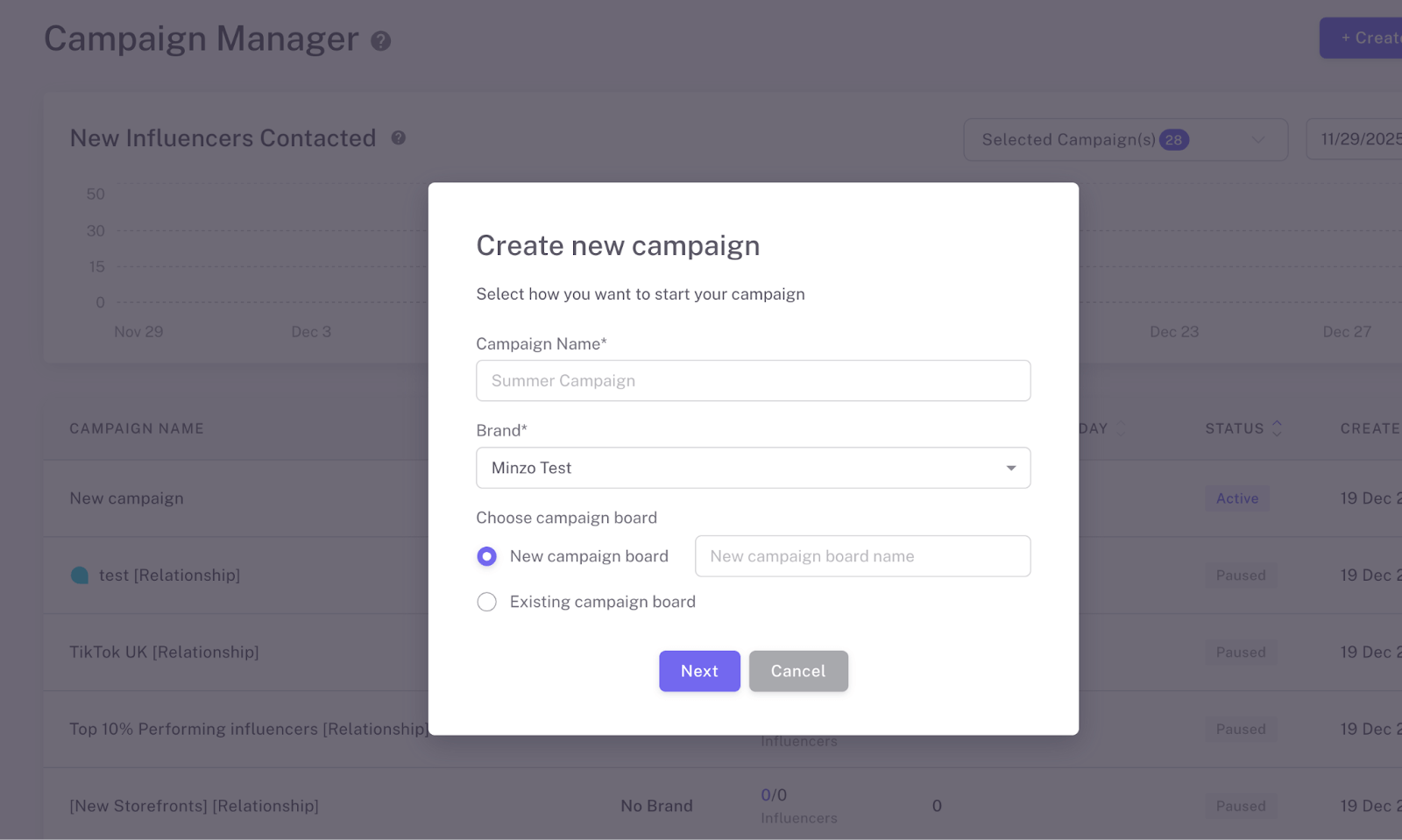
Once a campaign is launched, the CRM activates automatically. Influencers begin populating into a Campaign Board, and the system starts tracking communication, replies, and collaboration progress in real time.
The Campaign Manager sets the rules. The CRM handles the execution.
Adding Influencers
Influencers can be added to a campaign directly from the Influencer Finder.
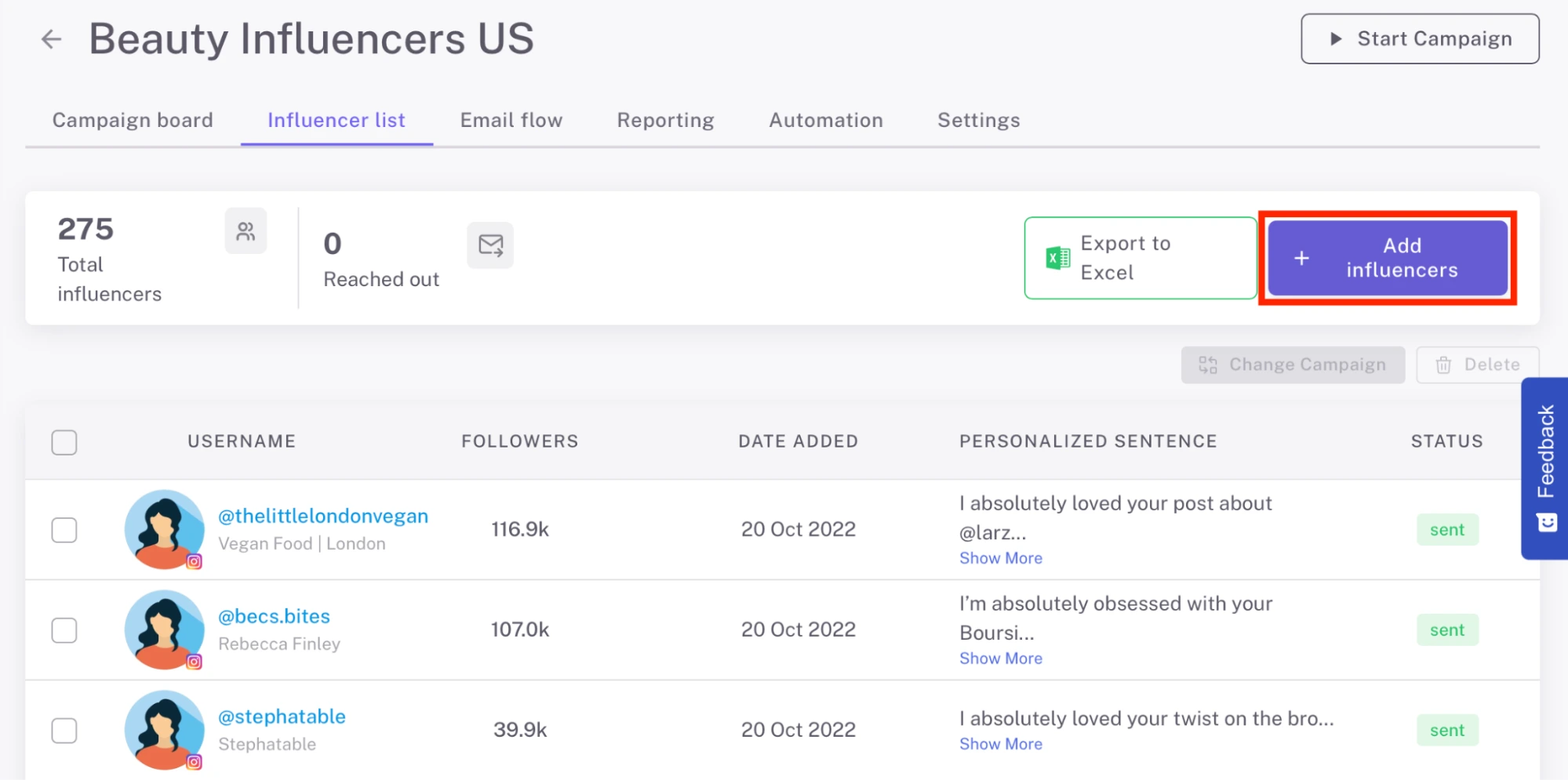
From the Influencer List tab, you can:
- Add creators to the campaign
- See who has already been contacted
- Remove influencers from the campaign
- Move influencers to a different Campaign Board
- Review the AI-generated personalized sentence for each influencer
- Edit or rewrite the personalized sentence before the outreach email is sent
- Export the list to Excel
Once outreach begins, selected influencers automatically populate into the Campaign Board, where collaboration management takes place.
Creating and Assigning Email Flows
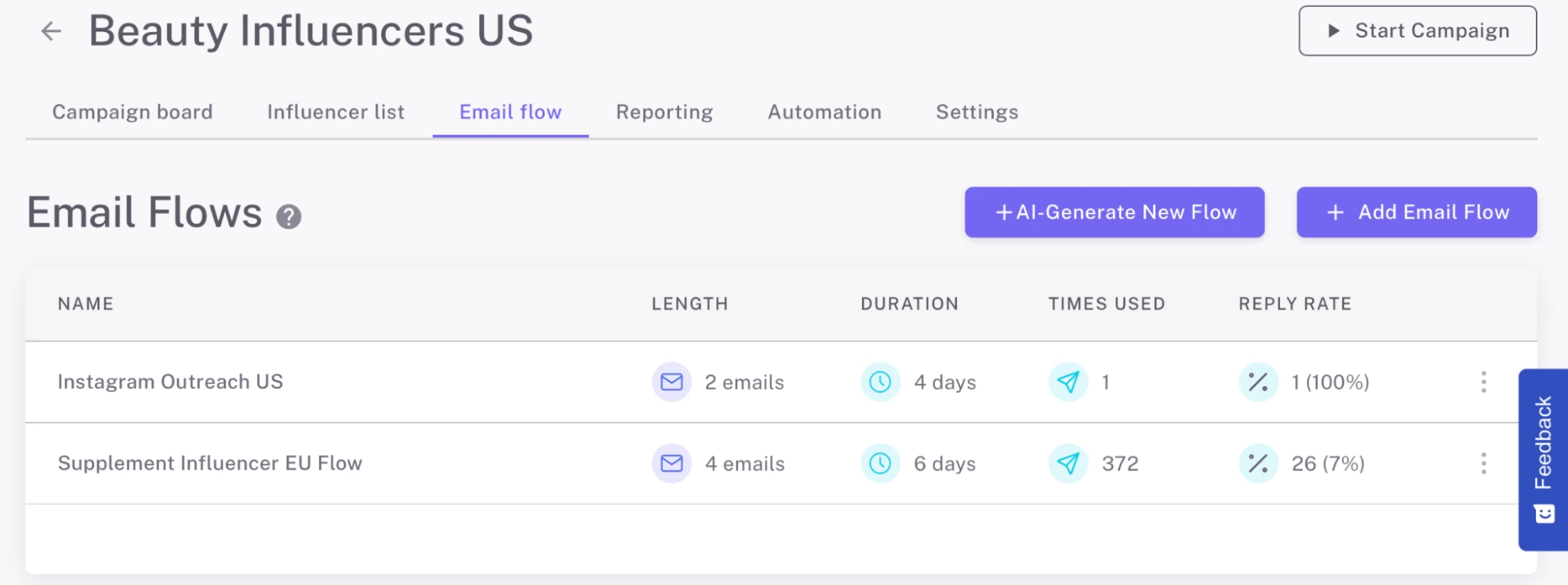
Each campaign is powered by an email flow. You can generate an outreach sequence using AI or build one manually. Once created, the flow is assigned to the campaign and handles:
- Initial outreach
- Follow-up emails
- Automated scheduling
- Dynamic personalization using placeholders (including the AI-generated personalized sentence from the Influencer List based on influencer’s latest posts, which is automatically inserted into the outreach email with the placeholder)
This allows you to review and refine personalization in advance, while still automating the sending process at scale.
Once you have defined these details, you can start your campaign:

Campaign Analytics
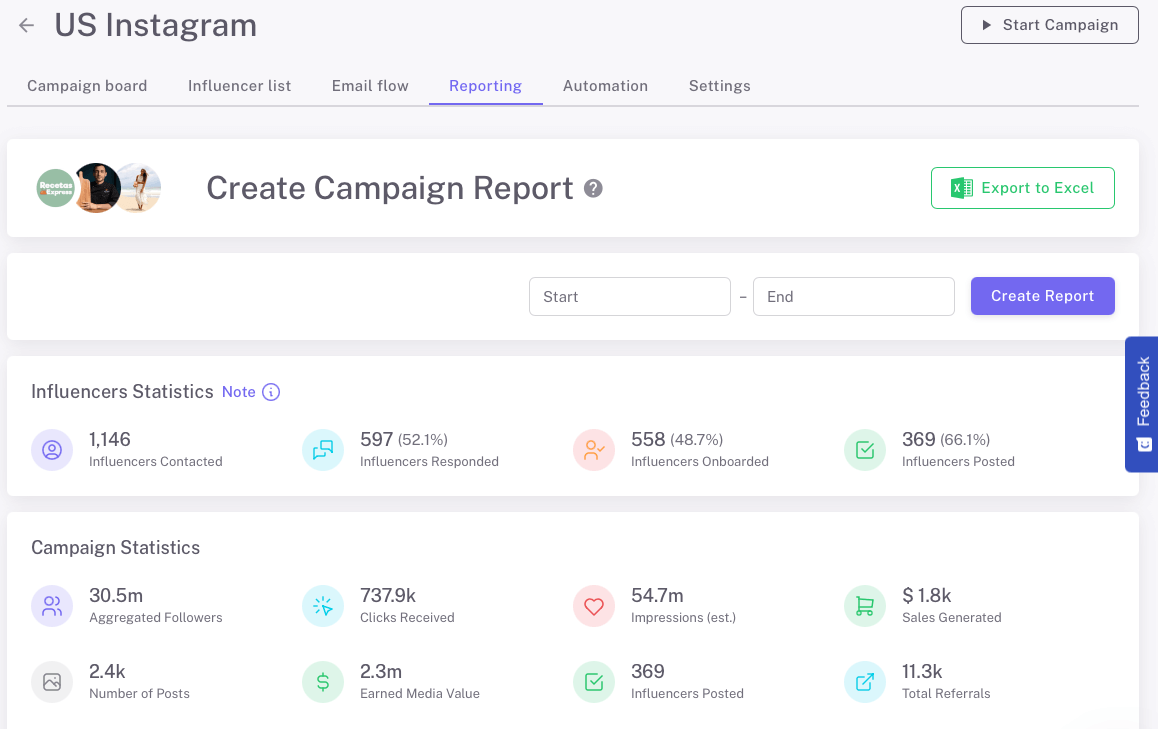
Performance tracking is built directly into the campaign. Inside the Reporting tab, you can:
- Compare performance across creators
- Analyze relevant KPIs and ROI
- Identify optimization opportunities
Campaign-level analytics connect outreach and collaboration activity directly to revenue outcomes. Influencer Hero’s CRM also allows you to compare and get a detailed overview of all the campaigns you manage:
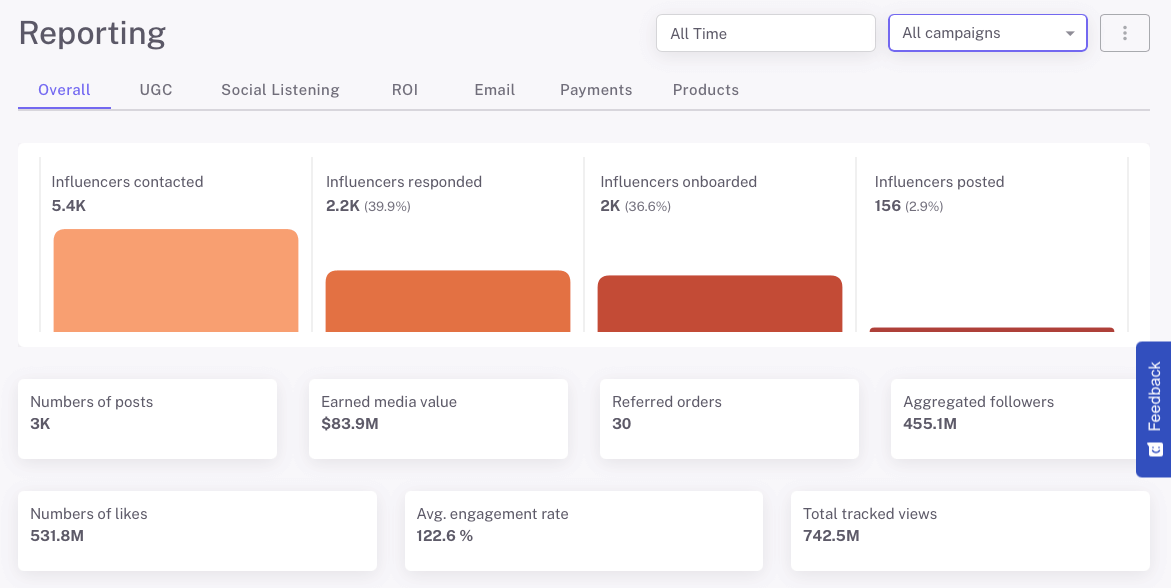
Once a campaign is live, day-to-day collaboration management moves from the Campaign Manager into the CRM itself — through Campaign Boards and individual Deal Pages.
Campaign Boards: The Operational Layer of the CRM
Once a campaign is live, collaboration management moves into the Campaign Board.
Campaign Boards act as a structured pipeline that visually organizes influencers based on where they are in the partnership process.
Instead of tracking progress manually, the CRM automatically places each influencer into the appropriate stage and updates their position as actions occur.
For outreach campaigns, the board typically includes the following stages:
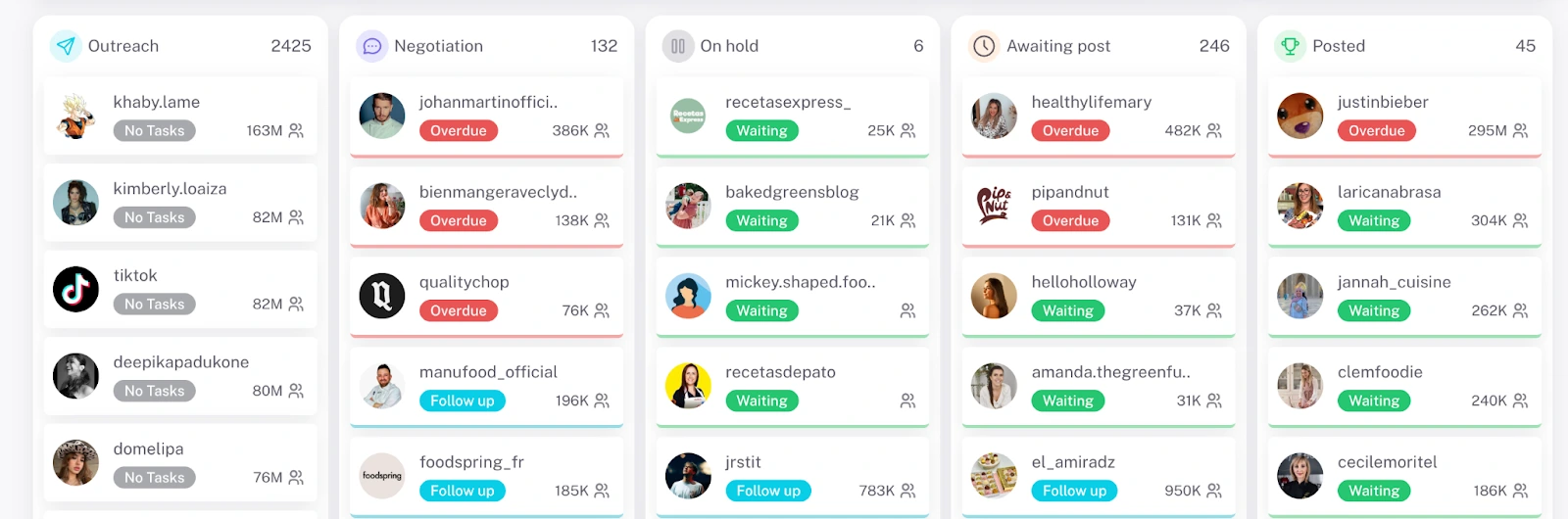
- Outreach – Influencers who have been contacted but have not yet replied
- Negotiation – Influencers who have responded and are in discussion
- Awaiting Post – Collaborations confirmed and waiting for content
- Posted – Content detected and logged
- On Hold – A flexible stage for custom workflows
Now, you can manage and add more columns, re-order them and customize them in a way that matches your workflow.
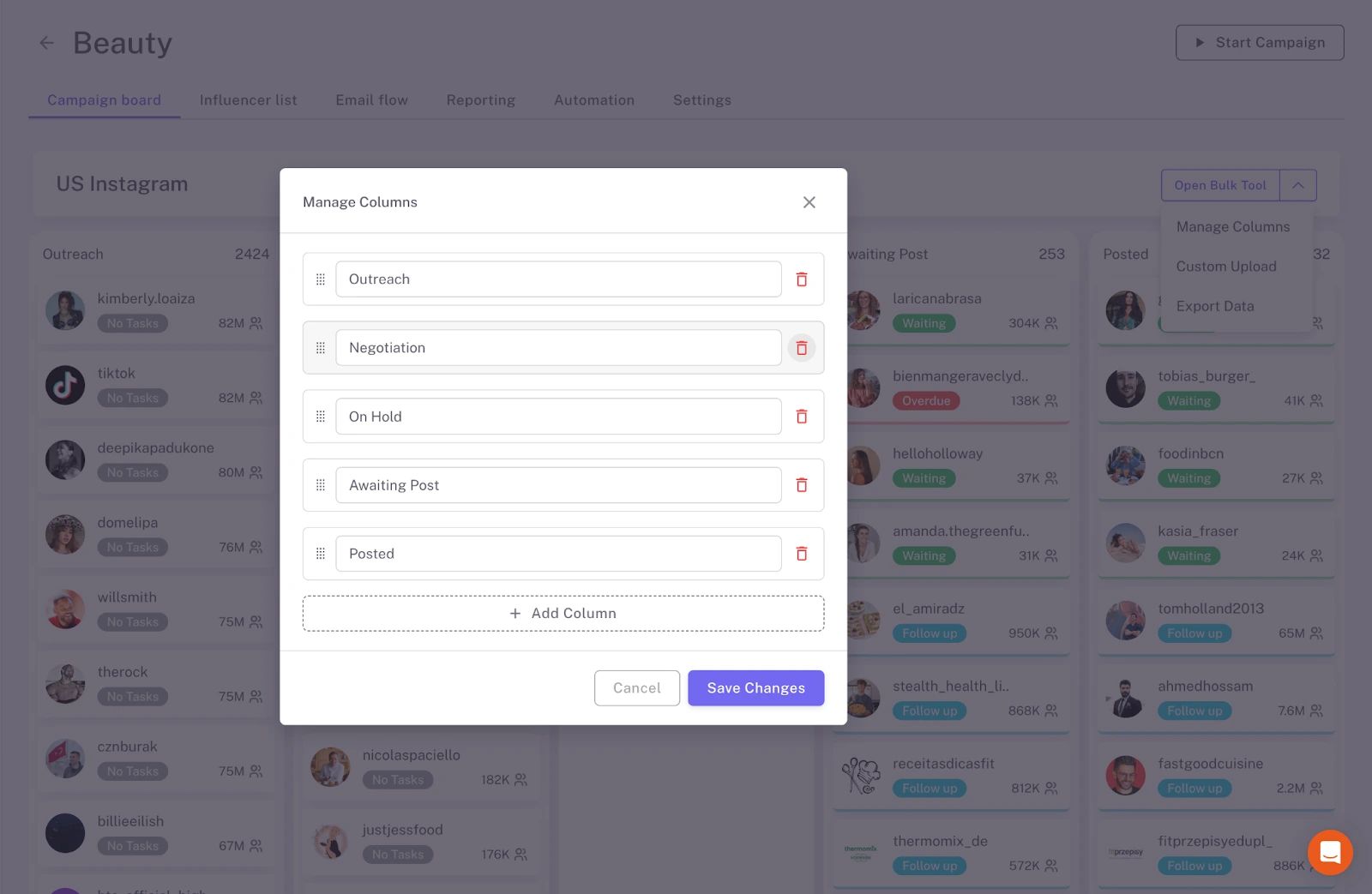
Campaign Boards can be powered by automation rules that manage how deals progress through your workflow. Instead of relying on fixed system logic, teams can now configure custom rules that respond to activity inside the campaign.
Influencer Hero also includes built-in automations that move deals automatically as key actions happen. For example, when an influencer replies to your outreach email, the deal can move from Outreach → Negotiation. When a product shipment is recorded, the deal can move to Awaiting Post, and once a post is detected, it can automatically move to Posted.
Automations can be triggered by changes in the Campaign Board itself. For example, when a creator moves to a specific column, the system can automatically perform predefined actions such as updating deal status, triggering follow-up steps, or advancing the collaboration to the next stage.
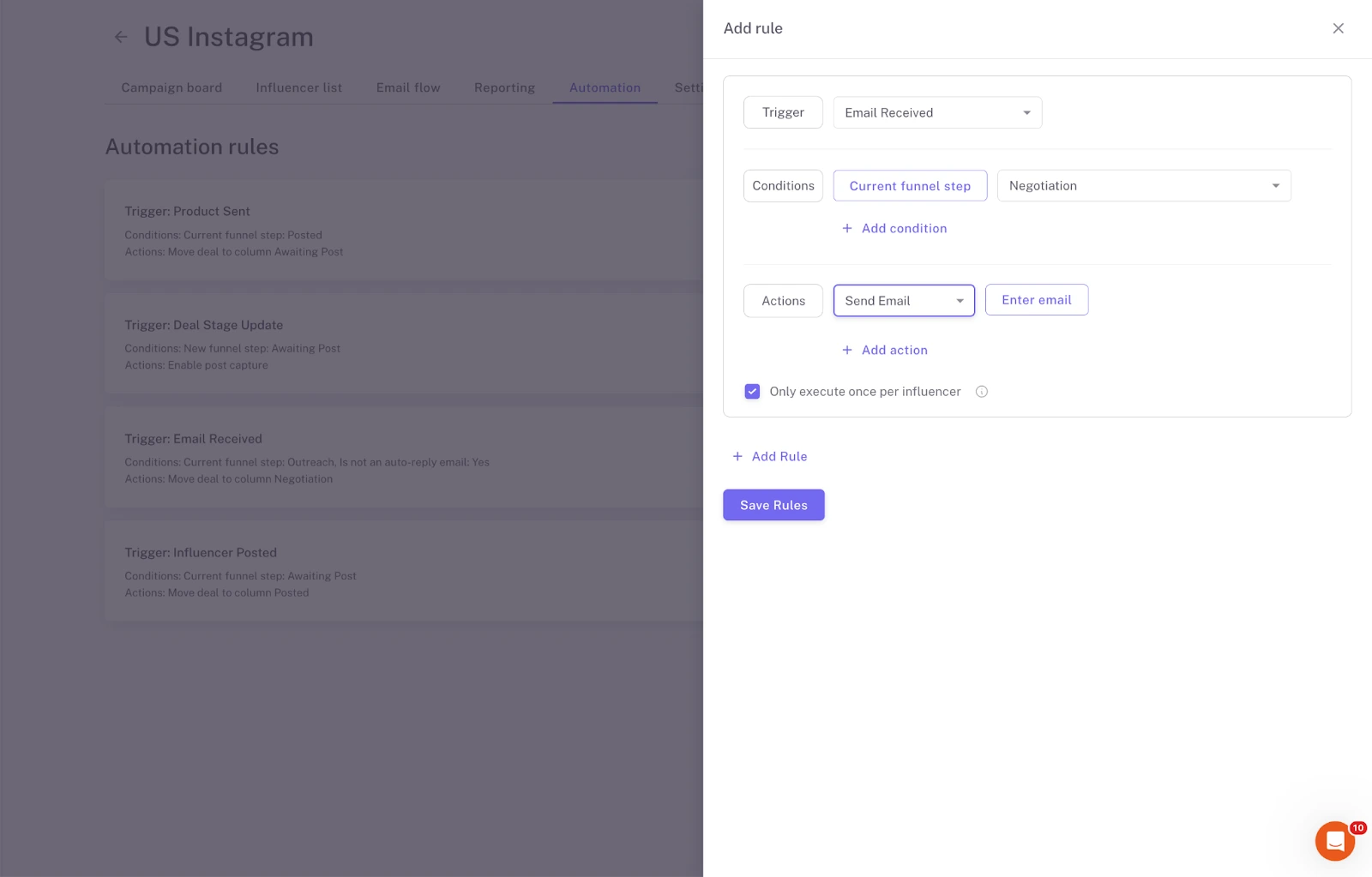
This allows each team to design a workflow that reflects how they actually manage campaigns. With Campaign Board Automations, you can:
- Define rules based on Campaign Board column changes
- Control how and when deals move through the campaign
- Automate repetitive workflow steps across your team
- Replace fixed system behavior with logic you can edit and adjust anytime
These automations turn the Campaign Board from a simple tracking view into an active workflow system, ensuring campaigns move forward without constant manual updates.
Import Existing Creator Collaborations
Campaign Boards are not limited to creators discovered inside Influencer Hero. Brands can also migrate their existing influencer or affiliate relationships directly into the platform.
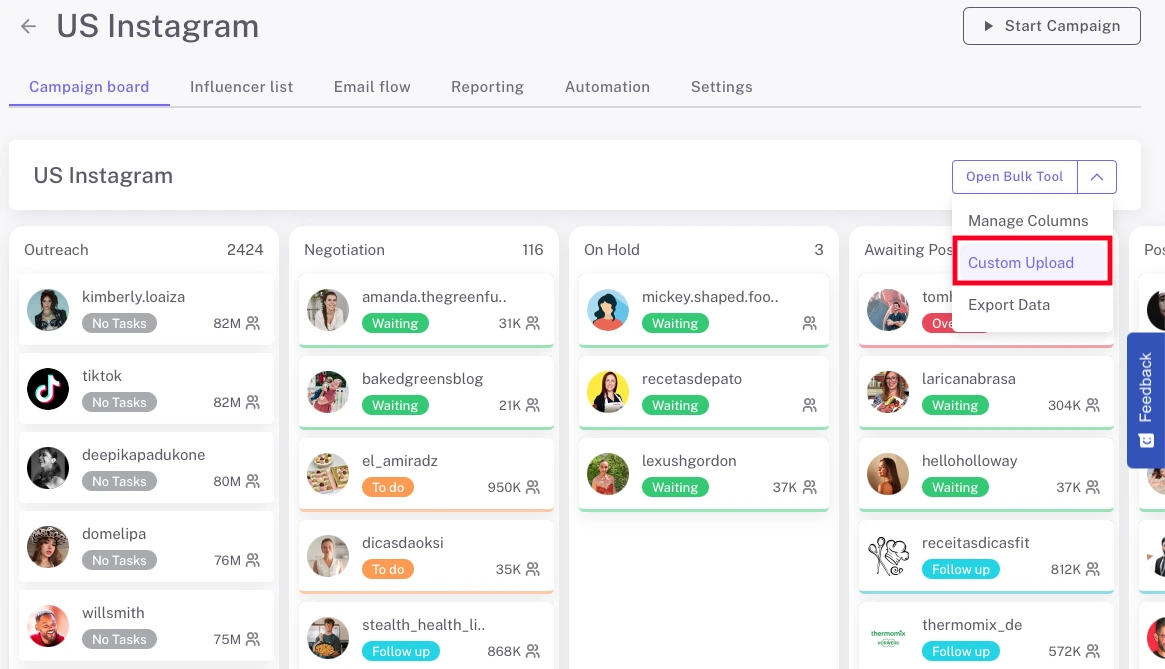
If you have previously worked with creators outside Influencer Hero, you can upload them to a Campaign Board using a custom CSV template. This allows teams to centralize past and ongoing collaborations inside the same workflow used for new campaigns.
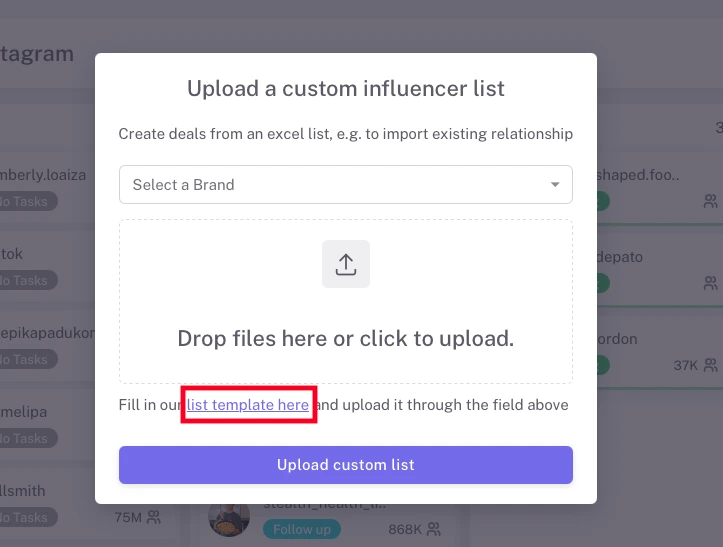
After uploading the file, each creator is automatically added as a deal inside the Campaign Board, where they can move through the same stages as any other collaboration.
This makes it easy to:
- Import existing influencer partnerships or affiliate relationships
- Consolidate external creator lists into one campaign workflow
- Continue managing those collaborations inside the Campaign Board
The CSV template includes fields for the creator’s social platform (Instagram, TikTok, YouTube) and other optional details to enrich the deal page.
Task Management Built Into Each Stage
Beyond stage movement, each influencer card displays a task status indicator. These include:
- To Do: Something we need to take action on, for example when an influencer replies to our email.
- Waiting: No action needed from our side; we are waiting for the influencer’s reply.
- Overdue: We have not completed the task after 3 days or deadline, for example when we haven’t replied to the influencer’s email.
- Follow Up: The influencer hasn’t replied to our email after 3 days (although you can set your own deadline for each task), and we need to send a follow-up message.
This layer of task tracking allows teams to manage dozens or hundreds of collaborations simultaneously while maintaining clarity on what needs attention. The Campaign Board provides a high-level operational overview. It shows how collaborations are progressing and where bottlenecks may exist.
However, while the board shows movement, the full context and data behind each partnership lives inside the Deal Page.
The Deal Page: The Core CRM Engine
While Campaign Boards show where an influencer is in the collaboration process, the Deal Page holds everything behind that movement.
Every influencer inside your CRM has a dedicated Deal Page. This is their centralized profile - the place where communication, logistics, content, performance, and payouts are managed in one connected view.
Instead of switching between inboxes, spreadsheets, store platforms, and analytics dashboards, the Deal Page consolidates all operational and performance data into a single workspace.
Centralized Influencer Information
At the foundation of the Deal Page is the influencer’s profile data. This includes:
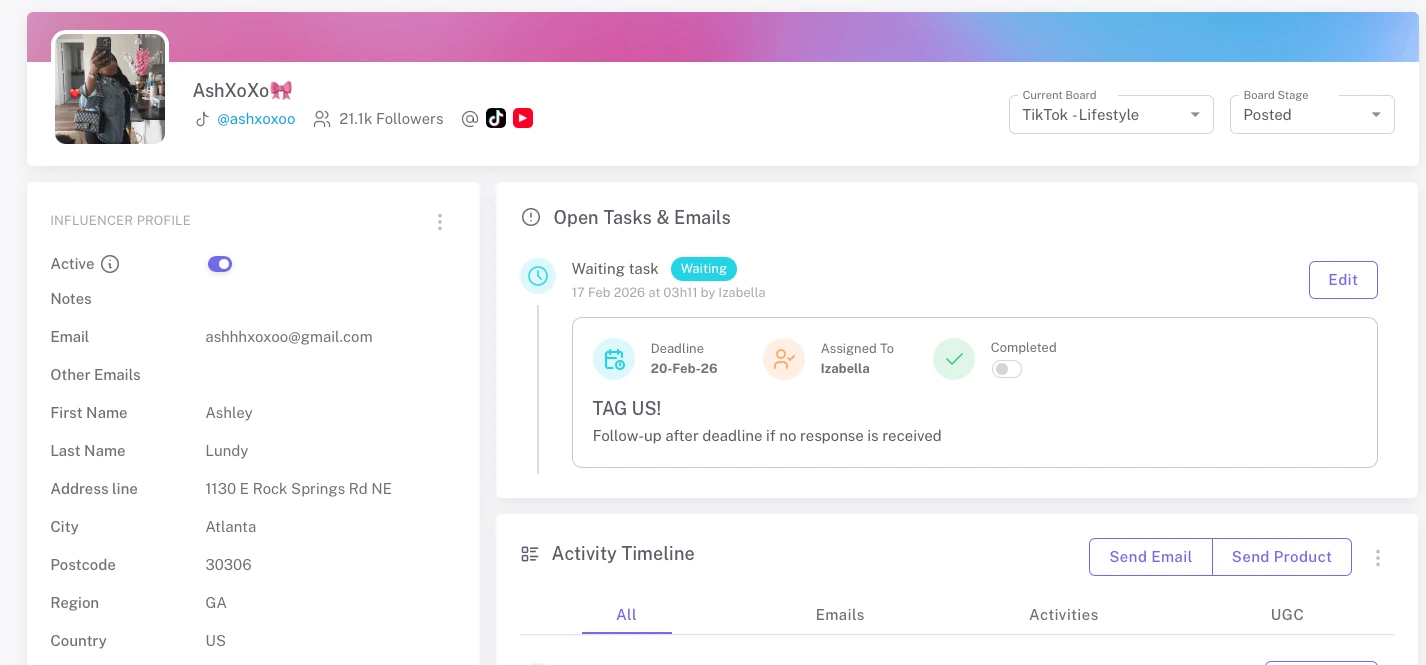
- Contact details
- Shipping address
- Social media accounts
- Internal notes
- Collaboration history
Shipping details can be entered manually or captured automatically by AI from email conversations. Once saved, this information is used directly for product fulfillment.
This ensures logistical data is not stored separately from campaign execution.
Full Communication History
All outreach and negotiation emails are stored directly inside the Deal Page.
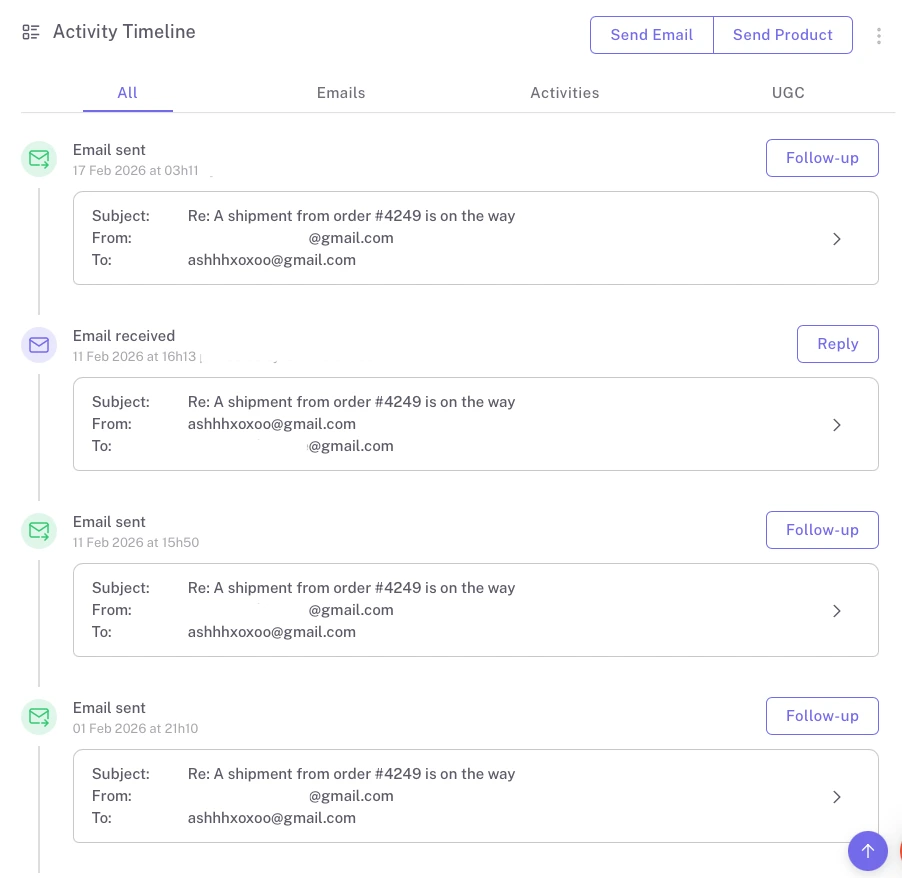
This gives you a complete communication timeline, including:
- Initial outreach
- Follow-ups
- Replies
- Internal notes
Teams can review past conversations instantly, ensuring continuity - especially when multiple team members are involved in managing campaigns.
Product Send-Outs & Fulfillment
For eCommerce brands, product gifting is handled directly from the Deal Page. When a collaboration is confirmed, you can send products through your connected store integration. The system:
- Creates a $0 order in your store
- Logs the order inside the Deal Page
- Generates a tracking task and show the tracking link
- Creates a follow-up reminder once the product is delivered
This removes the need to coordinate separately with operations teams or manually track shipping updates.
The Deal Page connects marketing and fulfillment into one workflow.
Affiliate Tracking & Revenue Attribution
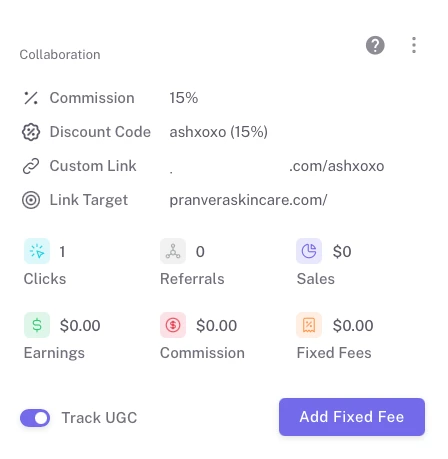
The Deal Page also serves as the performance tracking center for each influencer. Inside the profile, you can monitor:
- Custom affiliate links
- Discount codes
- Clicks generated
- Sales attributed
- Revenue produced
- Commission owed
All performance data is logged at the influencer level, allowing you to understand exactly how each creator contributes to campaign outcomes.
Post Detection & Content Tracking
Once influencers move into the Awaiting Post stage, the system begins scanning for content.
Detected posts are automatically:
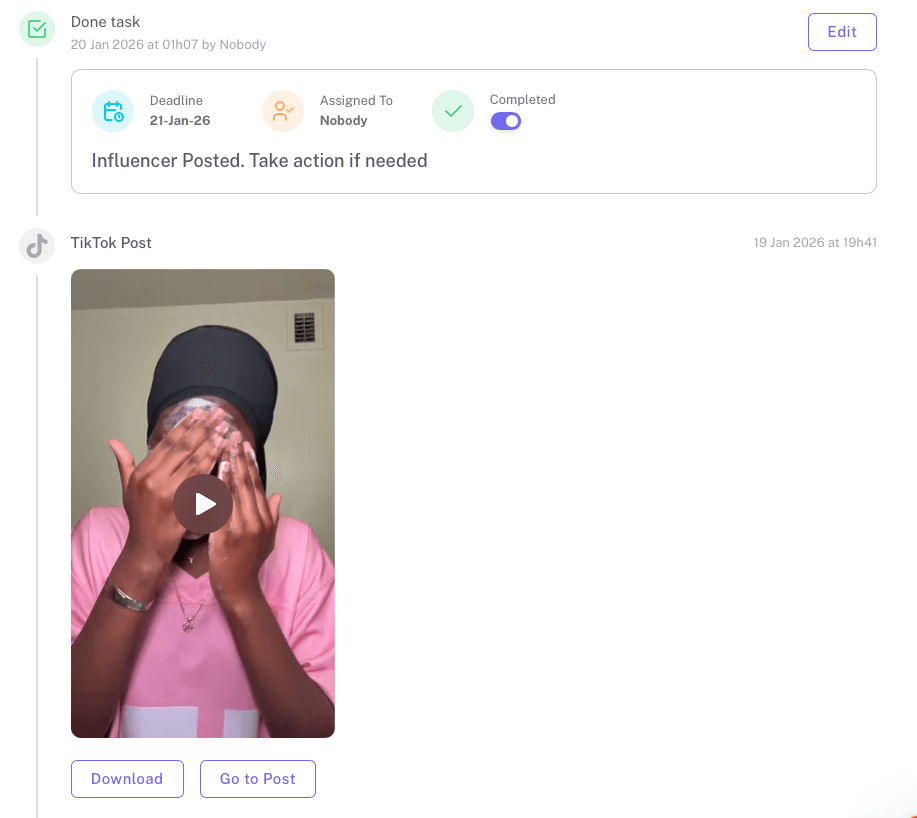
- Logged inside the Deal Page
- Automatically moved to the “Posted” column in the Campaign Board when content is detected
- Linked to the corresponding post URL (Instagram, YouTube, TikTok — except Instagram Stories)
- Linked to the relevant campaign in reporting
- Reflected in performance tracking
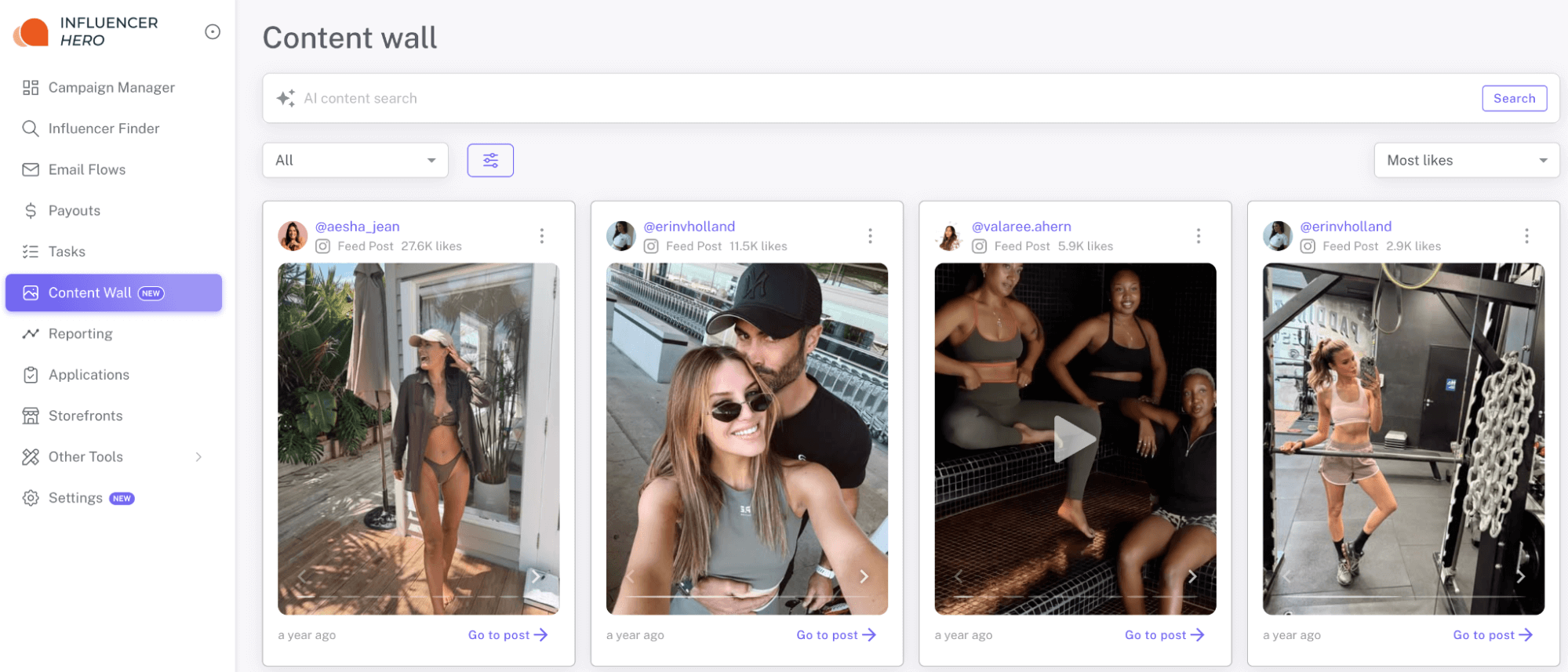
This allows you to review published content directly from the influencer’s profile without manual monitoring. All detected content is also stored in the Content Wall, where you can filter and analyze UGC across campaigns.
Creator Dashboard & Payout Management
From the Deal Page, you can invite influencers to access their Creator Dashboard.
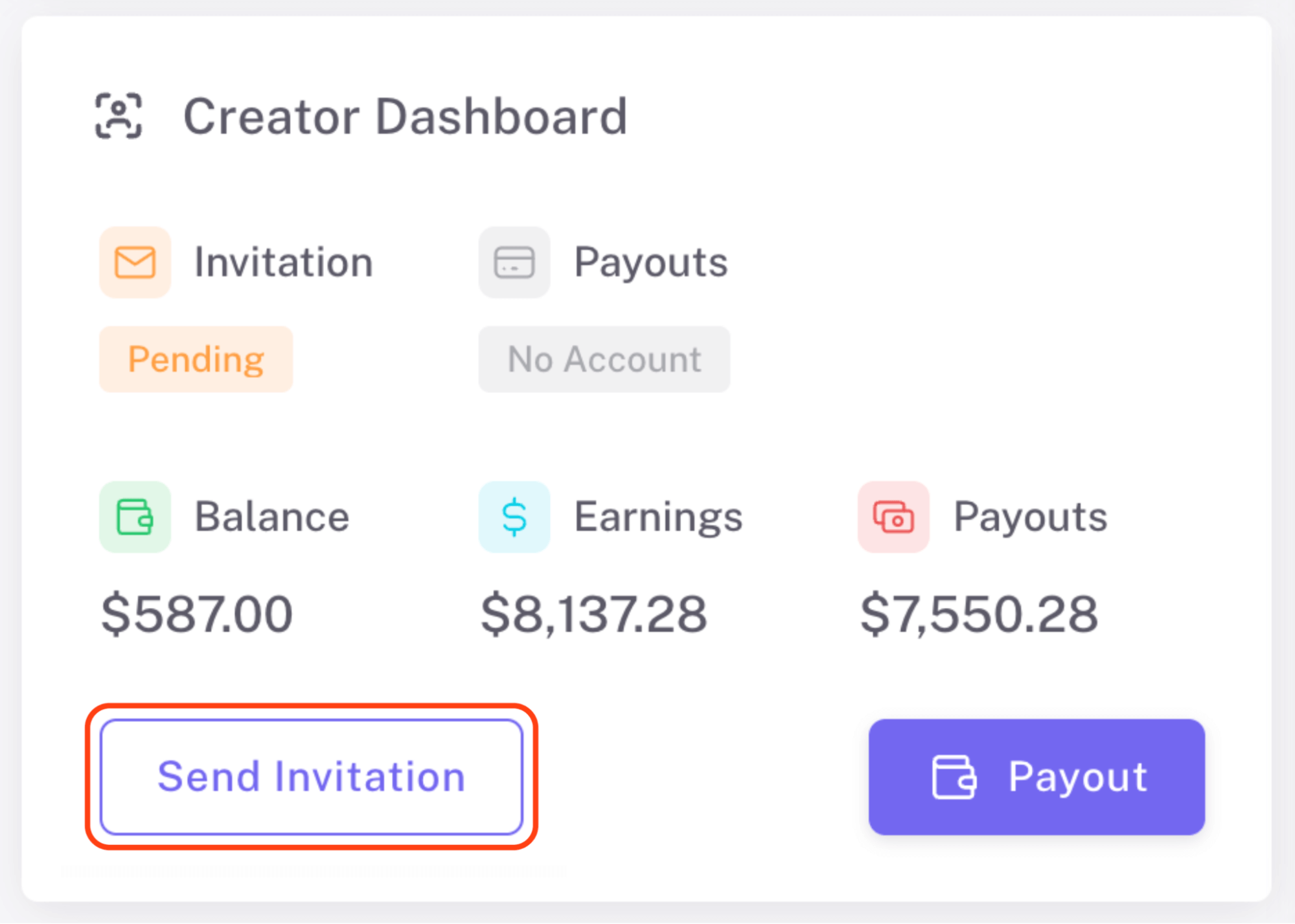
This allows creators to:
- Track their sales and commissions
- View affiliate links and discount codes
- Enter payout details
- Monitor performance
Once payout details are submitted, commissions can be issued directly from the CRM. This keeps financial management transparent while centralizing payout operations.
What You Can Do With the CRM
Once your campaigns are running, the CRM becomes your operational control center. From here, you can create, assign, track, and optimize every influencer relationship in one connected workflow.
1. Create & Structure Campaigns
Inside the CRM, you can:
- Create campaigns and define outreach volume
- Assign email flows (AI-generated or manual)
- Add influencers directly from the Influencer Finder
- Organize collaborations into Campaign Boards
Each campaign becomes a structured environment where outreach, negotiation, posting, and tracking happen automatically. Because the CRM connects directly to discovery and outreach automation, adding influencers and activating campaigns does not require switching tools.
2. Assign & Execute Collaborations
From the Deal Page, you can manage all operational steps of a partnership:
- Send products through store integrations
- Track shipping and delivery automatically
- Manage affiliate links and discount codes
- Invite creators to their Creator Dashboard
- Issue commission payouts
You can also move influencers between stages manually or automatically based on system triggers. Everything related to execution - communication, logistics, compensation - is handled inside the CRM.
3. Track Content & Performance
The CRM continuously logs activity across campaigns. You can:
- Track detected posts once influencers publish
- Monitor clicks, sales, and revenue per creator
- Compare influencer performance within a campaign
- View historical collaboration data inside each Deal Page
Content is automatically stored in the Content Wall, where you can filter by platform, performance, media type, or AI-based quality signals. Performance data connects directly to affiliate tracking and storefront integrations, allowing you to attribute revenue accurately.
This means you are not just tracking posts - you are tracking outcomes.
4. Analyze & Optimize Campaign Results
Performance reporting is built directly into the CRM.
At the campaign level, you can:
- Measure total revenue and ROI
- Compare influencer contributions
- Identify top-performing creators
- Detect underperforming collaborations
At the influencer level, you can:
- Review revenue generated across campaigns
- Compare commission vs. sales
- Evaluate long-term performance trends
Because analytics are integrated into the same system that manages outreach and execution, insights are actionable. You can immediately:
- Move high performers into Relationship Boards
- Increase commission rates
- Launch seasonal reactivation campaigns
- Pause low-performing partnerships
Analytics are not stored separately - they directly inform workflow decisions.
5. Manage at Scale With Bulk Actions & AI
When working with dozens or hundreds of creators, the CRM allows bulk execution.
You can:
- Select multiple deals using filters such as “$100+ in sales” or “no reply in 7 days”
- Update stages in bulk
- Send bulk emails
- Trigger product shipments
- Request payouts across multiple creators
You can also use AI-powered deal selection. Instead of applying manual filters, you can type a prompt such as: “Select creators who generated over $500 and replied positively to the last email.”
The system analyzes deal data and email conversations to identify matching creators. This reduces manual sorting and speeds up campaign optimization.
6. Connect the Entire Influencer Workflow
The CRM connects directly to:
- Influencer Discovery
- Outreach automation
- Store integrations
- Affiliate tracking
- Creator Storefronts
- Reporting and analytics
Once a creator enters your system, discovery, communication, fulfillment, content tracking, performance measurement, and payouts all stay connected. There is no need to export data or sync across multiple platforms.
How the CRM Connects With Other Influencer Hero Features
The Influencer Hero CRM is not designed as a standalone database. It operates as the central layer that connects discovery, outreach, fulfillment, content tracking, and reporting into one structured system.
Each connected feature feeds data into the CRM - and the CRM, in turn, powers execution across those features.
Here’s how that connection works in practice.
CRM + Influencer Discovery
When you identify creators inside the Influencer Finder, they don’t live in a separate tool.
With one click, influencers are imported directly into a campaign and assigned a Deal Page inside the CRM. Their social metrics, audience data, and profile details become part of your internal system.
Discovery becomes execution immediately - without exporting lists or switching platforms.
CRM + Outreach Automation
Outreach is structured in the Campaign Manager, but communication history lives inside the Deal Page. Replies automatically trigger stage movement in Campaign Boards. Follow-ups are scheduled through email flows, while the CRM tracks engagement, response status, and tasks.
This ensures communication is not disconnected from collaboration management.
CRM + Store Integrations (Product Fulfillment)
When a collaboration is confirmed, product send-outs happen directly from the Deal Page through integrated stores.
Orders are logged, tracking links are stored, and delivery follow-ups are automated. The CRM connects marketing decisions with operational execution.
There is no need to manually coordinate across separate eCommerce dashboards.
CRM + Affiliate Tracking & Storefronts
Affiliate links, discount codes, and storefront performance are tied directly to each influencer’s Deal Page.
Clicks, conversions, and revenue attribution flow back into the CRM automatically. This allows you to see not only who posted - but who generated measurable outcomes.
Revenue tracking is not external. It is built into the collaboration workflow.
CRM + Content Wall
Detected posts are logged inside Deal Pages and stored centrally in the Content Wall.
This connects campaign execution with content reuse. High-performing UGC can be identified and repurposed for paid ads, email marketing, or website assets - without manually collecting files.
Content becomes an asset layer connected to performance.
CRM + Reporting & Analytics
Campaign analytics pull directly from Deal Page activity, affiliate data, and detected content.
Because performance data is tied to each influencer’s profile, insights are actionable:
Reporting is not separate from execution - it informs it.
CRM + Payments & Creator Dashboard
Creators access their Creator Dashboard through the CRM. Commission tracking, payout details, and payment execution are handled from the same Deal Page that tracks posts and revenue.
Financial management stays aligned with campaign performance.
When Teams Use the Influencer Hero CRM
The CRM is built to support different stages of influencer program maturity - from launching your first campaign to managing long-term creator portfolios. Here are common scenarios where teams rely on the CRM as their operational backbone.
Launching a New Product or Entering a New Market
When launching a new product or expanding into a new region, influencer activity typically increases fast. Teams use the CRM to coordinate outreach, track negotiations, manage product shipments, and monitor early performance signals in one place.
Instead of juggling emails and spreadsheets during a high-volume launch, everything - from replies to detected posts to revenue - is structured inside Campaign Boards and Deal Pages.
Running Ongoing Affiliate & Gifting Programs
For brands managing continuous affiliate or gifting campaigns, the CRM becomes a relationship engine. Performance data is logged automatically at the influencer level, allowing teams to compare revenue contribution, track commission payouts, and prioritize high-performing creators.
Rather than treating each campaign as isolated, collaborations build on historical data stored inside each Deal Page.
Scaling From Dozens to Hundreds of Creators
As influencer programs grow, operational visibility becomes the challenge. Teams use the CRM to manage volume through structured Campaign Boards, task indicators, and bulk actions. Outreach, follow-ups, product fulfillment, and reporting remain aligned even when multiple team members are involved.
The CRM reduces manual coordination and prevents missed opportunities.
Optimizing Budget Based on Performance
When influencer marketing becomes performance-driven, decisions need to be data-backed. The CRM allows teams to evaluate revenue per creator, compare commission efficiency, and identify top performers across campaigns.
Because analytics are integrated directly into influencer profiles and campaign reports, optimization happens inside the same system used for execution.
Final Thoughts
The Influencer Hero CRM is designed to structure your entire influencer workflow - from campaign setup and outreach to content tracking, revenue attribution, and long-term relationship management.
Instead of managing creators across disconnected tools, the CRM centralizes communication, logistics, performance, and payouts into one connected system. Campaign Boards provide visibility. Deal Pages hold the intelligence. Analytics drive optimization. Every layer feeds into the next.
Whether you’re launching new campaigns, scaling affiliate programs, or refining budget allocation based on performance, the CRM exists to give your team operational clarity and measurable outcomes.
If you’d like to see how it works in practice, you can explore it firsthand.
Summary
This is some text inside of a div block.
This is some text inside of a div block.
Pricing/Month
Shopify Reviews
This is some text inside of a div block.
This is some text inside of a div block.
This is some text inside of a div block.
This is some text inside of a div block.
This is some text inside of a div block.
This is some text inside of a div block.
This is some text inside of a div block.
This is some text inside of a div block.
This is some text inside of a div block.
This is some text inside of a div block.
This is some text inside of a div block.
This is some text inside of a div block.
This is some text inside of a div block.
This is some text inside of a div block.
This is some text inside of a div block.
This is some text inside of a div block.
This is some text inside of a div block.
This is some text inside of a div block.
This is some text inside of a div block.
This is some text inside of a div block.
This is some text inside of a div block.
Read More

FAQs
What is an influencer CRM?

An influencer CRM is a system designed to manage creator relationships, campaign workflows, communication, and performance tracking in one structured environment. Unlike generic CRMs, an influencer CRM connects outreach, product fulfillment, content tracking, affiliate attribution, and payouts into a unified workflow tailored for influencer marketing.
How is the Influencer Hero CRM different from a traditional CRM?
Traditional CRMs are built for sales pipelines. The Influencer Hero CRM is built specifically for influencer collaborations. It includes Campaign Boards for managing outreach stages, Deal Pages for storing influencer data and performance, automated post detection, affiliate tracking, product send-outs, and integrated reporting — all designed around creator partnerships.
Can I track influencer performance and revenue inside the CRM?
Yes. Performance tracking is integrated directly into each influencer’s Deal Page and at the campaign level. You can monitor clicks, conversions, revenue generated, commission owed, and historical collaboration data — without exporting information into separate reporting tools.
Does the CRM support product gifting and affiliate campaigns?
Yes. You can send products directly from the Deal Page through store integrations, automatically log tracking information, and manage affiliate links or discount codes for each creator. Revenue attribution is tracked and connected to the same influencer profile.
Can multiple team members use the CRM?
Yes. The CRM is structured for teams managing campaigns collaboratively. Campaign Boards provide shared visibility, task indicators clarify next actions, and communication history is centralized inside each Deal Page. This ensures continuity across marketing, operations, and finance teams









Most Popular Blogs


Drive ROI With Influencer Marketing
Join 1,200+ brands and 150+ agencies scaling creator programs with Influencer Hero.