
Affiliate Tracking & Payments: Attribute Sales and Manage Creator Earnings

February 26, 2026
|
Published

October 12, 2026
|
Updated

16 minutes
|
Reading

Influencer Performance Marketing Course | VOUCHER: IMC100

Malena Garcia
| Author

Drive ROI With Influencers

Global Influencer Database
ALL-IN-ONE platform
CRM, Affiliate, UGC & More
Affiliate Tracking & Payments: Attribute Sales and Manage Creator Earnings
Affiliate Tracking & Payments in Influencer Hero allows brands to attribute sales to individual creators and manage their earnings directly inside the CRM.
From creating discount codes and custom affiliate links to tracking clicks, conversions, and commissions, everything is handled within the creator's deal page. This feature lives inside the Influencer CRM and connects to your e-commerce integrations to automatically sync sales data, calculate commissions, and centralize payout management.
The payment side has changed significantly since this article was first published. Payouts now run through regional bank debit methods with effective rates as low as 0.4%, against the 5% to 8% most influencer and affiliate platforms charge, and invoicing workflows collect and approve creator invoices automatically before money moves.
In this article, we'll walk through how affiliate tracking and payments work inside Influencer Hero, what you actually pay in fees, and how it all connects to campaigns, reporting, and creator relationships.
How Affiliate Payments and Tracking Works in Influencer Hero
Affiliate Tracking in Influencer Hero connects creator-specific links and discount codes to real sales data, then automatically calculates commissions and centralizes earnings inside the CRM. It lives inside each creator's deal page and behaves as the revenue layer of your influencer workflow.
Instead of using a separate affiliate platform, everything (setup, tracking, and payout management) happens directly inside the same deal where you manage communication, contracts, and campaign stages.
Step 1: Access Affiliate Setup From the Creator's Deal
Affiliate configuration begins inside the creator's deal page. From the respective campaign board or search bar, you open the deal and scroll down to the Collaboration section.
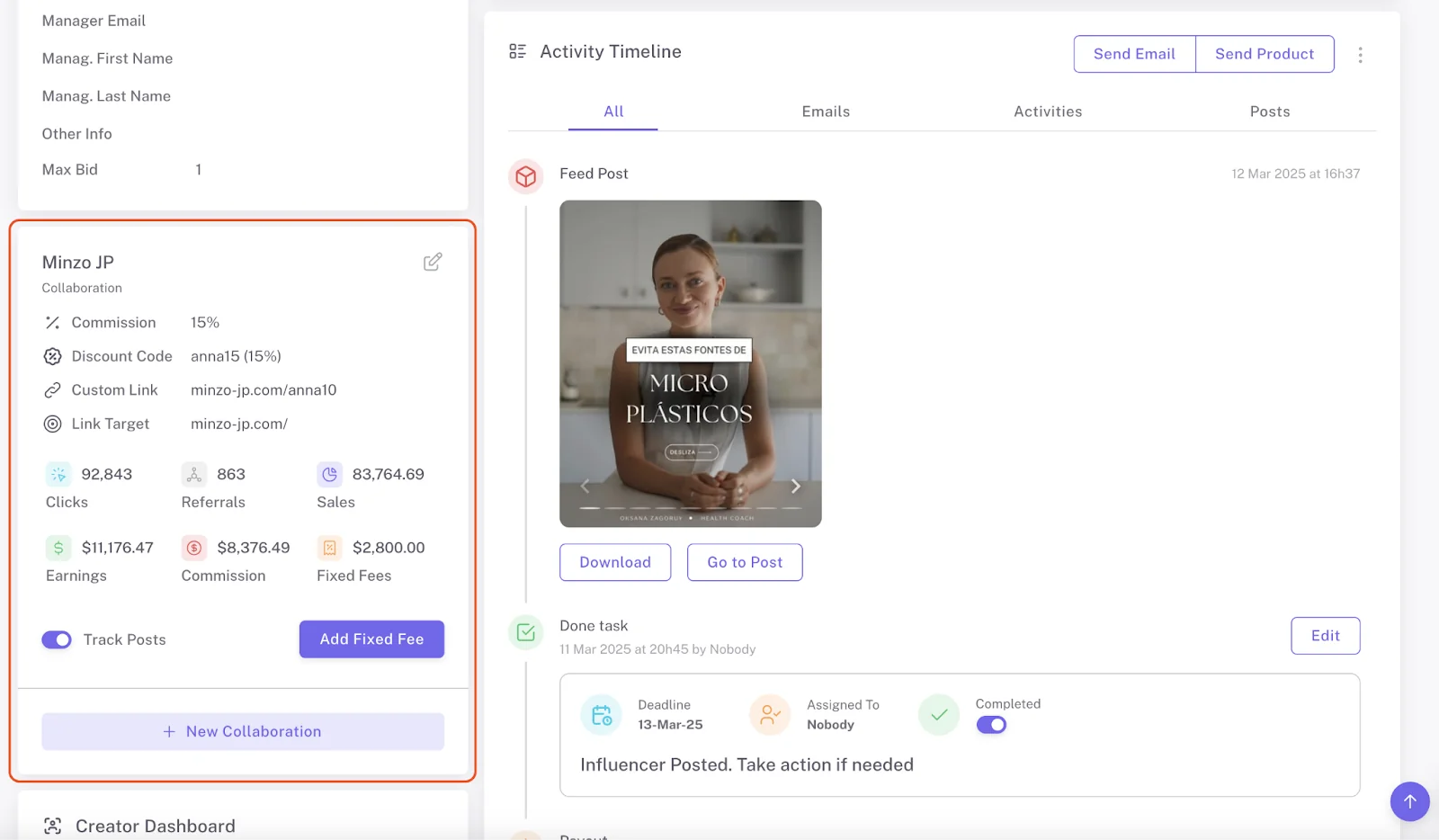
By clicking the edit (pencil) icon, you can define commission percentage, create discount codes, and generate custom affiliate links, all from one place. There is no need to switch tools or log into your store separately.
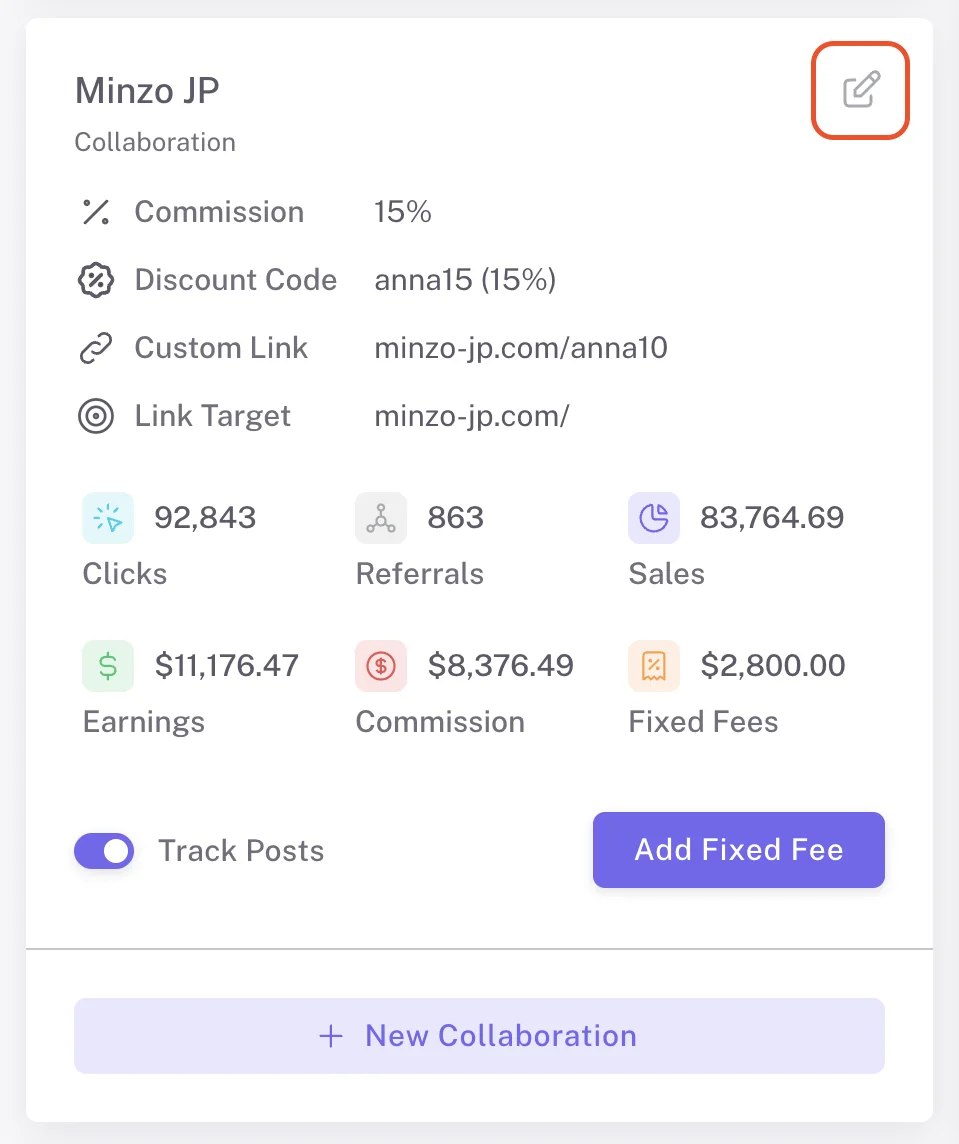
Step 2: Set Commission and Create Discount Codes
You first define the commission percentage the creator earns per sale. This percentage is automatically applied to any tracked revenue and added to the creator's balance inside the CRM.
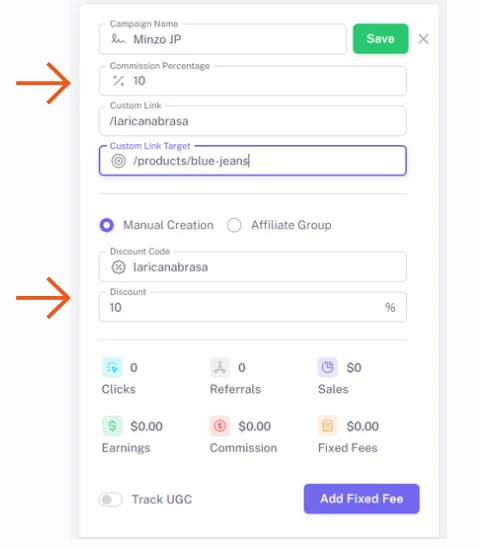
If you are using Shopify, you can create a discount code directly from this section. You can either create a manual store-wide code or assign the creator to an Affiliate Group with specific rules, such as percentage off products, order discounts, buy X get Y, or free shipping. The code is automatically created in your Shopify backend and linked to that creator's deal.
Discount code creation also works with Magento, Magento 2.X, BigCommerce, WooCommerce, and Prestashop, so this is not a Shopify-only workflow.
Step 3: Generate Custom Affiliate Links
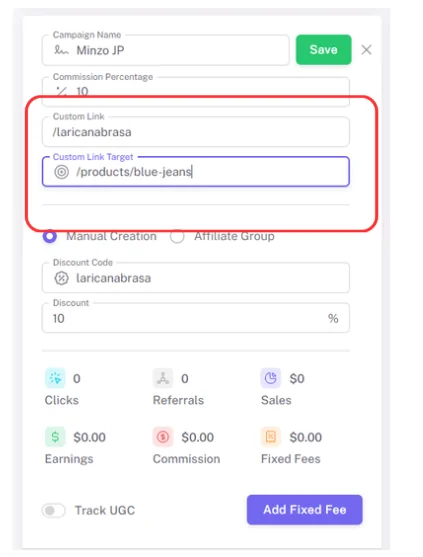
In the same Collaboration section, you can create a personalized affiliate link using the creator's name or handle. The link is automatically generated based on your connected domain.
You can also define a custom link target. If left blank, the link directs to your homepage. If you want to promote a specific product or collection, you simply paste the relevant URL path, for example /products/blue-jeans. This ensures traffic is directed exactly where you want it.
Step 4: Automatically Track Clicks, Sales, and Commissions
Once links and codes are live, tracking happens automatically through your connected store.
Native affiliate sales tracking now covers Shopify, WooCommerce, Magento, Magento 2.X, BigCommerce, Squarespace, Wix, Square, Prestashop, ShopBase, Ecwid, Thinkific, Webflow, and Amazon, with GoAffPro integrations and a custom API build available for anything outside that list.
When a customer clicks a tracked link or uses a creator's discount code, Influencer Hero attributes the sale to the correct creator, records the order value, and calculates the commission earned. Sales, referrals, clicks, and balances are visible inside the CRM without manual imports or reconciliation.
Step 5: Monitor Earnings and Request Payouts
Affiliate performance is visible directly inside the creator's deal page, including clicks, conversions, revenue, and accumulated commission. This data updates dynamically and remains connected to campaign stages and communication history.
Creators receive access to a Creator Dashboard where they can track their earnings and submit payment details securely, once the brand sends them a Creator Dashboard invitation from the deal page. On the brand side, commission totals are centralized, so you review and process payouts without manually calculating what each creator is owed.
From there, payment moves into the Payout Manager, which handles the actual transfer, the fees, and the paperwork. That is where the next two sections come in.
What You Actually Pay to Pay Creators
Payment processing fees are the cost most teams accept without questioning it. Stripe takes around 3% on a card, the platform adds its margin, and everyone moves on.
At real volume, that stops being a rounding error. Multi-creator campaigns, monthly affiliate commissions, and regional rosters turn those percentages into budget you could have spent briefing more creators. Most influencer and affiliate platforms charge between 5% and 8% on every payout.
Influencer Hero takes no additional cut on payouts. Only the Stripe processing fee is passed through at cost, and regional bank debit methods bring that cost down sharply.
On larger sums, effective rates land as low as 0.4%. On smaller transactions you are around 0.5%, still well below the 5% to 8% norm. The $2 Stripe KYC fee has also been waived entirely.
Your region is pre-selected based on your account currency. To switch methods, open Payout Settings in the top right of the Payout Manager.
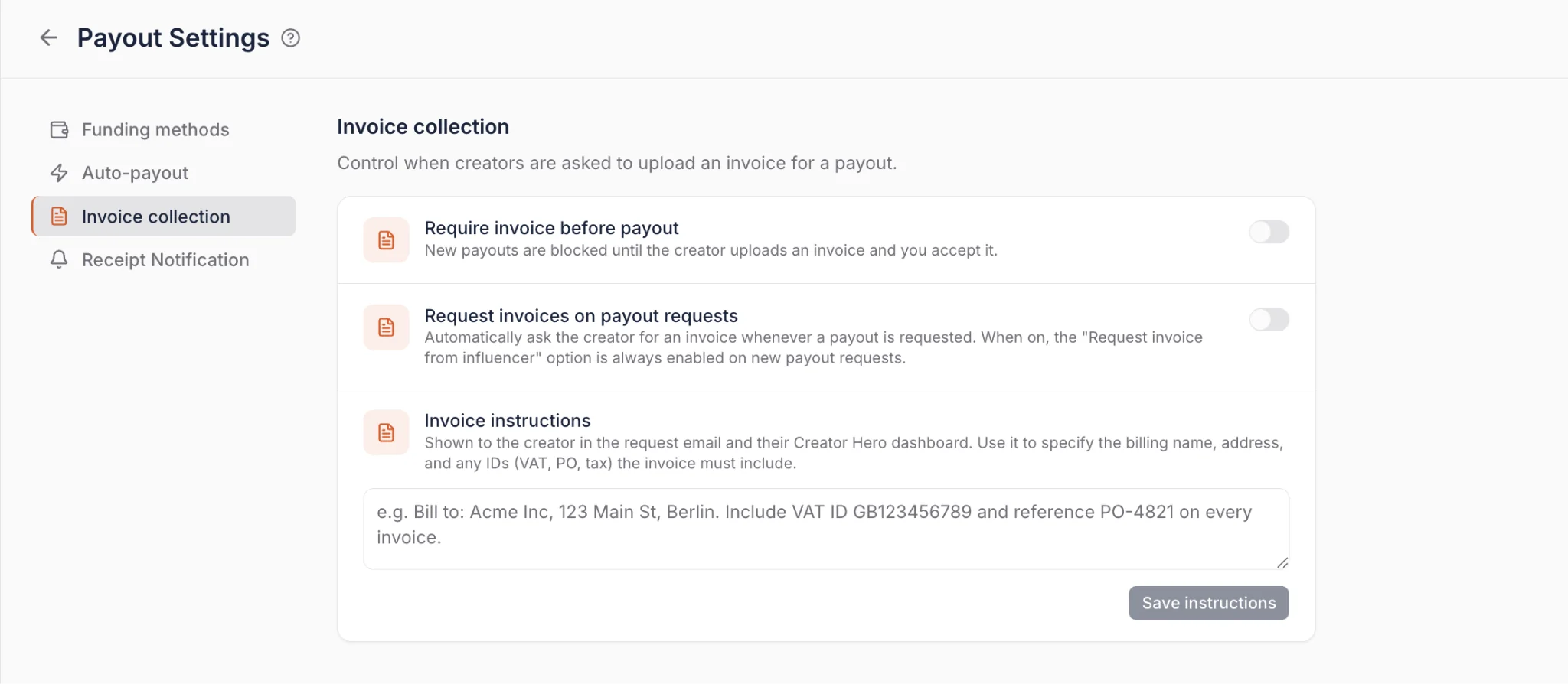
Paying in Bulk or on a Schedule
Fees are one half of payout cost. Time is the other.
- Bulk payout: Select multiple creators from the Payouts tab and pay them in a single transaction, with a full charge overview before you confirm and the option to cover fees on their behalf.
- Saved funding methods: Save a payment method once in Payout Settings and future payouts process instantly, with no Stripe checkout redirect.
- Auto-pay: Put payouts on a daily, weekly, or monthly schedule with spending limits attached. You get a warning email three hours before each run listing exactly who gets paid and how much, so nothing goes out unreviewed.
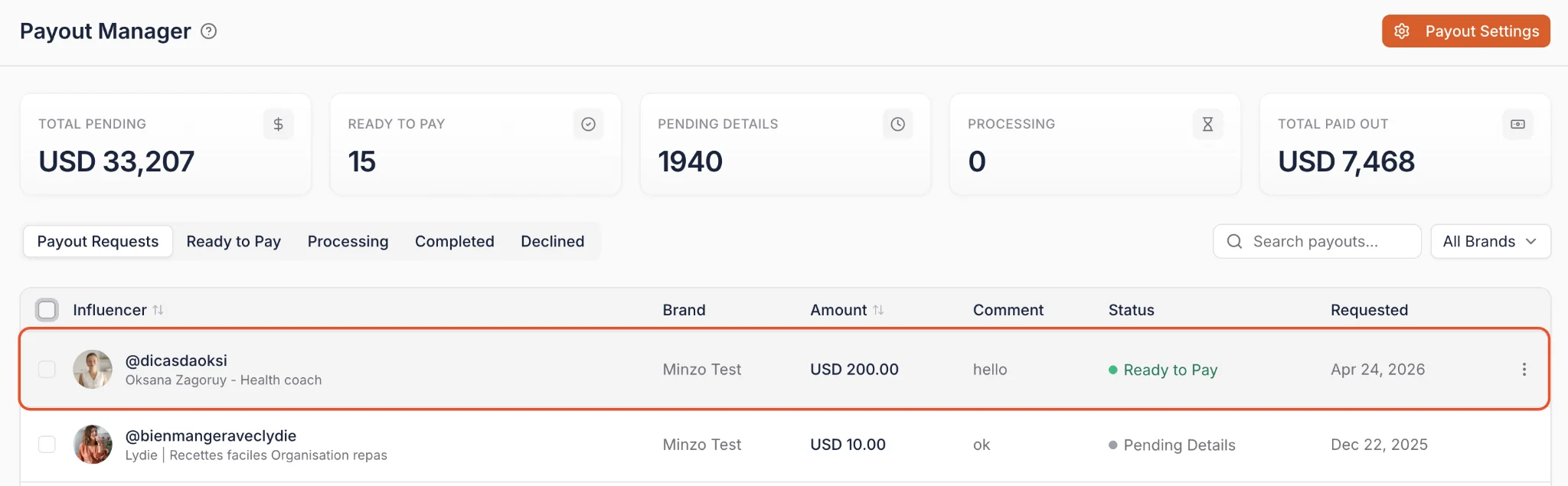
Collecting Creator Invoices Automatically
Low fees only help if the paperwork behind each payment is clean. Chasing invoices by email is where most finance teams lose their week, and it is the reason payouts sit pending long after the content has gone live.
Invoicing workflows handle that side inside the platform, right next to the payouts they belong to.
1. Request Invoices Automatically
You can ask a creator for an invoice manually, or set the platform to request one automatically every time a payout is requested. Creators can upload with or without a Creator Dashboard account, which removes the usual excuse for a delay.
2. Accept or Reject With Comments
Submitted invoices are reviewed straight from the Payout Manager. If something is missing or wrong, you reject it with a comment explaining what needs fixing, and the creator gets a clear prompt to re-upload rather than a vague follow-up email.
3. Block Payouts Until the Invoice Clears
You can optionally require an accepted invoice before a payout completes. That gives your accounting team a 100% payout-to-invoice match rate without anyone manually policing it.
Invoice settings live under Payouts > Payout Settings, and invoice events (requested, submitted, accepted, rejected) are available as automation triggers, so a submitted invoice can move a deal forward or fire a reminder on its own.
What You Can Do With The Affiliate Tracking and Payments Feature
Affiliate Tracking & Payments allows you to configure, track, and manage revenue directly from the same place where you run your influencer campaigns. Below is how teams use it in practice.
1. Create Affiliate Links and Discount Codes Per Creator
From each creator's deal page, you can assign a commission percentage and create a custom affiliate link. The commission logic is applied automatically once sales start syncing.
Each creator receives their own unique tracking structure, meaning performance is attributed individually. This keeps affiliate setup connected to the specific campaign and deal stage rather than managed in a separate system.
2. Assign Commission Logic Based on Campaign Strategy
Commission rates can be adjusted per creator depending on the agreement. For example, you might assign 10% for testing collaborations and increase it to 15% or 20% for high-performing influencers.
Because commission settings live inside the deal page, they stay aligned with outreach history, negotiation context, and campaign stages. You can also review past performance before deciding to adjust terms for seasonal pushes or ambassador tiers.
3. Track Clicks, Conversions, and Revenue Automatically
Once links and codes are live, Influencer Hero tracks click volume, order value, and commission earned through your connected store. Sales data syncs automatically into the creator's CRM record without manual reconciliation.
You can review performance inside the deal page or analyze aggregated results in reporting dashboards. This makes it possible to compare creators by revenue generated, not just engagement metrics.
4. Manage Affiliate Creators in Bulk
When running large affiliate programs, you can use CRM filters to segment creators based on keywords, tags, deal stages, campaign name, or performance history. This allows you to manage groups of affiliate creators without reviewing each profile individually.
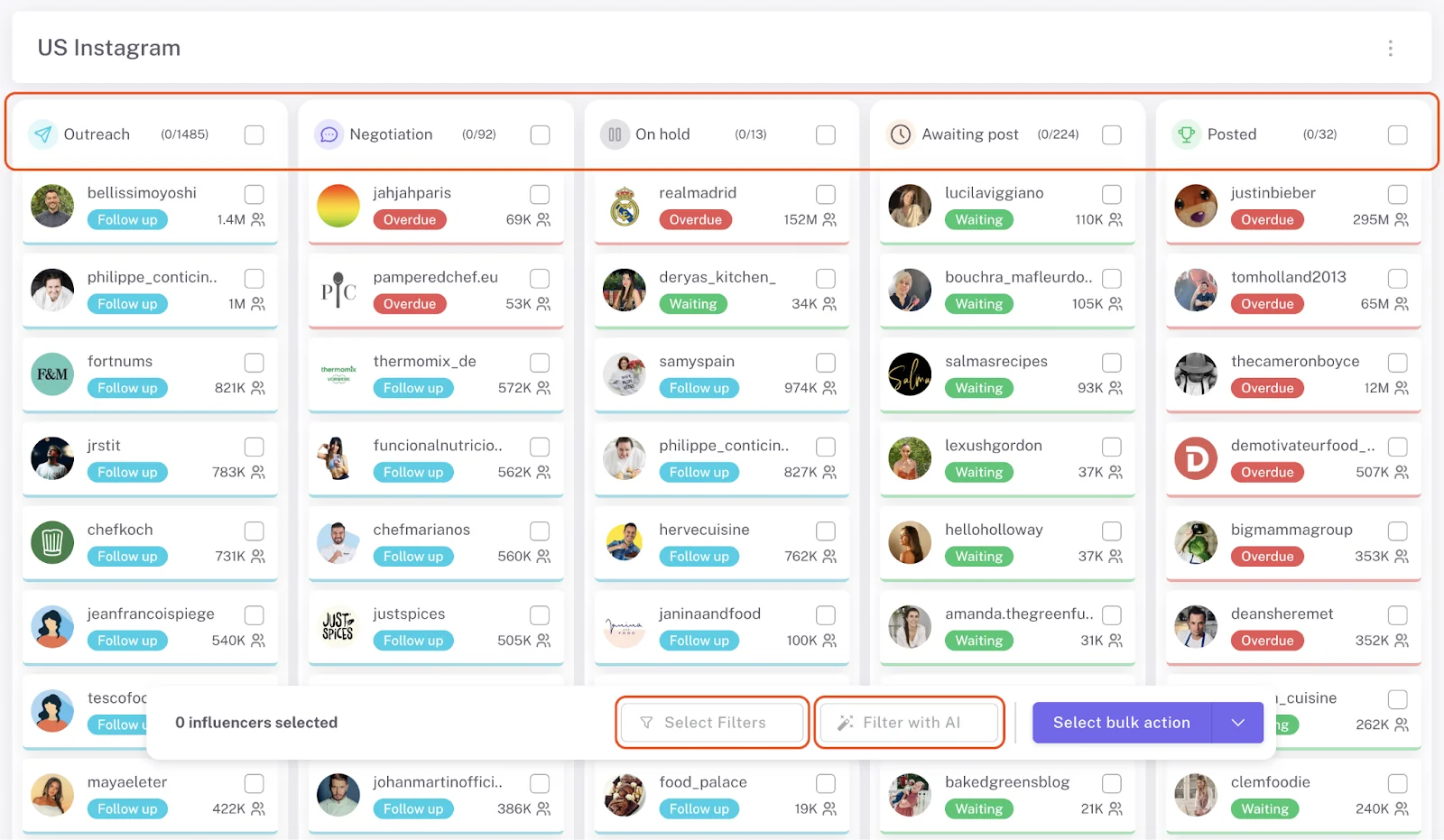
For example, you can filter those generating more than a specific revenue threshold and adjust commission tiers, outreach messaging, or reactivation flows accordingly. Bulk filtering keeps affiliate programs structured as they scale.
5. Connect Affiliate Data to Outreach and Relationship Management
Affiliate Tracking does not operate separately from communication. All affiliate settings and earnings are visible inside the same deal page where emails, follow-ups, and negotiation notes are stored. This creates a connection between affiliate programs, outreach, and relationship management.
This means when a creator asks about earnings, requests a higher commission, or qualifies for an ambassador role, you can respond based on real performance data without switching platforms. Affiliate performance becomes part of relationship management rather than a disconnected reporting task.
6. Centralize Earnings and Process Payouts
Commission totals accumulate automatically inside each creator's record. Creators can access their earnings through their Creator Dashboard, where they can track revenue and submit payment details securely.
On the brand side, you can review payout amounts without calculating commissions manually and add fixed fees when needed. This centralizes commission tracking, fixed payments, earnings visibility, and payout management into one structured workflow.
7. Keep More of the Budget in the Campaign
Because payouts run through regional bank debit at effective rates between 0.4% and 0.5%, the money that would have gone to processing fees stays in your creator budget.
On a program paying out six figures a year, the gap between a 5% platform fee and a sub-1% processing cost is the difference between funding another seeding wave and not funding it.
When Teams Use Affiliate Tracking and Payments
Affiliate Tracking & Payments is typically used when brands want to connect creator activity directly to measurable revenue, and manage commissions without manual calculations or external tools. Below are common scenarios where this feature becomes essential.
When Testing Influencers Before Committing to Paid Collaborations
Some teams use affiliate tracking as a testing layer before agreeing to fixed payments. Instead of paying upfront, they offer commission-based compensation and evaluate performance based on actual clicks, conversions, and revenue generated.
This allows brands to see which creators are capable of driving measurable outcomes rather than relying only on engagement metrics or follower counts.
By tracking performance directly inside the deal page, brands can compare creators objectively and identify who should be re-engaged, offered higher commission tiers, or moved into long-term paid partnerships. Strong performers can also be explored for other ways to collaborate, such as seasonal campaigns, ambassador programs, giveaways, or paid ads usage rights.
When Running Large-Scale Affiliate or Performance Campaigns
Brands use Affiliate Tracking & Payments when they work with dozens or hundreds of creators at once and need centralized revenue visibility. Managing discount codes and affiliate links manually across different systems quickly becomes difficult, especially during seasonal promotions, product launches, or always-on affiliate programs.
With affiliate tracking integrated into the CRM, teams can create personalized links and codes, automatically sync conversions, and calculate commissions without reconciling external spreadsheets. This keeps revenue attribution accurate while the operational workload stays manageable as the program scales.
When Payout Fees Are Eating the Program Budget
Brands paying out monthly commissions across a large roster often discover that processing fees have quietly become one of their biggest line items, especially when every transfer runs on a credit card.
Switching those payouts to regional bank debit inside the Payout Manager drops the per-transaction cost to a capped or near-flat amount, and bulk payout means the whole roster clears in one action instead of dozens of individual transfers.
When Finance Requires an Invoice for Every Payment
Some teams cannot release a payment at all until an invoice is on file, which turns every payout cycle into an email chase.
Invoicing workflows request the invoice automatically on each payout request, let the reviewer reject with a comment when something is wrong, and can block the payout from completing until the invoice is accepted. Finance gets its paperwork without the marketing team acting as a collections department.
When Building a Scalable, Budget-Conscious Influencer Program
Ondecor, a US-based home and decor brand selling customizable wallpapers, used affiliate tracking as a core part of scaling their influencer marketing program without relying on fixed payments. Their objective was to increase brand awareness, generate UGC, and drive conversions within a limited budget while testing a high volume of creators.
Through a combination of gifting and affiliate campaigns, they facilitated over 270 influencer collaborations in six months, generating 1.3M+ impressions and $37.6K in Earned Media Value while identifying 35 high-performing influencers. Because affiliate revenue and commission data were centralized inside Influencer Hero, the brand could clearly see which creators drove measurable sales and confidently reinvest in long-term partnerships.
When Developing a Brand Ambassador Program
Affiliate Tracking & Payments is also used when brands want to formalize relationships with top-performing creators and transition them into ambassador roles. Once sales data clearly shows who consistently drives revenue, brands can increase commission tiers, provide exclusive discount codes, or negotiate fixed payments based on historical performance rather than assumptions.
Because earnings history and conversion data remain visible inside the CRM, ambassador decisions become data-backed rather than speculative. Creators benefit from transparent earnings tracking through their dashboard, which strengthens trust and incentivizes ongoing promotion across seasonal campaigns and recurring activations.
How Affiliate Tracking and Payments Connects With Other Influencer Hero Features
Affiliate Tracking & Payments is not a standalone affiliate tool. It exists as part of a connected workflow where outreach, campaign management, reporting, and payouts all live inside the same system. When affiliate revenue data is tied to the CRM and campaign boards, performance becomes actionable rather than isolated.
Below is how this feature connects across the platform.
Campaign Boards + Affiliate Tracking
Affiliate links and commission logic are configured inside the creator's deal page, which sits within your Campaign Boards. This means affiliate performance is directly connected to deal stages such as "Outreach," "Negotiation," "Awaiting Post," or "Ambassador."
When a creator moves through stages, affiliate revenue history stays attached to that deal. This makes it possible to adjust commission tiers, reactivate past performers, or prioritize outreach based on real sales data rather than assumptions. Affiliate tracking becomes part of the campaign lifecycle, not something reviewed separately at the end of the month.
Outreach + Affiliate Offers
Because outreach emails are managed inside the CRM, affiliate terms can be included directly in your communication flows. Commission percentages, discount codes and custom links are visible while negotiating, allowing you to tailor offers based on audience size or expected performance.
For example, you can filter creators by niche or engagement rate, send a commission-based offer through automated outreach, and immediately configure their affiliate terms once they accept. This keeps negotiation, setup, and tracking within one continuous workflow instead of jumping between tools.
Reporting + Revenue Attribution
Affiliate performance feeds directly into reporting dashboards alongside post tracking, campaign results, and other performance metrics. Instead of tracking engagement in one place and sales in another, revenue attribution is centralized.
This allows teams to compare creators not only by reach or impressions, but by actual revenue generated and commission efficiency. Over time, this makes it easier to identify your top 5% to 10% of performers and allocate budget accordingly, strengthening ROI-driven decision making.
Creator Dashboard + Payment Management
Affiliate earnings are not only visible to brands but also accessible to creators through their dedicated Creator Dashboard. This transparency builds trust and reduces friction around commission questions.
Because payment details are collected securely inside the platform, commission totals are calculated automatically, and invoices are requested and approved in the same place, payouts connect directly to performance tracking. Tracking, earnings visibility, paperwork, and payments all function as part of the same structured system.
Integrations + Automated Sync + Workflow Automation
Affiliate Tracking & Payments connects natively to Shopify, WooCommerce, Magento, BigCommerce, Wix, Squarespace, Square, Amazon, and other supported stores, with GoAffPro available as an alternative route. This ensures clicks, orders, and revenue data sync automatically into the CRM without manual uploads.
Beyond syncing sales data, affiliate setup can also be embedded into your automation workflows. For example, you can create a rule where if an influencer is moved to the "Awaiting Post" column inside your Campaign Board, the system automatically generates their affiliate link and assigns a specific discount code.
Because integrations and automation are tied directly to campaign boards and deal pages, brands can run full-funnel influencer programs, from discovery and outreach to gifting, affiliate tracking, automated link creation, invoicing, and reporting, without separating data across multiple dashboards or manually triggering setup steps.
Final Thoughts
Affiliate Tracking & Payments in Influencer Hero is built to centralize revenue attribution, commission tracking, and payout management inside your influencer workflow. From creating personalized links and discount codes to syncing conversions and calculating earnings automatically, everything happens within the same CRM where campaigns and relationships are managed.
The payment layer is where the biggest change has landed. With regional bank debit, bulk and scheduled payouts, and automated invoicing, you keep more of your budget in the campaign and less of it in processing fees. Our full breakdown of payout fees covers the method-by-method numbers if you want the detail.
If you want to see how Affiliate Tracking & Payments connects with Campaign Boards, Outreach automation, Creator Dashboards, and reporting, you can explore the feature in a live walkthrough. Book a demo with Influencer Hero to see how affiliate tracking, commission management, and influencer workflows operate together inside one structured system.
Summary
This is some text inside of a div block.
This is some text inside of a div block.
Pricing/Month
Shopify Reviews
This is some text inside of a div block.
This is some text inside of a div block.
This is some text inside of a div block.
This is some text inside of a div block.
This is some text inside of a div block.
This is some text inside of a div block.
This is some text inside of a div block.
This is some text inside of a div block.
This is some text inside of a div block.
This is some text inside of a div block.
This is some text inside of a div block.
This is some text inside of a div block.
This is some text inside of a div block.
This is some text inside of a div block.
This is some text inside of a div block.
This is some text inside of a div block.
This is some text inside of a div block.
This is some text inside of a div block.
This is some text inside of a div block.
This is some text inside of a div block.
This is some text inside of a div block.
Read More

FAQs
Can I create affiliate links and discount codes directly in Influencer Hero?

Yes. You can create personalized affiliate links for each creator directly from their deal page.
How are affiliate commissions calculated?
Commissions are calculated based on the percentage you define inside the creator’s deal. When a tracked sale occurs through a custom link or discount code, Influencer Hero automatically applies the commission rate and updates the creator’s earnings.
Can I track clicks and conversions in real time?
Yes. Influencer Hero tracks clicks, orders, and revenue through Shopify or GoAffPro integrations. Performance data is synced directly into the creator’s CRM record and reporting dashboards without manual imports.
How do influencers see their earnings?
Creators receive access to a dedicated Creator Dashboard where they can track their affiliate earnings, view performance metrics, and submit their payment details securely. This keeps earnings transparent and reduces back-and-forth communication about commissions.
Is affiliate tracking connected to campaign management and reporting?
Yes. Affiliate performance is tied to the same deal pages, Campaign Boards, and reporting dashboards used for outreach and content tracking. This ensures revenue attribution is part of your broader influencer workflow rather than managed in a separate system.





Most Popular Blogs


Drive ROI With Influencer Marketing
Join 1,200+ brands and 150+ agencies scaling creator programs with Influencer Hero.