
Payout Manager: Centralize and Process Your Creator Payments in One Place

March 5, 2026
|
Published

October 12, 2026
|
Updated

17 minutes
|
Reading

Influencer Performance Marketing Course | VOUCHER: IMC100

María Vincenzini
| Author

Drive ROI With Influencers

Global Influencer Database
ALL-IN-ONE platform
CRM, Affiliate, UGC & More
Payout Manager: Centralize and Process Your Creator Payments in One Place
Most influencer marketing platforms charge between 5% and 7% in payment fees on every creator payout. Influencer Hero charges 0.4% to 0.5%, which is the lowest in the market for influencer marketing.
That gap is the reason this feature exists. On a program paying out six figures a year, the difference between a 6% platform fee and a sub-1% processing cost is another full seeding wave you get to fund. Influencer Hero takes no cut of your payouts at all: only the Stripe processing fee is passed through at cost, and the $2 Stripe KYC fee has been waived entirely.
Beyond the fees, the Payout Manager fixes the other half of the problem. Manual payment tracking is usually the first thing to cause burnout, so this tool centralizes every transaction, from fixed campaign fees to performance-based commissions, into one streamlined workflow.
It gives you a single source of truth for what's owed, what's pending, and what's already been processed, so you can stop jumping between PayPal, banking apps, and spreadsheets. Because Influencer Hero is an all-in-one platform, the payout tool is baked directly into the Influencer Deal Page, always synced with your campaign data.
Let's take a look at how to use it to keep your creators happy and your books organized.
How the Payout Manager Works in Influencer Hero
Think of the Payout Manager as your brand's dedicated accounting department for creator partnerships.
Instead of manually calculating what you owe for a Reel versus a TikTok affiliate link, this feature acts as a centralized ledger to process and track every payment in one place. It shifts your workflow from "calculating" to "confirming," ensuring your creators are paid accurately without the administrative burnout.
Every payout starts on the deal page and is finalized in the Payout Manager.
Step 1: Open the Payouts Tab on the Deal Page
Go to the influencer's deal page and head over to their Payouts tab. This is where you track performance (clicks, sales, commissions), add fixed payments, and initiate payouts.
Step 2: Add Commissions and Fixed Fees
The system handles both performance-based pay and flat rates in the same place:
- Affiliate commissions: Nothing to add. Earned commission is already visible in the Affiliates tab and the Payouts tab, calculated from your synced conversion data.
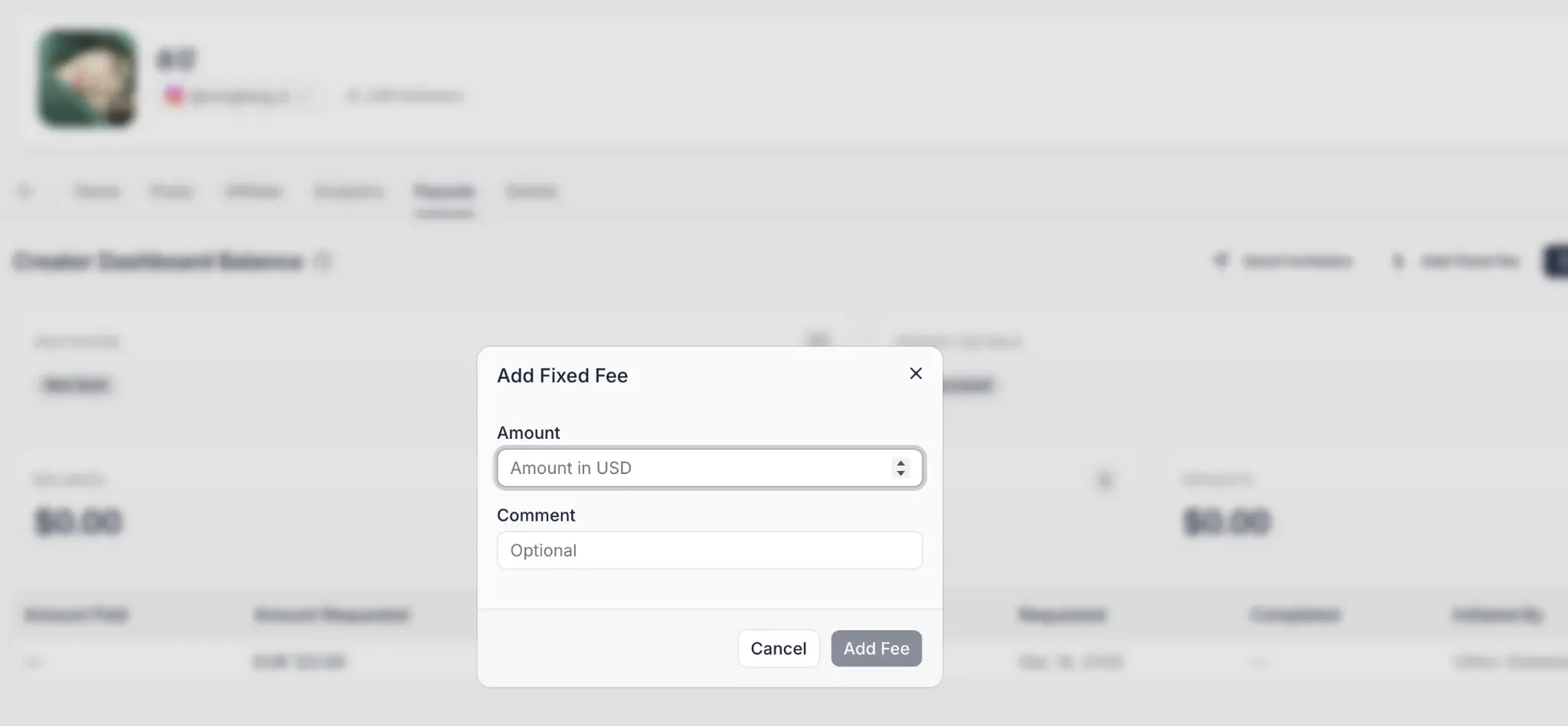
- Fixed fees: For paid collaborations, click "Add Fixed Fee" in the Payouts tab and input the due amount.
- Organization: Comments on fixed fees are optional but recommended, so you always know what a payment was for.
- Real-time totals: Once submitted, amounts are reflected in "Earnings" and "Fixed Fees."
Step 3: Invite the Creator, Only If Paying Through the Platform
This step is conditional, and it is worth knowing that before you set up your workflow.
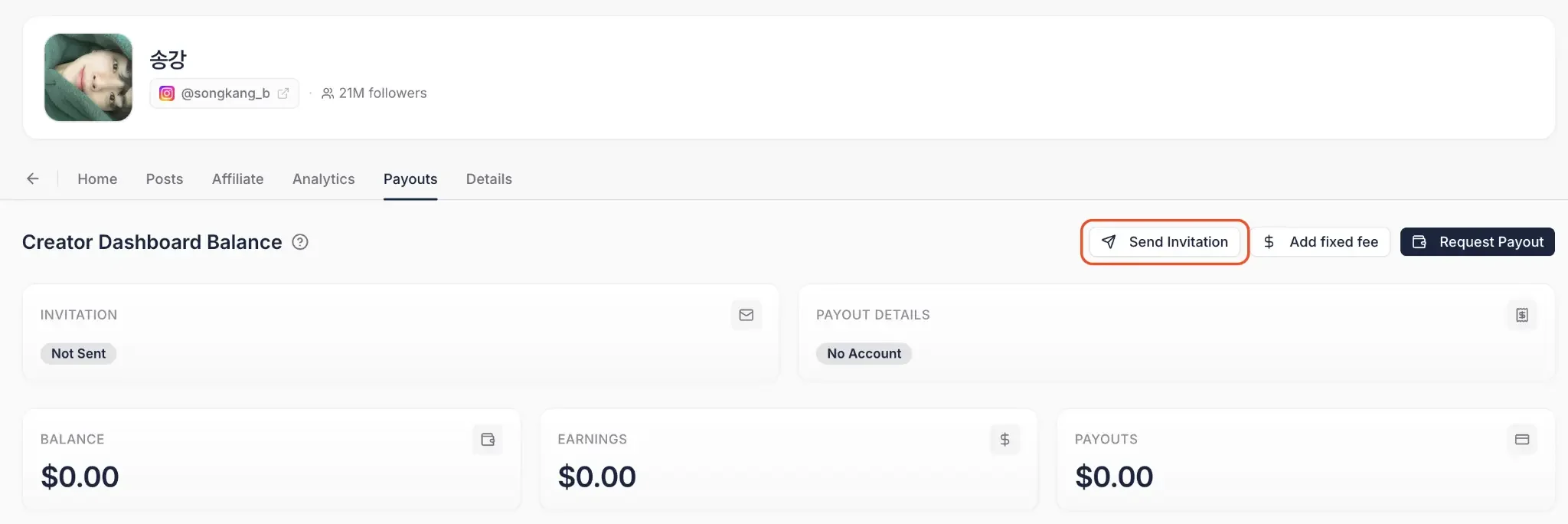
If you plan to pay through Influencer Hero via Stripe, the creator needs to join the Creator Dashboard and add their payout details. Send them an invite from the deal page and wait for them to complete their payment setup. You can see right on the deal page whether they have accepted and filled in their information.
If you are paying them outside the platform, for example through PayPal or a manual bank transfer, you can skip this step entirely and log the payment as an offline payout later.
Step 4: Request the Payout
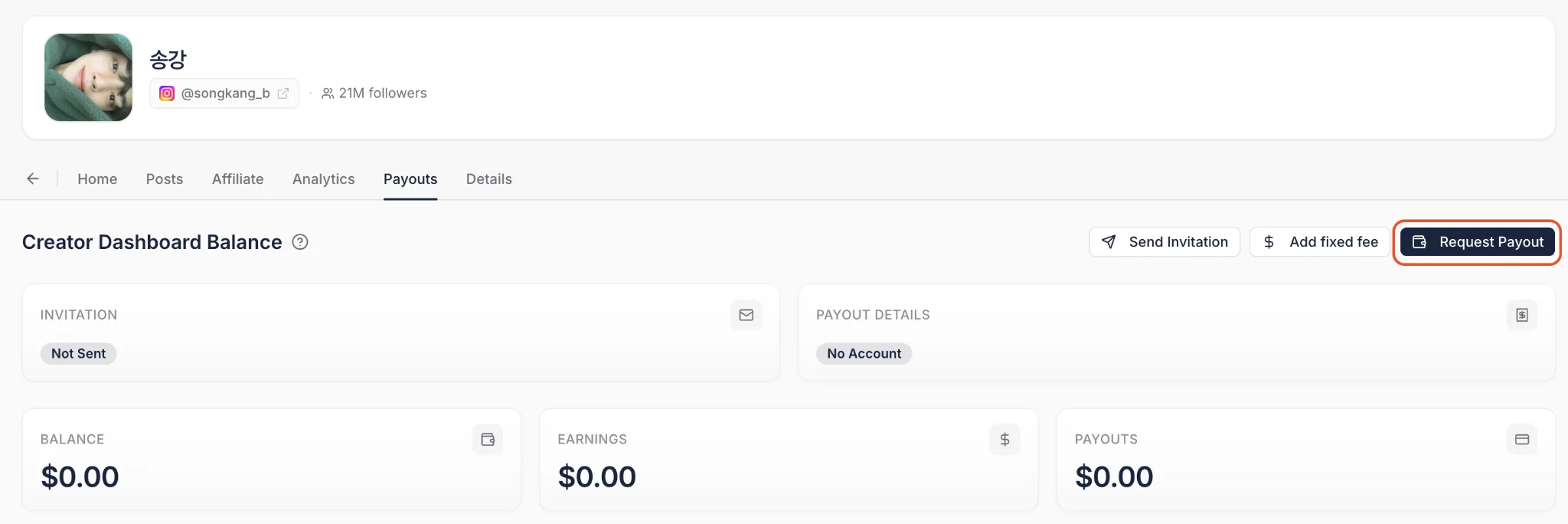
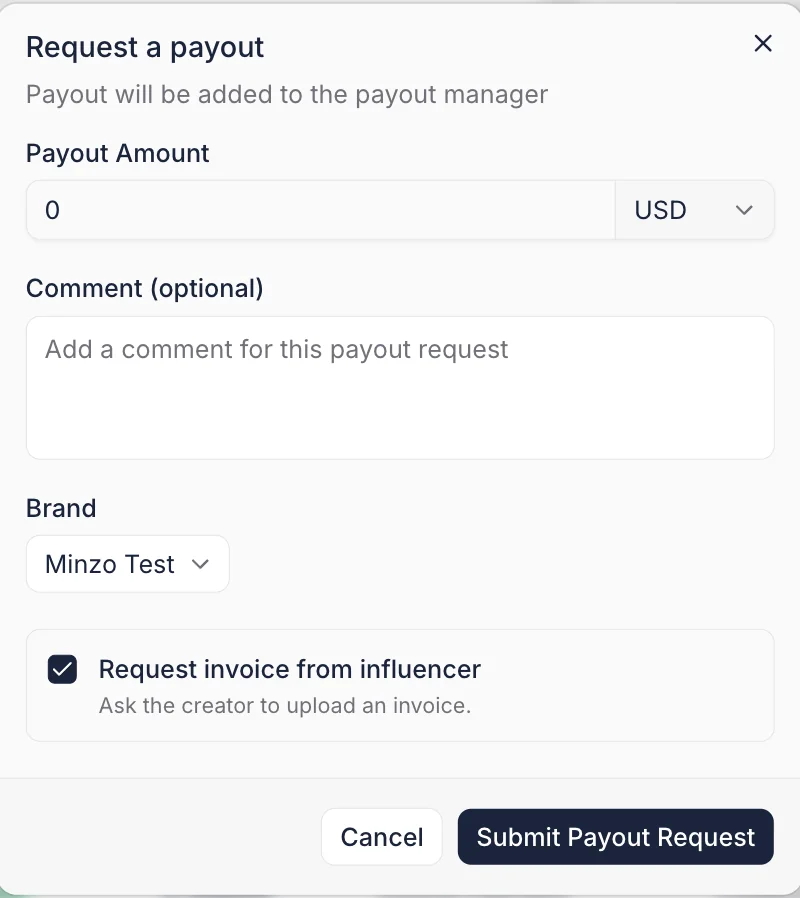
When you are ready to settle a balance, click "Request Payout" and enter the amount. This moves the request out of the deal page and into your main financial queue.
Step 5: Complete the Payment
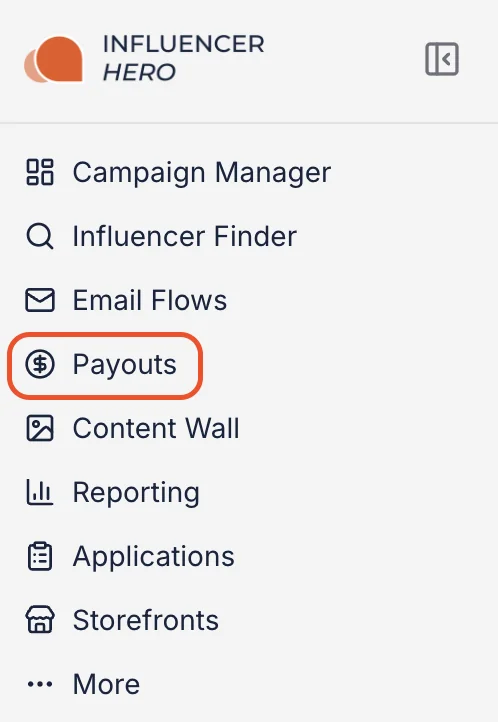
All requested payments are centralized in the Payouts tab in the left-hand menu.
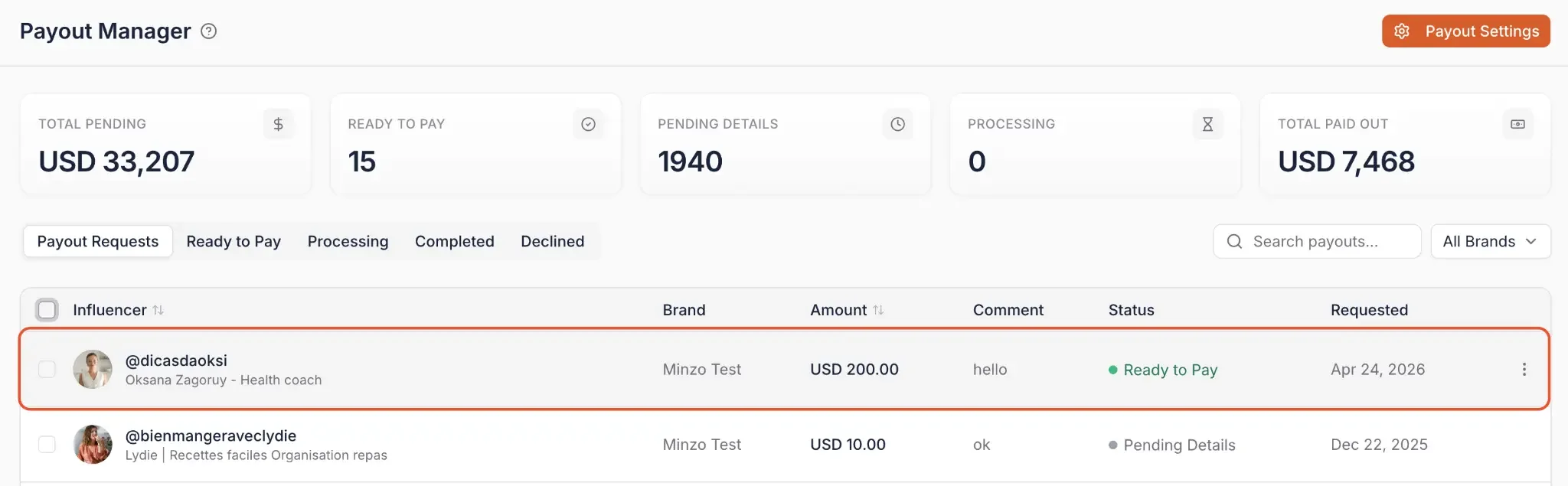
From here you have two routes:
Option 1: Pay through Influencer Hero (Stripe)
Select the influencers sitting in the "Ready to pay" tab and click "Bulk pay" to process them together. You get a full charge overview before confirming, and you can choose whether to cover payment fees on their behalf.
If you have a funding method saved in Payout Settings, payments process immediately with no Stripe checkout redirect. If you prefer not to save one, the one-time Stripe checkout option is still there.
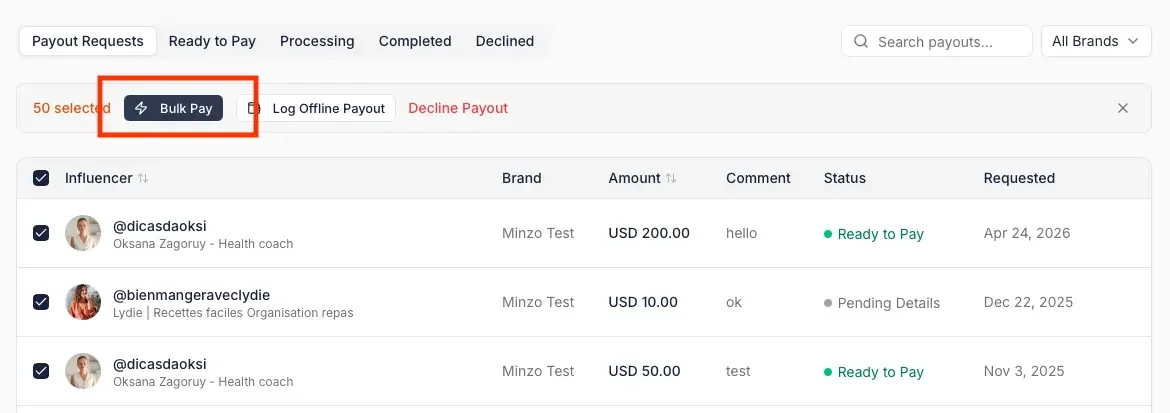
Option 2: Log an offline payout
Select the influencers you already paid outside of Influencer Hero, click "Log Offline Payout" and confirm. This keeps your internal balance and CRM history accurate even when the money moved elsewhere.
Note: If a creator has not yet submitted their financial information, the system displays a "Payout details missing" alert and prevents payment until the data is provided.

Step 6: Track Status, Receipts, and Spend
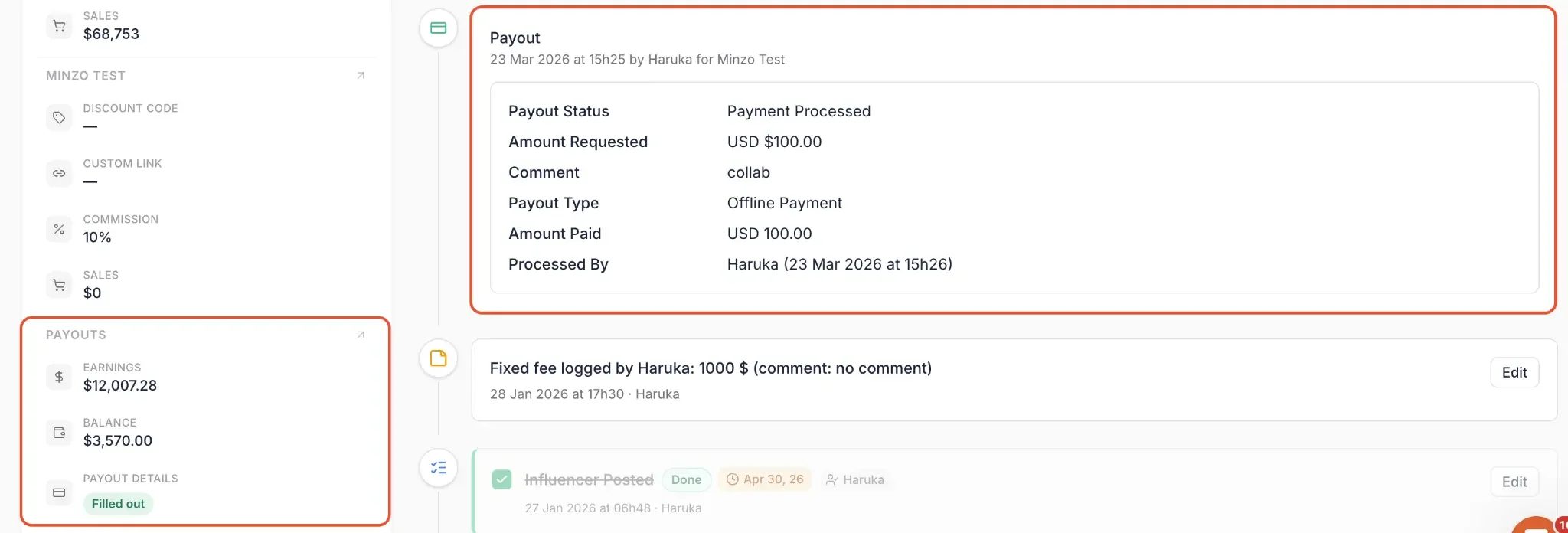
Once a payment is processed, the Payouts tab keeps the record. You can see pending and completed payouts, track and download past receipts, and monitor total spend across your whole roster.
Statuses update automatically, and the remaining balance is reflected back on the influencer's deal page. Returning to that deal page gives you the full transaction history: who processed the payment, when it was done, how much it was for, how it was processed, and what balance is left.
Why Payment Fees Matter More Than You Think
Payment processing fees are the kind of cost most teams accept because "that's just how it works." Stripe takes around 3% on a card, the platform adds its margin, you move on.
But once you're running real volume, multi-creator campaigns, monthly affiliate commissions, regional rosters, those percentages stop being a rounding error. They start eating into the budget you'd otherwise use to brief more creators or scale a winning campaign. Most influencer and affiliate platforms charge between 5% and 7% on every payout. That's not a line item. That's a budget.
The Payout Manager changes that by giving you access to regional bank direct debit methods. Influencer Hero takes no additional cut, and only the Stripe processing fee is passed through at cost.
Here is what that looks like method by method:
On larger sums, effective rates land as low as 0.4%. Even on smaller transactions, you're around 0.5%, still far below the 5% to 7% norm.
Your region is pre-selected based on your account currency, so setup is straightforward. To access these methods, open Payout Settings in the top right of the Payout Manager, where an estimated fee calculator lets you compare methods before you commit to one.

Collecting Invoices Alongside Your Payouts
Cheap payouts do not help if your accounting team is still chasing paperwork by email. Invoicing workflows close that gap by handling invoices in the same place as the payments they belong to.
- Automatic invoice requests: Ask a creator for an invoice manually, or automatically every time a payout is requested.
- Accept or reject with comments: Review submitted invoices from the Payout Manager and reject with a comment when something is missing, prompting a quick re-upload rather than a vague follow-up.
- Require invoice before payout: Optionally block a payout from completing until its invoice has been accepted.
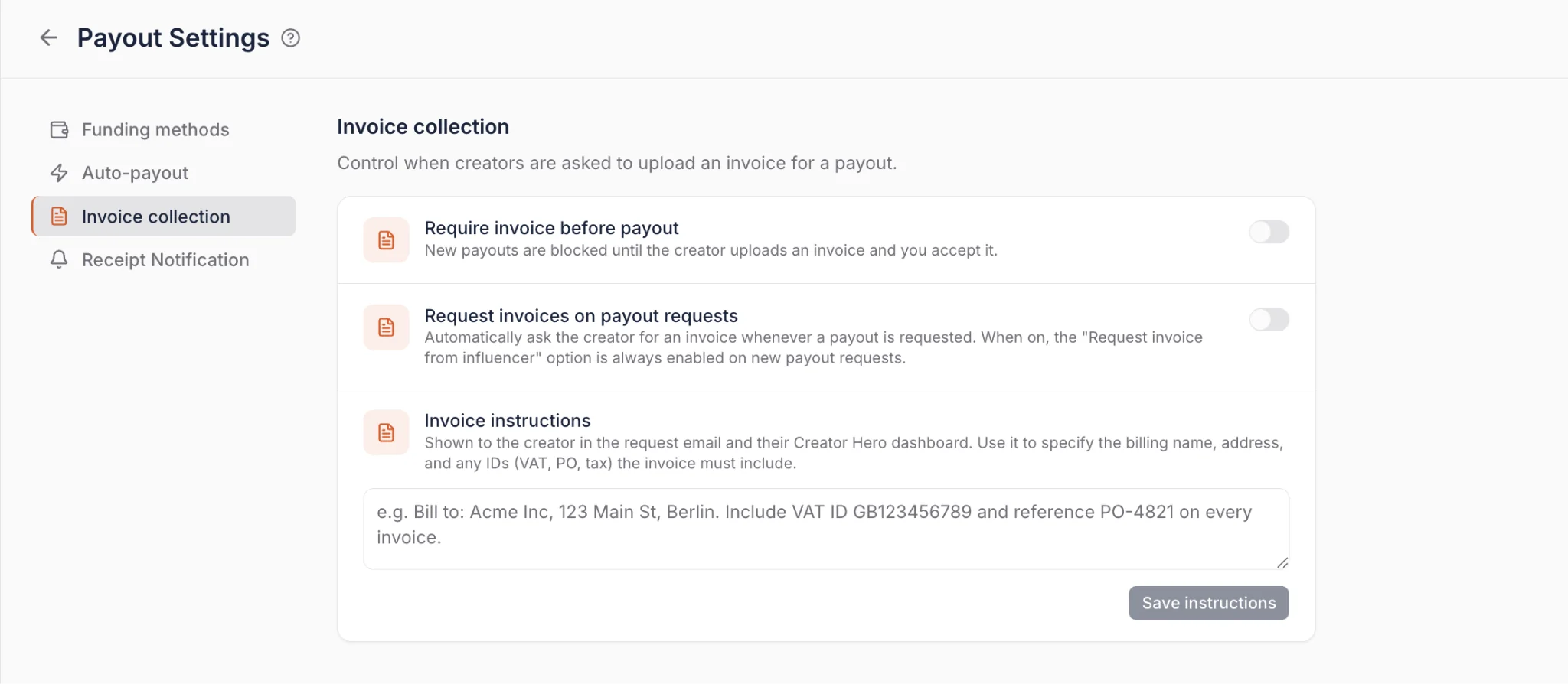
The result is a 100% payout-to-invoice match rate without anyone policing it manually. Creators can upload with or without a Creator Dashboard account, invoicing workflows are configured under Payouts > Payout Settings, and invoice events (requested, submitted, accepted, rejected) work as automation triggers.
What You Can Do With the Payout Manager
The Payout Manager is more than a payment processor; it's a logistics tool that connects campaign performance to your financial records. Here is how you can use it to manage your creator operations:
1. Centralize Commissions and Fixed Fees
Instead of using separate tools for affiliate tracking and flat-rate sponsorships, you manage both in one view.
- For affiliates: The system automatically tracks earnings from conversion data, so you don't calculate percentages by hand.
- For paid collabs: You assign fixed fees on any creator's deal page. Whether a creator is earning 10% of sales or a $500 flat fee for a post, it lands in the same "Pending" queue.
2. Pay Multiple Influencers at Once
You have two bulk options depending on where you are in the workflow.
To create payout requests in bulk, use the Bulk Tool from inside your campaign:
- Click "Open Bulk Tool" in the top right corner.
- Select the influencers you're ready to pay, manually or using filters such as minimum sales, referrals, or whether their Creator Dashboard is set up.
- Click "Select Bulk Action" and choose "Request Payout."
- Choose a specific amount, or request the full due balance for each selected influencer.
- The requests appear in the Payout Manager for final processing.
To process all open requests at once, go to the Payouts tab, select everyone in "Ready to pay," and click "Bulk pay."
3. Compare Methods Before You Pay
Payout Settings includes an estimated fee calculator, so you can see what a given payout will actually cost across the available methods rather than guessing.
For teams paying regularly into the same region, checking this once and saving the cheapest method is the single highest-return five minutes in this whole workflow.
4. Save Your Funding Methods
Previously, every payout required going through a Stripe checkout flow. Now you save your preferred method directly in Payout Settings, and all future payouts, including bulk and automated ones, process instantly. The one-time checkout option is still available if you prefer it.
5. Choose Lower-Cost Payment Methods by Region
Bank direct debit methods are dramatically cheaper than card processing, and your region is pre-selected based on your account currency:
- United States, ACH Debit: Fees capped at $5 regardless of payout size. A $1,000 payout via credit card costs around $30; a $9,000 payout that would have cost $260 in card fees costs $5 with ACH.
- United Kingdom, Bacs Direct Debit: On a £9,000 payout, fees drop from around £170 by card to around £4.
- European Union, SEPA Direct Debit: Fees can be as low as €0.30 per transaction, against roughly €170 by credit card on large payouts.
- Rest of the world: Credit card remains the available option for now.
Bank transfer methods take 2 to 3 business days and show as "Processing" until cleared. Credit card payouts are instant and move directly to "Completed."
6. Automate Payout Requests
If the two-step workflow (requesting on the deal page, then processing in the Payout Manager) is unnecessary for your team, automate the first step. Enable Auto-Submit Payout in Payout Settings and set a balance threshold, for example $50. Any time a creator's balance crosses it, a payout request is created automatically with the comment "balance threshold crossed."
If you want every balance to surface regardless of size, set the threshold to $1.
7. Automate Payments With Auto-Pay
Once requests are being created, you can automate the payment step too. Enable Auto-Pay in Payout Settings and configure:
- Frequency: Daily, every Monday, or the 1st of every month.
- Daily and monthly spending limits to stay in control of your budget.
- Whether to cover payment fees on behalf of your influencers.
Three hours before a scheduled run, you receive a warning email listing exactly which influencers will be paid and how much. If something looks off, click "Review Payouts" from the email to decline individual payouts or pause all automatic payments before the run starts. Once it completes, you get a confirmation email summarizing the total paid out.
8. Require Invoices Before Money Moves
For teams that cannot release payment without paperwork on file, invoice requests can fire automatically on every payout request, and payouts can be blocked until the invoice is accepted. Your marketing team stops acting as a collections department.
9. Route Receipts to Your Accounting Team
In Payout Settings, add any email address, such as accounting@yourbrand.com, to automatically receive receipts every time a payout is processed. Receipts can also be downloaded directly from the platform at any time.
10. Bridge the Gap With the Creator Dashboard
By sending an invite to the Creator Dashboard, you shift data entry onto the influencer. They log their own payment details via Stripe, which populates automatically in your Payout Manager. This eliminates asking for banking info over email or DM.
11. Connect Your Entire Campaign Lifecycle
Because the Payout Manager sits inside the all-in-one Influencer Hero ecosystem, it works alongside your other tools:
- CRM integration: Every payment is logged on the influencer's profile, so you see their lifetime value at a glance.
- Outreach and recruitment: Use payment history to identify your most reliable partners for future outreach.
- Reporting: Processed payments feed into your campaign ROI reports, giving you an accurate look at net profit after creator costs.
When Teams Use the Payout Manager
Is this feature for you? The best way to answer that is to look at how growing brands use centralized tracking to solve real scaling challenges.
1. Scaling an Ambassador or Affiliate Program
When you want to move from 10 to 100+ partners, you cannot manually audit every sale and commission.
- The scenario: You have a growing list of affiliates, and manually calculating 10% of every sale from your store has become a bottleneck.
- The workflow: Because the system pulls conversion data directly, earnings are already calculated per creator. You review the totals and process the payouts in bulk, moving from "calculating" to "confirming."
2. Cutting Payment Fees on a High-Volume Program
For brands paying out monthly across a large roster, processing fees quietly become one of the biggest line items in the program.
- The scenario: You pay 120 creators a month by card and your finance lead flags that fees are running into four figures.
- The workflow: Open Payout Settings, use the fee calculator to compare methods for your region, and save bank direct debit as your funding method. On US payouts, that takes a $260 card fee on a $9,000 transfer down to $5.
3. Managing Hybrid "Fee + Commission" Deals
High-level partnerships often involve a guaranteed flat rate plus a performance bonus. Tracking these in two places leads to payment errors.
- The scenario: You've hired a creator for a $500 fixed fee for a TikTok post, and also want to pay a bonus commission on sales they generate.
- The workflow: Use "Add Fixed Fee" to log the $500 and let the system track affiliate earnings automatically. Both amounts appear in the "Pending" balance, so you settle the entire deal in one transaction.
4. Professionalizing Your Financial Audit Trail
For brands keeping tight records, "sending a transfer" without a formal log isn't enough.
- The scenario: Your finance team needs to know which campaign a payment belonged to and which team member approved it.
- The workflow: Every payment, whether through Stripe or logged as an offline payout, generates a permanent record on the deal page. You get the who, when, and how behind every transaction, plus downloadable receipts routed to your accounting inbox automatically.
5. Satisfying an Invoice-Required Finance Process
Some teams cannot release a payment at all until an invoice is filed, which turns every payout cycle into an email chase.
- The scenario: Finance requires a matching invoice for all creator payments, and your team spends the last week of every month collecting them.
- The workflow: Turn on automatic invoice requests so every payout request asks for one, reject anything incomplete with a comment, and block payouts from completing until the invoice is accepted.
6. Moving Away From "Email Tag" for Payment Info
Chasing influencers via DM for banking details is a major drain on your team's time.
- The scenario: You work with international creators and need a secure way to collect payment details without back-and-forth.
- The workflow: Send a Creator Dashboard invitation. They log their own details securely, which populates in your Payout Manager, so you always have the right info on file.
7. Running Hands-Off Payouts With Full Automation
For teams managing large volumes, manually triggering every request and payment is not scalable.
- The scenario: You're running an always-on ambassador program with 50+ creators earning on a rolling basis, and your team doesn't want to log in weekly to trigger payouts that are always approved anyway.
- The workflow: Enable Auto-Submit Payout with a $50 threshold, then Auto-Pay set to weekly. Three hours before each run, finance gets a warning email to catch anything unexpected, and a confirmation summary once it completes.
How the Payout Manager Connects With Other Influencer Hero Features
The Payout Manager is not a standalone ledger; it is the financial conclusion of your entire influencer marketing engine. By centralizing payments within the same environment as your campaign data, you eliminate fragmented spreadsheets and manual math.
1. Integration With CRM & Relationship History
Every transaction processed is automatically logged onto the creator's profile within your influencer CRM.
- Automatic audit trail: The system records when a payment was issued and for how much, creating a permanent history of the partnership.
- Operational transparency: Because every deal page updates in real time, your team keeps a single source of truth for every influencer's financial status.
2. Integration With Affiliate Tracking & eCommerce
Because Influencer Hero connects directly to your e-commerce store, performance data automatically populates your payment queue.
- Real-time commission sync: Affiliate tracking records store clicks and sales to calculate exactly what a creator has earned, with no manual input.
- Hybrid payment flexibility: You settle performance-based commissions and fixed fees in one workflow, clearing "Pending" balances with precision.
3. Integration With Reporting & ROI Analytics
By logging all payouts within the platform, your campaign reporting can show true net profitability.
- True ROI visibility: Real-time dashboards factor actual creator costs against revenue generated, giving a clear view of campaign success.
- Optimized discovery: Reviewing cost-per-acquisition data helps you refine your criteria when using the discovery tool to find new high-ROI partners.
Final Thoughts
The best way to understand how the Payout Manager can transform your post-campaign workflow is to see the automation in action. Whether you're centralizing affiliate commissions, cutting payment processing fees from 6% to under 1%, or fully automating your payout runs, the platform turns manual spreadsheet work into a streamlined, scalable process.
With bulk payouts, saved funding methods, regional direct debit, automated invoicing, and full Auto-Submit and Auto-Pay automation, Influencer Hero covers the entire payment lifecycle: from tracking what's owed to processing it automatically on a schedule with the paperwork already matched.
And because everything is integrated with your CRM, reporting, and Creator Dashboards, your financial records stay accurate whether you're managing five creators or five hundred.
Book a demo with our team to get a live look at how much the new Payout Manager can save you on fees and put your creator payments on autopilot.
Summary
This is some text inside of a div block.
This is some text inside of a div block.
Pricing/Month
Shopify Reviews
This is some text inside of a div block.
This is some text inside of a div block.
This is some text inside of a div block.
This is some text inside of a div block.
This is some text inside of a div block.
This is some text inside of a div block.
This is some text inside of a div block.
This is some text inside of a div block.
This is some text inside of a div block.
This is some text inside of a div block.
This is some text inside of a div block.
This is some text inside of a div block.
This is some text inside of a div block.
This is some text inside of a div block.
This is some text inside of a div block.
This is some text inside of a div block.
This is some text inside of a div block.
This is some text inside of a div block.
This is some text inside of a div block.
This is some text inside of a div block.
This is some text inside of a div block.
Read More

FAQs
How do I track commissions for my affiliate partners?

You don’t have to calculate these manually; the system automatically tracks earnings from conversion data and displays the total amount each creator has earned directly within the Collaboration Portal.
Can I pay influencers for one-off posts or fixed fees?
Yes. You can manually click "Add Fixed Fee" on the influencer’s deal page, input the specific amount for the collaboration, and even add comments to keep track of what the payment was for.
How do creators provide their payment information?
You can send an invitation for the creator to join their own Creator Dashboard. Once they join, they can securely log their own payment details and track their performance stats.
What is the difference between a Stripe payout and an "Offline Payout"?
A Stripe payout is processed directly through the platform if the influencer has connected their details. An Offline Payout is used to log payments made outside of Influencer Hero (like a bank transfer) to ensure your internal balance and transaction history stay up to date.
Where can I see the history of my previous payments?
All transaction details are stored on the Influencer’s Deal Page. This log shows you exactly who processed the payment, when it was made, the total amount, and the remaining balance.






Most Popular Blogs


Drive ROI With Influencer Marketing
Join 1,200+ brands and 150+ agencies scaling creator programs with Influencer Hero.