Custom Fields in Influencer Hero: Track Any Data and Use It in Automations

October 8, 2026
|
Published

October 8, 2026
|
Updated

5 minutes
|
Reading

Influencer Performance Marketing Course | VOUCHER: IMC100

Malena Garcia

Drive ROI With Influencers

Global Influencer Database
ALL-IN-ONE platform
CRM, Affiliate, UGC & More
Custom Fields in Influencer Hero: Track Any Data and Use It in Automations
You can now add your own custom fields to deal pages in Influencer Hero.
Track whatever your team needs to track, whether that is a post date, a negotiated rate, or a revenue threshold specific to one brand deal. More useful still: those fields can be referenced inside automation conditions, which unlocks campaign rules that were previously impossible to build.
If you have ever been told a workflow was not supported, this is probably the release that changes that answer.
What's New
- Add your own fields to any deal page
- Choose between text, number and date field types
- Fields appear instantly under General Information on the deal page
- Reference custom fields inside automation conditions
- Remove fields you no longer need
Worth clarifying up front: these are different from the custom fields on application forms. Those collect information from creators applying to your program. These live on the deal page itself and sit inside your influencer CRM as trackable data.
How to Create a Custom Field
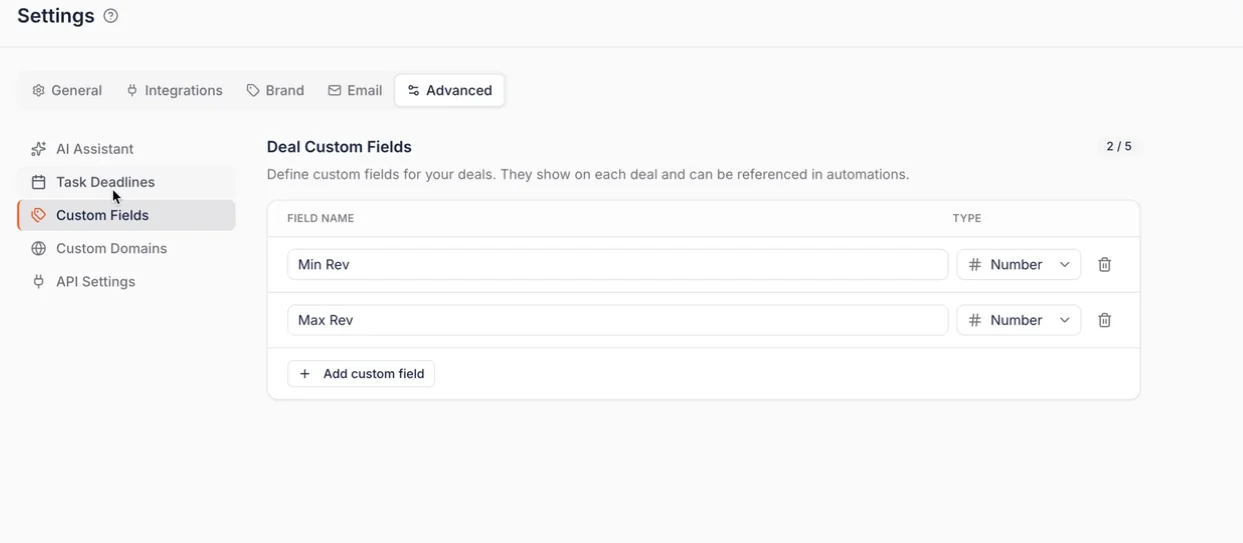
Go to Settings, then Advanced settings, then Custom fields.
Add a field, give it a name, and pick the type:
- Text for notes, contract references or content angles
- Number for rates, thresholds or targets
- Date for post dates, deadlines or contract end dates
The field appears immediately on your deal pages under General Information, no refresh needed. Remove it the same way when a campaign wraps.
This is different from custom columns, which control what you see across your campaign board. Custom fields live on the individual deal, so they are the right place for anything that varies creator by creator.
Referencing Custom Fields in Automations
This is where custom fields stop being a nice CRM addition and start being genuinely powerful.
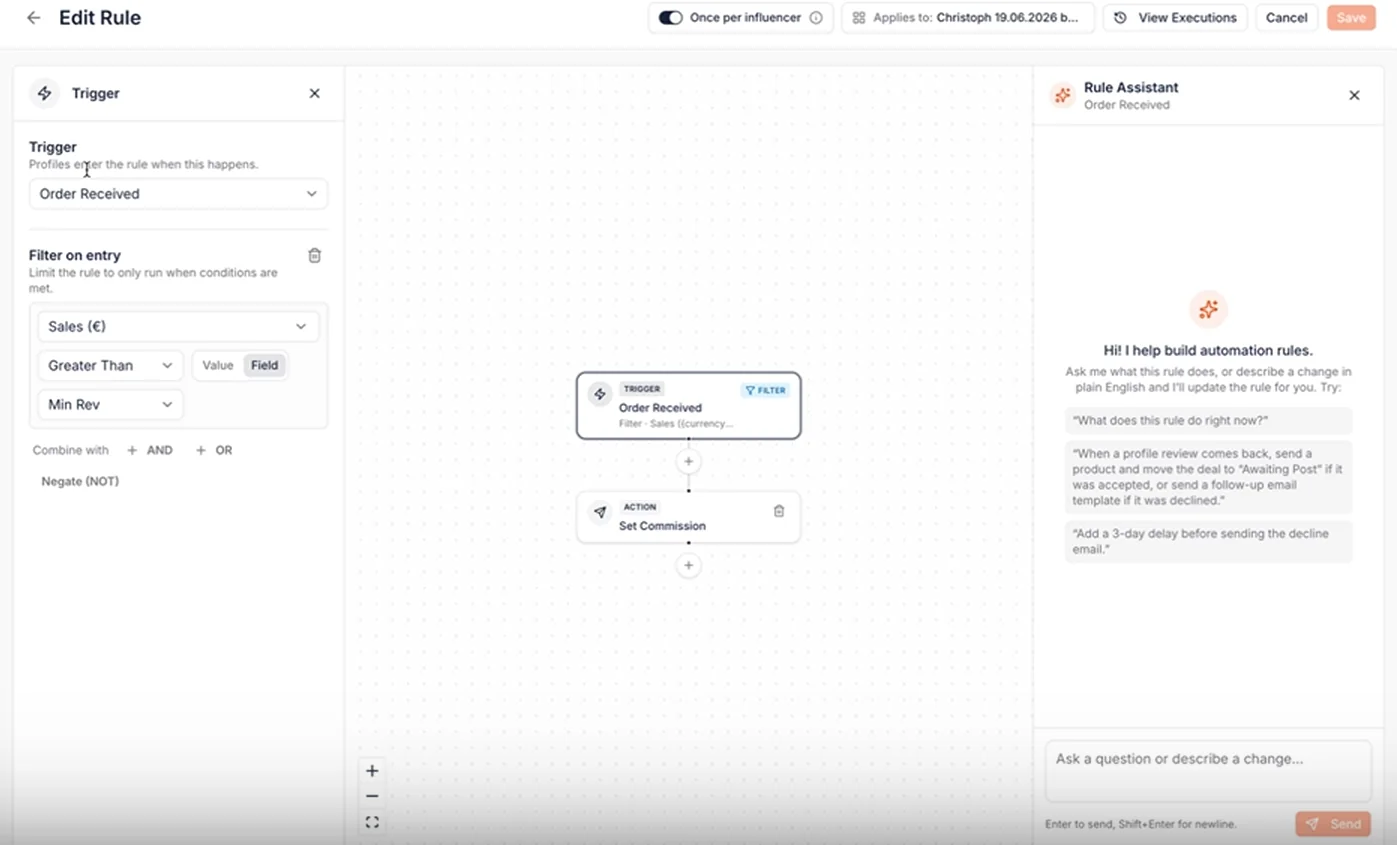
Previously, an automation condition could only compare against a fixed number. Sales greater than 1,000, for example, hard coded into the rule. Now a condition can reference a custom field instead, so the threshold lives on each deal and changes per creator without touching the automation.
Set the number once on the deal page, and your automations read it from there. One rule, unlimited variations.
A Real Example: Commission Only Between $1,000 and $4,000
Here is an actual setup a brand asked for. They wanted to pay 10% commission only on sales between $1,000 and $4,000. Below $1,000, nothing. Above $4,000, nothing again.
Before custom fields, that was a hard no. Now it takes two automations and two fields.
Step 1. Create two number fields: Min Rev and Max Rev. Fill them in on the deal page with 1,000 and 4,000.
Step 2. Build the first automation. Trigger: new order received. Condition: sales greater than the Min Rev field. Action: set commission to 10%.
Step 3. Build the second automation. Trigger: new order received. Condition: sales greater than the Max Rev field. Action: set commission back to 0%.
Step 4. Add a guard to the first automation. Without it, the "greater than Min Rev" rule keeps firing at $5,000 and $6,000 too, fighting your second automation. Add a second condition so sales must also be less than Max Rev.
The point is not the specific scenario. The point is that the long tail of unusual requests, the ones that used to need custom development, now come down to a field plus a condition. Tiered rates, per creator caps, date gated bonuses, region specific rules. All buildable, and all reflected in your affiliate commissions automatically.
Why This Matters
Influencer Hero is a CRM at its core, and a CRM is only as useful as the data you can put in it.
Custom fields give you:
- A place to track brand specific data instead of external spreadsheets
- Thresholds and values that live per creator rather than hard coded per rule
- Automation logic that adapts without rebuilding the automation
- Campaign rules that match how your commercial agreements actually work
- One source of truth your whole team reads from
The knock on effect matters most for teams running volume. Fewer manual checks, fewer exceptions handled by hand, and fewer commission calculations someone has to catch after the fact. Combined with bulk actions, it removes another layer of repetitive work from campaign operations.
Build the CRM Around Your Workflow
Most platforms make you adapt your process to their fields. Custom fields flip that, so the data model matches how your program actually runs.
Set them up once in Advanced settings, reference them across your automations, and they carry through the whole pipeline from the campaign manager to the payout manager.
Book a demo and see how custom fields fit into your influencer program.
Summary
This is some text inside of a div block.
This is some text inside of a div block.
Pricing/Month
Shopify Reviews
This is some text inside of a div block.
This is some text inside of a div block.
This is some text inside of a div block.
This is some text inside of a div block.
This is some text inside of a div block.
This is some text inside of a div block.
This is some text inside of a div block.
This is some text inside of a div block.
This is some text inside of a div block.
This is some text inside of a div block.
This is some text inside of a div block.
This is some text inside of a div block.
This is some text inside of a div block.
This is some text inside of a div block.
This is some text inside of a div block.
This is some text inside of a div block.
This is some text inside of a div block.
This is some text inside of a div block.
This is some text inside of a div block.
This is some text inside of a div block.
This is some text inside of a div block.
Read More

FAQs



Most Popular Blogs


Drive ROI With Influencer Marketing
Join 1,200+ brands and 150+ agencies scaling creator programs with Influencer Hero.