
Content Reviews in Influencer Hero: Approve Creator Content Before It Goes Live

October 8, 2026
|
Published

October 8, 2026
|
Updated

6 minutes
|
Reading

Influencer Performance Marketing Course | VOUCHER: IMC100

Malena Garcia

Drive ROI With Influencers

Global Influencer Database
ALL-IN-ONE platform
CRM, Affiliate, UGC & More
Content Reviews in Influencer Hero: Approve Creator Content Before It Goes Live
Content approval is now built into Influencer Hero.
Request content from a creator, get their submission back in the platform, and either approve it or send it back with notes. If it needs another round, the creator uploads a new version. Repeat until it is right.
This has been one of the most requested features from enterprise accounts, and it closes the last big gap where teams were still working out of email threads and shared drives.
What's New
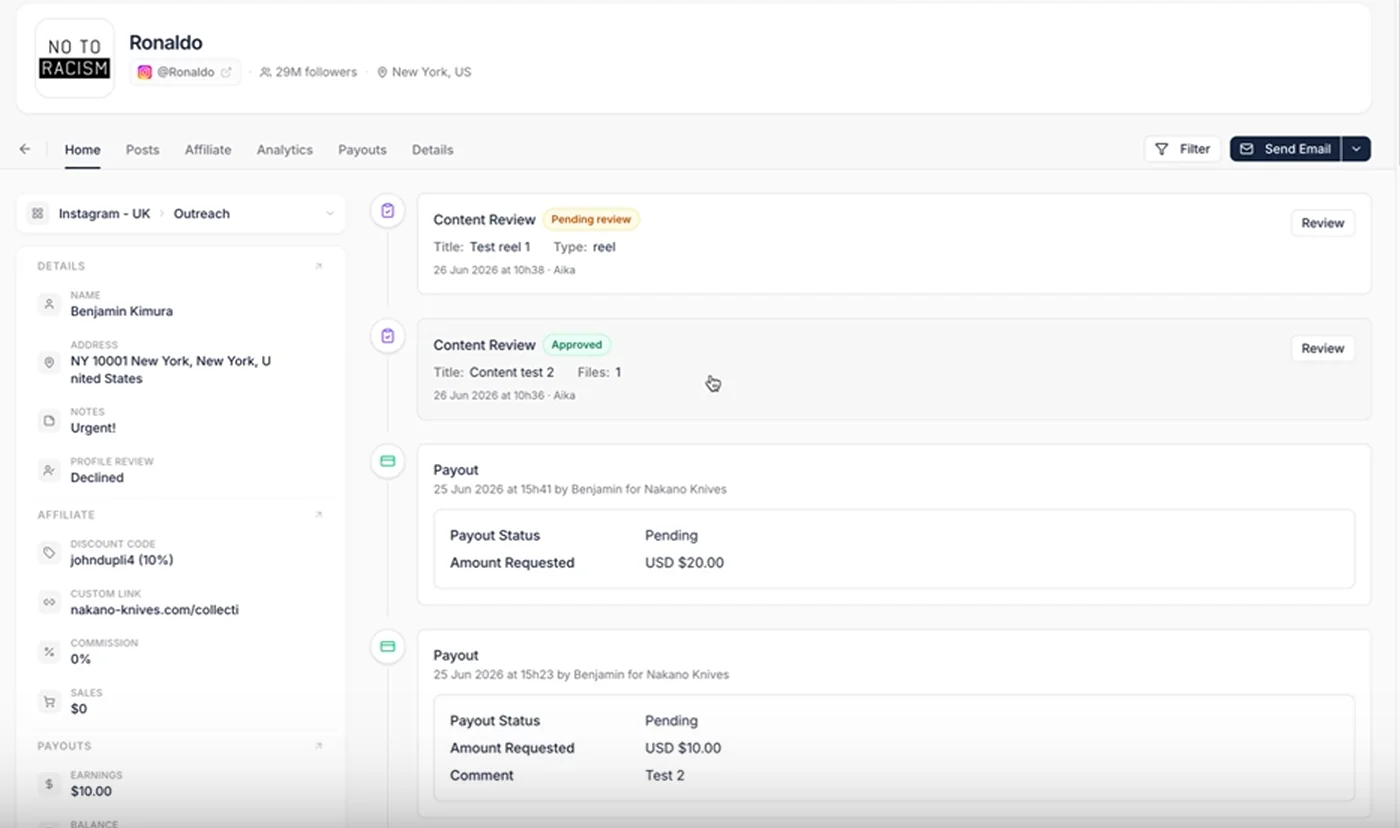
- Request content directly from any deal page
- Creators submit files or a Drive link
- Approve, or request edits with a reason
- Unlimited revision rounds until you are happy
- A central overview of everything pending review
- Content review actions available as automation triggers
Quick clarification, because the two look similar in the platform: this is not the same as profile reviews. Profile reviews are for vetting a creator before you work with them. Content reviews are for approving the content they produce afterwards. Both live in your influencer CRM, but they solve different problems.
Requesting Content from a Creator
Open the deal page and click Request Content, sitting just below create task.
The creator gets a Creator Hero notification asking them to provide their content pieces. No separate email thread, no chasing a Dropbox link, no wondering whether they saw the message.
From your side, the deal moves into a tracked state so you can see exactly which creators have been asked and which have delivered. That visibility carries across the campaign manager rather than living in someone's inbox.
What Creators Submit
Creators have two options, which matters more than it sounds when you are working with people across very different setups.
Direct upload. Images or video files, submitted straight through the platform.
Drive link. For larger files, raw footage, or creators who already work out of a shared folder.
Each round is logged as a numbered submission, so submission one and submission two sit side by side with the feedback attached to each. When you are three rounds deep with a creator, you can see exactly what changed and why, which is the thing spreadsheets and email threads always lose.
Approved content can be downloaded, or replaced later if a better cut comes through. It flows into your UGC library alongside everything else your creators produce.
Approving or Requesting Edits
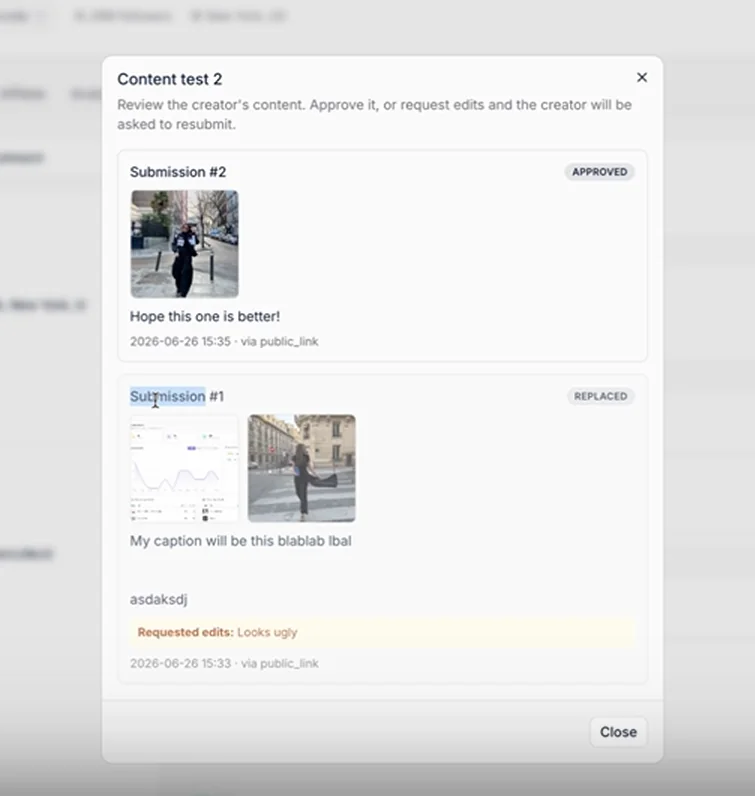
Open a submission and you have two paths.
Approve. The content is signed off and the review closes.
Request edit. Pick a reason and send it back. The presets cover the things that actually go wrong:
- Wrong product shown
- Add discount code
- Caption needs changes
- Quality or lighting issues
The creator sees your feedback and uploads a new version against it. There is no cap on rounds, so a piece can go back and forth as many times as it needs. In practice most content clears in one or two, but the ones that need four are exactly the ones you do not want going live early.
Same logic as the Content Wall: decide once what good looks like, then hold everything to it.
The Central Review Overview
You do not have to open deal pages one at a time to find what is waiting on you.
There is a centralized content review page showing everything currently pending, in the same way profile reviews are centralized. Pending review means the creator has submitted and you need to approve.
For a campaign running 300 creators, this is the difference between a review queue and an unknown. Pair it with bulk actions and content approval stops being the thing that holds up a launch.
Content Review Triggers in Automations
Every content review action is available as an automation trigger, including content review submitted.
Which means the workflow around approval can run itself:
- Notify your team channel the moment a creator submits
- Send the creator a reminder if nothing arrives within a set window
- Move the deal to a different board when content is approved
- Kick off your posting or payment flow off the back of an approval
Building those chains alongside your existing automations means approval stops being a manual checkpoint someone has to remember to check.
Why This Matters
Content approval is where brand safety actually happens. It is also where campaigns quietly lose a week, because the process usually lives in email and nobody owns it.
Content reviews give you:
- Approval inside the same system as the rest of the collaboration
- Full version history with feedback attached to each round
- Clear rejection reasons instead of vague "can you tweak this"
- Creators who can submit however suits them
- One queue showing everything awaiting sign off
- Automated notifications instead of manual checking
The knock on effect shows up in your reporting too, since content moves through defined states rather than existing somewhere between "sent" and "posted".
Keep Approval Inside the Collaboration
Every content approval process that lives outside your platform eventually costs you a campaign delay, a wrong product shot, or a post that went live without the discount code.
Content reviews put the whole loop where the collaboration already is, from the first request through to the approved file.
Book a demo and see how content reviews fit into your influencer program.
Summary
This is some text inside of a div block.
This is some text inside of a div block.
Pricing/Month
Shopify Reviews
This is some text inside of a div block.
This is some text inside of a div block.
This is some text inside of a div block.
This is some text inside of a div block.
This is some text inside of a div block.
This is some text inside of a div block.
This is some text inside of a div block.
This is some text inside of a div block.
This is some text inside of a div block.
This is some text inside of a div block.
This is some text inside of a div block.
This is some text inside of a div block.
This is some text inside of a div block.
This is some text inside of a div block.
This is some text inside of a div block.
This is some text inside of a div block.
This is some text inside of a div block.
This is some text inside of a div block.
This is some text inside of a div block.
This is some text inside of a div block.
This is some text inside of a div block.
Read More

FAQs








Most Popular Blogs


Drive ROI With Influencer Marketing
Join 1,200+ brands and 150+ agencies scaling creator programs with Influencer Hero.