
UGC Content Library: Collect, Organize, and Reuse Influencer Content

February 27, 2026
|
Published

October 12, 2026
|
Updated

15 minutes
|
Reading

Influencer Performance Marketing Course | VOUCHER: IMC100

Lucía Zabala
| Author

Drive ROI With Influencers

Global Influencer Database
ALL-IN-ONE platform
CRM, Affiliate, UGC & More
UGC Content Library: Collect, Organize, and Reuse Influencer Content
The UGC Content Library is a centralized, AI-powered hub within the Influencer Hero CRM designed to collect, organize, and analyze social media assets at scale. It serves as a bridge between your influencer management and your creative strategy by automatically capturing every reel, story, and feed post from the influencers you work with.
Directly connected to your influencer campaigns and to organic customer mentions and tags, the library turns a scattered feed of posts into a searchable, filterable asset database your whole team can work from.
It now covers the step before publishing too. You can request content from a creator, review it, and approve it or send it back for an edit without leaving the deal page, so what lands in your library is content you already signed off on.
In this article, we'll break down how the library uses AI to rank visual quality, how semantic search lets you find specific creative elements inside your videos, how content review works end to end, and how the system filters content for immediate use in paid media.
How UGC Content Library Works in Influencer Hero
The UGC Content Library functions as a high-performance asset management system that replaces manual content tracking. It is specifically engineered for brands and agencies managing high-volume programs where reviewing thousands of individual posts manually is no longer feasible.
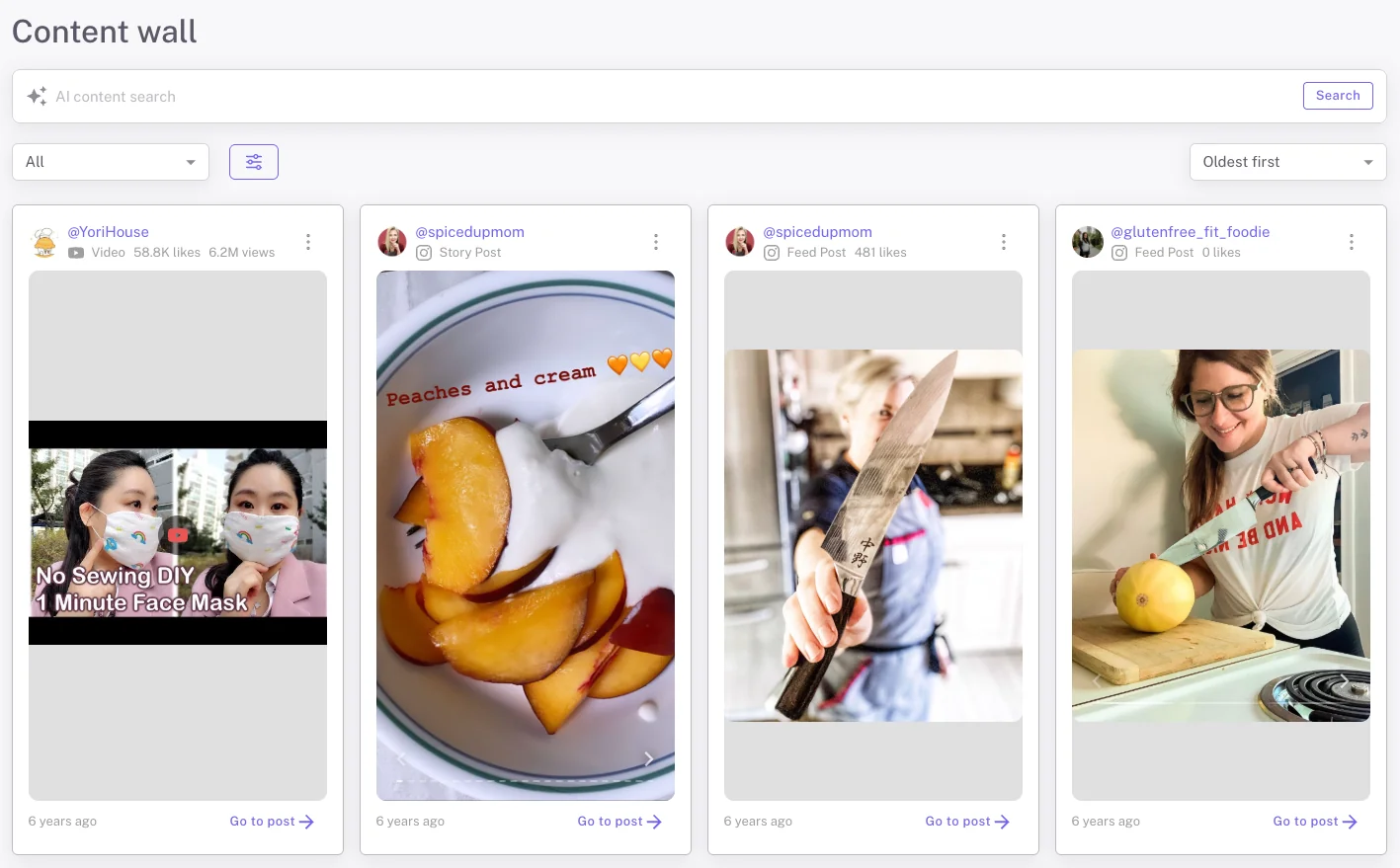
1. Automated Content Collection
The library functions as a real-time post detection system.
Automatic Capture
- Detects when influencers publish content and tag your brand's social accounts
- Automatically uploads posts into the CRM
- Shows real-time engagement analytics like views, likes, and comments
Platform Coverage
- Instagram (Feed, Reels, Stories)
- TikTok
- YouTube
Source Categorization
- Influencer Posts, meaning campaign-specific collaborations
- Organic customer mentions and tags
This separation helps distinguish contracted content from authentic user-generated content.
2. AI-Powered Search & Ranking
AI reduces manual scrolling and surfaces high-performing creative faster.
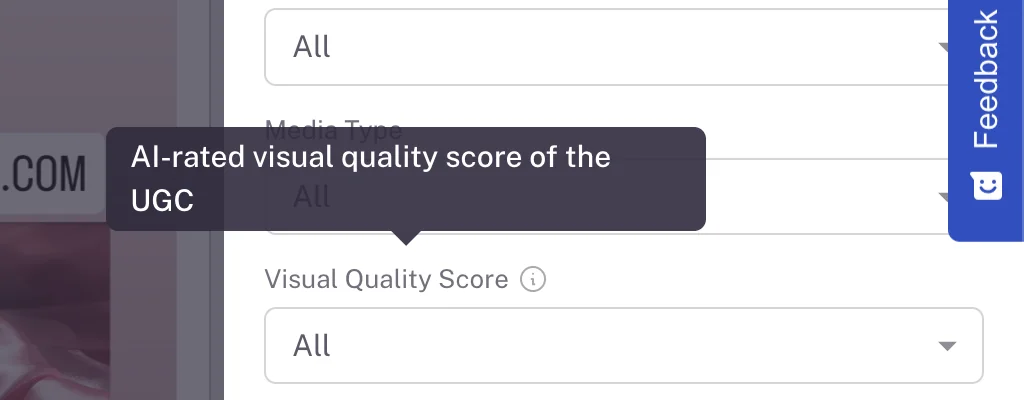
Visual Quality Scoring
- Content is rated 0 to 10
- High quality assets are prioritized by default
Semantic Search
- Search by themes or visual elements
- Searching "Christmas" surfaces holiday-themed content even without explicit tags
Transcript Analysis (Pro & Business Plans)
- AI analyzes video audio
- Search by spoken keywords or phrases
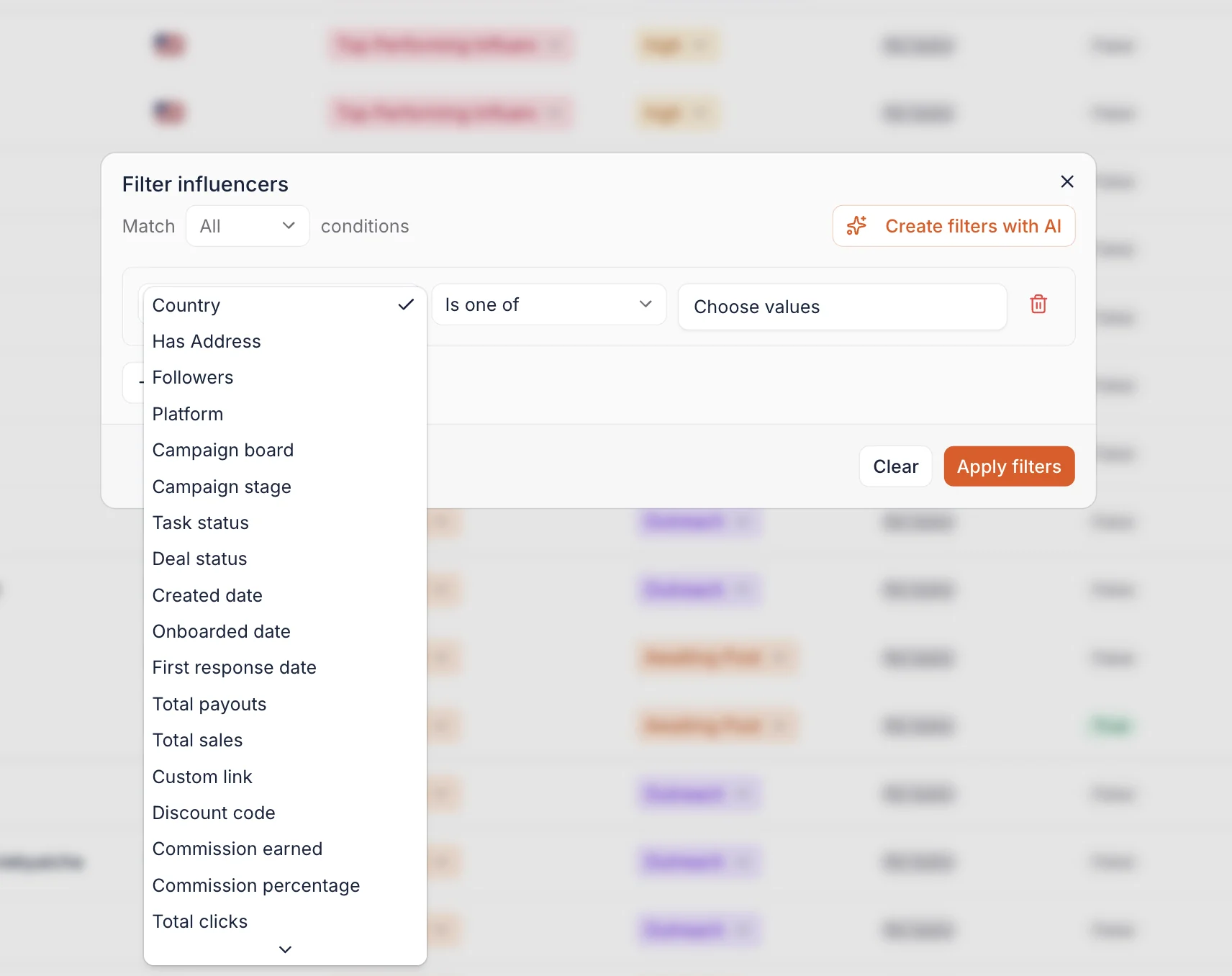
Two things to know when you read these results: feed and story posts may not include view metrics, and the depth of AI video analysis depends on your plan.
3. Filters for Paid Media Amplification
The library bridges influencer marketing and paid advertising with specialized filters:
Product Visibility Detection
- Identifies whether the product is clearly visible or just tagged
Aspect Ratio Filtering
- Filter by dimensions, for example 9:16 for vertical placements
Performance Metrics
- View likes, impressions, and views directly on each asset
- Quickly identify content worth boosting
4. Repurposing & Downloads
Once top assets are identified:
- Bookmark content
- Organize by campaign
- Download high-quality (HQ) files directly
This simplifies repurposing content for organic social channels or moving it into ad accounts.
Reviewing and Approving Content Before It Goes Live
Collecting published posts solves half the problem. The other half is everything that happens before the post exists: the draft sitting in an email thread, the caption that mentions the wrong product, the third round of feedback nobody can find anymore.
Content review workflows close that gap. You can request, review, and approve influencer content pieces directly inside Influencer Hero, on the same deal page where the contract, shipping status, and payment history already live.
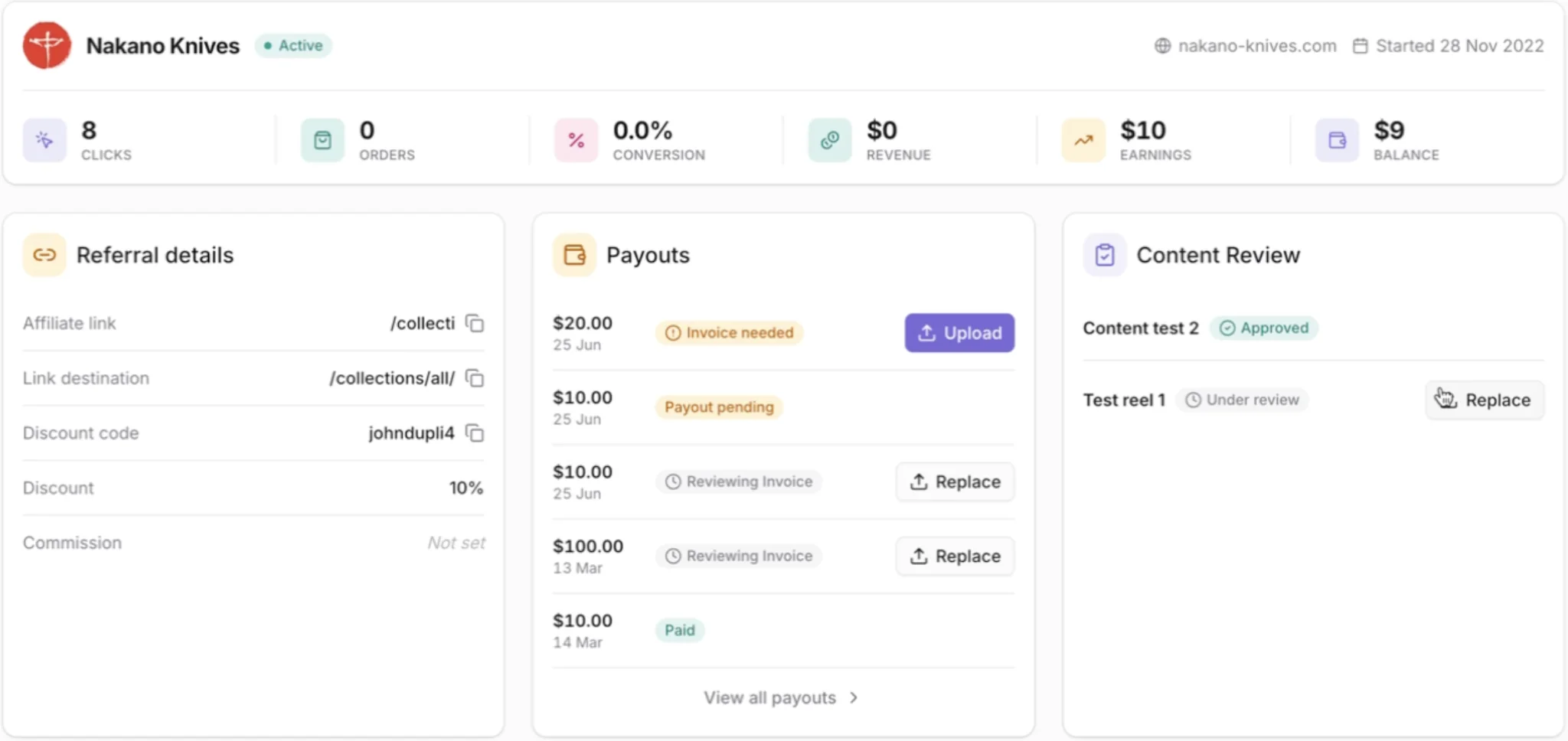
1. Request Content
Trigger a content request straight from the deal page and the influencer is notified to submit their pieces. There is no separate tool to set up and no folder to share.
Creators can submit in whichever way suits them, either as a direct upload or as a Google Drive link, which removes the usual friction of asking a creator to use a system they have never seen before.
2. Approve or Request an Edit
Once a submission lands, you review it and take one of two actions:
- Approve it, and the piece is cleared to publish.
- Request an edit, with a quick reason attached. Wrong product shown, caption needs changes, and other common reasons are built in, so the creator gets specific direction rather than a vague "can you redo this."
The influencer is looped back in until the content is right, and every round of that exchange stays attached to the deal instead of scattering across DMs and email threads.
3. Track Everything From One Overview
Reviewing one submission is easy. Reviewing two hundred across a dozen campaigns is where teams lose track.
A centralized review overview shows every pending content submission across all of your campaigns in a single view, so you can see what is waiting on you without opening deal pages one by one.

4. Automate the Follow-Up
Content review events, meaning submitted, approved, and declined, are available as automation triggers inside your influencer CRM.
That means an approval can automatically move a deal to the next column, an approved piece can kick off a payout request, and a declined submission can trigger a reminder sequence. The review step stops being a manual checkpoint and becomes part of the workflow.
How Review Connects to the Library
Approved content does not sit in a separate silo. Once the creator publishes, the Post Detector picks the post up automatically and files it into your library with its engagement data attached, ready for quality scoring, semantic search, and paid media filtering like everything else.
The result is a single path from brief to boost: request the content, approve it, watch it publish, then pull the best-performing version into your ad account.
What You Can Do With the UGC Content Library
The UGC Content Library is designed to be an active workspace where you can manage thousands of assets through automated workflows. Here is how you can use the library to streamline your creative and performance tasks:
1. Curate and Categorize Assets in Bulk
Instead of reviewing posts one by one, you can manage your library at scale using AI-driven selection tools.
- Filter by Visual Quality: Use the AI quality score (0 to 10) to instantly isolate high-production content for your brand.
- Keyword-Based Selection: Use semantic search to find assets featuring specific keywords, themes, or visual elements like "unboxing" or "summer".
2. Approve Content Before It Reaches Your Audience
Quality control moves upstream instead of becoming a post-publication problem.
- Request and review in one place: Ask for content from the deal page and review submissions without switching tools.
- Give actionable feedback: Request an edit with a specific reason so creators know exactly what to change.
- Stay on top of volume: Use the central review overview to catch anything pending across every active campaign.
3. Identify Performance Winners for Paid Ads
The library acts as a bridge to your ad account by identifying which organic posts are worth a paid boost.
- Track Engagement: View likes, comments, and impressions directly on each asset.
- Filter by Format: Sort by aspect ratio, for example 9:16, to ensure the content is ready for TikTok or Instagram Reels placements without further editing.
- Product Detection: Use the "Likely Showcases Product" filter to remove social listening noise and find posts where your product is the clear focus.
4. Connect to the Full Influencer CRM
The UGC library does not function alone. It is deeply integrated with the rest of the Influencer Hero platform.
- CRM Integration: Every post is automatically linked to the specific influencer's profile in your CRM, making it easy to see which creators consistently produce the best-performing content.
- Influencer Outreach: Use the library to identify high-quality organic social listening posts from customers and reach out to them for future partnerships.
- Automated Reporting: Content and its performance data flow directly into your campaign reports, allowing you to show clients or stakeholders the exact ROI of your UGC investment.
5. Download and Repurpose HQ Media
Once you have identified the top-tier content, the library facilitates the transfer of these assets to your other channels.
- Direct Downloads: Access and download the original high-quality (HQ) files directly from the library.
- Cross-Channel Use: Move these assets from the library into your organic social calendar or directly into your ad manager for amplification.
When Teams Use the UGC Content Library
The UGC Content Library is designed to solve specific bottlenecks for brands managing high volumes of social assets. These are the scenarios where teams find the most value:
Beyond Manual Content Tracking
If your brand has grown to managing 100 to 200 influencers per month, manually tracking every post, story, and reel is no longer realistic. In this scenario, teams use the library as an automated post detector that recognizes when an influencer has posted.
That shift moves the manual work off your team and onto the platform, freeing time for high-level strategy and relationship management.
Approving Content at Scale Without a Bottleneck
Brands with strict guidelines, regulated claims, or a legal review step usually pay for it in turnaround time, because every draft travels through email and someone has to keep the thread straight.
Teams use content review workflows to keep that approval step inside the platform. Requests go out from the deal page, feedback comes back with a reason attached, and the pending queue is visible in one overview instead of buried in an inbox.
Sourcing Creative for Paid Media Amplification
Performance marketing teams use the library when they need to quickly identify high-performing content for ad accounts. By filtering for specific aspect ratios like 9:16 and using the AI product visibility detector, teams can isolate assets where the product is clearly featured and ready for use in paid campaigns.
Reporting Impact to Clients
Agencies use the redesigned library to give a clean, professional presentation of campaign results during client demos and reporting. Instead of showing a random gallery of tagged posts, teams use the AI-powered visual quality ranking to surface the most impressive content first.
By including real-time metrics like impressions and views, they can instantly demonstrate brand awareness growth and the tangible ROI of their influencer program.
How the UGC Content Library Connects With Other Influencer Hero Features
The UGC Content Library isn't a standalone tool. It's a core part of the Influencer Hero platform, built to work with outreach, campaign management, payments, and reporting in one connected system.
By serving as the central hub for all creative assets, it keeps your team's work organized and connected from first contact with a creator to final performance reporting.
1. Campaign Boards + Outreach: From Discovery to Partnership
The library helps turn outreach into a data-driven process.
- Find organic advocates: Through Social Listening, you can identify customers already creating content about your brand.
- Personalize your first message: Since their content is already saved in the system, you can reference specific posts in your outreach to increase reply rates.
2. Campaign Boards + Payments: Connecting Content to Compensation
One common challenge in influencer marketing is managing the gap between content going live and paying creators.
- Automatic content detection: The Post Detector saves content as soon as it's published.
- Approval-triggered payouts: Because approval and decline events work as automation triggers, a payout request can fire the moment content is signed off.
- Everything in one place: Each asset is linked to the influencer's Deal Page, where you can see their contract, shipping status, and payment history together.
3. Campaign Boards + Reporting: Connecting Creative to Performance
Most reporting tools focus only on numbers. The UGC Content Library connects those numbers to the actual content.
- See what creative works: You can identify which content styles drive the most engagement.
- Real-time metrics: Views, impressions, and likes sync automatically and feed into your campaign reporting.
- Better stakeholder presentations: Instead of sharing only spreadsheets, you can show a live Content Wall alongside performance data.
4. Integration with Your E-commerce Stack
The library connects to the same e-commerce integrations that power gifting and affiliate tracking, so the content, the product that generated it, and the sales it drove all sit in the same system.
This eliminates the need to move files between tools like Dropbox, Trello, and separate analytics platforms. Everything lives inside one connected workflow.
Final Thoughts
The UGC Content Library transforms manual asset management into an AI-driven, automated ecosystem. By consolidating every influencer post and story into a single, searchable database, the platform removes the administrative burden of tracking content while surfacing the highest-quality assets for your brand.
With content review workflows, that coverage now starts before publication. You request the content, approve it or send it back with clear feedback, and the approved piece flows straight into the library the moment it goes live, complete with quality scoring, product visibility detection, and performance data.
This library is a core engine within the Influencer Hero all-in-one system, connecting your creative assets directly to outreach, payments, and reporting. It gives you the infrastructure to turn social proof into a measurable revenue driver at scale.
To see how the UGC Content Library can streamline your workflow and maximize your ROI, book a demo with our team.
Summary
This is some text inside of a div block.
This is some text inside of a div block.
Pricing/Month
Shopify Reviews
This is some text inside of a div block.
This is some text inside of a div block.
This is some text inside of a div block.
This is some text inside of a div block.
This is some text inside of a div block.
This is some text inside of a div block.
This is some text inside of a div block.
This is some text inside of a div block.
This is some text inside of a div block.
This is some text inside of a div block.
This is some text inside of a div block.
This is some text inside of a div block.
This is some text inside of a div block.
This is some text inside of a div block.
This is some text inside of a div block.
This is some text inside of a div block.
This is some text inside of a div block.
This is some text inside of a div block.
This is some text inside of a div block.
This is some text inside of a div block.
This is some text inside of a div block.
Read More

FAQs
What is a UGC content library?

A UGC content library is a centralized digital hub that automatically collects and stores media created by your influencers and customers. Unlike a standard cloud folder, it includes specific metadata like usage rights, creator profiles, and engagement metrics, allowing teams to manage high volumes of social assets in one searchable location.
How do you collect UGC from influencers automatically?
Collection is handled by a "Post Detector" that monitors linked influencer accounts and brand mentions. The system automatically captures Reels, Stories, and Feed posts the moment they go live and uploads the high-quality files directly into your CRM, ensuring no content is lost.
How do you organize large volumes of influencer content?
To manage thousands of assets, platforms use AI-powered sorting and search. This includes visual quality scoring (ranking posts 0–10), semantic search (finding objects or themes like "fitness" or "summer"), and filtering by "Product Visibility" to instantly separate high-value creative from organic noise.
What are the best ways to reuse influencer content?
The most effective way to reuse UGC is for Paid Media Amplification, turning high-performing organic posts into TikTok or Meta ads. Brands also repurpose these assets for e-commerce product pages to build social proof, email marketing campaigns, and high-quality organic reposts on their own brand channels.
Do I need permission to reuse influencer content?
Yes. While a library collects the content, you must ensure your influencer contracts include specific usage rights for repurposing. A professional UGC library helps track these permissions, linking the legal rights directly to the asset so your team knows exactly which content is cleared for ad use.





Most Popular Blogs


Drive ROI With Influencer Marketing
Join 1,200+ brands and 150+ agencies scaling creator programs with Influencer Hero.