Gestionnaire de paiements : centralisez vos rémunérations creators en un seul endroit

March 5, 2026
|
Publié

October 19, 2026
|
Mis à jour

17 minutes
|
Lecture

Cours de Marketing de Performance avec Influencers | BON DE RÉDUCTION : IMC100

María Vincenzini
| Author

Sommaire
- Payout Manager : Centralisez les paiements des creators
- Comment ça fonctionne dans Influencer Hero
- Pourquoi les frais de paiement sont importants
- Collecter les factures en même temps que vos paiements
- Ce que vous pouvez faire avec le Payout Manager
- Quand les équipes utilisent le Payout Manager
- Comment il se connecte aux autres fonctionnalités
- Réflexions finales
- Questions fréquemment posées
Générez du ROI avec les Influencers

Base de données mondiale d'influencers
Plateforme TOUT-EN-UN
CRM, Affiliate, UGC & Plus
Gestionnaire de Paiements : Centralisez et Traitez les Paiements de Vos Creators en Un Seul Endroit
La plupart des plateformes de marketing d'influence facturent entre 5 % et 7 % de frais de paiement sur chaque versement de creator. Influencer Hero facture 0,4 % à 0,5 %, ce qui est le plus bas du marché pour le marketing d'influence.
C'est cet écart qui a motivé la création de cette fonctionnalité. Sur un programme versant six chiffres par an, la différence entre des frais de plateforme de 6 % et un coût de traitement inférieur à 1 % représente une vague de seeding supplémentaire que vous pouvez financer. Influencer Hero ne prélève aucune commission sur vos versements : seuls les frais de traitement Stripe vous sont facturés au coût réel, et les frais KYC Stripe de $2 ont été entièrement supprimés.
Au-delà des frais, le Gestionnaire de Paiements résout l'autre moitié du problème. Le suivi manuel des paiements est généralement la première cause d'épuisement professionnel, c'est pourquoi cet outil centralise chaque transaction, des honoraires fixes aux commissions basées sur la performance, dans un flux de travail rationalisé.
Il vous offre une source unique et fiable de ce qui est dû, ce qui est en attente et ce qui a déjà été traité, pour que vous arrêtiez de naviguer entre PayPal, vos applications bancaires et vos feuilles de calcul. Puisque Influencer Hero est une plateforme tout-en-un, l'outil de versement est intégré directement à la Page de Contrat d'Influence, toujours synchronisé avec vos données de campagne.
Découvrez comment l'utiliser pour maintenir vos creators satisfaits et vos registres organisés.
Comment Fonctionne le Gestionnaire de Paiements dans Influencer Hero
Considérez le Gestionnaire de Paiements comme le département comptable dédié de votre marque pour les partenariats avec les creators.
Au lieu de calculer manuellement ce que vous devez pour un Reel par rapport à un lien d'affiliation TikTok, cette fonctionnalité agit comme un grand livre centralisé pour traiter et suivre chaque paiement en un seul endroit. Elle transforme votre flux de travail de « calcul » à « confirmation », garantissant que vos creators sont payés avec précision sans l'épuisement administratif.
Chaque versement commence sur la page de contrat et est finalisé dans le Gestionnaire de Paiements.
Étape 1 : Ouvrez l'Onglet Paiements sur la Page de Contrat
Allez à la page de contrat de l'influencer et dirigez-vous vers leur onglet Paiements. C'est là que vous suivez la performance (clics, ventes, commissions), ajoutez des paiements fixes et lancez les versements.
Étape 2 : Ajoutez des Commissions et des Honoraires Fixes
Le système gère à la fois les paiements basés sur la performance et les tarifs forfaitaires au même endroit :
- Commissions d'affiliation : Rien à ajouter. La commission gagnée est déjà visible dans l'onglet Affiliés et l'onglet Paiements, calculée à partir de vos données de conversion synchronisées.
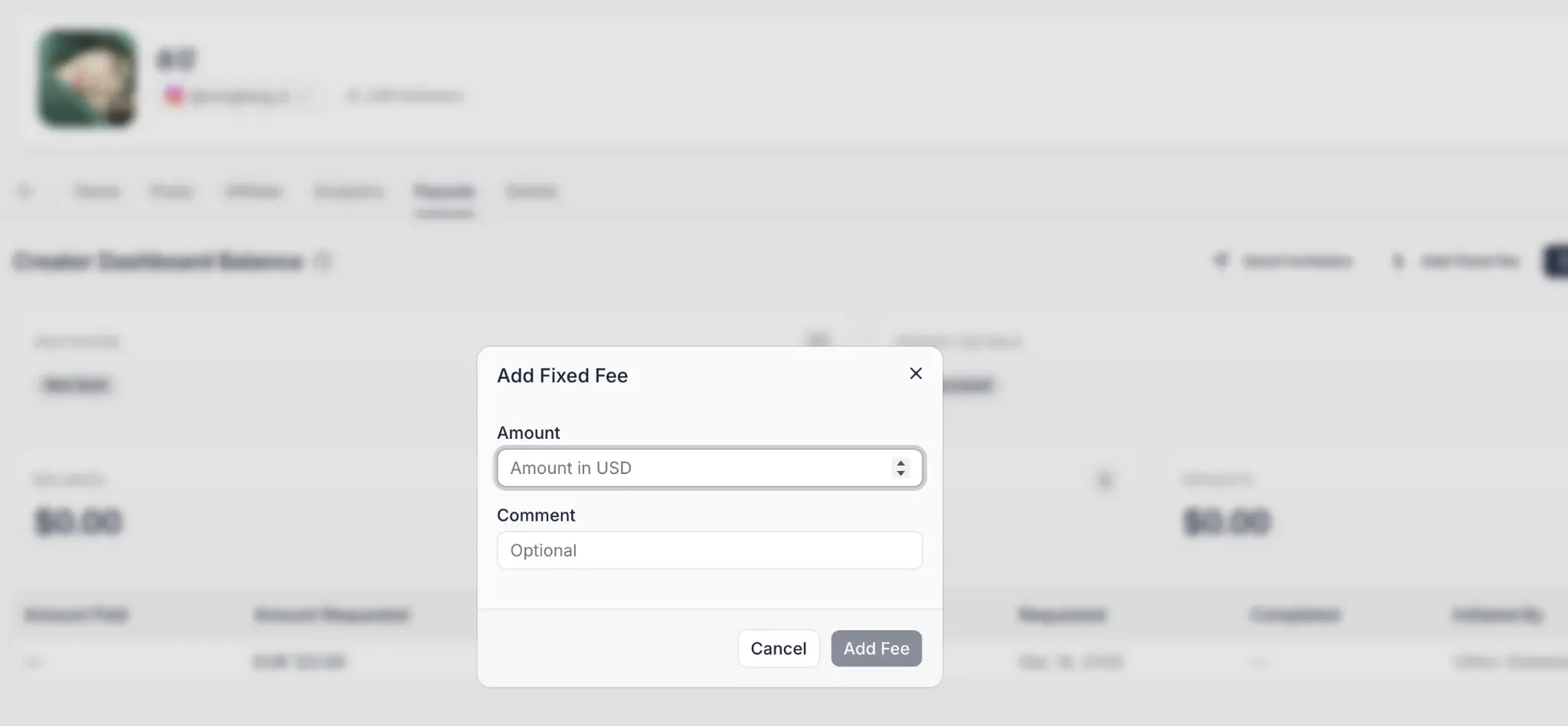
- Honoraires fixes : Pour les collaborations payantes, cliquez sur « Ajouter un Honoraire Fixe » dans l'onglet Paiements et entrez le montant dû.
- Organisation : Les commentaires sur les honoraires fixes sont facultatifs mais recommandés, afin que vous sachiez toujours à quoi correspond un paiement.
- Totaux en temps réel : Une fois soumis, les montants sont reflétés dans « Gains » et « Honoraires Fixes ».
Étape 3 : Invitez le Creator, Uniquement si Vous Payez Via la Plateforme
Cette étape est conditionnelle et il est important de le savoir avant de configurer votre flux de travail.
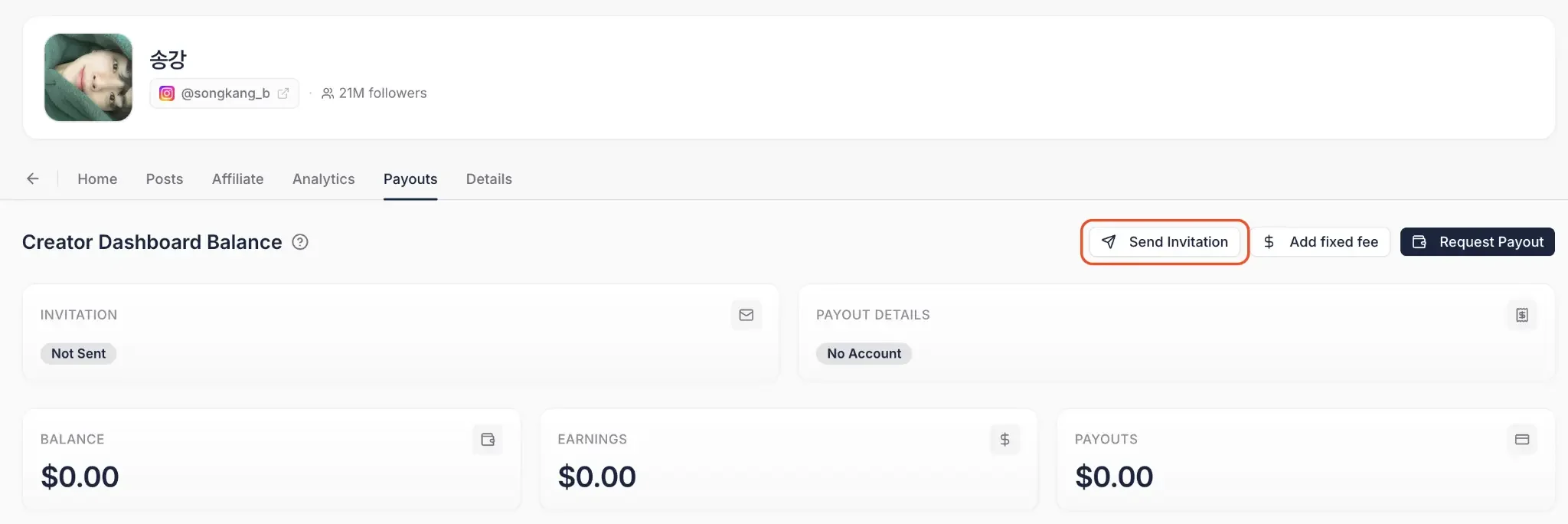
Si vous prévoyez de payer via Influencer Hero par Stripe, le creator doit rejoindre le Tableau de Bord du Creator et ajouter ses coordonnées de paiement. Envoyez-lui une invitation depuis la page de contrat et attendez qu'il termine sa configuration de paiement. Vous pouvez voir directement sur la page de contrat s'il a accepté et rempli ses informations.
Si vous le payez en dehors de la plateforme, par exemple via PayPal ou un virement bancaire manuel, vous pouvez sauter cette étape entièrement et enregistrer le paiement comme un versement hors ligne ultérieurement.
Étape 4 : Demandez le Versement
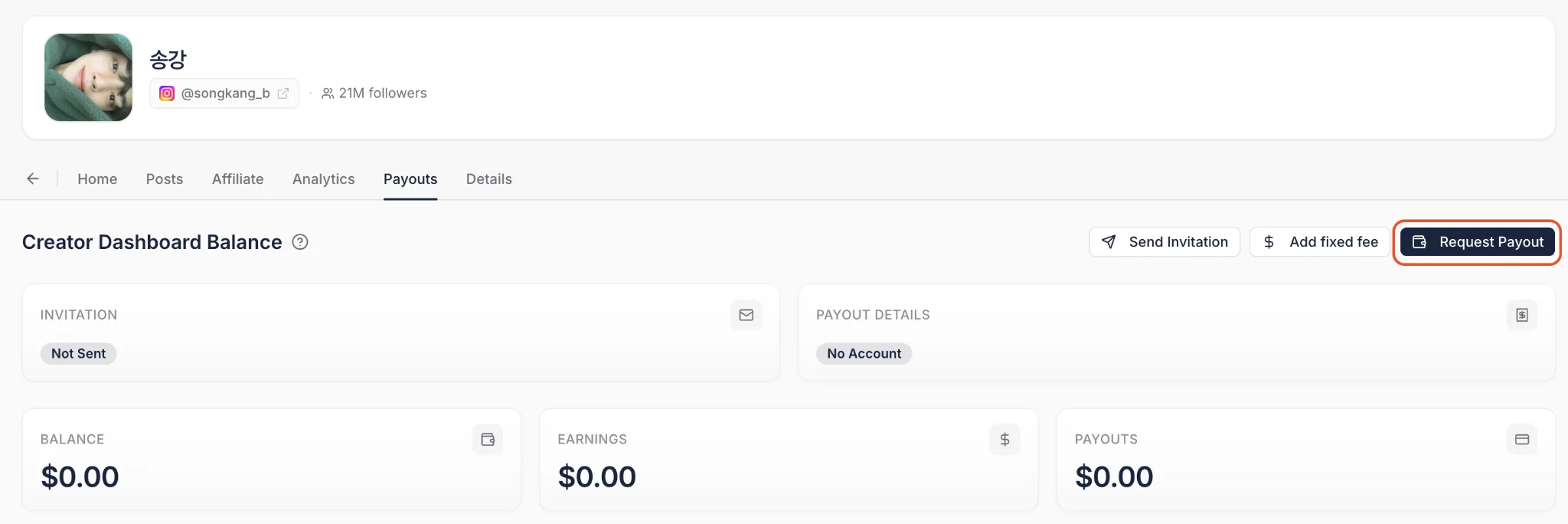
Quand vous êtes prêt à régler un solde, cliquez sur « Demander un Versement » et entrez le montant. Cela sort la demande de la page de contrat et la place dans votre queue financière principale.
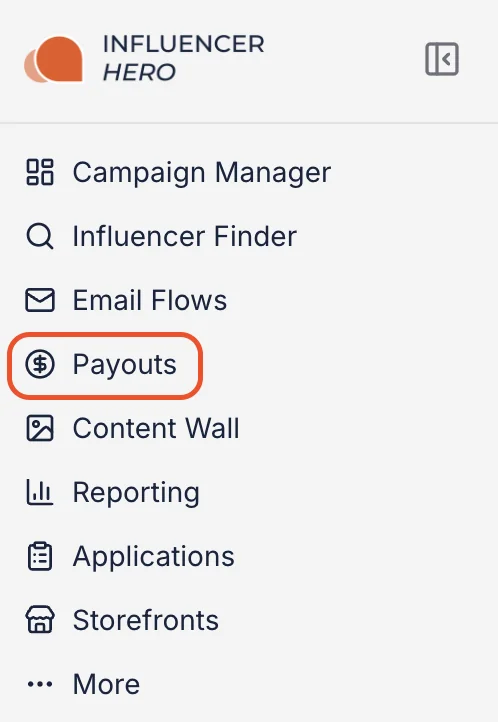
Étape 5 : Complétez le Paiement
Tous les paiements demandés sont centralisés dans l'onglet Paiements du menu de gauche.
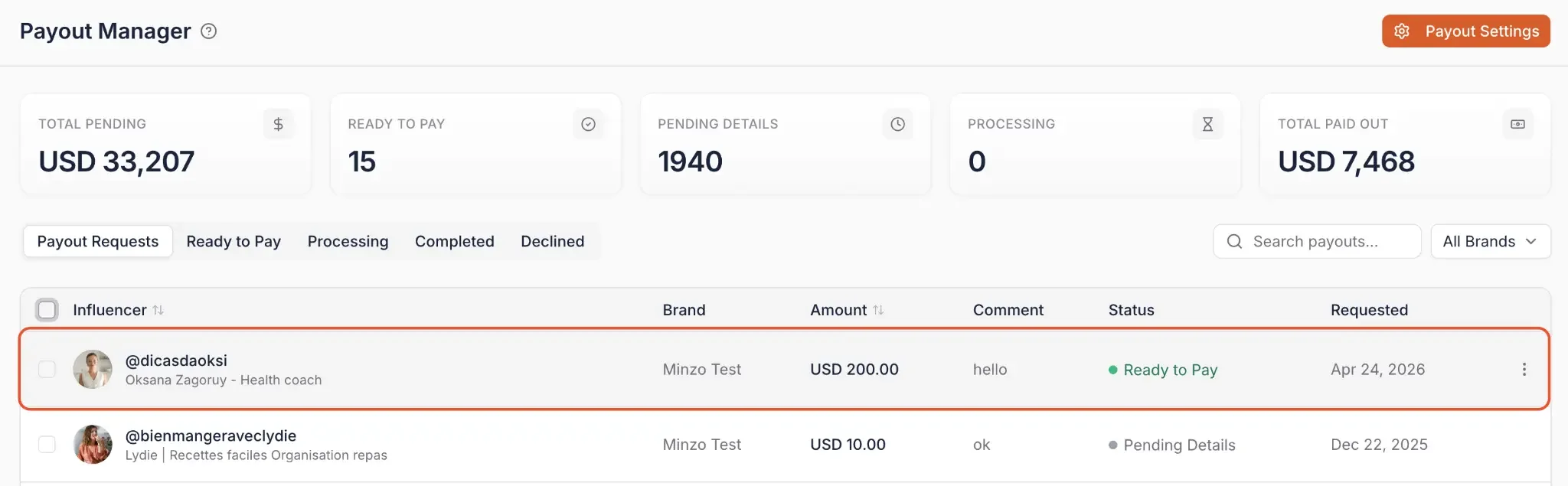
À partir de là, vous avez deux options :
Option 1 : Payer via Influencer Hero (Stripe)
Sélectionnez les influencers dans l'onglet « Prêt à payer » et cliquez sur « Paiement en masse » pour les traiter ensemble. Vous obtenez un aperçu complet des frais avant de confirmer, et vous pouvez choisir de couvrir les frais de paiement en leur nom.
Si vous avez enregistré une méthode de financement dans les Paramètres de paiement, les paiements sont traités immédiatement sans redirection vers le paiement Stripe. Si vous préférez ne pas en enregistrer une, l'option de paiement Stripe ponctuel est toujours disponible.
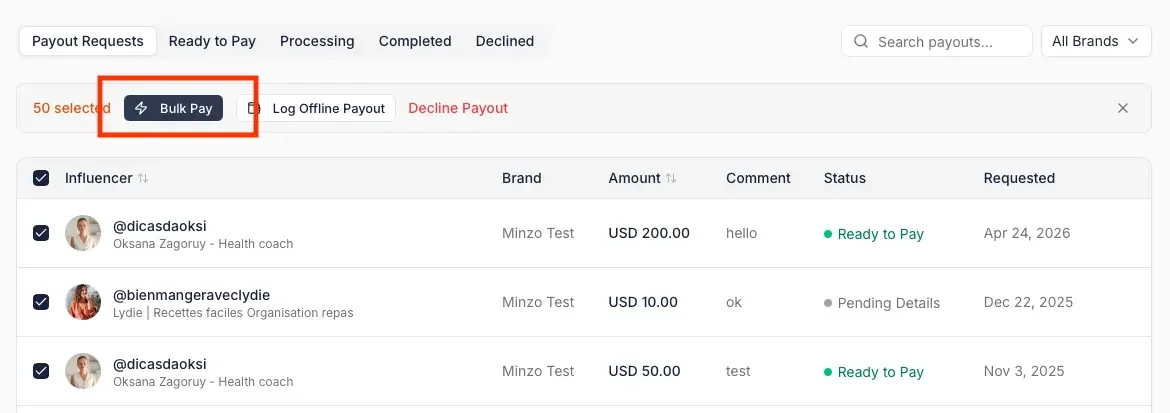
Option 2 : Enregistrer un paiement hors ligne
Sélectionnez les influencers que vous avez déjà payés en dehors d'Influencer Hero, cliquez sur « Enregistrer paiement hors ligne » et confirmez. Cela maintient votre solde interne et l'historique CRM à jour, même si l'argent a circulé ailleurs.
Remarque : Si un creator n'a pas encore soumis ses informations financières, le système affiche une alerte « Détails de paiement manquants » et empêche le paiement jusqu'à ce que les données soient fournies.

Étape 6 : Suivre le statut, les reçus et les dépenses
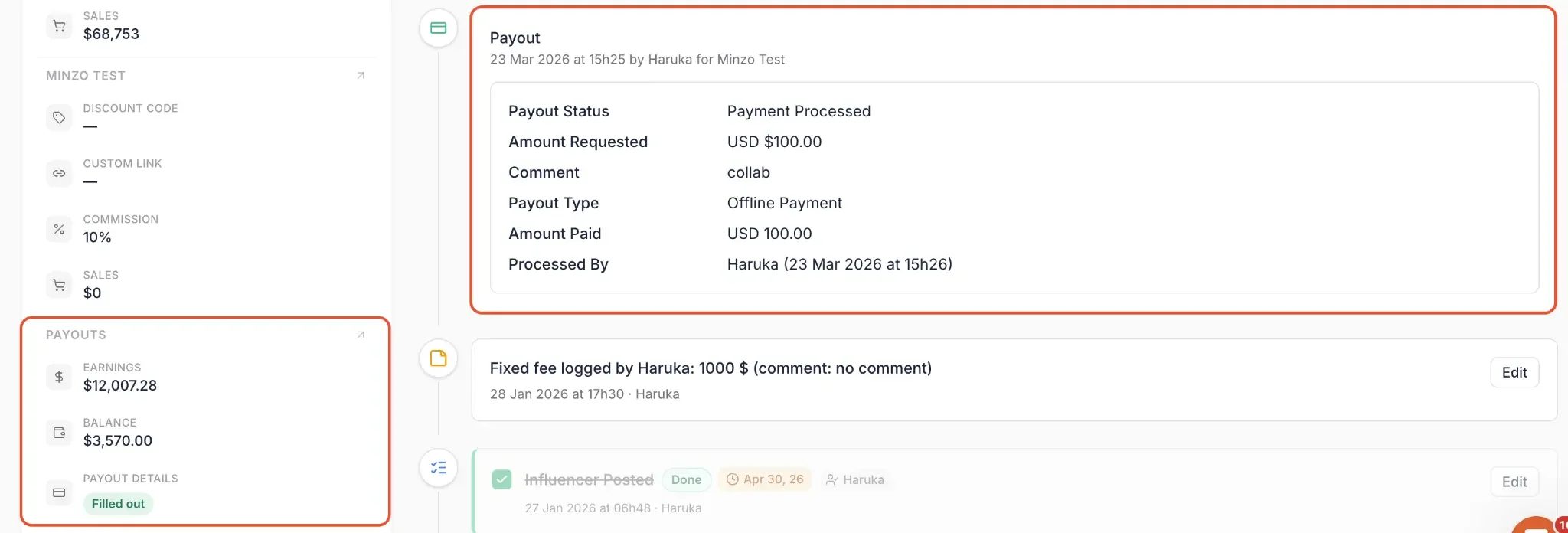
Une fois qu'un paiement est traité, l'onglet Paiements conserve l'enregistrement. Vous pouvez voir les paiements en attente et complétés, suivre et télécharger les reçus précédents, et surveiller les dépenses totales sur l'ensemble de votre roster.
Les statuts se mettent à jour automatiquement, et le solde restant s'affiche sur la page de deal de l'influencer. Revenir à cette page de deal vous donne l'historique complet des transactions : qui a traité le paiement, quand cela a été fait, quel montant c'était, comment c'a été traité, et quel solde reste.
Pourquoi les frais de paiement sont plus importants que vous ne le pensez
Les frais de traitement des paiements sont le type de coût que la plupart des équipes acceptent parce que « c'est comme ça que ça marche ». Stripe prélève environ 3 % sur une carte, la plateforme ajoute sa marge, vous continuez.
Mais une fois que vous gérez un vrai volume, des campagnes multi-creators, des commissions affiliées mensuelles, des rosters régionaux, ces pourcentages cessent d'être une erreur d'arrondi. Ils commencent à gruger le budget que vous auriez autrement utilisé pour briefer davantage de creators ou adapter une campagne gagnante. La plupart des plateformes d'influencers et d'affiliation facturent entre 5 % et 7 % sur chaque paiement. Ce n'est pas une ligne de budget. C'est un budget en soi.
Payout Manager change la donne en vous donnant accès aux méthodes de débit bancaire direct régionales. Influencer Hero ne prélève aucune marge supplémentaire, et seuls les frais de traitement Stripe sont répercutés au coût réel.
Voici à quoi cela ressemble selon la méthode :
Sur des sommes plus importantes, les taux effectifs peuvent descendre jusqu'à 0,4 %. Même sur les petites transactions, vous êtes autour de 0,5 %, bien en dessous de la norme de 5 à 7 %.
Votre région est présélectionnée en fonction de la devise de votre compte, le paramétrage est donc simple. Pour accéder à ces méthodes, ouvrez Payout Settings en haut à droite du Payout Manager, où une calculatrice de frais estimés vous permet de comparer les méthodes avant de vous engager.

Collecter les factures en même temps que vos versements
Des versements bon marché ne servent à rien si votre équipe comptable chasse toujours les documents par e-mail. Les flux de facturation comblent cette lacune en gérant les factures au même endroit que les paiements auxquels elles appartiennent.
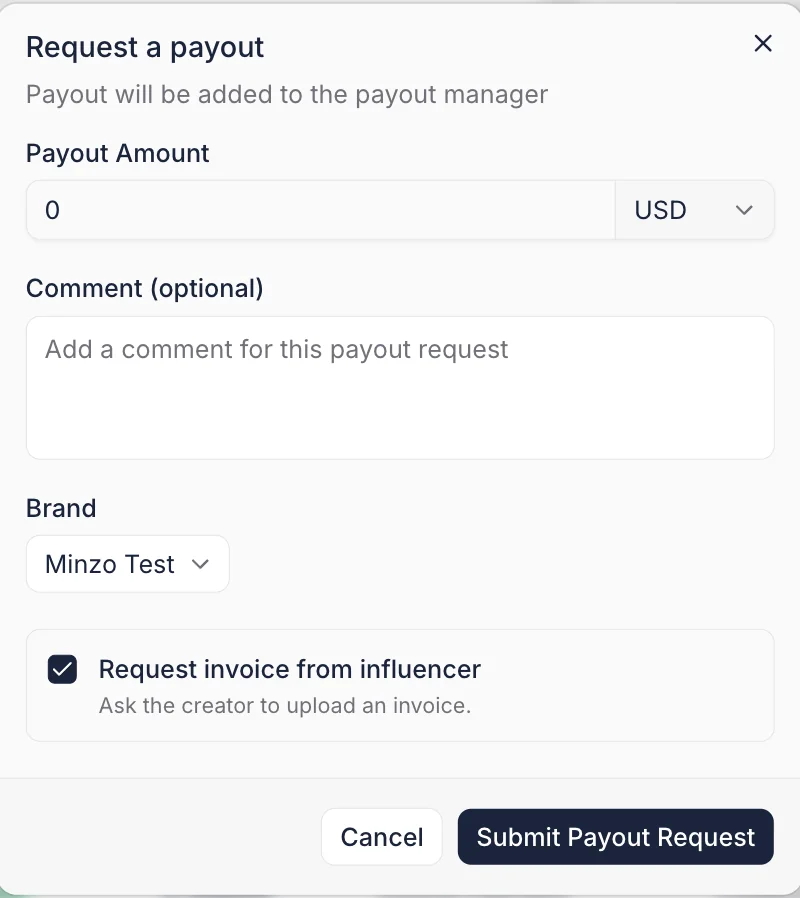
- Demandes de factures automatiques : Demandez une facture à un creator manuellement ou automatiquement chaque fois qu'un versement est demandé.
- Accepter ou rejeter avec commentaires : Examinez les factures soumises depuis le Payout Manager et rejetez-les avec un commentaire en cas de manque, ce qui provoque un re-téléchargement rapide plutôt qu'un suivi vague.
- Exiger une facture avant le versement : Bloquez optionnellement un versement jusqu'à ce que sa facture ait été acceptée.
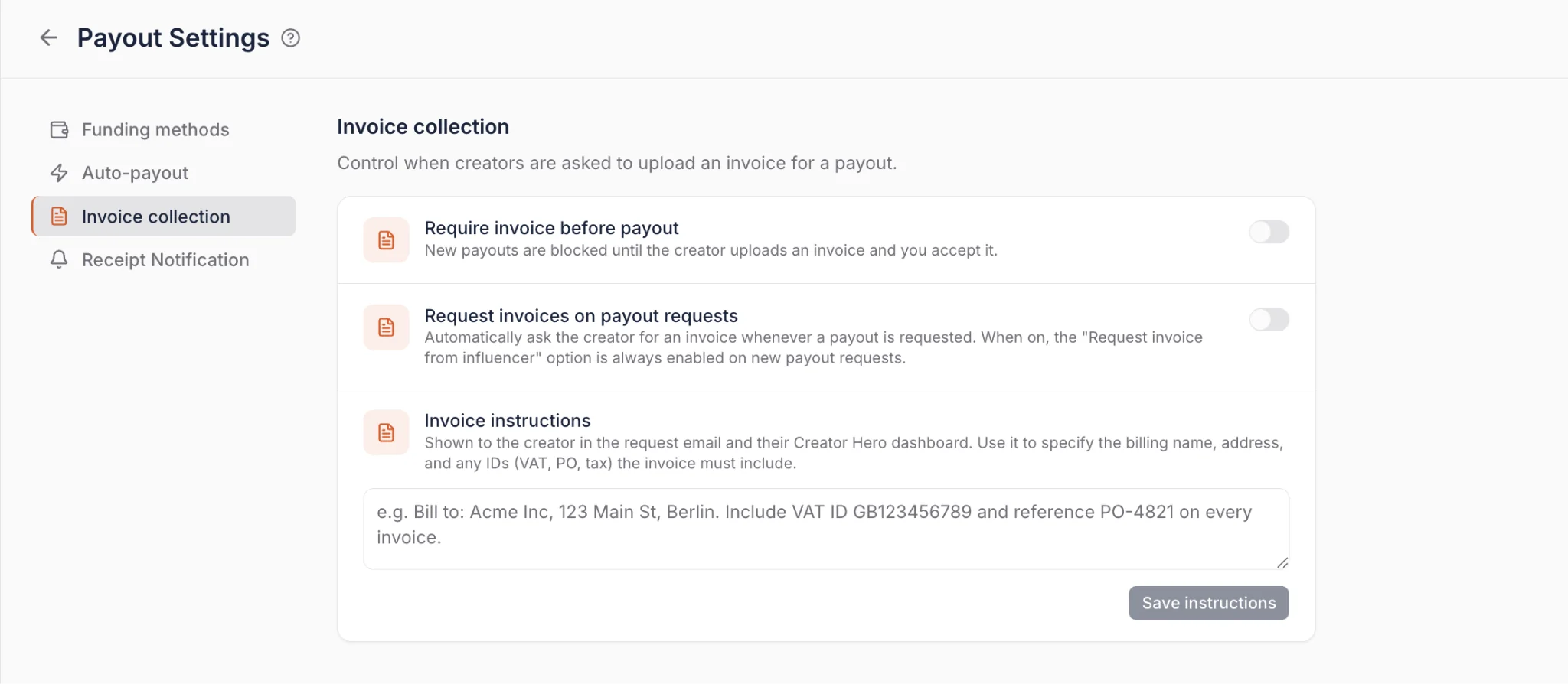
Le résultat est un taux de correspondance versement-facture de 100 % sans que personne n'ait à le contrôler manuellement. Les creators peuvent télécharger avec ou sans compte Creator Dashboard, les flux de facturation sont configurés sous Payouts > Payout Settings, et les événements de facture (demandée, soumise, acceptée, rejetée) fonctionnent comme des déclencheurs d'automatisation.
Ce que vous pouvez faire avec le Payout Manager
Le Payout Manager est plus qu'un processeur de paiement ; c'est un outil de logistique qui relie la performance des campagnes à vos dossiers financiers. Voici comment vous pouvez l'utiliser pour gérer vos opérations de creators :
1. Centraliser les commissions et les frais fixes
Au lieu d'utiliser des outils distincts pour le suivi d'affiliation et les parrainages à tarif forfaitaire, vous gérez les deux dans une seule vue.
- Pour les affiliés : Le système suit automatiquement les gains à partir des données de conversion, donc vous n'avez pas à calculer les pourcentages à la main.
- Pour les collabs payantes : Vous assignez des frais fixes sur n'importe quelle page de partenariat d'un creator. Qu'un creator gagne 10 % des ventes ou des frais forfaitaires de $500 pour un post, cela se retrouve dans la même file d'attente « En attente ».
2. Payer plusieurs influencers à la fois
Vous avez deux options de traitement groupé selon votre étape du workflow.
Pour créer des demandes de paiement en masse, utilisez l'outil de traitement groupé depuis votre campagne :
- Cliquez sur « Ouvrir l'outil de traitement groupé » dans le coin supérieur droit.
- Sélectionnez les influencers que vous êtes prêt à rémunérer, manuellement ou en utilisant des filtres tels que les ventes minimales, les parrainages, ou si leur tableau de bord Creator est configuré.
- Cliquez sur « Sélectionner une action groupée » et choisissez « Demander un paiement ».
- Choisissez un montant spécifique, ou demandez le solde complet dû pour chaque influencer sélectionné.
- Les demandes apparaissent dans le Gestionnaire de paiements pour traitement final.
Pour traiter toutes les demandes en attente à la fois, allez à l'onglet Paiements, sélectionnez tout le monde dans « Prêt à payer », et cliquez sur « Paiement groupé ».
3. Comparez les méthodes avant de payer
Les Paramètres de paiement incluent une calculatrice de frais estimés, vous pouvez donc voir le coût réel d'un paiement donné selon les méthodes disponibles plutôt que de deviner.
Pour les équipes qui paient régulièrement vers la même région, vérifier cela une fois et enregistrer la méthode la moins chère est le gain de temps le plus important des cinq premières minutes de tout ce workflow.
4. Enregistrez vos méthodes de financement
Auparavant, chaque paiement nécessitait de passer par un flux de paiement Stripe. Maintenant, vous enregistrez votre méthode préférée directement dans les Paramètres de paiement, et tous les futurs paiements, y compris les paiements groupés et automatisés, sont traités instantanément. L'option de paiement unique est toujours disponible si vous la préférez.
5. Choisissez des méthodes de paiement moins chères par région
Les méthodes de prélèvement bancaire direct sont considérablement moins chères que le traitement par carte, et votre région est présélectionnée en fonction de la devise de votre compte :
- États-Unis, débit ACH : Les frais plafonnés à $5 quel que soit le montant du paiement. Un paiement de $1 000 par carte de crédit coûte environ $30; un paiement de $9 000 qui aurait coûté $260 en frais de carte coûte $5 avec l'ACH.
- Royaume-Uni, virement Bacs : Sur un paiement de 9 000 £, les frais chutent d'environ 170 £ par carte à environ 4 £.
- Union européenne, virement SEPA : Les frais peuvent être aussi bas que 0,30 € par transaction, contre environ 170 € par carte de crédit sur les paiements importants.
- Reste du monde : La carte de crédit reste actuellement la seule option disponible.
Les virements bancaires prennent 2 à 3 jours ouvrables et s'affichent comme « En cours de traitement » jusqu'à la compensation. Les paiements par carte de crédit sont instantanés et passent directement à « Finalisé ».
6. Automatisez les demandes de paiement
Si le workflow en deux étapes (demande sur la page de l'accord, puis traitement dans le Gestionnaire de paiements) est inutile pour votre équipe, automatisez la première étape. Activez Paiement automatique dans les Paramètres de paiement et définissez un seuil de solde, par exemple $50. Chaque fois que le solde d'un creator franchit ce seuil, une demande de paiement est créée automatiquement avec le commentaire « seuil de solde atteint ».
Si vous voulez que chaque solde s'affiche quelle que soit sa taille, réglez le seuil à $1.
7. Automatisez les paiements avec la fonction Paiement automatique
Une fois que les demandes sont créées, vous pouvez automatiser l'étape de paiement aussi. Activez la fonction Paiement automatique dans les Paramètres de paiement et configurez :
- Fréquence : Quotidienne, chaque lundi, ou le 1er de chaque mois.
- Limites de dépenses quotidiennes et mensuelles pour rester maître de votre budget.
- Couvrir ou non les frais de paiement au nom de vos influencers.
Trois heures avant une exécution programmée, vous recevez un e-mail d'avertissement listant exactement quels influencers seront payés et combien. Si quelque chose semble anormal, cliquez sur « Examiner les paiements » à partir de l'e-mail pour refuser les paiements individuels ou suspendre tous les paiements automatiques avant que l'exécution ne commence. Une fois terminer, vous recevez un e-mail de confirmation récapitulant le montant total payé.
8. Exigez les factures avant le transfert d'argent
Pour les équipes qui ne peuvent pas libérer le paiement sans documentation en dossier, les demandes de facture peuvent se déclencher automatiquement à chaque demande de paiement, et les paiements peuvent être bloqués jusqu'à ce que la facture soit acceptée. Votre équipe marketing cesse d'agir comme un département de recouvrement.
9. Dirigez les reçus vers votre équipe comptable
Dans les Paramètres de paiement, ajoutez n'importe quelle adresse e-mail, par exemple accounting@yourbrand.com, pour recevoir automatiquement des reçus chaque fois qu'un paiement est traité. Les reçus peuvent également être téléchargés directement depuis la plateforme à tout moment.
10. Combler le vide avec le tableau de bord Creator
En envoyant une invitation au tableau de bord Creator, vous transférez la saisie de données à l'influencer. Ils enregistrent leurs propres détails de paiement via Stripe, qui se remplissent automatiquement dans votre Gestionnaire de paiements. Cela élimine le besoin de demander les coordonnées bancaires par e-mail ou par DM.
11. Connectez l'ensemble de votre cycle de vie de campagne
Parce que le Gestionnaire de paiements se trouve dans l'écosystème tout-en-un Influencer Hero, il fonctionne aux côtés de vos autres outils :
- Intégration CRM : Chaque paiement est enregistré sur le profil de l'influencer, vous pouvez donc voir sa valeur à vie en un coup d'œil.
- Prospection et recrutement : Utilisez l'historique des paiements pour identifier vos partenaires les plus fiables pour les futures prospections.
- Rapports : Les paiements traités s'intègrent dans vos rapports de ROI de campagne, vous donnant une vision précise du bénéfice net après les coûts des creators.
Quand les équipes utilisent le Gestionnaire de paiements
Cette fonctionnalité est-elle faite pour vous ? La meilleure façon de répondre est d'examiner comment les marques en croissance utilisent le suivi centralisé pour résoudre les vrais défis de scaling.
1. Scaling un programme d'ambassadeur ou d'affiliation
Lorsque vous souhaitez passer de 10 à 100+ partenaires, vous ne pouvez pas auditer manuellement chaque vente et commission.
- Le scénario : Vous avez une liste croissante d'affiliés, et calculer manuellement 10 % de chaque vente depuis votre boutique est devenu un goulot d'étranglement.
- Le workflow : Parce que le système extrait les données de conversion directement, les gains sont déjà calculés par creator. Vous vérifiez les totaux et traitez les paiements en masse, passant de « calculer » à « confirmer ».
2. Réduire les frais de paiement sur un programme à haut volume
Pour les marques qui font des versements mensuels à une large liste, les frais de traitement deviennent silencieusement l'un des plus gros postes du programme.
- Le scénario : Vous payez 120 creators par mois par carte et votre responsable financier signale que les frais atteignent quatre chiffres.
- Le workflow : Ouvrez les paramètres de paiement, utilisez le calculateur de frais pour comparer les méthodes dans votre région, et enregistrez le virement bancaire direct comme votre méthode de financement. Sur les paiements aux États-Unis, cela réduit un frais de carte de $260 sur un virement de $9 000 à seulement $5.
3. Gérer les contrats hybrides « Frais + Commission »
Les partenariats de haut niveau impliquent souvent un tarif forfaitaire garanti plus une prime de performance. Suivre ces éléments à deux endroits mène à des erreurs de paiement.
- Le scénario : Vous avez engagé un creator pour un forfait de $500 pour un post TikTok, et vous souhaitez également payer une commission bonus sur les ventes qu'il génère.
- Le workflow : Utilisez « Ajouter frais forfaitaire » pour enregistrer les $500 et laisser le système suivre automatiquement les gains d'affiliation. Les deux montants apparaissent dans le solde « En attente », vous pouvez donc finaliser l'ensemble de l'accord en une seule transaction.
4. Professionnaliser votre piste d'audit financière
Pour les marques qui tiennent des registres stricts, « envoyer un virement » sans un journal formel n'est pas suffisant.
- Le scénario : Votre équipe financière doit savoir à quelle campagne un paiement appartenait et quel membre de l'équipe l'a approuvé.
- Le workflow : Chaque paiement, qu'il soit effectué via Stripe ou enregistré en tant que paiement hors ligne, génère un enregistrement permanent sur la page de l'accord. Vous obtenez le qui, quand et comment derrière chaque transaction, plus des reçus téléchargeables acheminés automatiquement vers votre boîte de comptabilité.
5. Satisfaire un processus financier nécessitant une facture
Certaines équipes ne peuvent pas libérer un paiement tant qu'une facture n'est pas déposée, ce qui transforme chaque cycle de paiement en une chasse aux emails.
- Le scénario : La finance exige une facture correspondante pour tous les paiements de creators, et votre équipe passe la dernière semaine de chaque mois à les collecter.
- Le workflow : Activez les demandes de facture automatiques pour que chaque demande de paiement en demande une, rejetez tout ce qui est incomplet avec un commentaire, et bloquez les paiements jusqu'à ce que la facture soit acceptée.
6. S'éloigner de « l'étiquetage par email » pour les informations de paiement
Chasser les influencers via DM pour les coordonnées bancaires est un drain majeur pour le temps de votre équipe.
- Le scénario : Vous travaillez avec des creators internationaux et avez besoin d'un moyen sécurisé de collecter les détails de paiement sans allers-retours.
- Le workflow : Envoyez une invitation au tableau de bord du creator. Ils enregistrent leurs propres coordonnées de manière sécurisée, qui s'affichent dans votre gestionnaire de paiement, vous avez donc toujours les bonnes informations à jour.
7. Effectuer des paiements sans intervention avec automatisation complète
Pour les équipes gérant de grands volumes, déclencher manuellement chaque demande et paiement n'est pas scalable.
- Le scénario : Vous exécutez un programme d'ambassadeur toujours actif avec 50+ creators gagnant de manière continue, et votre équipe ne veut pas se connecter chaque semaine pour déclencher des paiements qui sont toujours approuvés de toute façon.
- Le workflow : Activez l'envoi automatique de paiement avec un seuil de $50, puis le paiement automatique défini sur hebdomadaire. Trois heures avant chaque exécution, la finance reçoit un email d'avertissement pour détecter toute anomalie, et un résumé de confirmation une fois terminé.
Comment le gestionnaire de paiement se connecte avec les autres fonctionnalités d'Influencer Hero
Le gestionnaire de paiement n'est pas un registre autonome ; c'est la conclusion financière de l'ensemble de votre moteur de marketing d'influence. En centralisant les paiements dans le même environnement que vos données de campagne, vous éliminez les feuilles de calcul fragmentées et les calculs manuels.
1. Intégration avec le CRM et l'historique des relations
Chaque transaction traitée est automatiquement enregistrée sur le profil du creator dans votre CRM d'influencers.
- Piste d'audit automatique : Le système enregistre quand un paiement a été émis et pour quel montant, créant un historique permanent du partenariat.
- Transparence opérationnelle : Parce que chaque page d'accord se met à jour en temps réel, votre équipe maintient une source unique de vérité pour le statut financier de chaque influencer.
2. Intégration avec le suivi des affiliés et l'eCommerce
Grâce à la connexion directe d'Influencer Hero à votre boutique eCommerce, les données de performance remplissent automatiquement votre file d'attente de paiement.
- Synchronisation des commissions en temps réel : Le suivi des affiliés enregistre les clics et les ventes en magasin pour calculer précisément ce qu'un creator a gagné, sans intervention manuelle.
- Flexibilité de paiement hybride : Vous réglez les commissions basées sur la performance et les frais fixes dans un seul flux de travail, en effaçant les soldes « En attente » avec précision.
3. Intégration avec les rapports et l'analyse du ROI
En enregistrant tous les paiements dans la plateforme, votre rapport de campagne peut afficher la véritable rentabilité nette.
- Visibilité réelle du ROI : Les tableaux de bord en temps réel tiennent compte des coûts réels des creators par rapport au chiffre d'affaires généré, offrant une vision claire du succès de la campagne.
- Découverte optimisée : L'examen des données de coût par acquisition vous aide à affiner vos critères lors de l'utilisation de l'outil de découverte pour trouver de nouveaux partenaires à fort ROI.
Conclusion
La meilleure façon de comprendre comment le Payout Manager peut transformer votre flux de travail post-campagne est de voir l'automatisation en action. Que vous centralisiez les commissions d'affiliés, réduisiez les frais de traitement des paiements de 6 % à moins de 1 %, ou automatisiez complètement vos séries de paiements, la plateforme transforme le travail manuel sur feuille de calcul en un processus rationalisé et scalable.
Avec les paiements en masse, les méthodes de financement enregistrées, les virements directs régionaux, la facturation automatisée et l'automatisation complète d'Auto-Submit et Auto-Pay, Influencer Hero couvre l'ensemble du cycle de paiement : du suivi de ce qui est dû au traitement automatique selon un calendrier avec les documents déjà appariés.
Et comme tout est intégré à votre CRM, à vos rapports et aux tableaux de bord des creators, vos dossiers financiers restent précis, que vous gériez cinq creators ou cinq cents.
Réservez une démonstration avec notre équipe pour voir en direct combien le nouveau Payout Manager peut vous économiser en frais et mettre vos paiements aux creators en pilote automatique.
Résumé
Ceci est un texte à l'intérieur d'un bloc div.
Ceci est un texte à l'intérieur d'un bloc div.
Tarification/Mois
Avis Shopify
Ceci est du texte à l'intérieur d'un bloc div.
Ceci est un texte à l'intérieur d'un bloc div.
Ceci est un texte à l'intérieur d'un bloc div.
Ceci est du texte à l'intérieur d'un bloc div.
Ceci est un texte à l'intérieur d'un bloc div.
Ceci est un texte à l'intérieur d'un bloc div.
Ceci est du texte à l'intérieur d'un bloc div.
Ceci est un texte à l'intérieur d'un bloc div.
Ceci est un texte à l'intérieur d'un bloc div.
Ceci est du texte à l'intérieur d'un bloc div.
Ceci est un texte à l'intérieur d'un bloc div.
Ceci est un texte à l'intérieur d'un bloc div.
Ceci est du texte à l'intérieur d'un bloc div.
Ceci est un texte à l'intérieur d'un bloc div.
Ceci est un texte à l'intérieur d'un bloc div.
Ceci est du texte à l'intérieur d'un bloc div.
Ceci est un texte à l'intérieur d'un bloc div.
Ceci est un texte à l'intérieur d'un bloc div.
Ceci est du texte à l'intérieur d'un bloc div.
Ceci est un texte à l'intérieur d'un bloc div.
Ceci est un texte à l'intérieur d'un bloc div.
Lire la suite

Questions fréquemment posées
Comment puis-je suivre les commissions pour mes partenaires affiliés ?

Vous n'avez pas besoin de les calculer manuellement ; le système suit automatiquement les gains à partir des données de conversion et affiche le montant total que chaque creator a gagné directement dans le Portail de Collaboration.
Puis-je payer les influencers pour des publications ponctuelles ou des frais fixes ?
Oui. Vous pouvez manuellement cliquer sur « Ajouter des frais fixes » sur la page de collaboration de l'influencer, entrer le montant spécifique pour la collaboration, et même ajouter des commentaires pour suivre à quoi correspondait le paiement.
Comment les creators fournissent-ils leurs informations de paiement ?
Vous pouvez envoyer une invitation au creator pour rejoindre son propre Tableau de bord des creators. Une fois qu'il a adhéré, il peut enregistrer en toute sécurité ses propres informations de paiement et suivre ses statistiques de performance.
Quelle est la différence entre un virement Stripe et un « Offline Payout » ?
Un paiement Stripe est traité directement via la plateforme si l'influencer a connecté ses coordonnées. Un Paiement Hors Ligne est utilisé pour enregistrer les paiements effectués en dehors d'Influencer Hero (comme un virement bancaire) afin de maintenir votre solde interne et l'historique des transactions à jour.
Où puis-je consulter l'historique de mes paiements antérieurs ?
Tous les détails de transaction sont stockés sur la page Deal de l'influencer. Ce journal vous montre exactement qui a traité le paiement, quand il a été effectué, le montant total et le solde restant.










Les Articles les Plus Populaires


Boostez votre ROI grâce au marketing d'influence
Rejoignez plus de 1 200 marques et 150+ agences qui font croître leurs programmes creators avec Influencer Hero.