
Reporting de Influencers: Mide Rendimiento y Resultados de Campañas

March 27, 2026
|
Publicado

August 16, 2026
|
Actualizada

15 minutes
|
Lectura

Curso de marketing de resultados para influencers | Cupón: IMC100

María Vincenzini
| Author

Tabla de contenido
- Informes y Análisis de Influencers
- Cómo funciona en Influencer Hero
- Navegación del Panel de Rendimiento
- Análisis de tu cartera completa
- Clasificación y seguimiento de menciones
- Auditoría de tu embudo de alcance y reclutamiento
- Análisis de regalos y ROI automatizado
- Pagos, facturación y presupuesto
- Exportación para la acción
- Lo que puedes hacer con Informes y Análisis
- Cuándo los equipos utilizan Informes y Análisis
- Cómo se conecta con otras funciones
- Reflexiones finales
- Preguntas frecuentes
Impulse el ROI con Influencers

Base de datos global de influencers
Plataforma TODO EN UNO
CRM, afiliados, UGC y más
Reportes y Análisis de Influencers: Mide el Rendimiento y los Resultados de tu Campaña
Ya sea que estés migrando desde hojas de cálculo manuales o refinando un programa que ya ejecutas, tus datos son lo que determina si mides con precisión el ROI de la campaña o seguirás adivinando. Este artículo te muestra exactamente cómo funciona la suite de Reportes y Análisis dentro de Influencer Hero y cómo convertir los datos de tu campaña en decisiones accionables.
La suite es un centro de control en tiempo real que te da visibilidad completa sobre tus campañas a través de pestañas de datos especializadas. Se conecta directamente a tu CMS de e-commerce, lo que cierra la brecha entre el engagement social y los resultados empresariales: alcance, clics, ventas por afiliación, rendimiento de outreach y costos de productos, todo en un solo lugar.
Desde la última actualización importante, la suite también se integra con un Payout Manager rediseñado, flujos de facturación, campos personalizados, y una nueva pestaña Todos los Influencers que te permite analizar todo tu roster de creadores en una sola vista en lugar de hacerlo campaña por campaña.
Veamos cómo funciona en la práctica.
Cómo Funciona Reportes y Análisis en Influencer Hero
Piensa en la suite de Reportes y Análisis como el motor de ROI de tu programa de influencers. Otras herramientas se enfocan en el "quién" y el "cómo". Esta responde la pregunta que realmente importa: ¿está funcionando esta campaña?
Va más allá de likes superficiales para probar el valor empresarial de cada asociación, ya sea que ejecutes grandes programas de afiliación o campañas de seeding orientadas al awareness. Se comporta como una auditoría automatizada de toda tu operación, extrayendo datos directamente de plataformas sociales y de tu tienda de e-commerce para que nunca tengas que calcular manualmente una conversión nuevamente.
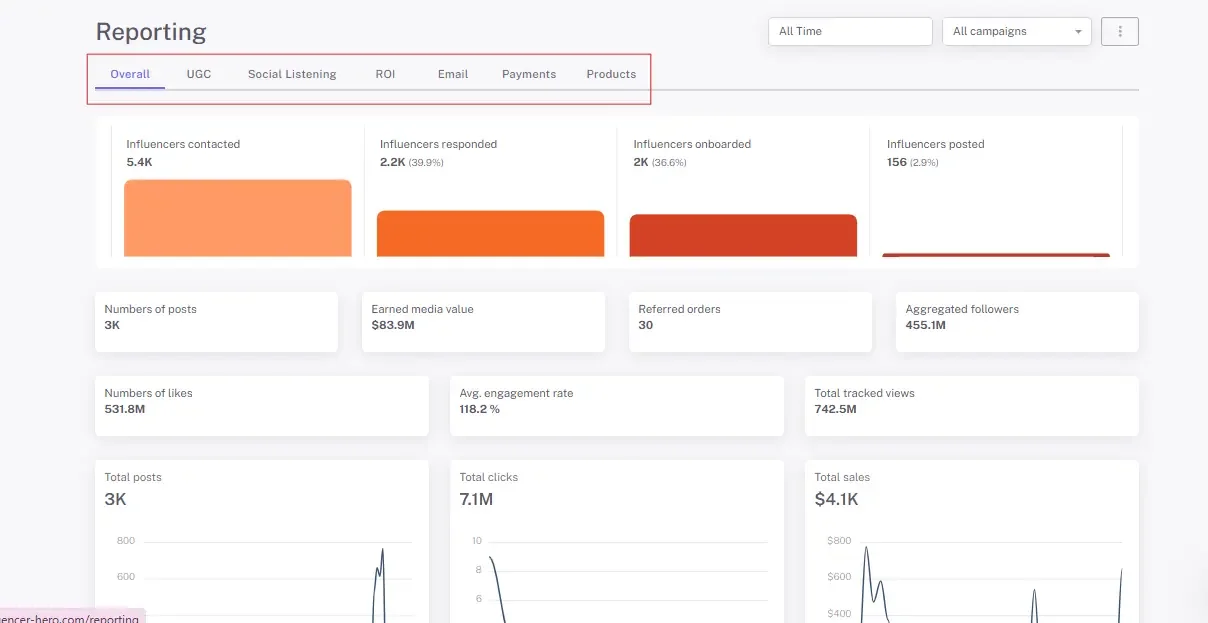
La interfaz rediseñada divide esos datos en pestañas especializadas (General, UGC, Escucha Social, Outreach, ROI y Ventas, Pagos y Productos) para que puedas analizar cualquier etapa del embudo por separado.
Paso 1: Navegando el Panel de Rendimiento
Cuando abres la sección de Reportes, llegas a un panel diseñado para actuar como tu centro de comando de campaña: un resumen de alto nivel en la parte superior, luego pestañas dedicadas debajo.
La Pestaña "General": Tu Resumen Rápido de Rendimiento
La pestaña General te ofrece una lectura general de la salud de tu campaña. Agrega datos de toda la plataforma, incluyendo reportes de UGC, escucha social, ROI y email, para una instantánea de tu alcance total e impacto.
- Reportes dinámicos por rango de fechas: Filtra por fechas específicas para que los pedidos referidos y ventas solo reflejen lo que sucedió dentro de esa ventana.
- Visualización de embudo: Ve el viaje completo desde el total de influencers contactados hasta pedidos referidos.
- Gráficos de engagement: Usa "Influencers Totales por Tamaño" y "Total de Likes por Tamaño" para identificar qué rangos de seguidores (nano vs. mega) generan tus mejores resultados.
- Control del alcance del reporte: Los reportes usan por defecto datos de la pizarra de campaña, que incluyen influencers importados directamente a la pizarra. Si solo quieres datos de outreach, cambia el alcance desde el menú de tres puntos en la esquina superior derecha del reporte.
Un matiz que vale la pena conocer al leer estos números: un influencer se cuenta como incorporado una vez que ha recibido un producto o publicado una pieza de UGC rastreada. Esta definición mantiene tu tasa de incorporación vinculada a actividad real en lugar de a un estado que alguien olvidó actualizar.
Las Pestañas Especializadas
Cada pestaña aísla una parte del embudo:
- UGC: Rastrea cada publicación recopilada y muestra tu contenido de mejor rendimiento por vistas, likes y comentarios.
- Escucha Social: Rastrea contenido etiquetado, mostrando quién habla sobre tu marca de manera orgánica fuera de tus contactos de campaña formales.
- ROI y Ventas: Donde rastrearás el impacto financiero, incluyendo Valor de Medios Ganados (EMV) y ventas totales por plataforma, extraídas de tu tienda conectada en tiempo real.
- Pagos: Tu libro mayor financiero para compensación de creadores. Estados de pago, facturas pendientes y seguimiento de comisiones viven aquí.
- Productos: El centro logístico para regalos. Rastrea el inventario enviado a influencers, monitorea el cumplimiento a través de tu integración de e-commerce, e identifica qué productos generan más engagement social.
Paso 2: Analizando tu Roster Completo Con la Pestaña Todos los Influencers
El reportaje a nivel de campaña te dice cómo se desempeñó una campaña. No te dice cómo está desempeñándose un creador en todo lo que has ejecutado con ellos. Esa es la brecha que cierra la pestaña Todos los Influencers.
Encontrada bajo Gestor de Campaña > Todos los Influencers, te da una sola vista de cada influencer en tu CRM en todas las campañas, con el filtrado y control de columnas que esperarías de una herramienta de análisis adecuada.
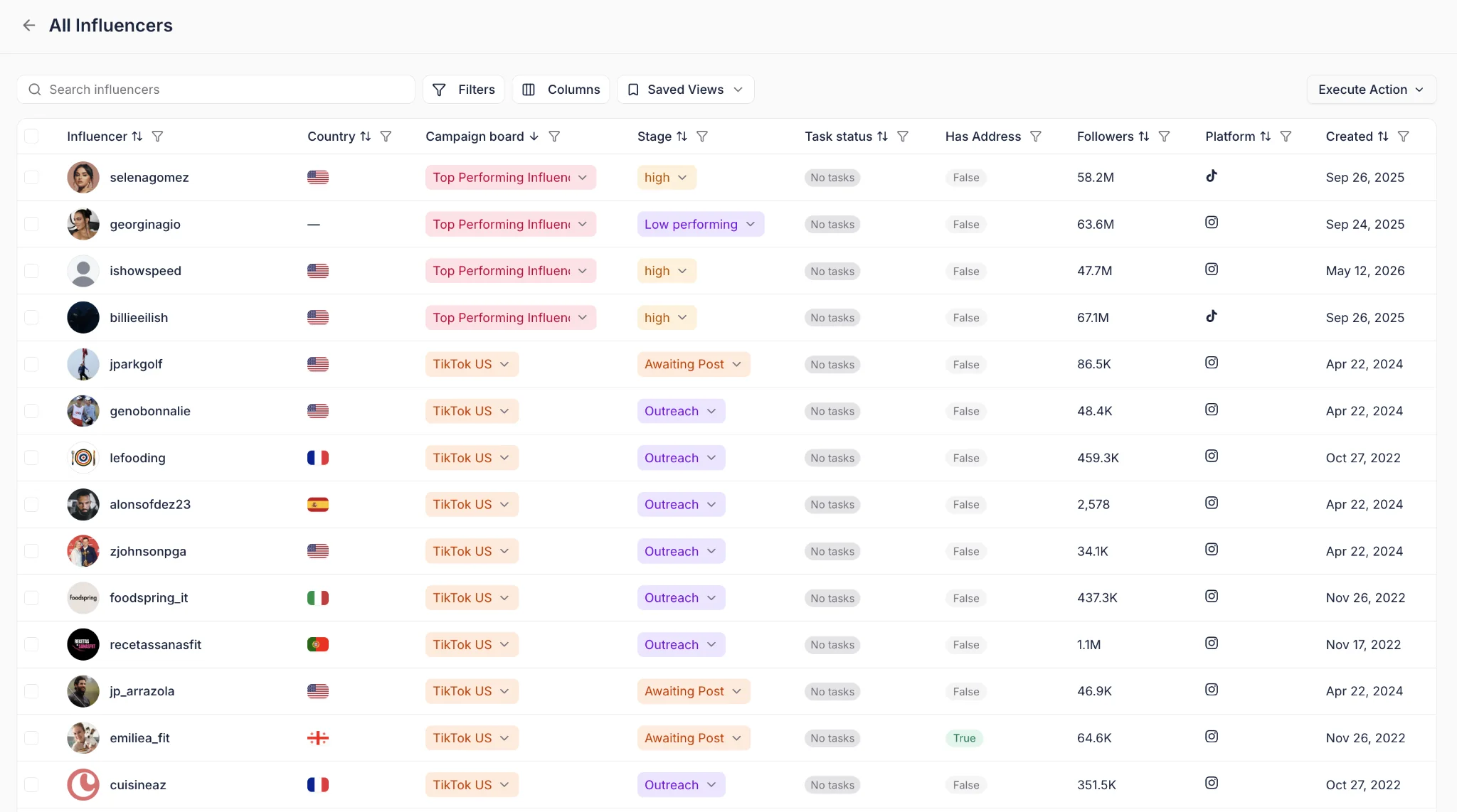
- Filtrado avanzado y potenciado por IA: Filtra por más de 20 criterios integrados, o describe lo que buscas en lenguaje natural. Algo como "influenciadores en EE.UU. que publicaron más de 5 veces pero generaron menos de $2k en ventas" te devuelve exactamente ese segmento.
- Columnas personalizadas: Construye la vista con las métricas que realmente reportas, y luego guárdala.
- Vistas guardadas: Mantén una vista privada o compártela con el equipo para que todos reporten sobre la misma definición.
- Acciones en lote desde la lista: Una vez que tengas un segmento en pantalla, actúa sobre él. Envía un correo, activa un flujo, crea una tarea o dispara una acción de integración en todo el grupo.
Ese último punto es lo que convierte esto en una funcionalidad de reporting en lugar de un directorio. No solo estás identificando a los que tienen bajo desempeño o a tu top 5% de generadores de ingresos, sino que estás ejecutando acciones sobre ellos en la misma pantalla.
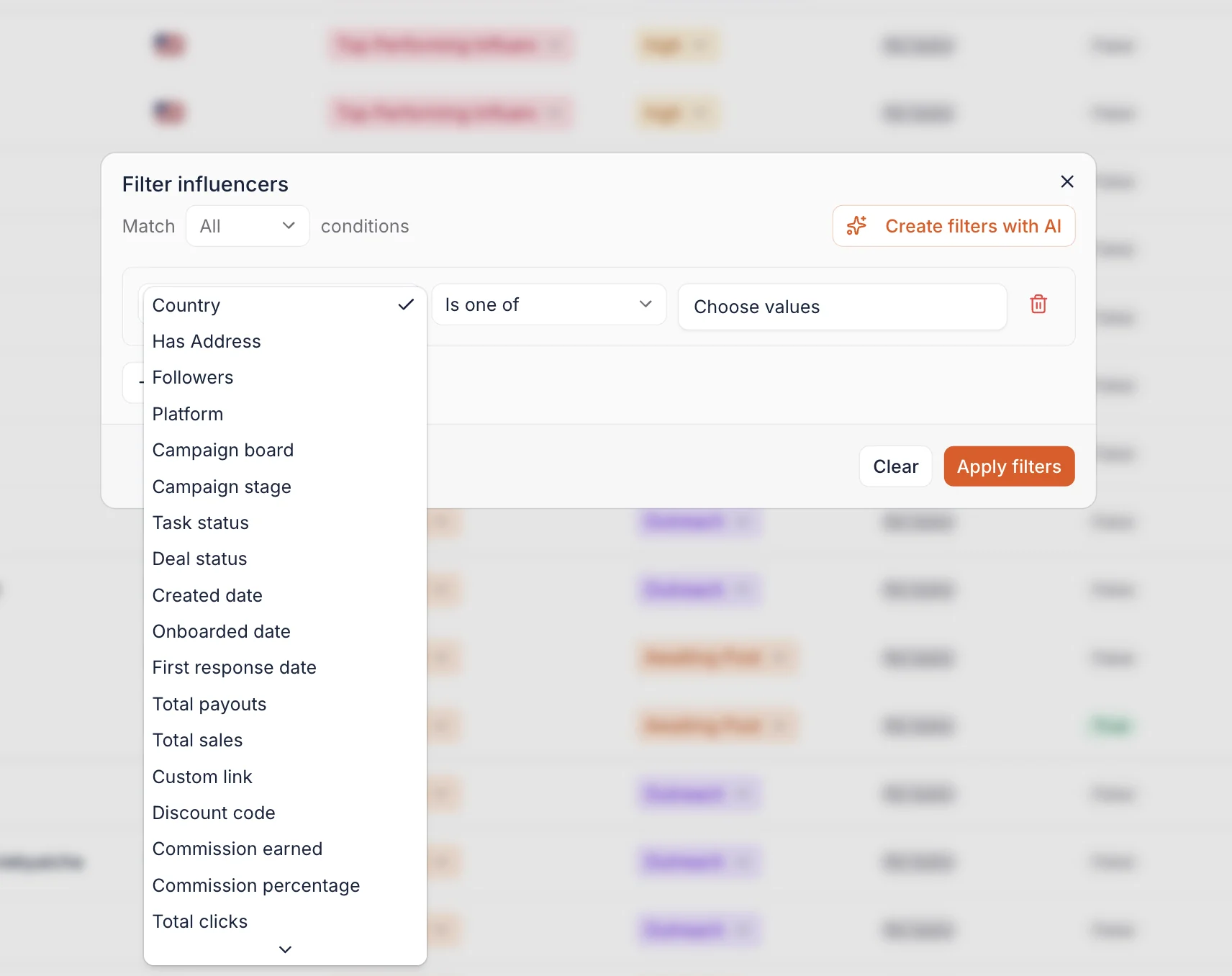
Dos cosas a tener en cuenta: los filtros potenciados por IA consumen créditos mensuales de GPT, y las columnas de campos personalizados solo se populan para influenciadores que tengan ese campo completado en su página de deal. Puedes seguir cada lanzamiento en nuestro registro de actualizaciones de producto.
Reporting sobre Datos Específicos de tu Negocio
Las métricas estándar cubren la mayoría de lo que necesitas. El resto es para lo que existen los campos personalizados.
Ahora puedes agregar tus propios campos de Texto, Número o Fecha a las páginas de deal, hasta 10 por cuenta, y extraerlos directamente a las columnas de Todos los Influenciadores. Tasas de comisión escalonadas, límites de regalos por influenciador, fechas de renovación de contrato, propiedad de agencia: cualquier cosa que tu configuración rastree y que un campo predeterminado no cubra.
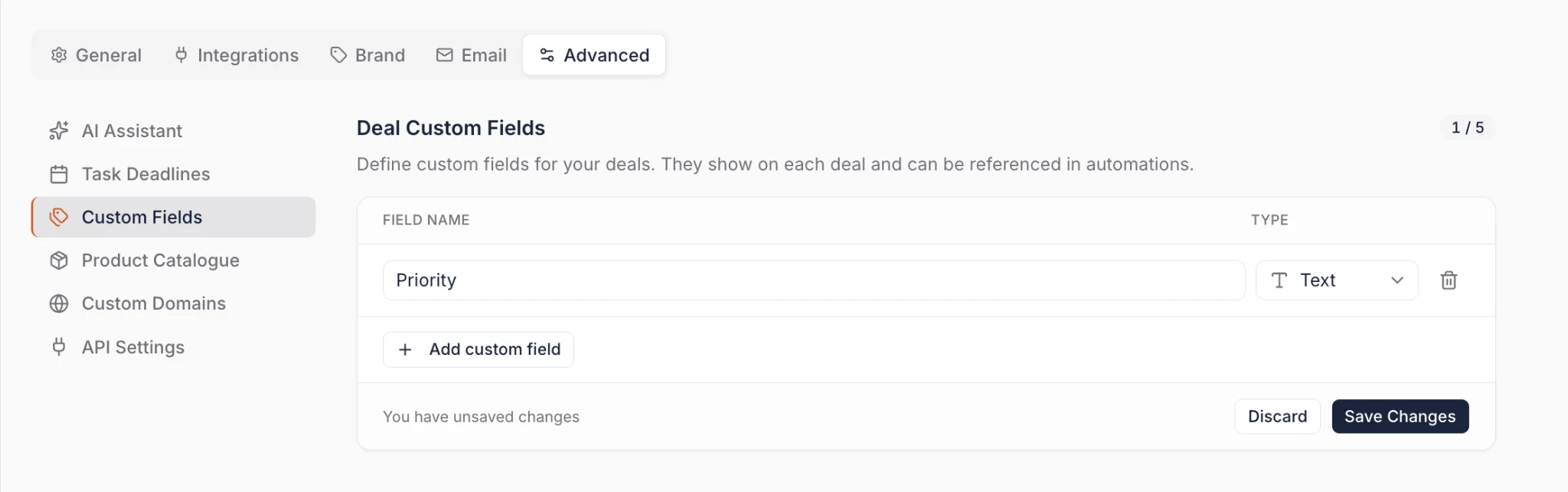
Esos mismos campos pueden ser leídos por las automatizaciones de Campaign Board, así que una única automatización puede aplicar diferentes umbrales por influenciador en lugar de una sola regla fija en toda tu lista. Los campos personalizados se crean en Configuración > Configuración Avanzada > Campos Personalizados.
Paso 3: Clasificar Contenido de Alto Desempeño y Rastrear Menciones Orgánicas
Este paso te lleva de la salud general de la campaña a la responsabilidad individual.
Encontrar tu Contenido con Mayor Desempeño
La pestaña UGC identifica automáticamente tu contenido de mejor desempeño en función del engagement, mostrando de un vistazo los tres mejores posts. Eso facilita compartir logros con clientes o stakeholders sin crear una presentación desde cero.
Para un análisis más profundo de tu contenido generado por usuarios, el Content Wall actualizado es donde vive el volumen. Los likes son visibles directamente en el muro y ordenables por desempeño, y un ordenamiento recomendado por IA clasifica los posts por calidad visual para que el contenido mejor presentado aparezca primero por defecto. También puedes buscar por palabra clave o filtrar por tipo de medio, puntuación de calidad visual, visibilidad del producto y relación de aspecto, lo que importa cuando trabajas con miles de posts en lugar de docenas.
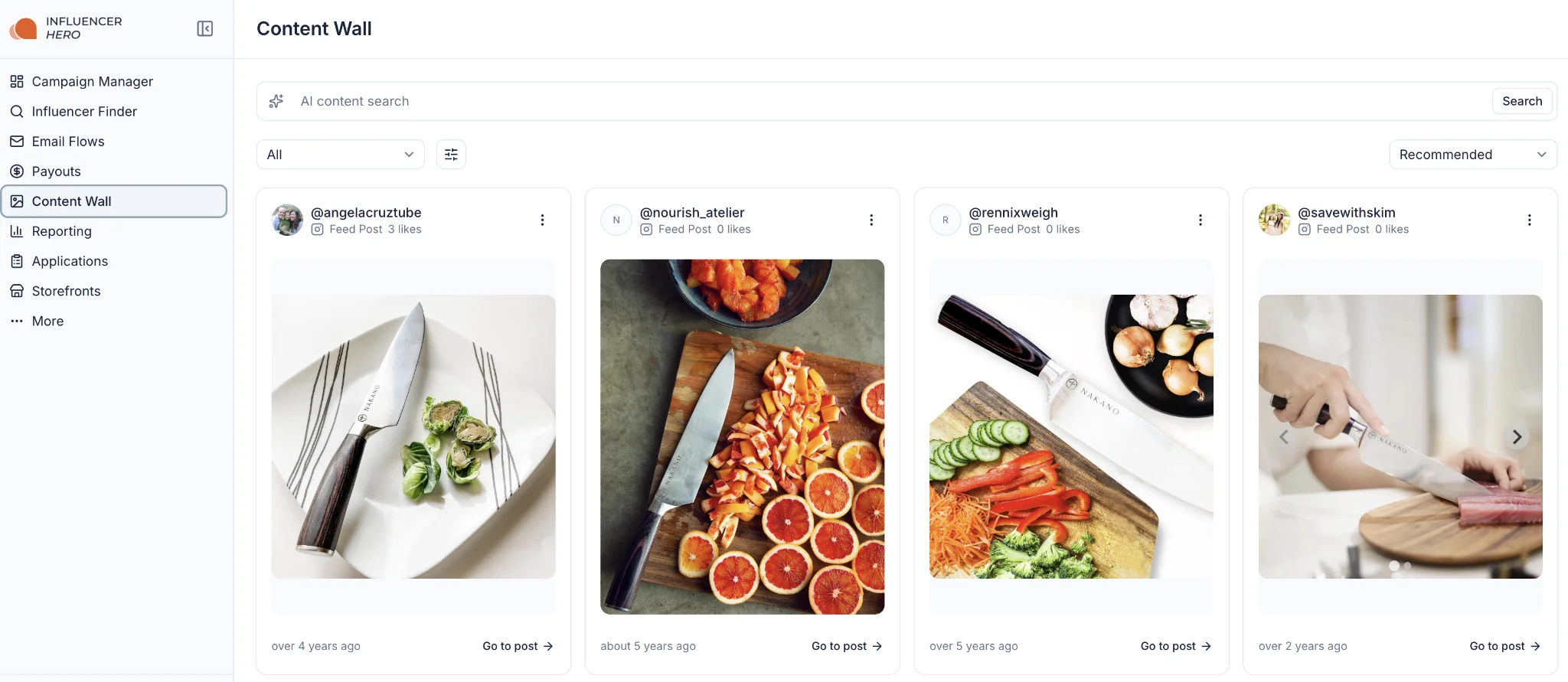
Vale la pena mencionar: los posts de feed e historias pueden no incluir métricas de visualizaciones, y la profundidad del análisis de video con IA depende de tu plan.
Revisar Contenido Antes de que se Publique
Reportear sobre contenido ya publicado es útil. Detectar problemas antes de que se publique es mejor. Ahora puedes solicitar, revisar y aprobar contenido de influenciadores directamente desde la página de deal.
Activa una solicitud de contenido y el influenciador recibe una notificación para enviar. Revisa el envío y apruébalo o solicita una edición con un motivo específico, como que se muestre el producto incorrecto o un caption que necesite cambios, lo que devuelve la responsabilidad al creador hasta que esté bien. Una vista de revisión centralizada muestra cada envío pendiente en todas las campañas, así que nada se pierde a escala.
Los influenciadores pueden enviar como carga directa o un enlace de Google Drive, y los eventos de revisión de contenido (enviado, aprobado, rechazado) están disponibles como disparadores de automatización.
Escucha Social
La pestaña Social Listening rastrea contenido etiquetado donde tu marca fue mencionada por influencers que no están en tu CRM. Captura el efecto halo orgánico de tu programa y muestra quién más está hablando de ti, incluidos creadores que nunca contactaste.
Paso 4: Auditar tu embudo de alcance y reclutamiento
Ya no tienes que adivinar si tu estrategia de alcance de influencers está funcionando. Al analizar la salud técnica de tus comunicaciones, puedes corregir la secuencia y el tiempo antes de que te cuesten registros.
- Desempeño de email integral: Monitorea tasas de apertura, quejas de spam, tasas de desuscripción y tasas de rebote para mantener tu dominio saludable.
- Seguimiento del volumen del embudo: Ve cuántos influencers fueron contactados versus cuántos respondieron, y calcula tu porcentaje de conversión.
- Análisis de seguimiento estratégico: El sistema rastrea el número promedio de emails necesarios para obtener una respuesta, por ejemplo si el 40% de influencers responden después del primer email o el 34% después del segundo, para que puedas optimizar tus secuencias de automatización con datos reales.
- Cuentas de email con mejor desempeño: Identifica qué cuentas (SMTP, Outlook, Gmail y otras) generan el mayor engagement y cuáles pueden estar marcadas o con bajo desempeño.
Los datos de seguimiento son más útiles ahora que puedes actuar sobre ellos en el mismo flujo de trabajo. El Redactor de Respuestas IA escribe respuestas para que revises y envíes, y las Sugerencias de Seguimiento IA generan seguimientos personalizados que hacen referencia a la conversación real y ofrecen términos en lugar de un bump genérico. Puedes establecer tono, ritmo y límites duros a nivel de campaña o cuenta, por lo que lo que tu reporte te dice sobre el tiempo de seguimiento se traduce directamente en cómo se comportan las secuencias.
Paso 5: Analizar regalos y ROI automatizado
Para la mayoría de marcas DTC el mayor costo oculto es el envío de regalos, y nuestra guía completa de regalos cubre cómo estructurar esas campañas antes de reportarlas. Influencer Hero se conecta con tu CMS de e-commerce para rastrear tanto los aspectos físicos como financieros de tus campañas en una sola vista.
Actualización importante aquí: esto ya no es solo para Shopify. El seguimiento de ventas de afiliados, la creación de códigos de descuento y los datos de costo ahora funcionan en WooCommerce, Magento, Magento 2.X, BigCommerce, Amazon, Wix, Squarespace, Webflow, Square, Prestashop, ShopBase, Ecwid y Thinkific, junto con Shopify y GoAffPro. Si tu tienda funciona en cualquier lugar que no sea Shopify, tu reporte ya no es una exportación manual.
Pestaña Productos: Envío de regalos automatizado y seguimiento de inventario
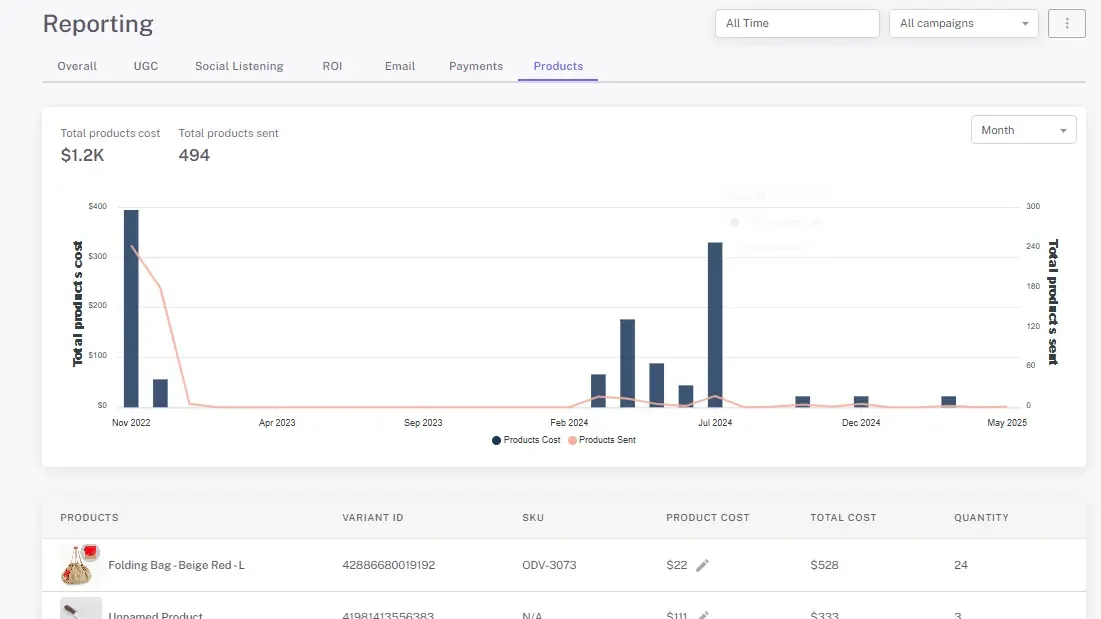
Los datos de regalos viven en la pestaña Productos, y proporciona la base de costos para tu rentabilidad general.
- Seguimiento automatizado de COGS: Los costos de productos se extraen automáticamente de tu tienda conectada, lo que elimina la entrada manual de datos.
- Análisis de volumen de siembra: Ve gráficos que cubren "Gasto total en envíos de productos" versus "Productos totales enviados" para monitorear la escala de tu envío de regalos.
- Alineación de inventario: Rastrea cuántos productos se enviaron cada mes para mantener la logística alineada y evitar desabastecimiento.
Pestaña ROI y Financieros: Probar rentabilidad neta
Esta pestaña extrae de tus datos de producto y pago para una vista definitiva de la salud financiera de la campaña.
- Métricas de rentabilidad verdadera: El costo total combina costos de productos con pagos a influencers, luego se compara contra las ventas totales para mostrar el ROI neto.
- Valor de medios obtenidos: Más allá de las ventas directas, EMV muestra el impacto total de medios y la equidad de marca que tus asociaciones generan.
- Costo por engagement: "Costo por influencer" identifica qué asociados son más eficientes en dirigir tráfico y ventas.
- Ventas específicas por plataforma: Ve qué plataformas sociales generan los ingresos más altos para que puedas asignar presupuesto en consecuencia.
Paso 6: Cerrar el ciclo en pagos, facturación y presupuesto
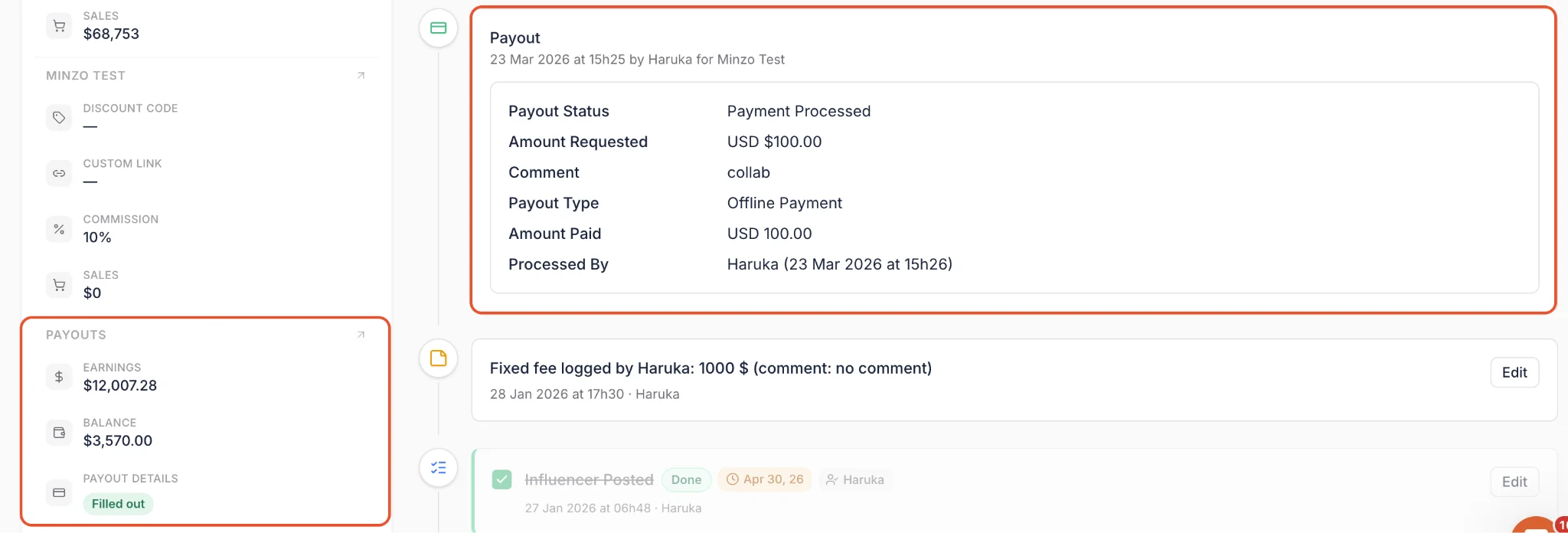
El paso final en el flujo de trabajo de reporte es finanzas. En lugar de transferencias bancarias manuales y papeleo perseguido, el Gestor de Pagos lo centraliza.
Pagar a creadores
- Pagos en lote: Selecciona múltiples influencers y págalos en una acción en lugar de procesar transferencias una por una.
- Pagos automáticos de solicitudes de pago: Coloca los pagos en un calendario diario, semanal o mensual y paga automáticamente desde un método de pago guardado. El pago automático requiere que ese método guardado esté configurado antes de habilitar un calendario.
- Tarifas de transacción bajas: Las ejecuciones bancarias funcionan al 0,1% a 0,5% por transacción dependiendo del método y destino, y la tarifa KYC de Stripe de $2 ha sido eximida por completo.
- Diseño basado en estado: Una vista estructurada muestra exactamente dónde se encuentra cada pago de un vistazo.
Recopilación de facturas
Los reportes de pagos solo son claros si la documentación coincide. Los flujos de trabajo de facturación se encargan de eso automáticamente.
- Solicitudes automáticas de facturas: Solicita una factura a los influencers manualmente o automáticamente cada vez que se solicita un pago.
- Aceptar o rechazar con comentarios: Revisa las facturas enviadas desde el Payout Manager y rechaza con un comentario si falta algo, solicitando una recarga rápida.
- Requerir factura antes del pago: Opcionalmente bloquea un pago hasta que se acepte su factura.
El resultado es una tasa de coincidencia 100% entre pagos e facturas para tu equipo de contabilidad sin que nadie tenga que perseguirlo. Los influencers pueden cargar con o sin una cuenta de Creator Dashboard, la configuración de facturas está en Pagos > Configuración de pagos, y los eventos de facturación (solicitado, enviado, aceptado, rechazado) funcionan como disparadores de automatización.
Auditorías financieras
Genera reportes semanales o mensuales que muestren exactamente qué se ha pagado versus qué se adeuda, lo que facilita el presupuesto para tu equipo de finanzas.
Paso 7: Exportar para actuar
Los datos solo son útiles si puedes compartirlos. Junto con las exportaciones estándar a Excel, puedes generar reportes en PDF listos para presentar que incluyan todos los gráficos y KPIs visuales anteriores.
Ya sea que la audiencia sea un cliente o tu propio CEO, estos reportes transforman números crudos en una historia profesional del desempeño de la campaña.
Qué puedes hacer con reportes y análisis
Una vez que una campaña está en vivo, el trabajo cambia de ejecución a validación. Así es cómo la suite prueba si tu estrategia está alcanzando objetivos o necesita un cambio.
1. Identifica tus conductores de ROI
La plataforma agrega el desempeño en una tabla de clasificación clara dentro de la pestaña Resumen, para que puedas ver qué creadores impulsan las conversiones y clics dentro de un rango de fechas y campaña específica. Deja de adivinar y comienza a enfocarte en las asociaciones que retornan valor.
2. Segmenta tu cartera en lugar de tus campañas
La pestaña Todos los influencers te permite analizar cada creador con el que trabajas en una sola vista. Filtra por desempeñadores destacados con tareas atrasadas, creadores que publican consistentemente pero convierten poco, o cualquiera que coincida con una descripción en lenguaje natural, luego actúa en todo el segmento a la vez.
3. Mide la rentabilidad de resultado final
Los costos de productos se extraen automáticamente de tu tienda conectada, por lo que el COGS total se rastrean contra los ingresos generados sin entrada manual. Obtienes una vista transparente de los márgenes de ganancia reales, lo que elimina el trabajo de cálculo manual de ROI y te dice si tu estrategia de regalos o pagos es sostenible a escala.
4. Valida tu estrategia de niveles
Escalar requiere saber qué tamaño de influencer resuena con tu audiencia. "Total de influencers por tamaño" y "Total de likes por tamaño" muestran dónde tu presupuesto funciona mejor y si debes desplazar el gasto hacia nano creadores para engagement o creadores mega para alcance.
5. Audita gastos y salud financiera
Más allá del gasto total y comisiones pendientes, puedes auditar la salud del alcance a través de tasas abiertas y de respuesta, y mantener cada pago emparejado con una factura aceptada.
6. Prueba valor a los stakeholders
Cada dashboard, desde ventas de afiliados hasta desempeño UGC y escucha social, se exporta en reportes PDF profesionales. Tu equipo, liderazgo o clientes obtienen pruebas listas para presentar de cómo el marketing de influencers contribuye al crecimiento.
Cuándo los equipos usan reportes y análisis
Los reportes transforman datos fragmentados en un roadmap estratégico. Estos son los escenarios donde los equipos dependen de ellos más.
1. Escalando afiliados y desempeño de ventas
El escenario: Estás ejecutando una campaña de ventas de un mes y necesitas decidir qué creadores invitar a un embajadorial a largo plazo.
El flujo de trabajo: Filtra el dashboard por rango de fechas para ver exactamente qué pedidos se refirieron en ese período. Usa la tabla de clasificación para identificar los influencers con mayor conversión, luego mueve esos desempeñadores principales a un nivel de comisión más alto a través de affiliate tracking.
2. Auditando programas de regalos "gratuitos"
El escenario: Enviaste tu último producto a 200 micro-influencers y necesitas justificar el gasto a finanzas.
El flujo de trabajo: Los costos de productos se extraen automáticamente de tu CMS, así que puedes ver "Gasto total en envíos de productos" contra productos enviados, luego compara ese costo contra impresiones generadas y EMV para confirmar que la siembra sigue siendo rentable.
3. Optimizando el embudo de reclutamiento
El escenario: Estás enviando cientos de emails pero no firmando los contratos que esperabas.
El flujo de trabajo: Audita las tasas de apertura y los porcentajes de respuesta. Si los influencers típicamente responden después del tercer email en lugar del primero, ajusta tus secuencias automatizadas y deja que las sugerencias de seguimiento de IA manejen la personalización en cada una.
4. Limpieza de un equipo que ha superado sus campañas
El escenario: Has trabajado con 800 creadores en una docena de campañas y no tienes idea de quién realmente vale la pena mantener.
El flujo de trabajo: Abre la pestaña All Influencers, filtra creadores que hayan publicado más de cinco veces pero generaron ventas por debajo de un umbral establecido, guarda esa vista para tu equipo y envía un flujo de recuperación masivo o sácalos de la rotación activa en una sola acción.
5. Refinamiento de tu perfil de creador ideal
El escenario: Quieres saber si tu presupuesto se gasta mejor en cinco macro-influencers o cincuenta nano-influencers.
El flujo de trabajo: Compara "Total de Me Gusta por Tamaño" y "Total de Influencers por Tamaño" entre tiers para ver qué grupo genera la eficiencia más alta, luego ajusta tu segmentación de reclutamiento en consecuencia.
6. Gestión de logística y presupuesto de alto volumen
El escenario: Trabajas con cientos de influencers en diferentes tiers y enfrentas docenas de pagos individuales e informes para stakeholders cada mes.
El flujo de trabajo: Configura pagos automáticos en un cronograma semanal o mensual, requiere una factura aceptada antes de que se complete cada pago y exporta un PDF listo para presentación para la dirección cuando el mes cierre.
Cómo Reporting & Analytics se conecta con otras funciones de Influencer Hero
En la mayoría de plataformas de reportes, analizar una campaña es una tarea manual separada que ocurre semanas después de que el contenido se publica. Construimos Influencer Hero para que el reporting sea un pulso en tiempo real que informe todas las otras partes del flujo de trabajo.
Reporting + CRM & Outreach
- Prioriza los mejores desempeños: Usa datos de conversión en tiempo real para etiquetar tus influencers más rentables en el CRM para acceso prioritario a nuevas campañas.
- Segmenta en todo: La pestaña All Influencers reporta sobre tu CRM completo en lugar de una campaña a la vez, y te permite accionar un segmento sin salir de la vista.
- Optimiza tu embudo: Las tasas de apertura y porcentajes de respuesta de la pestaña Outreach te dicen cuándo los influencers realmente responden, para que puedas reconstruir tus secuencias automatizadas alrededor de ese timing.
Reporting + Gifting & Payments
- Seguimiento automático de ROI: Los costos de producto se extraen automáticamente de tu tienda conectada, en Shopify y todas las otras plataformas compatibles, para que el suite calcule el ROI en cada producto enviado sin entrada manual.
- Recompensas automatizadas: Una vez que el suite captura una venta de afiliado, el sistema calcula y procesa la comisión.
- Emparejamiento de pago a factura: Los flujos de facturación mantienen cada pago vinculado a una factura aceptada, para que tu reporting de pagos se reconcilie de forma limpia al cierre del mes.
Reporting + Discovery & AI
- Descubrimiento basado en datos: Si el análisis muestra que un nicho específico de micro-influencers genera el 80% de las ventas, usa el filtro de lookalike de la herramienta Discovery para encontrar cientos de perfiles similares.
- Calibración de estrategia por tier: Usa "Total de Me Gusta por Tamaño" para identificar qué tiers funcionan, luego filtra tu próxima búsqueda de Discovery a ese tamaño de creador.
Reporting + UGC Collection & Social Listening
- Reutilización de contenido superior: La pestaña UGC destaca tus tres posts con mejor desempeño de un vistazo, y el ordenamiento de calidad AI del Content Wall y los filtros te ayudan a extraer los mejores assets para anuncios pagados.
- Aprobación antes de reportar: Los flujos de revisión de contenido te permiten aprobar o solicitar ediciones en envíos desde la página de deal, para que lo que llegue a tu reporting sea contenido que realmente aprobaste.
- Social listening: Rastrea menciones de creadores fuera de tu CRM, luego extrae a los fans orgánicos hacia tu flujo de outreach oficial.
Mantener tus datos y herramientas bajo un mismo techo significa que no solo estás rastreando una campaña, estás ejecutando un motor que ahorra a tu equipo horas de trabajo manual y respalda cada decisión con resultados reales.
Reflexiones finales
La mejor forma de entender el suite de Reporting & Analytics es ver tus propios datos en él. Ya sea que estés rastreando el ROI de un tier de micro-influencers a través de gráficos visuales, auditando COGS en una tienda que no es Shopify o segmentando tu equipo completo en la pestaña All Influencers, la plataforma convierte números sin procesar en una estrategia clara.
Al conectar el reporting directamente con tus flujos de trabajo de CRM, outreach, gifting y pagos, abandonas las hojas de cálculo manuales y te enfocas en escalar las asociaciones que funcionan. Con exportaciones de PDF listas para presentación, facturación automatizada y salud de outreach en tiempo real, pasas de adivinar a saber exactamente qué impulsa tus resultados.
Agenda una demostración con nuestro equipo para ver la plataforma en vivo y obtener un recorrido de cómo podemos ayudarte a medir y escalar tu programa de influencers.
Resumen
Este es un texto dentro de un bloque div.
Este es un texto dentro de un bloque div.
Precios/mes
Reseñas de Shopify
Este es un texto dentro de un bloque div.
Este es un texto dentro de un bloque div.
Este es un texto dentro de un bloque div.
Este es un texto dentro de un bloque div.
Este es un texto dentro de un bloque div.
Este es un texto dentro de un bloque div.
Este es un texto dentro de un bloque div.
Este es un texto dentro de un bloque div.
Este es un texto dentro de un bloque div.
Este es un texto dentro de un bloque div.
Este es un texto dentro de un bloque div.
Este es un texto dentro de un bloque div.
Este es un texto dentro de un bloque div.
Este es un texto dentro de un bloque div.
Este es un texto dentro de un bloque div.
Este es un texto dentro de un bloque div.
Este es un texto dentro de un bloque div.
Este es un texto dentro de un bloque div.
Este es un texto dentro de un bloque div.
Este es un texto dentro de un bloque div.
Este es un texto dentro de un bloque div.
Leer más

Preguntas frecuentes
¿Qué métricas puedo seguir en el panel de informes?

La plataforma le proporciona una vista completa de sus KPI de campaña más importantes, incluidas las impresiones totales, clics y conversiones. También puede monitorear resultados específicos del extremo inferior del embudo, como ventas de afiliados por creador y el Valor de Medios Ganados (EMV) general.
¿Puedo rastrear los costos asociados con el envío de productos?
Sí. Influencer Hero le permite analizar su Costo de Bienes Vendidos (COGS) para campañas de gifting sincronizando directamente con su CMS de comercio electrónico. Esto le ayuda a rastrear exactamente cuántos productos se enviaron y el gasto total involucrado en sus esfuerzos de seeding.
¿Es posible ver cuáles son los influencers individuales que están teniendo el mejor desempeño?
Por supuesto. El sistema incluye una tabla de clasificación simple que identifica sus socios con mejor desempeño según sus resultados en tiempo real. Esto le permite evaluar el rendimiento en diferentes tamaños de influencers—desde nano hasta mega—y recompensar a quienes generan el mayor ROI.
¿Cómo maneja la plataforma los pagos a los influencers?
Puede realizar un seguimiento de los pagos a influencers generando informes semanales y mensuales para mantener su presupuesto sin complicaciones. Para ahorrar tiempo, la plataforma también cuenta con una herramienta de procesamiento por lotes que le permite gestionar múltiples pagos a creadores de una sola vez en lugar de procesarlos manualmente.
¿Puedo compartir estos informes con mi equipo o clientes?
Sí. Todos los gráficos y funciones de informes están diseñados para una fácil comprensión. Puede generar informes exportables y paneles de ROI para compartir la visibilidad del rendimiento en tiempo real y los detalles de la campaña con partes interesadas o equipos internos.










Blogs más populares


¿Estás listo para lograr un ROI de más de 10 veces?
Programa una demostración con uno de nuestros expertos en medios a continuación.