
What Is an MCP for Influencer Marketing?

November 14, 2026
|
Published

November 14, 2026
|
Updated

15 minutes
|
Reading

Influencer Performance Marketing Course | VOUCHER: IMC100

Malena Garcia

Table of Contents
- Key Takeaways
- What Is an MCP?
- What Is an MCP for Influencer Marketing?
- How Does an MCP Work?
- MCP vs API vs Integrations vs Built-In AI
- Why MCPs Matter for Influencer Marketing
- What You Can Do With an Influencer Marketing MCP
- Real Example
- Read-Only vs Action MCPs: What's the Difference?
- How to Choose an Influencer Marketing MCP
- Is an MCP Safe to Use for Influencer Marketing?
- The Influencer Hero MCP
- Tips for Getting the Most out of it
- Conclusion
- FAQs
Drive ROI With Influencers

Global Influencer Database
ALL-IN-ONE platform
CRM, Affiliate, UGC & More
What Is an MCP for Influencer Marketing?
AI assistants have become part of every marketer's day, and they're quickly moving from chatting to doing. The Social Media Examiner 2026 AI Marketing Industry Report found that 79% of marketers are either using AI agents or planning to. The top things they want to learn are automating repetitive tasks (77%) and building workflows (75%).
The technology making that possible is the MCP. Since Anthropic launched it, MCP has been adopted by ChatGPT, Gemini, Microsoft Copilot and other major AI products. By December 2025, there were more than 10,000 active public MCP servers, according to Anthropic.
For influencer marketers, this is a big shift. Instead of clicking through boards, inboxes, spreadsheets and your store, you can ask your AI assistant to check, update and report on your creator program for you. This guide explains what an MCP is, how it works, what you can do with one, and what to look for before you connect one to your influencer marketing.
Key Takeaways
- MCP stands for Model Context Protocol. It's an open standard that connects AI assistants like Claude, ChatGPT and Gemini to other software.
- An influencer marketing MCP lets your AI assistant read your creator data and use your platform's tools, all through plain-language prompts.
- No code is needed. You add a connector in your AI assistant, log in and start asking.
- Not all MCPs are equal. Many only pull data out (read-only). The most useful ones also take actions, like moving creators, sending products or creating payouts.
- A good MCP keeps you in control: it follows your permissions and asks for approval before changing anything.
What Is an MCP?
MCP stands for Model Context Protocol. It's an open standard that lets an AI assistant connect to another piece of software, read that software's data and use its tools.
Think of it like a USB-C port for AI. Before MCP, every AI tool needed a custom integration for every app. With MCP, a software platform builds one MCP server, and any AI assistant that supports MCP can plug into it.
On its own, ChatGPT or Claude only knows what you paste into the chat. Connected through an MCP, it can look at your actual campaigns, creators, emails, orders and payouts, and work with them directly.
What Is an MCP for Influencer Marketing?
An influencer marketing MCP is an MCP server built by an influencer marketing platform. It connects your AI assistant to your creator program: discovery, outreach, CRM, product seeding, discount codes, content, payouts and reporting.
In practice, it means you can type something like "Who's in Product Received and hasn't posted yet?" and get the answer from your real data in seconds. No opening boards, no scanning cards, no exporting reports.
How Does an MCP Work?
Every MCP setup has three parts:
- The AI assistant: Claude, ChatGPT, Gemini or another assistant that supports MCP. This is where you type your prompts.
- The MCP server: built by the software platform. It tells the assistant what data it can read and which actions it can take.
- The platform: your influencer marketing software, where your creators, campaigns and results actually live.
When you ask a question, the assistant figures out which tools it needs, calls them through the MCP, and turns the result into a clear answer. If your request involves changing something, a well-built MCP shows you what it's about to do and waits for your approval.
Example: you ask, "Send the starter kit to everyone in the Accepted stage." The assistant finds the creators in that stage, finds the product in your connected store, shows you the list, and only creates the orders once you confirm.
MCP vs API vs Integrations vs Built-In AI
MCPs often get confused with APIs and integrations. Here's how they compare:
The short version: an API is for developers, an integration connects two specific tools, built-in AI helps inside one app, and an MCP lets you run a platform from the AI assistant you already use.
Why MCPs Matter for Influencer Marketing
Influencer marketing is a high-volume, high-admin channel. A single program can involve hundreds of creators, each with their own emails, shipping details, discount codes, deliverables and payments. Most of the time goes into checking status and moving things along, not strategy.
That's exactly the work an MCP is good at:
- Less clicking: one question replaces a round of opening boards, cards and reports.
- Bulk actions in one sentence: act on 50 creators as easily as on one.
- One place for everything: combine your influencer data with your other connected tools, like email, Slack or Google Sheets.
- Faster answers for leadership: budget, revenue and content questions get answered in seconds.
- No technical setup: unlike an API, anyone on the team can use it.
What You Can Do With an Influencer Marketing MCP
Here's what a full-featured influencer marketing MCP can handle, with example prompts for each job.
Run a Daily Check
Instead of opening every board, ask for a summary of what needs your attention today.
Prompt: Scan my boards for today: overdue tasks, new applications, creators who replied and open payouts.
Find and Vet Creators
Search creators by niche, follower range, location and audience location, find lookalikes of creators you already like, and pull audience reports before reaching out.
Prompt: Find TikTok creators in the US with 10k to 100k followers who post about home fitness.
Manage Outreach and Replies
Add creators to campaigns, check scheduled emails, and draft replies based on the full conversation history.
Prompt: Read @handle's whole timeline and brief me: what we agreed, what we sent and what's still open. Then draft a reply to her last email.
Move Creators Through Your Pipeline
Update stages, add notes and create tasks, for one creator or a whole group.
Prompt: Move everyone in Outreach who never replied to On Hold.
Send Products
Search your store's catalog and send products to one creator or an entire stage.
Prompt: Send the starter kit to everyone in the Accepted stage.
Set Up Codes, Links and Commissions
Create discount codes, affiliate links and commission rates, then track clicks, orders and sales per creator.
Prompt: Create a 15% discount code for @anna and set her commission to 10%.
Request and Review Content
Request deliverables with guidelines, review submissions and search your content library.
Prompt: Find Reels on my Content Wall with over 50k views that show the product.
Handle Payouts
Check open payouts, create payout requests and track totals paid over time.
Prompt: Which payouts are still open? Create a $200 payout for @handle for her September Reel.
Build Automations in Plain Language
Describe a rule in one sentence and let the assistant set it up on your board.
Prompt: Create an automation: when a creator moves to Product Received, wait 7 days, then send my post reminder email.
Get Reports on Demand
Pull results for any campaign, board or date range, and compare them side by side.
Prompt: Compare my two boards for September and give me three takeaways.
Real Example: How a D2C Brand Runs Its Influencer Program With an MCP
Here's how an in-house influencer manager at a D2C brand uses the Influencer Hero MCP with Claude every day. (We've kept the brand anonymous.)

A Daily Dashboard That Builds Itself
She set up a scheduled task in Claude that pulls data from Influencer Hero every morning, 10 minutes before she opens her laptop. Her dashboard shows:
- Today's tasks: which creators replied and what she needs to do, with links straight to each deal.
- Seeding progress: how many products have shipped per campaign.
- A content calendar: what's been posted this month, and which creators still need to post or haven't set a date yet.
- Revenue so far this month: broken down by affiliate and by influencer.
- Last month's report: pulled automatically, so she can compare month over month.
Post Alerts for the Social Team
She connected the MCP to Slack to create an automatic influencer post alert. Every time a creator posts, the brand's social media manager gets a message in the influencer channel with the post's reach, the deal and a link to the content. Nobody misses seeded or paid content anymore.
Instant Answers for the Founders
When the founders ask questions, she asks Claude. For example: "Check all the signed deals that are supposed to post in October and tell me how much we'll pay in fees for that content in total."
One honest note: in that example, Claude initially missed one creator, and she caught it before sharing the number. The MCP saves hours, but budget figures still deserve a quick check.
Contract and Email Follow-Ups
Not sure if a contract went out? She asks Claude to check the email history in Influencer Hero and confirm whether it was sent. When a creator needs a reply, Claude drafts it based on the thread, in her own writing style, so routine replies take one message instead of two steps.
Briefs and Everything Else
Because it's all happening in Claude, she also uses the same chat to create creator briefs she can adapt per creator persona. The MCP gives Claude the data, and Claude does the writing.
Read-Only vs Action MCPs: What's the Difference?
This is the most important thing to understand when comparing influencer marketing MCPs.
- Read-only MCPs let your AI assistant pull data out: creator profiles, audience stats, campaign summaries. Useful for questions and reports, but the actual work still happens manually inside the platform.
- Action MCPs let your AI assistant also do the work: add creators to campaigns, move stages, send products, create codes, request content and create payouts.
Most influencer marketing platforms that offer an MCP today are read-only or close to it. If you want an MCP that actually saves your team hours every week, look for one that covers the full workflow.
How to Choose an Influencer Marketing MCP
Use this checklist when comparing platforms:
- Which AI assistants does it support? Look for Claude, ChatGPT and Gemini, so your team can use the assistant they prefer.
- Is it read-only or can it take actions? Check whether it can move creators, send products, create codes and handle payouts.
- Does it support bulk actions? The biggest time savings come from acting on many creators at once.
- Does it ask before changing anything? Emails, orders, payouts and credit spend should always need your approval.
- Does it respect user roles? The assistant should only see the brands and boards your login can access.
- Does it cost extra? Check whether searches and reports use the same credits as in the app or carry extra fees.
- How easy is setup? It should take minutes and need no code or developer.
- What can't it do? Ask about limits, like deleting data or exporting everything, so there are no surprises.
Is an MCP Safe to Use for Influencer Marketing?
A well-built MCP is designed to keep you in control. Before connecting one, make sure it:
- Asks for approval before sending emails, creating product orders, requesting payouts or spending credits.
- Shows you the exact list of creators and actions before running anything in bulk.
- Follows your permissions, so team members only access what their role allows.
- Avoids destructive actions, for example archiving creators instead of deleting them.
Also check your AI assistant's own data settings, especially if you work with creator contracts or personal details like shipping addresses.
The Influencer Hero MCP
Influencer Hero's MCP connects your account to Claude, ChatGPT and Gemini. While most influencer marketing MCPs stop at pulling data, Influencer Hero built a large set of endpoints so you can run your full creator workflow from your AI assistant, not just read reports.
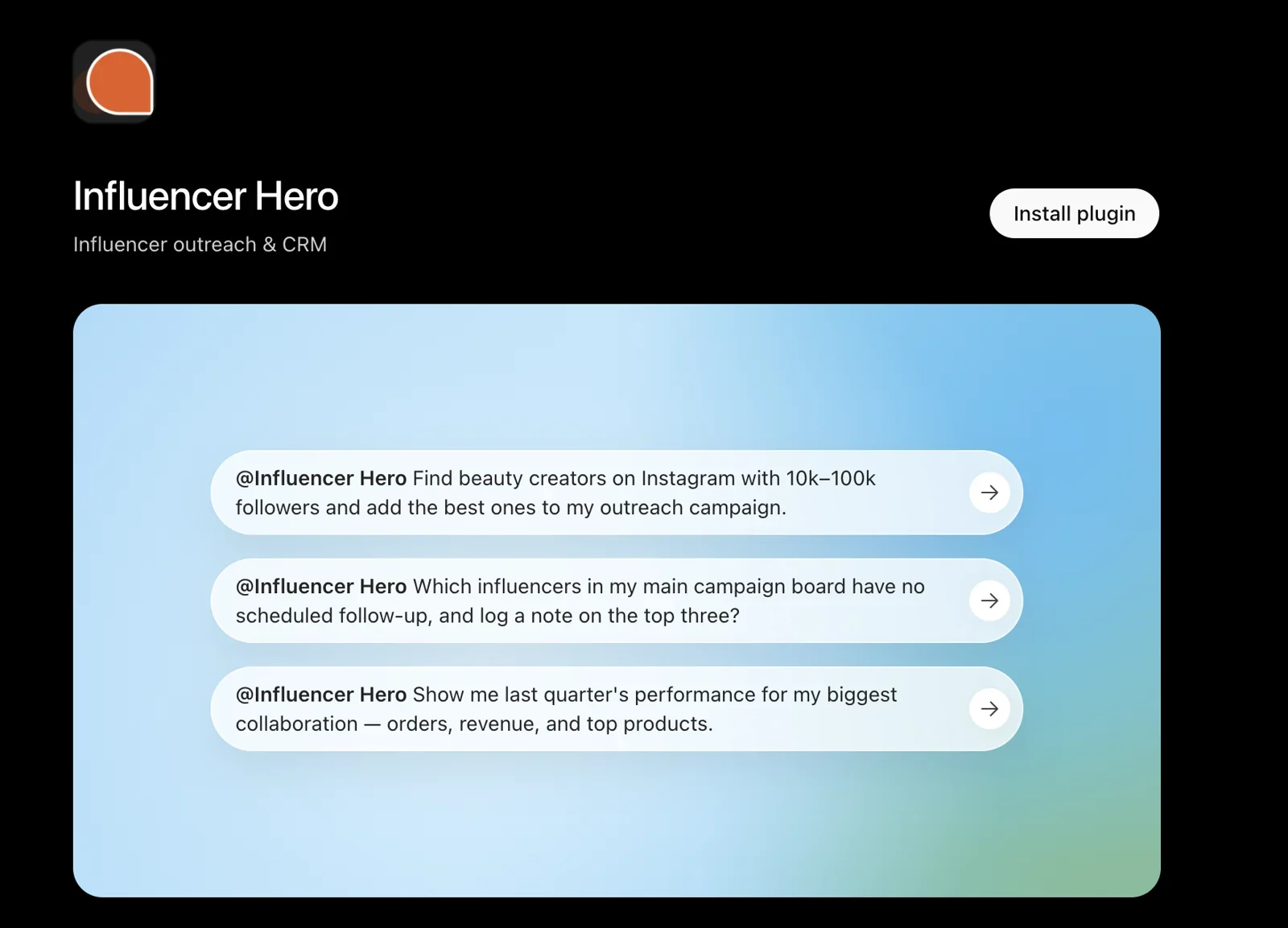
What It Can Do
- Creator discovery: search Instagram, TikTok and YouTube from a 450M+ creator database by niche, followers, location and audience location, plus lookalikes, audience reports and contact emails. Learn more about AI Profile Search.
- Bulk actions: send emails or flows, send products, move stages, add notes or tasks, request content or payouts, and set codes and commissions for whole groups of creators.
- Automations: describe a rule in one sentence and it's built on your board. See how board automations work.
- CRM and boards: stage counts, filters, full creator timelines, notes and tasks in your influencer CRM.
- Application pages: create, edit and publish application forms, then accept or reject applicants.
- Products, codes and links: send products from your connected store, and create discount codes, affiliate links and commissions per creator.
- Content, payouts and reports: request and approve content, manage payouts, and generate reports for any campaign or date range.
Built-In Safeguards
- Account-changing actions (emails, product orders, payouts and credit spend) always need your approval.
- You see the exact list of creators before any bulk action runs.
- New automations are saved inactive until you approve them.
- The assistant only sees the brands and boards your login can access, and follows your role.
- Creators can be archived and restored, not deleted.
- Most actions are free. Searches, audience reports and contact emails use the same credits as in the app, and you're told before any are spent.
How to Connect It
- Add the Influencer Hero connector in your AI assistant (Claude, ChatGPT or Gemini).
- Log in and authorize your Influencer Hero account.
- Start prompting. Name the campaign or board, the stage and the result you want for the best answers.
Setup takes a few minutes and needs no code. For step-by-step instructions, see the setup guide. For every feature in detail, read our full Influencer Hero MCP guide. New to AI assistants? Start with using ChatGPT for influencer marketing.
Influencer Hero is trusted by 1,200+ brands and 150+ agencies and rated 5.0/5.0 (Capterra). Brands on managed plans also get a dedicated human account manager, available 24/7.
Want to see the MCP running on a real creator program? Book a demo and we'll walk you through it live.
Tips for Getting the Most Out of an Influencer Marketing MCP
- Be specific: name the campaign, board, stage and result you want.
- Start with read questions: get comfortable with daily checks and reports before running bulk actions.
- Double-check money: verify budget, fee and payout totals before sharing them.
- Schedule your routines: turn your daily check or weekly report into a scheduled task so it's ready every morning.
- Combine tools: connect Slack, email or Google Sheets alongside your influencer MCP to automate handoffs to other teams.
- Keep setup in the platform: build campaigns, board stages and email flows in your influencer platform, then let the assistant run and track them.
Final Thoughts
An MCP turns your AI assistant from a writing tool into a teammate that can actually work inside your influencer program. Instead of jumping between boards, inboxes and reports, you ask, review and approve.
When you compare options, look past the "we have an MCP" label. The real difference is whether it only reads your data or also takes action, and whether it keeps you in control while it does.
Summary
This is some text inside of a div block.
This is some text inside of a div block.
Pricing/Month
Shopify Reviews
This is some text inside of a div block.
This is some text inside of a div block.
This is some text inside of a div block.
This is some text inside of a div block.
This is some text inside of a div block.
This is some text inside of a div block.
This is some text inside of a div block.
This is some text inside of a div block.
This is some text inside of a div block.
This is some text inside of a div block.
This is some text inside of a div block.
This is some text inside of a div block.
This is some text inside of a div block.
This is some text inside of a div block.
This is some text inside of a div block.
This is some text inside of a div block.
This is some text inside of a div block.
This is some text inside of a div block.
This is some text inside of a div block.
This is some text inside of a div block.
This is some text inside of a div block.
Read More

FAQs



Most Popular Blogs


Drive ROI With Influencer Marketing
Join 1,200+ brands and 150+ agencies scaling creator programs with Influencer Hero.