
Influencer Hero MCP: Run Your Influencer Marketing From Claude, ChatGPT and Gemini

October 20, 2026
|
Veröffentlicht

October 20, 2026
|
Aktualisiert

11 minutes
|
Lektüre

Influencer Performance Marketing Kurs | GUTSCHEIN: IMC100

Gabriela Molina
I Author

Steigern Sie Ihren ROI mit Influencern

Globale Influencer-Datenbank
ALL-IN-ONE Plattform
CRM, Affiliate, UGC & More
Influencer Hero MCP: Run Your Influencer Marketing From Claude, ChatGPT and Gemini
Your AI assistant can now run your influencer campaigns. With the new Influencer Hero MCP, you can connect Claude, ChatGPT, or Gemini directly to your IH account and [find creators, send outreach, and pull campaign reports] without leaving the chat.
The Influencer Hero MCP connects your Influencer Hero account to the AI assistant you already use, so you can ask in plain language and get the work done: "Who's in Product Received and hasn't posted yet?" "Move everyone in Outreach who never replied to On Hold." "Create a 15% discount code for @anna and set her commission to 10%."
It ships alongside a big upgrade to how you search for creators inside Influencer Hero. Below, we break down what the MCP is, what it can actually do, the new search engine behind it, and how to get started.
What Is the Influencer Hero MCP?
MCP stands for Model Context Protocol. It's an open standard that lets an AI assistant connect to other software, read its data and use its tools.
The Influencer Hero MCP is a connection between your Influencer Hero account and an AI assistant like Claude, ChatGPT or Gemini. Once it's connected, the assistant can read your boards, creator timelines, email history, payouts and reports, and take actions on your behalf, always asking for your approval before it changes anything.
A few things worth knowing upfront:
- No API or developer needed. You connect it from your AI assistant in a few clicks. It’s available on all Influencer Hero plans.
- It's not a separate product. The MCP runs on top of your Influencer Hero account. Campaigns, board stages and email flows are still set up in the web app; the assistant then runs and tracks them.
- Your permissions apply. The assistant only sees the brands and boards your login can open, and follows your role.
Why It's Different: An MCP That Takes Action, Not Just Reports
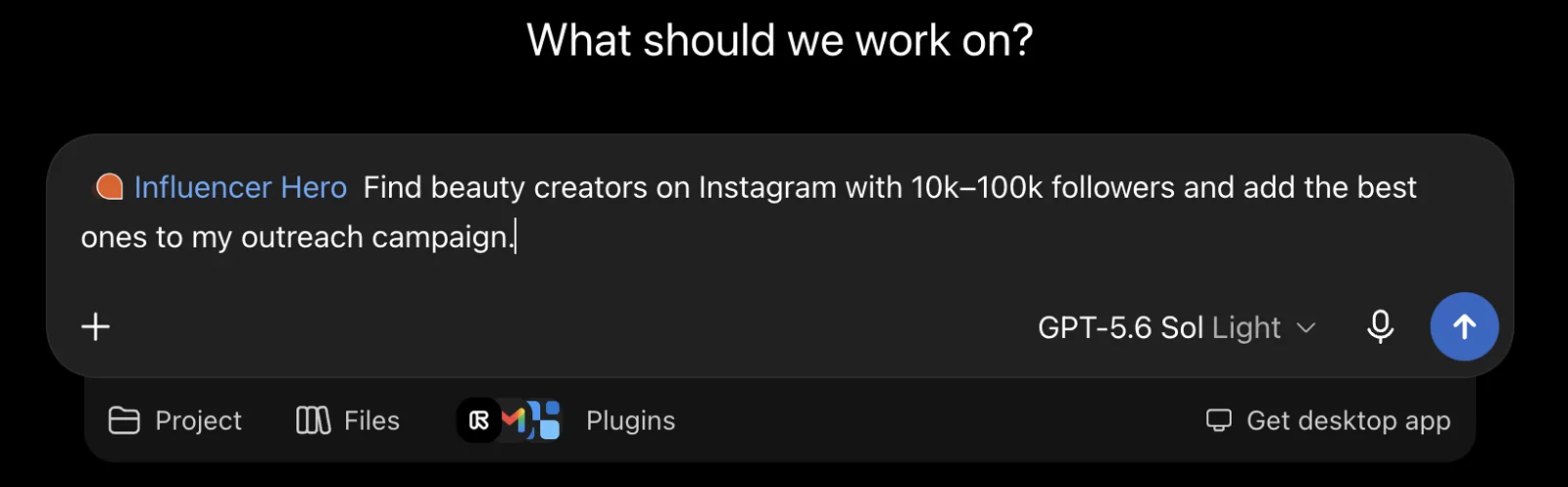
MCPs are popping up across influencer marketing tools, but most of them are built around one job: pulling data out. You can ask for creator profiles, audience stats or a performance summary, and that's where it ends. The actual work (moving creators, sending emails, shipping products, setting up codes, paying people) still happens by hand on the platform.
We took a different route. We built a large set of endpoints so the Influencer Hero MCP covers the full campaign workflow, not just reporting. That means you can run large-scale actions from a single prompt:
- Move 80 creators to a new stage in one go
- Send a starter kit to everyone in the Accepted stage
- Add 10 creators to a campaign and kick off their outreach sequence
- Create discount codes, affiliate links and commission rates per creator
- Request content, review submissions and create payout requests
Reading is instant. Anything that changes your account goes through an approval step first, so you get the speed of automation without losing control.
Quick Comparison: By Hand vs With the MCP
What You Can Do With the Influencer Hero MCP

Here's everything the MCP covers today, with prompts you can copy straight into your assistant.
Find the Right Creators
Search creators on Instagram, TikTok and YouTube by niche, follower range, location and audience location, or ask for creators similar to one you already like. Before reaching out, pull an audience report (credibility, demographics, top posts) and the contact email.
Searches, reports and contacts use credits, and the assistant tells you before any are spent.
- "Find TikTok creators in the US with 10k to 100k followers who post about home fitness."
- "Find Instagram creators similar to @handle."
Act on Many Creators at Once
This is where the MCP earns its keep. Describe a group of creators by stage, country, followers, reply status or sales, then run one action on all of them: send an email or flow, send products, move stage, add a note or task, request content or a payout, or set codes and commissions.
You see the exact list of creators before anything runs.
- "Move everyone in Outreach who never replied to Not Interested/On Hold."
- "Move @handle1, @handle2 and @handle3 to Product On The Way."
Build Automations in Plain Language
Describe a rule in one sentence and the assistant builds it on your board. A rule has a trigger (application accepted, stage change, product sent or received, creator posted), optional conditions, and actions like sending an email, creating a discount code, moving a stage or creating a task.
New automations are saved as inactive, and you approve a summary before they go live. The stages, email templates and flows it uses need to exist already, and you'll need a Manager role or above.
- "Create an automation: when a creator moves to Product On The Way, send my On The Way email."
- "When a creator moves to Product Received, wait 7 days, then send my post reminder email."
Keep Your Campaign Board Up to Date
Ask how many creators sit in each stage, filter them in plain language, or get the full history of one collaboration: emails, notes, tasks, products sent, payouts and posts. You can also move a creator, add a note, or create and assign a task with a due date.
- "How many creators are in each stage of my board?"
- "Move @handle to Product Received and add a note: delivery confirmed by email."
Run Your Application Page
Create an application page, edit its steps, preview it and publish it, including on your own domain. Then review who applied and accept or reject each one. Accepted creators land on the board you choose (Manager role or above).
- "Who applied this week?"
- "Accept @handle and reject @otherhandle."
Start and Manage Outreach
Add creators to a campaign to start its outreach emails, check what's scheduled for any creator, start or stop an email flow, or send a one-off email. You see the creators, the sender and the text before anything goes out.
- "Add these 10 creators to my Spring Launch campaign."
- "What emails are scheduled for @handle?"
Send Products
Search your connected store's catalogue and send a product to one creator or a whole stage. This creates a real order in your store, so you confirm the creators and products first.
- "Send the starter kit to everyone in the Accepted stage."
Set Up Codes and Links, and Track Sales
Create a discount code, a tracked affiliate link and a commission rate for each creator. Codes are created directly in your connected store. Then check each creator's clicks, orders, sales, top products and earnings, day by day.
- "Create a 15% discount code ANNA15 for @anna and set her commission to 10%."
- "How many clicks and sales has @handle generated so far?"
Request and Review Content
Request specific deliverables with your guidelines, see what a creator submitted, and approve it or send back changes. You can also search your Content Wall by description, platform, post type, views, likes or whether the product is shown.
- "Request one Reel and two Stories from @handle with these guidelines: …"
- "Find Reels on my Content Wall with over 50k views that show the product."
Pay Your Creators
List payouts by status, see totals paid over time, create a payout request (and ask the creator for an invoice), log a payment made outside the platform, or decline a request. You can also invite creators to the Creator Dashboard.
You confirm the amount, currency and brand before a payout is requested.
- "Which payouts are still open?"
- "Create a $200 payout for @handle for her September Reel."
Get Reports on Demand
Pull a report for the whole account or for specific campaigns and boards, over any date range: creators contacted, response rates, sales, payouts, ROI and content. You can compare several boards side by side in one report.
- "Compare my two boards for September and give me three takeaways."
The New Creator Search Behind It
The MCP lands alongside a major upgrade to the Influencer Finder. Through your AI assistant, you can search Instagram, TikTok and YouTube creators using natural-language prompts and find lookalikes from a single creator handle, all powered by Influencer Hero’s proprietary search engine, which indexes 450M+ creator profiles. Inside the platform, the Influencer Finder also offers visual search, Deep Research and lookalike discovery across multiple creators and campaigns.
Here's what's new.
Describe What You Want in Plain Language

Type something like "Hyrox athletes in Germany with an email" and the AI applies the right filters for you: followers, country, has email and more. You can tweak any filter afterwards.
Tip: the more specific your prompt, the better the results. "Fitness creators" gets you a long list. "Female Hyrox athletes in Germany, 10k–80k followers, who post training content weekly" gets you a shortlist.
Visual Search
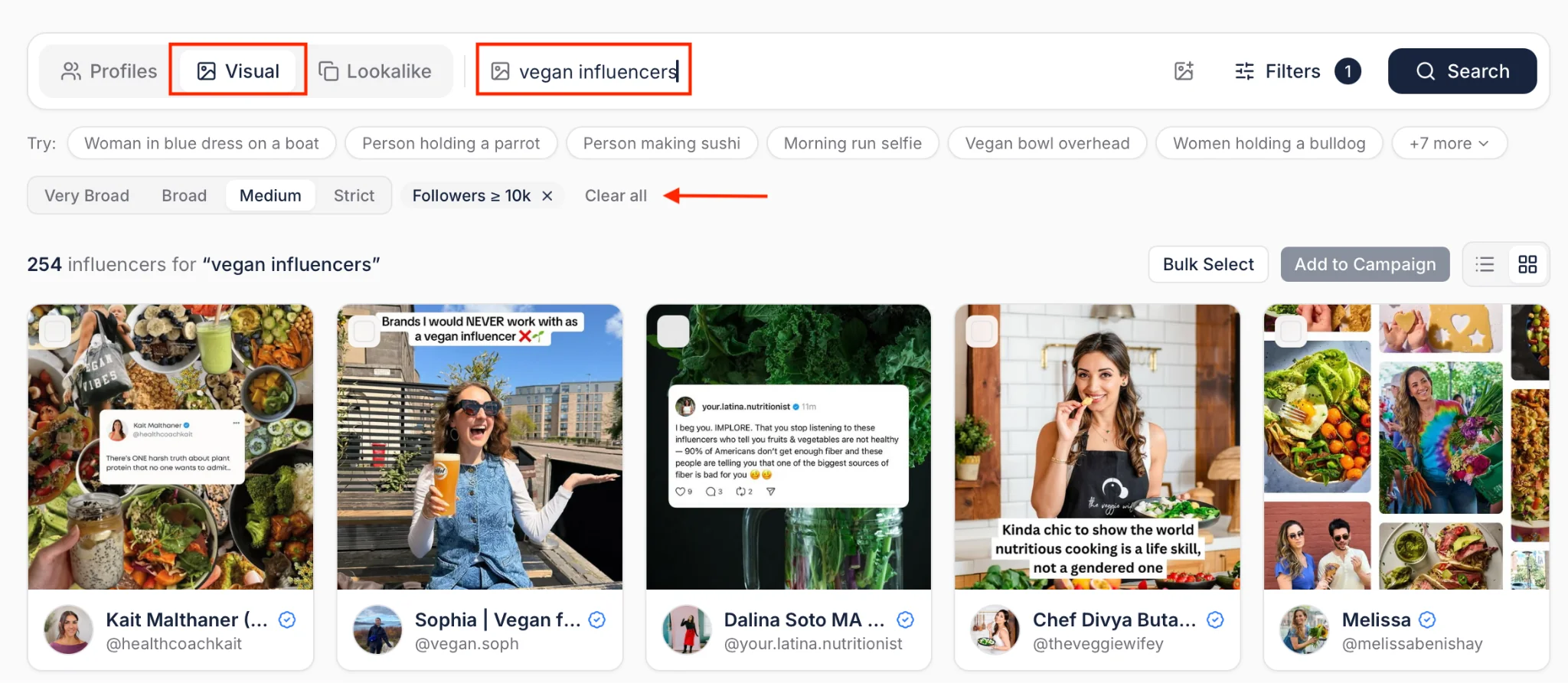
Describe a look or upload an image, and the Finder returns creators whose content matches it visually. Have a creator post that crushed it for your brand? Upload it and find more creators who shoot content like that.
You can stack regular filters on top (country, email available, follower range) to narrow results further.
Lookalikes From Multiple Creators or a Whole Campaign
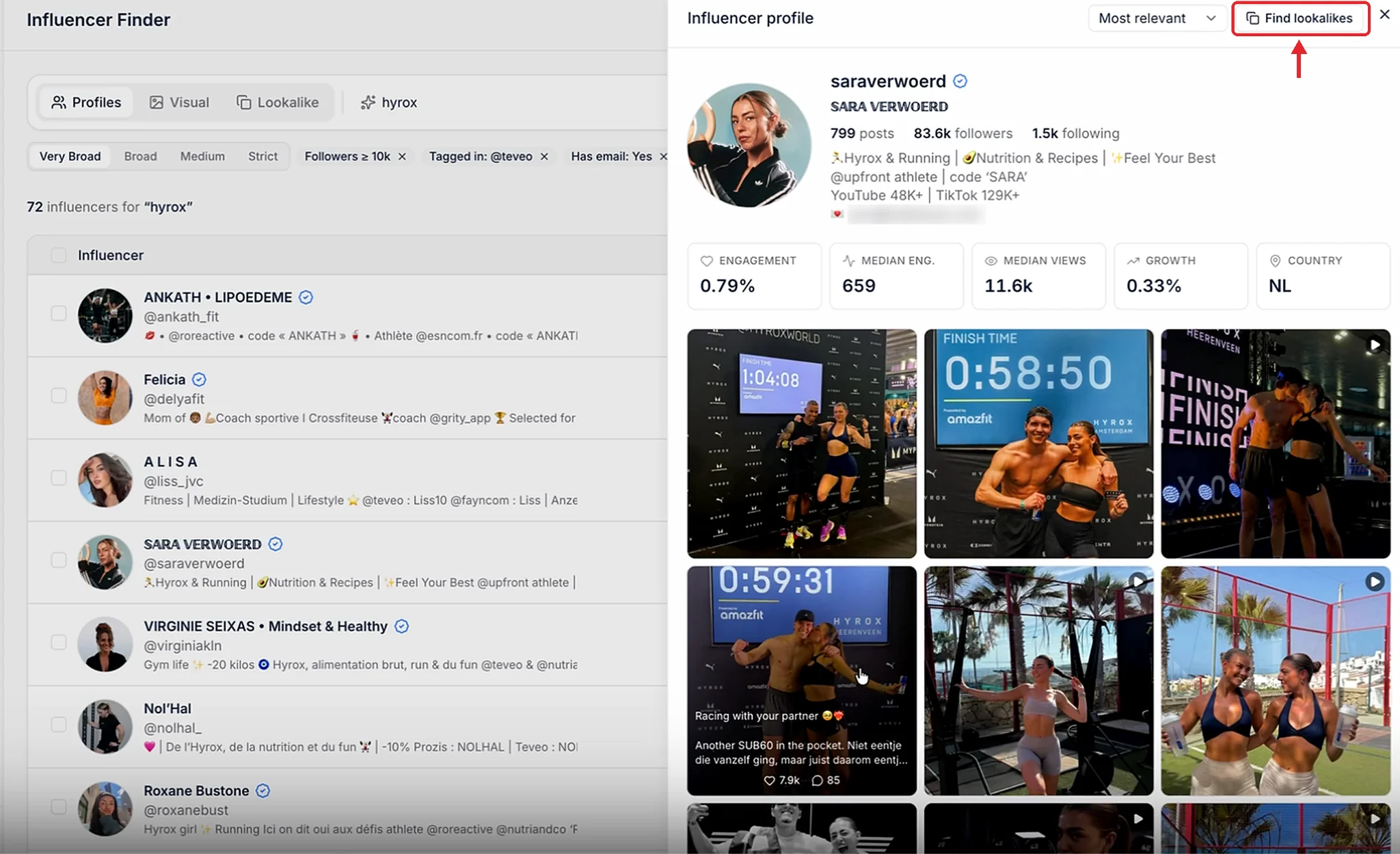
Lookalike search used to work from a single handle. Now you can enter several handles at once, or run a lookalike search based on every creator in a campaign. Add your three best performers to a campaign, run lookalikes on it, and get creators who match all of them.
You can also preview any creator's feed and metrics right from the results, and jump straight to their lookalikes from that preview.
Deep Research
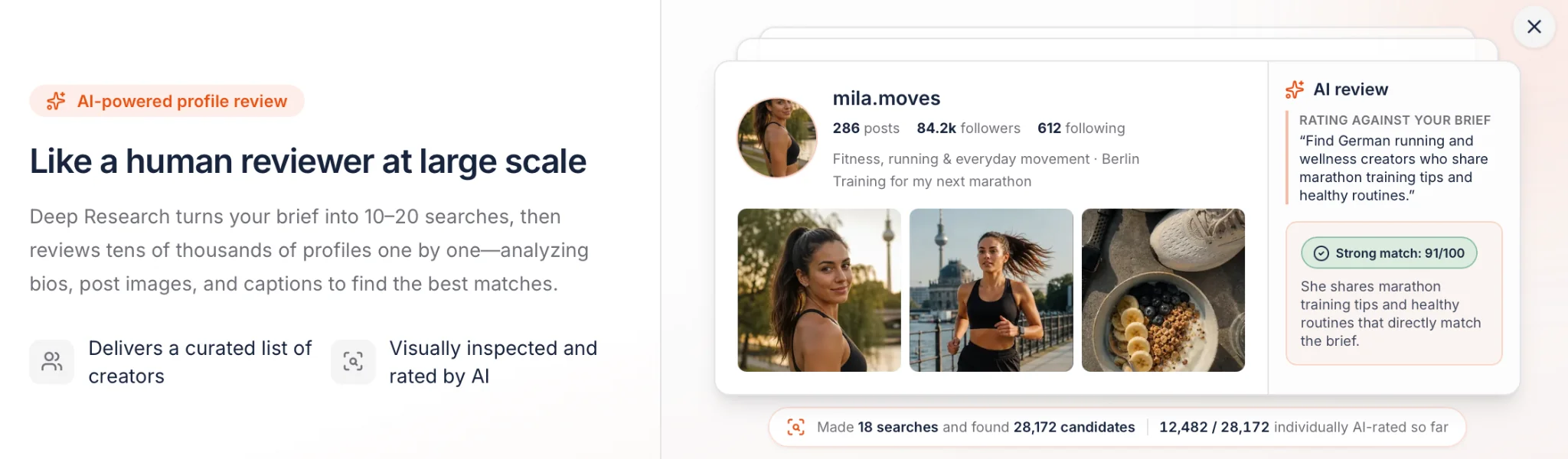
Think of it like Deep Research in ChatGPT, built for creator discovery. You write a brief, and the AI shows you six sample profiles. You mark each one as a good fit or not (and tell it why), then submit your feedback.
From there, it runs 10 to 20 searches on your behalf, removes duplicates, and scores every creator from 0 to 100 against your brief, with a short explanation of why each one is a match.
Expand or Refine Any Search
Every search type comes with a dial from very broad to very strict. Too few results? Expand. Too much noise? Refine. No need to start over.
You Stay in Control
Giving an AI access to your campaigns only works if you trust what it does. The MCP is built with clear guardrails:
- Approval before spending credits. The assistant waits for your approval before using report or contact credits. Search behavior may vary depending on your AI assistant’s settings, so some searches can run without a separate confirmation.
- Your role and permissions apply. It only sees the brands and boards your login can access.
- Nothing gets deleted by accident. Creators can be archived and restored, not deleted.
- Some limits are intentional. The MCP can't delete deals, export all your deals to a spreadsheet (use the export in the app for that), or mark payouts as paid.
- Credits work the same way. Most actions are free. Anything that costs credits in the app (searches, reports, contacts) costs the same through the MCP.
And when you need a person, not a prompt, brands on managed plans still get 24/7 support from a human account manager. The AI handles the busywork; our team is there for strategy and the tricky stuff.
How to Get Started
Setup takes a few minutes and doesn't require any code.
- Have an Influencer Hero account. Anyone on your team with access to Influencer Hero can use the MCP.
- Add the Influencer Hero connector in your AI assistant (Claude, ChatGPT or Gemini). Step-by-step instructions are in our Help Center.
- Log in and authorize your Influencer Hero account.
- Start asking. Try the morning check prompt from the table above.
One thing to know: each AI account connects to one Influencer Hero account at a time. If you manage several, disconnect and reconnect to switch.
Tips for Better Prompts
The MCP is only as good as what you ask it. A few habits that make a big difference:
- Name the board or campaign. "My Spring Launch board" beats "my campaign."
- Name the stage. "Creators in Product Received" is clearer than "creators who got the product."
- Say what you want back. "Give me a list with handle, follower count and last message date" gets you a usable output instead of a wall of text.
- Chain steps. "Find everyone in Negotiation, rank them by follower count and engagement, then draft a reply to the top five" turns 30 minutes of triage into one prompt.
Take Your Influencer Campaigns to the Next Level
Most influencer marketing tools are adding AI as a reporting layer: ask a question, get a chart. The Influencer Hero MCP goes further. It lets your AI assistant actually run the campaign, from finding creators and launching outreach to sending products, creating codes and requesting payouts, with you approving every change.
Pair that with the new search engine (plain-language search, visual search, multi-creator lookalikes and Deep Research) and you spend less time clicking and more time on the decisions that actually move your program forward.
Already an Influencer Hero customer? Connect the MCP today and try your first prompt. New here? Book a demo and we'll show you what it can do with your own campaigns.
Zusammenfassung
Dies ist ein Text in einem Div-Block.
Dies ist ein Text in einem Div-Block.
Preisgestaltung/Monat
Shopify Bewertungen
Dies ist etwas Text in einem Div-Block.
Dies ist Text in einem Div-Block.
Dies ist Text in einem Div-Block.
Dies ist etwas Text in einem Div-Block.
Dies ist Text in einem Div-Block.
Dies ist Text in einem Div-Block.
Dies ist etwas Text in einem Div-Block.
Dies ist Text in einem Div-Block.
Dies ist Text in einem Div-Block.
Dies ist etwas Text in einem Div-Block.
Dies ist Text in einem Div-Block.
Dies ist Text in einem Div-Block.
Dies ist etwas Text in einem Div-Block.
Dies ist Text in einem Div-Block.
Dies ist Text in einem Div-Block.
Dies ist etwas Text in einem Div-Block.
Dies ist Text in einem Div-Block.
Dies ist Text in einem Div-Block.
Dies ist etwas Text in einem Div-Block.
Dies ist Text in einem Div-Block.
Dies ist Text in einem Div-Block.
Mehr erfahren

Häufig gestellte Fragen


Beliebteste Blog-Beiträge


Steigern Sie Ihren ROI mit Influencer Marketing
Über 1.200 Marken und mehr als 150 Agenturen skalieren ihre Creator-Programme mit Influencer Hero.