Páginas de Solicitud de Creadores: Permita que los Influencers Soliciten Colaborar con Su Marca
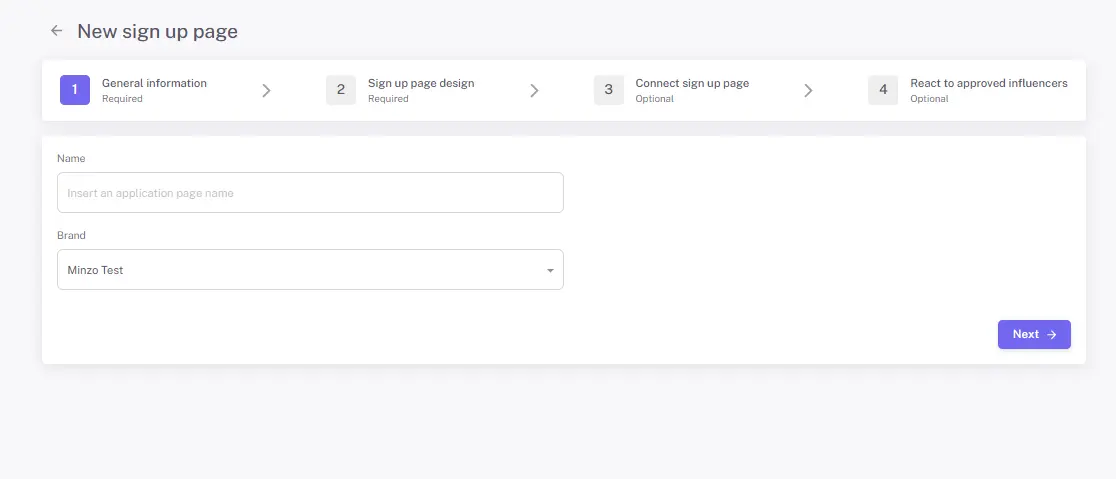
Ya sea que esté haciendo la transición de mensajes directos manuales o buscando refinar una estrategia de reclutamiento existente, automatizar su interés entrante es la clave para escalar sin agotamiento. Puede hacerlo fácilmente a través de nuestras Páginas de Solicitud de Creadores.
La herramienta de Página de Solicitud le proporciona un formulario de recopilación simple y personalizable para recopilar todo lo que necesita de antemano, desde identificadores de redes sociales hasta detalles de envío y preguntas de afinidad con la marca, todo en un solo lugar.
Dado que Influencer Hero es una plataforma todo en uno, los creadores aprobados se sincronizan automáticamente con su CRM de Influencers, lo que facilita pasar de la solicitud al envío de obsequios, enlaces de afiliados o colaboraciones pagadas sin trabajo manual.
Veamos cómo utilizar las páginas de solicitud para que creadores de alto interés vengan a usted.
Cómo Funcionan las Páginas de Solicitud de Creadores en Influencer Hero
Piense en las Páginas de Solicitud de Creadores como la puerta de entrada digital de su marca para posibles asociados. En lugar de que su equipo haga todo el trabajo pesado manual para encontrar influencers, esta función le permite alojar una página profesional "Únete a Nuestro Equipo" donde los creadores vienen a usted.
Actúa como un guardián automatizado, asegurando que cada solicitante proporcione los datos exactos que necesita, desde estadísticas de redes sociales hasta direcciones de envío, antes de que lleguen a su CRM. Esto cambia su flujo de trabajo de "búsqueda" a "selección", permitiéndole escalar su comunidad sin la sobrecarga administrativa.
Para comenzar, simplemente navegue a la pestaña Solicitudes en su menú de la izquierda, donde puede administrar formularios existentes o crear uno nuevo desde cero.
Paso 1: Diseñar Su Página de Destino Marcada
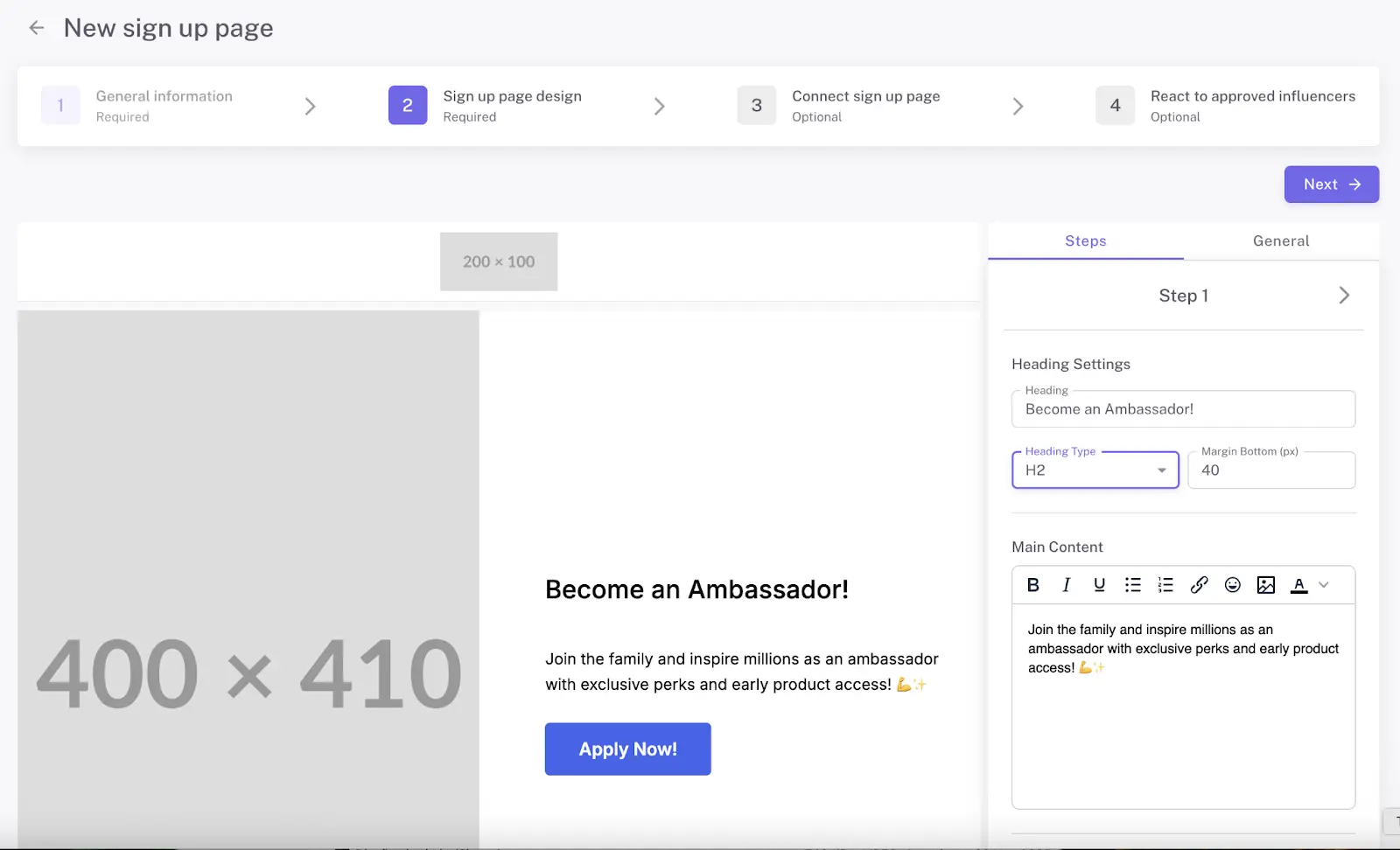
Lo primero que hará es personalizar la apariencia de su página para asegurarse de que se sienta como una extensión natural de su sitio web. No necesita un diseñador ni un desarrollador; la interfaz le permite alternar entre configuraciones de marca fácilmente.
Personalización Visual: Puede cargar el logotipo de su marca, elegir sus colores primarios y agregar una imagen de bienvenida de alta calidad para establecer el tono de su asociación.
Preguntas Personalizadas: Más allá de lo básico, puede agregar campos personalizados para hacer cualquier pregunta a los creadores, como por qué aman su marca o cuál es su producto favorito.
Paso 2: Establecer Sus Requisitos
Para mantener su calidad alta, el sistema le permite establecer pasos "obligatorios" para los solicitantes.
Verificación de Cuenta: Puede requerir que los influencers verifiquen sus cuentas de redes sociales, que automáticamente extraen sus estadísticas en tiempo real en su panel.
Datos Logísticos: Puede elegir hacer que los detalles de envío sean un requisito desde el principio, para que tenga todo lo que necesita para enviar un obsequio en el momento en que sean aprobados.
Paso 3: Elegir Su Método de Alojamiento
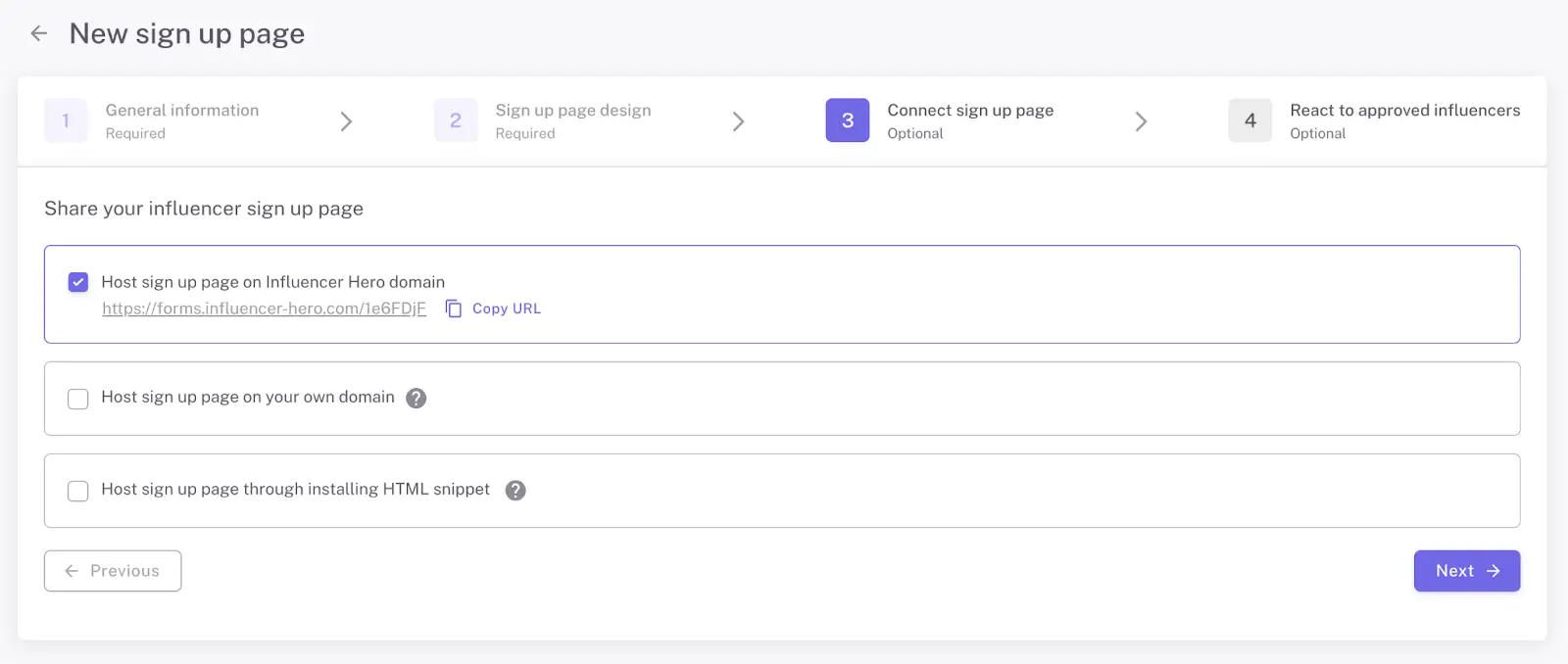
Una vez que su página esté lista, tiene tres formas flexibles de presentarla a los creadores:
Enlace Directo: Alójelo en un dominio de Influencer Hero para la configuración más rápida, perfecto para compartir en su biografía de Instagram o herramientas de enlace en biografía.
iFrame Incrustado: Utilice un fragmento de código simple para incrustar el formulario directamente en su propio sitio web (como una página "Colaboraciones" en Shopify) para que los creadores nunca abandonen su sitio.
Dominio Personalizado: Conecte su propio subdominio (p. ej., https://www.google.com/search?q=ambassadors.yourbrand.com) para una experiencia completamente personalizada.
Paso 4: Revisión y Aprobación de Solicitantes (H3)
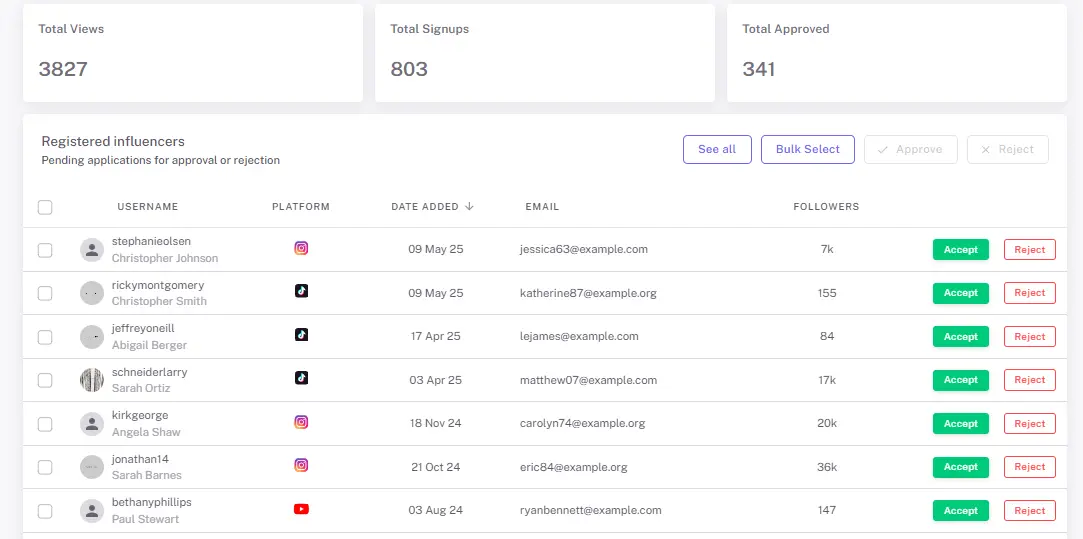
A medida que llegan las solicitudes, aparecen en un panel centralizado "Influencers Registrados". Esta es su estación de evaluación donde puede verificar estadísticas sociales y revisar la alineación con la marca en una sola vista.
Una vez que aprueba un influencer, puede elegir activar automáticamente una serie de acciones que manejan el trabajo manual por usted. Puede habilitar una o varias automatizaciones según su flujo de trabajo:
Asignación en CRM: Asigne automáticamente el creador a un tablero de campaña (por ejemplo, Gifting o Performance)
Configuración de Afiliado: Genere instantáneamente un código de afiliado único y un enlace para el creador.
Flujo de Correo de Bienvenida Automatizado: Active una secuencia de incorporación con detalles de campaña, pautas o próximos pasos.
Activación de Rastreo de Publicaciones: Active automáticamente el rastreador UGC para rastrear y monitorear las publicaciones de redes sociales y el desempeño del contenido del influencer.
Opciones de Cumplimiento y Logística: Influencer Hero le permite adaptar su flujo de trabajo posterior a la aceptación para que coincida con sus operaciones internas:
Logística Automatizada: Utilice la información de envío del creador para redactar automáticamente pedidos de productos al aprobar.
Selección Personalizada de Productos: Seleccione manualmente productos para cada creador o establezca artículos predeterminados que se envíen automáticamente a cada socio aceptado.
Paso 5: Gestión de la Lista "Aún No" (H3)
No todos los solicitantes serán adecuados hoy, pero podrían ser perfectos para una campaña futura. Influencer Hero le permite rechazar creadores mientras los mueve a un tablero de campaña específico de "Posibles Clientes Futuros". Incluso puede configurar un flujo de correo automático y educado para informarles que ha recibido su solicitud pero no está avanzando por ahora.
Qué Puede Hacer Con Páginas de Solicitud de Creadores
Una vez que su página de solicitud está en vivo, el objetivo cambia de "buscar" creadores a "curar" su comunidad. La función de Página de Solicitud actúa como un filtro, permitiéndole pasar del interés inicial a una asociación activa en cuestión de clics. Aquí le mostramos cómo se ve ese flujo de trabajo en la práctica:
1. Crear Embudos de Entrada Personalizados
Puede crear múltiples páginas de solicitud personalizadas para campañas específicas, como una "Guía de Regalos Navideños" o un "Programa de Embajador a Largo Plazo". Para cada página, puede personalizar el diseño y agregar preguntas específicas para asegurar que está recopilando la información exacta —como estilo de contenido, productos favoritos o detalles de envío— que su equipo necesita para tomar una decisión.
2. Automatizar Control de Calidad
En lugar de verificar manualmente el conteo de seguidores o el engagement de un creador, puede requerir verificación de cuenta social directamente en el formulario. Esto asegura que solo influencers con cuentas comerciales o de creadores legítimas puedan aplicar, y extrae automáticamente sus estadísticas en tiempo real en su panel de control para revisión.
3. Convertir Interés en Flujos de Transacciones Estructurados
Las páginas de solicitud eliminan la necesidad de entrada de datos manual. En el momento en que un influencer solicita, su perfil se organiza en un panel centralizado donde puede aprobar o rechazarlos con un solo clic. Los creadores aprobados se mueven automáticamente a su CRM de Influencers y se asignan a un tablero de campaña específico, transicionándolos instantáneamente de un "solicitante" a un "socio".
4. Vincular Sin Problemas a Gifting y Afiliados
Debido a que la plataforma es todo en uno, una solicitud aprobada puede activar toda su cadena de logística. Puede configurar el sistema para generar automáticamente un Enlace de Afiliado único y código de descuento para el creador en el momento en que son aceptados. Si su tienda de comercio electrónico está conectada, incluso puede hacer que el sistema active un envío de producto inmediatamente después de la aprobación.
Cuándo Los Equipos Utilizan Páginas de Solicitud de Creadores
¿Es esta función para usted? La mejor manera de responder es observar cómo las marcas en crecimiento utilizan la contratación inbound para resolver desafíos reales de escalabilidad. Ya sea que sea un fundador en solitario o un equipo de marketing global, aquí hay algunos escenarios donde las Páginas de Solicitud se convierten en su activo más valioso.
1. Escalando un Programa de Embajador o Afiliado
Cuando desea pasar de 10 a 1.000 socios, no puede permitirse el lujo de buscar manualmente a cada uno. Necesita una "puerta de entrada" donde los creadores puedan acercarse a usted.
El Escenario: Desea lanzar un programa de embajadores perenne donde cualquier fan de su marca pueda solicitar unirse.
El Flujo de Trabajo: Cree una página de solicitud marcada y vinculela en su biografía de Instagram o en el pie de página de su sitio web. A medida que los creadores solicitan, se filtran y organizan automáticamente en su panel, permitiéndole aprobar fans de alta calidad en lotes y trasladarlos directamente a su flujo de afiliados.
2. Lanzamiento de una "Convocatoria Abierta" para Campañas Específicas
A veces necesita un gran volumen de creadores para un evento específico, como el lanzamiento de un producto estacional o un impulso navideño.
El Escenario: Está lanzando una nueva línea de cuidado de la piel y necesita 50 creadores para publicar durante la semana de lanzamiento.
El Flujo de Trabajo: Construya una página de solicitud específica de campaña con preguntas personalizadas adaptadas al lanzamiento. Comparta el enlace a través de sus canales sociales o newsletter. Al requerir verificación en redes sociales, se asegura de que solo los creadores que cumplan con sus criterios específicos (como la calidad de seguidores y el engagement) lleguen a su tablero de campaña.
3. Simplificación de Solicitudes de Mensajes Directos Inbound
Si su marca tiene una fuerte presencia social, es probable que reciba mensajes "¿colaboración?" todos los días. Administrar esto manualmente es un drenaje importante de tiempo.
El Escenario: Su gerente de redes sociales está abrumado por cientos de mensajes no verificados de influencers.
El Flujo de Trabajo: Cree una página estándar de "Colaboración de Influencers" y úsela como su respuesta automática para todas las consultas inbound. Esto obliga a los creadores a proporcionar sus estadísticas e información de envío por adelantado. Solo dedica tiempo a revisar perfiles verificados que ya han sido organizados por el sistema.
4. Verificación de Creadores de Alta Calidad
Cuando necesita contenido para anuncios (UGC), debe asegurarse de que los creadores realmente tengan el equipo o el estilo que se adapte a su marca antes de enviar el producto.
El Escenario: Necesita creadores que puedan producir contenido de video de alta calidad y desea ver su portafolio antes de comprometerse.
El Flujo de Trabajo: Agregue campos personalizados a su página de solicitud solicitando un enlace a su portafolio o su identificador de TikTok. Utilice el panel "Influencers Registrados" para revisar su trabajo anterior y estadísticas sociales. Una vez aprobado, el sistema puede activar automáticamente un flujo de correo electrónico que les envíe su brief creativo.
Cómo las Páginas de Solicitud de Creadores se Conectan con Otras Funciones de Influencer Hero
En muchas configuraciones, la contratación de influencers es un proceso fragmentado. Puede publicar una convocatoria abierta en redes sociales, recopilar nombres en un Formulario de Google y luego copiar manualmente esos detalles en un CRM o una hoja de cálculo separados. Construimos Influencer Hero para que sus páginas de solicitud no sean solo una herramienta de entrada independiente, sino el punto de entrada automatizado para todo su motor de influencer marketing.
Aquí es cómo sus leads inbound fluyen naturalmente a través del resto de la plataforma:
Páginas de Solicitud + CRM y Seguimiento de Relaciones
En el momento en que aprueba a un solicitante, no es solo un nombre en una lista, sino que se convierte en una parte activa de su ecosistema.
Creación de Perfil Instantáneo: Los creadores aprobados se agregan automáticamente a su CRM de Influencers con todas sus estadísticas sociales verificadas, información de contacto y detalles de envío ya completados.
Integración Visual de Dealflow: Puede trasladar influencers aceptados directamente a un Tablero de Campaña (Dealflow), permitiéndole rastrear su progreso desde "Contrato Firmado" hasta "Contenido Publicado" en un pipeline centralizado.
Páginas de Solicitud + Alcance e Automatización
Las páginas de solicitud actúan como el disparador para su estrategia de comunicación, asegurando que ningún creador quede esperando.
Flujos de Correo Electrónico Automatizados: Puede configurar Flujos de Correo Electrónico específicos que se activen en el momento en que un influencer es aprobado. Ya sea una secuencia de bienvenida o un brief para su primera asignación, el sistema maneja el alcance mientras usted se enfoca en la estrategia.
Rechazos Profesionales: Incluso puede automatizar secuencias educadas de "no en este momento" para solicitantes rechazados, moviéndolos a una placa dedicada de "Clientes Potenciales Futuros" para que pueda volver a interactuar con ellos en campañas posteriores.
Páginas de Aplicación + Gestión de Gifting y Afiliados
Dado que Influencer Hero se integra directamente con su tienda de eCommerce, aprobar una aplicación puede activar todo su backend logístico.
Envío de Productos Sin Fricción: Si tiene Shopify o WooCommerce conectados, puede configurar el sistema para que active automáticamente un envío de producto en el momento en que se acepta un influencer.
Configuración Instantánea de Afiliados: Puede optar por tener Enlaces de Afiliados únicos, códigos de descuento y estructuras de comisión creadas automáticamente tras la aprobación. Esto significa que un creador puede pasar de solicitante a promotor de su marca en cuestión de minutos.
Páginas de Aplicación + Descubrimiento e IA
Los datos que recopila de las aplicaciones entrantes ayudan a refinar su estrategia de búsqueda general.
Definición de Su Perfil "Ideal": Al revisar qué tipos de creadores se sienten naturalmente atraídos por su marca a través de sus páginas de aplicación, puede usar esos datos para afinar sus filtros en la herramienta de Descubrimiento de Influencers.
Coincidencia Inteligente con IA: Nuestros creadores de nuestra base de datos de 450M+, ayudándole a encontrar más de lo que ya está funcionando para su marca.
Al mantener su reclutamiento y gestión bajo un mismo techo, no solo está recopilando aplicaciones, está construyendo una máquina repetible y escalable que convierte el interés entrante en asociaciones de alto ROI.
Reflexiones Finales
La mejor manera de entender cómo las Páginas de Aplicación de Creadores pueden cambiar su flujo de trabajo de reclutamiento es ver la automatización en acción. Ya sea que esté buscando construir una "puerta principal" profesional para su marca o usar campos personalizados para evaluar perfectamente cada solicitante, la plataforma está diseñada para convertir el interés entrante en asociaciones de alta calidad y activas sin el trabajo manual.
Al integrar sus páginas de aplicación directamente con su CRM de Influencers, gifting y alcance automatizado, elimina el desorden de mensajes directos desorganizados y hojas de cálculo. Influencer Hero proporciona el sistema centralizado que necesita para escalar de algunos creadores a miles mientras mantiene cada interacción personal y profesional.
Reserva una demostración con nuestro equipo para experimentar la simplicidad de nuestra plataforma todo en uno y obtener una vista en vivo de cómo podemos ayudarle a construir su embudo de creadores personalizado hoy.
¿Puedo personalizar el diseño y las preguntas en la página de solicitud?
Sí, puede personalizar completamente toda la página para que refleje su marca, incluidos los colores, logotipos, texto e imágenes de bienvenida. También puede añadir campos personalizados en cada paso del formulario para hacer preguntas específicas y recopilar toda la información que su equipo necesita para evaluar un perfil.
¿Dónde puedo alojar mi página de solicitud de creadores?
Tienes tres opciones de alojamiento flexibles: puedes alojarlo en un dominio de Influencer Hero para la configuración más rápida, usar un fragmento de iFrame proporcionado para incrustarlo directamente en su propio sitio web (como Shopify), o conectarlo a su propio subdominio personalizado para que aparezca como una página de destino nativa en su sitio.
¿El sistema verifica a los influencers que se solicitan?
Sí, puede optar por hacer obligatoria la verificación de cuentas de redes sociales. Si este requisito está habilitado, solo los influencers con una cuenta empresarial o de creador verificada podrán presentar solicitudes, lo que garantiza que solo reciba aplicaciones de creadores de alta calidad y legítimos.
¿Qué sucede automáticamente una vez que apruebo a un solicitante?
Los creadores aprobados se añaden automáticamente a su Influencer CRM y se trasladan a un tablero de campaña dedicado para el seguimiento de relaciones. Desde allí, puede activar instantáneamente secuencias de correo electrónico automatizadas, generar enlaces de afiliado únicos y códigos de descuento, e incluso iniciar el cumplimiento del envío de productos si su tienda eCommerce está conectada.
¿Cómo gestionó creadores que no son la opción correcta?
Puedes rechazar perfiles directamente desde tu panel de control mientras los conservas para futuras oportunidades trasladándolos a un tablero de campaña específico "rechazados". Esto también te permite enviar un flujo de correo electrónico automatizado y opcional para que esos creadores sepan que no fue la coincidencia correcta en este momento.