AI Summary in Influencer Hero: Get the Full Story of Any Creator Deal in Seconds

October 28, 2026
|
Published

October 28, 2026
|
Updated

5 minutes
|
Reading

Influencer Performance Marketing Course | VOUCHER: IMC100

Malena Garcia
IH Author

Drive ROI With Influencers

Global Influencer Database
ALL-IN-ONE platform
CRM, Affiliate, UGC & More
AI Summary in Influencer Hero: Get the Full Story of Any Creator Deal in Seconds
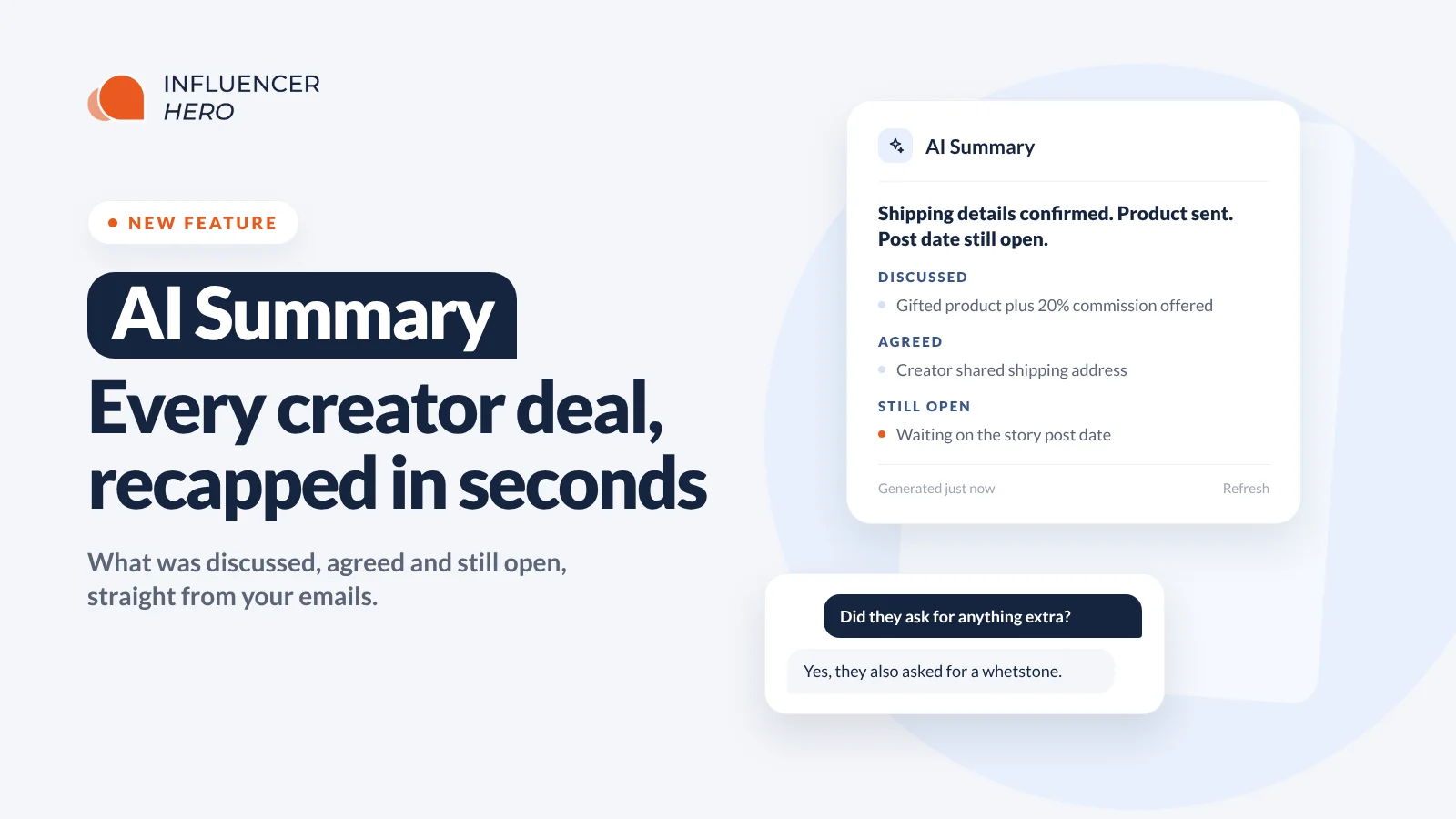
Every creator deal page in Influencer Hero now has an AI Summary. One click gives you a recap of what was discussed, what was agreed and what's still open in your emails with that creator.
Need more detail? Ask a follow-up question in plain English, right on the same page. No more scrolling through months of threads to find out where a collaboration stands.
What's New
- AI Summary on the deal page: a one-click recap of your email conversation with a creator.
- Three clear sections: Discussed, Agreed and Still open.
- Every point is attributed and dated: you see who said it (your team or the creator) and when.
- Chat with this page: ask questions about the creator and get answers drawn from the conversation.
- "Read all emails" toggle: go beyond the timeline and let the AI read the creator's full email history.
- Refresh anytime: regenerate the summary when new emails come in.
Where to Find It
Open any creator from your influencer CRM or a campaign manager board. On the Home tab, AI Summary sits in the left column, right under the board and stage selector and above the creator's details.
Click Generate. A few seconds later, the recap appears.
What the Summary Shows
The summary opens with a one-line status, then breaks the conversation into three parts:
- Discussed: what was offered and asked on both sides.
- Agreed: what's confirmed, like shipping details or the creator's info.
- Still open: what's still waiting on a reply.
Here's a real example from a gifting deal. The status line reads: "Creator provided shipping details; product sent; post date not confirmed."
Under Discussed, it shows that the brand offered a free product plus a 20% commission or discount code, and asked for the creator's planned story post date. Under Agreed, the creator sent their shipping address and confirmed their last name. Under Still open, the brand is still waiting for the creator to confirm the story post date.
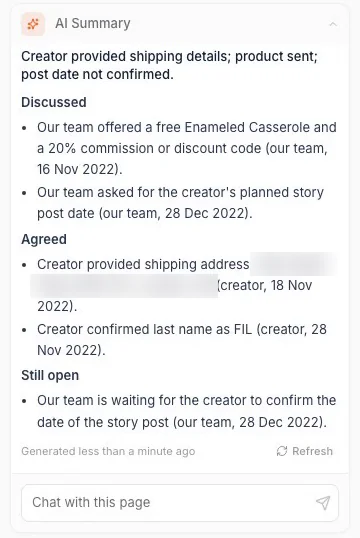
Every bullet includes who said it and the date, so you can check any point against the original thread in seconds. The panel also shows when the summary was generated, with a Refresh button for when the conversation moves forward.
Chat With the Deal Page
Below the summary there's a Chat with this page box. Type a question and get a plain-language answer about that creator.
Questions like:
- "What did the creator ask for?"
- "Did we confirm a post date?"
- "What did we offer this creator?"
It works like a teammate who has already read the whole thread. Ask, get the answer, move on.
Go Deeper With "Read All Emails"
By default, AI Summary works from the deal page timeline, which keeps it fast. For long collaborations, switch on the Read all emails toggle under the chat box. The AI then reads the creator's full email history. It takes a bit longer, and the toggle tells you that.
Here's why it matters. On one deal with 45 emails, we asked: "Did the creator ask for anything extra in the shipment?" Working from the timeline, the AI said it couldn't tell, because the timeline only showed emails sent by the brand.
With "Read all emails" switched on, the same question came back with: yes, on 14 Nov 2022 the creator's team asked if she could also get a whetstone in her package.
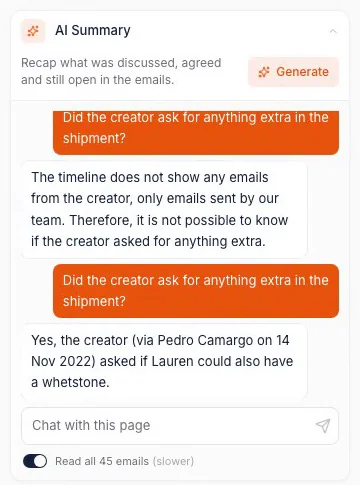
That's the kind of detail that gets lost in a long thread and ends up as a missing item in a shipment. Use the default for quick catch-ups, and flip the toggle when you need to be sure.
Why This Matters
- Handoffs without the homework: covering for a teammate or taking over a campaign no longer means rereading every thread.
- Fewer missed requests: small asks buried deep in an email chain (an extra product, a specific shade, a delivery note) come back to the surface.
- Faster follow-ups: "Still open" tells you exactly what to chase next.
- Easy to verify: every point is attributed and dated, so you're never trusting a black box.
- Built for scale: when you're running hundreds of creators, nobody can read every email. Pair AI Summary with automations, bulk actions and content reviews to keep every deal moving.
Know Every Deal Without Reading Every Email
AI Summary gives you the full story of any creator collaboration in seconds: what was discussed, what was agreed and what's still open. When you need something specific, ask the deal page directly, and switch on "Read all emails" when the answer could be buried deep in the thread.
Book a demo to see how AI Summary fits into your influencer program.
Summary
This is some text inside of a div block.
This is some text inside of a div block.
Pricing/Month
Shopify Reviews
This is some text inside of a div block.
This is some text inside of a div block.
This is some text inside of a div block.
This is some text inside of a div block.
This is some text inside of a div block.
This is some text inside of a div block.
This is some text inside of a div block.
This is some text inside of a div block.
This is some text inside of a div block.
This is some text inside of a div block.
This is some text inside of a div block.
This is some text inside of a div block.
This is some text inside of a div block.
This is some text inside of a div block.
This is some text inside of a div block.
This is some text inside of a div block.
This is some text inside of a div block.
This is some text inside of a div block.
This is some text inside of a div block.
This is some text inside of a div block.
This is some text inside of a div block.
Read More

FAQs



Most Popular Blogs


Drive ROI With Influencer Marketing
Join 1,200+ brands and 150+ agencies scaling creator programs with Influencer Hero.