Influencer-Outreach: Kontaktieren, Verfolgen und Verwalten Sie Creator-Konversationen

February 27, 2026
|
Veröffentlicht

October 12, 2026
|
Aktualisiert

13 Min
|
Lektüre

Influencer Performance Marketing Kurs | GUTSCHEIN: IMC100

Lucía Zabala
| Author

Steigern Sie Ihren ROI mit Influencern

Globale Influencer-Datenbank
ALL-IN-ONE Plattform
CRM, Affiliate, UGC & More
Influencer Outreach: Kontaktieren, Verfolgen und Verwalten Sie Creator-Gespräche
Denken Sie an unser Outreach-Tool als Kommandozentrale Ihres Teams mit KI-Unterstützung. Es nimmt Ihnen die schwere Arbeit beim Kontaktieren von Hunderten von Creatorn ab, ohne dass Sie wie ein Roboter klingen. Sie erhalten die Geschwindigkeit hochwertiger Sales-Automatisierung kombiniert mit dem persönlichen Touch, der Influencer tatsächlich zum Antworten bewegt. Anstatt zwischen Registern zu wechseln, fungiert dieses Tool als Frontend Ihres gesamten Influencer CRM. Kein lästiges Durchsuchen chaotischer Posteingänge mehr und kein Grübeln darüber, wer sich mit wem in Verbindung gesetzt hat.
Durch die direkte Integration in Ihren Shopify Store übernimmt das System die lästige Logistik für Sie. Sobald sich ein Creator zur Zusammenarbeit bereit erklärt, kann das System automatisch eindeutige Rabattcodes generieren, Gifting-Links versenden oder einen DocuSign-Vertrag auslösen, um alles offiziell zu machen.
So funktioniert Influencer Outreach in Influencer Hero
Die Verwaltung einer großvolumigen Outreach-Strategie sollte sich nicht wie ein ganztägiger manueller Job anfühlen. Als beste Influencer-Marketing-Software hat Influencer Hero den gesamten Kommunikationszyklus – vom Finden des richtigen Creators bis zum Abschluss des Deals – in einen optimierten, KI-gesteuerten Workflow zentralisiert.
Hier erfahren Sie genau, wie Sie von einer leeren Seite zu einer aktiven, automatisierten Kampagne gelangen.
1. Das Fundament: Aufbau Ihrer Kampagne
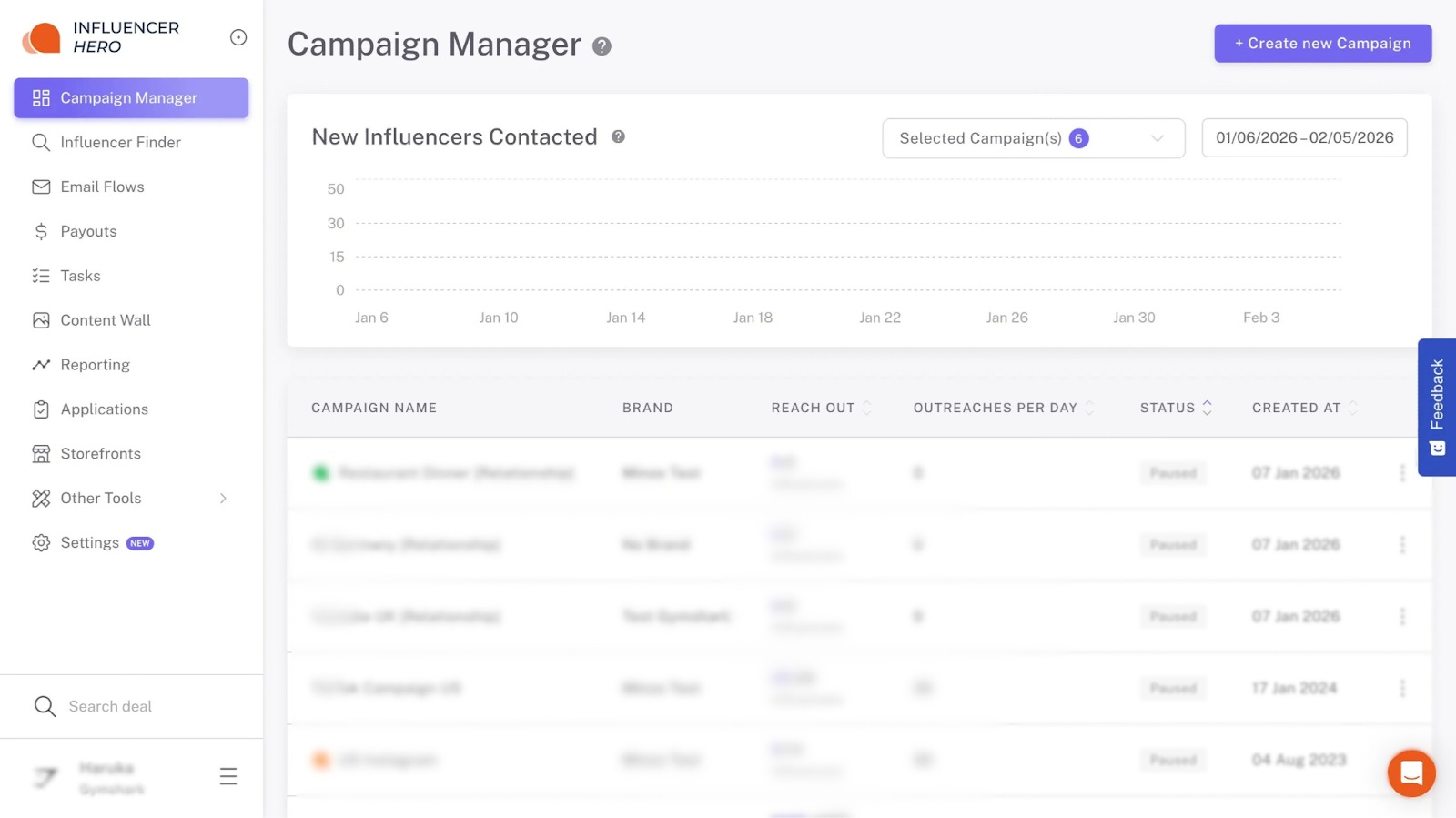
Alles beginnt im Campaign Manager. Um Ihre Outreach zu starten, benötigen Sie drei Kernelemente:
- Influencer-Liste: Die spezifischen Creator, die Sie ansprechen möchten.
- E-Mail-Flow: Ihre automatisierte Abfolge von Kontaktpunkten.
- Campaign Board: Ihr visuelles CRM, in dem jedes Gespräch stattfindet, nachdem die E-Mails versendet wurden.
2. Creator-Recherche und Entwurf mit KI
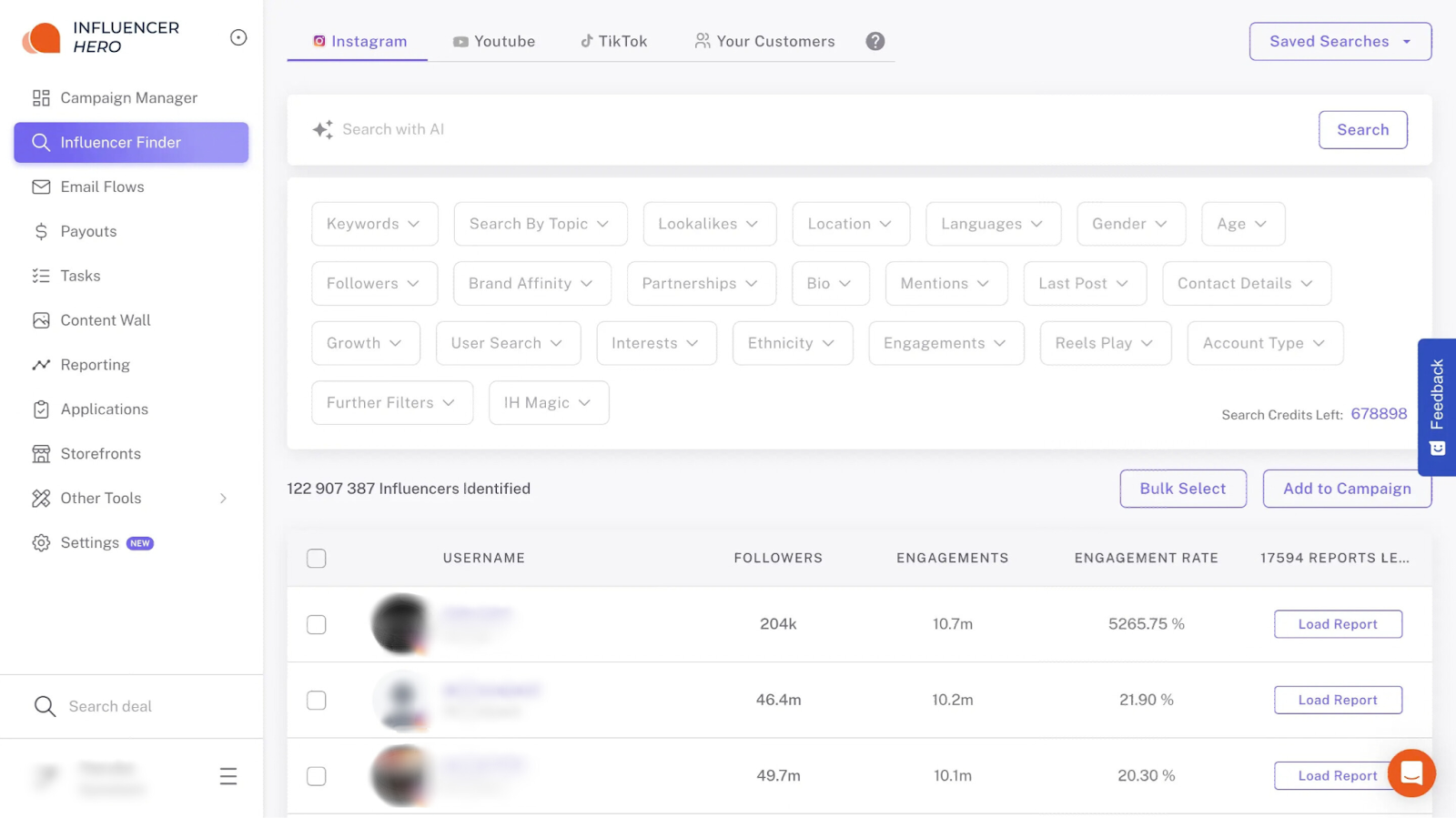
Mit intelligenten Filtern und KI-Suche im Influencer Finder ist die Entdeckung der richtigen Creator schnell und intuitiv. Sobald Sie Ihre Kriterien angewendet und Ihre Shortlist kuratiert haben, sind Sie bereit für den Outreach. Darüber hinaus bietet es mehr als 20 leistungsstarke Funktionen, um den Aufbau Ihrer Influencer-Liste mühelos zu gestalten.
Anstatt auf eine leere Seite zu starren, können Sie unser KI-E-Mail-Flow-Generator nutzen. Beschreiben Sie einfach Ihre Kampagnenziele, wählen Sie die Anzahl der Follow-ups, die Sie möchten, wählen Sie aus mehreren E-Mail-Flows pro Kampagne für einfache A/B-Tests und geben Sie Ihren Absendernamen an.
Die KI generiert in Sekunden eine vollständige, professionelle Outreach-Abfolge – vollständig bearbeitbar, um Ihre Markenstimme zu entsprechen. Sie können auch mit unseren bewährten Outreach-Vorlagen beginnen, wie diese kostenlosen Instagram-Influencer-Partnership-E-Mails von Influencer Hero, um den Kampagnenstart zu beschleunigen.
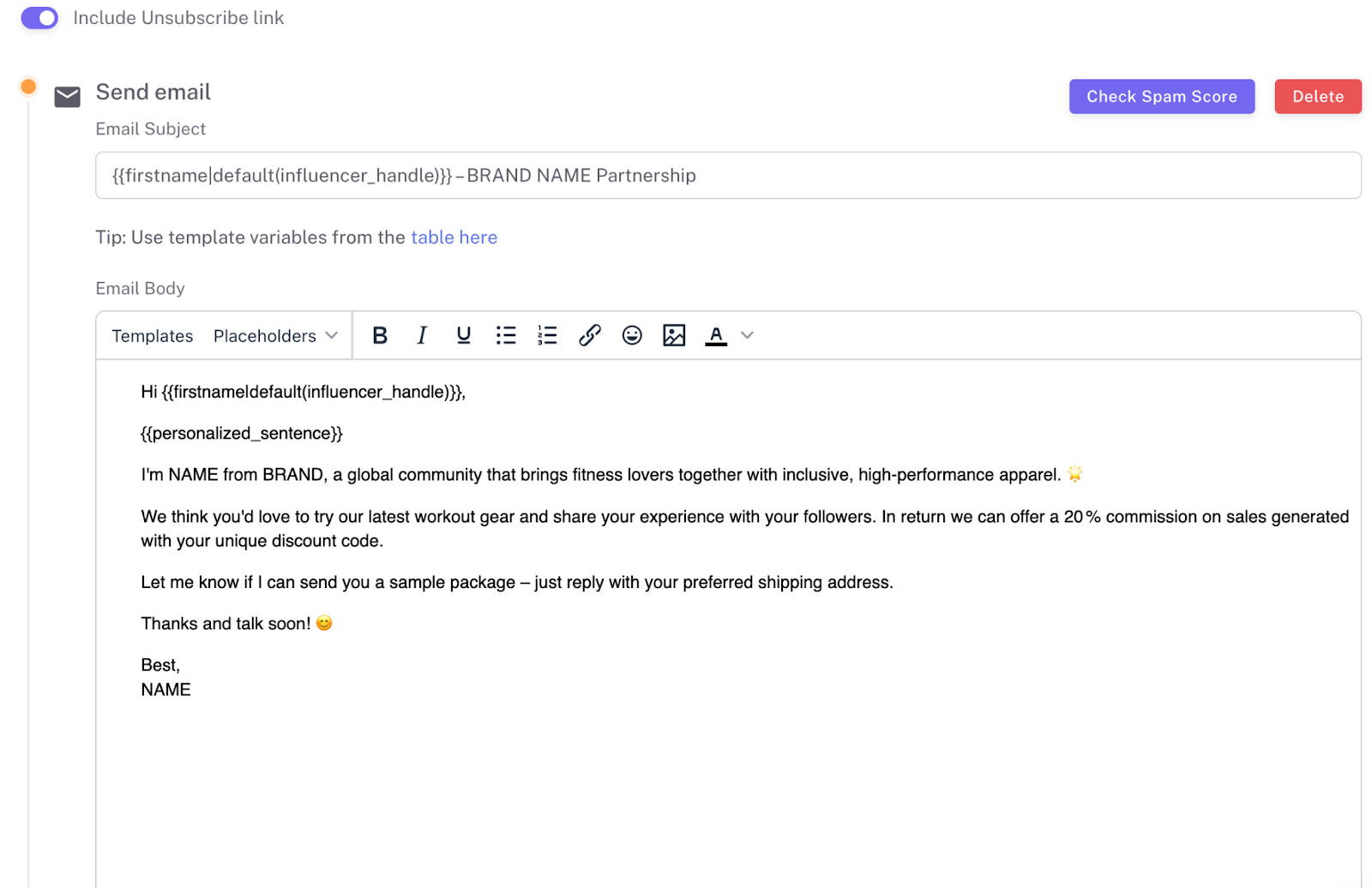
Zusätzlich hilft unsere Spam-Score-Funktion, dass Ihre Outreach-E-Mails im primären Posteingang von Influencern landen und nicht im Spam. Sie analysiert sowohl Ihren E-Mail-Inhalt (Schlüsselwörter, Links, Bilder) als auch den Ruf Ihres Sendkontos und gibt Ihnen dann einen Zustellbarkeitsscore mit umsetzbaren Empfehlungen zur Verbesserung der Posteingangsplatzierung und Antwortquoten.
3. Festlegen Ihrer Outreach-Richtlinien
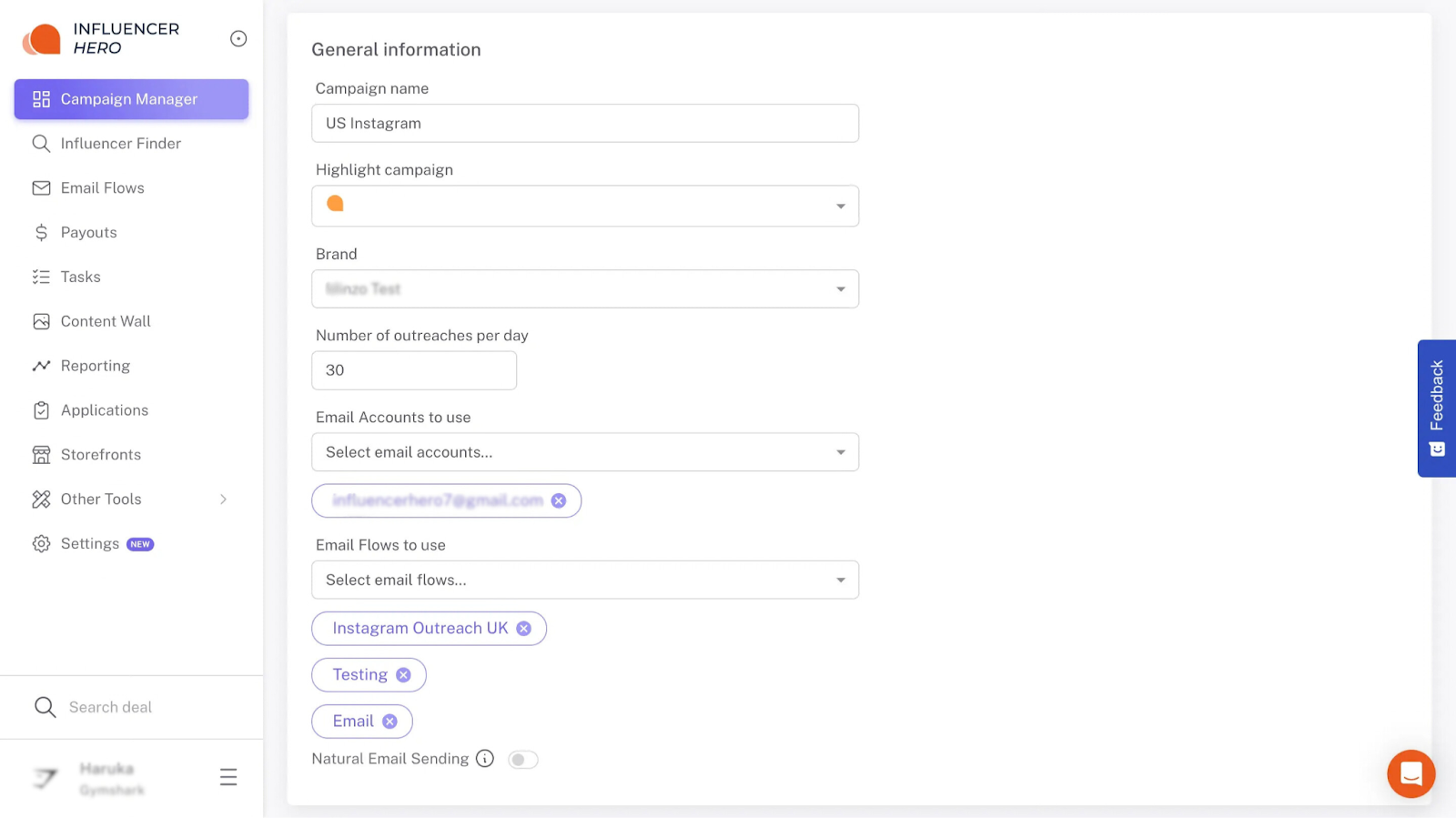
Bevor Sie auf „Start" klicken, gehen Sie zu Einstellungen zur Feinabstimmung der Zustellung. Dies stellt sicher, dass Ihre Outreach menschlich wirkt und Ihren Domain-Ruf schützt:
- Verbundene Konten: Bestätigen Sie, welche E-Mail-Adresse primär sein wird. Sie können mehrere E-Mail-Adressen auswählen.
- Outreach-Volumen: Definieren Sie Ihre „Outreach pro Tag" (wir empfehlen 30 bis 50 neue Kontakte täglich, um in Spam-Ordnern zu bleiben).
- Natürlicher E-Mail-Versand: Verteilt E-Mails über den Arbeitstag des Influencers, um menschlich versendet auszusehen und Spam-Flags zu vermeiden, mit einer Option für sofortigen Versand bei Bedarf.
4. Fortschritt verfolgen: Das Kampagnen-Board
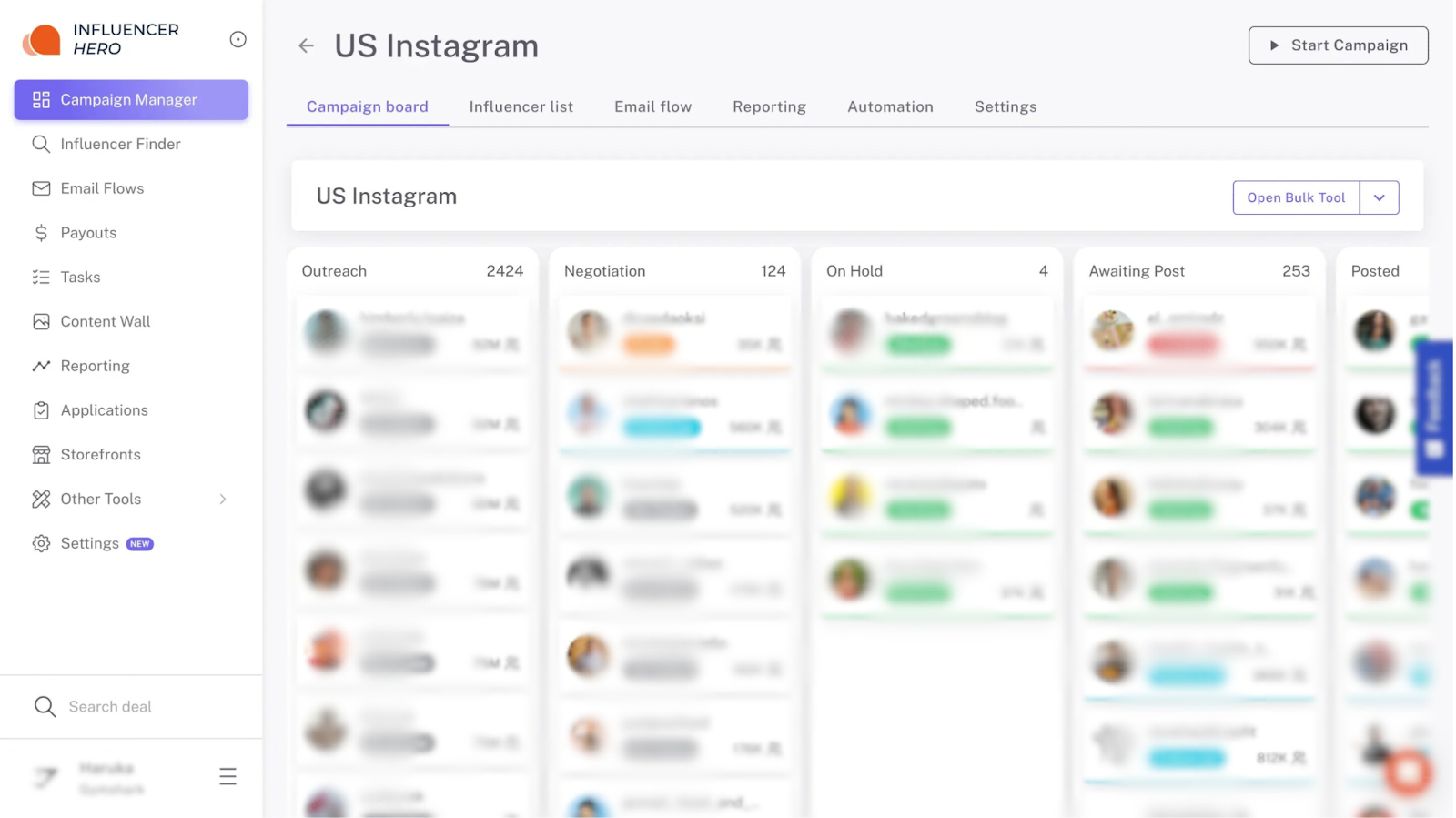
Das Kampagnen-Board ist Ihre Kommandozentrale. Es wird automatisch erstellt, während Sie Ihre Kampagne aufbauen. Sobald Sie auf „Kampagne starten" klicken, läuft der Prozess vollautomatisch:
- Automatisierte Outreach: Kontaktierte Influencer erscheinen sofort in der ersten Spalte „Outreach". Wenn sie nicht antworten, löst das System automatisch Ihre geplanten Follow-ups aus.
- Intelligente Progression: Sobald ein Influencer antwortet, erkennt unser System die Interaktion und verschiebt ihn automatisch in die Spalte „Verhandlung". Dies stellt sicher, dass Sie keinen Lead verpassen und aktive Gespräche priorisieren können.
- Die Master-Ansicht: Jederzeit können Sie zur Registerkarte „Influencer-Liste" im Kampagnen-Manager springen, um einen Überblick über den Status aller zu sehen, wer wartet, wer bereits
Was Sie mit Influencer Outreach erreichen können
Dieser Abschnitt konzentriert sich darauf, was Sie aktiv ausführen können, sobald Ihre Kampagne live ist – wie Sie Creator organisieren, Outreach skaliert personalisieren, Gespräche verwalten und die Leistung in Influencer Hero verfolgen.
1. Erstellen Sie skalierte personalisierte Outreach
Sie können Hunderte von E-Mails versenden, ohne dass sie automatisiert wirken.
In Ihren E-Mail-Flows können Sie:
- Dynamische Platzhalter einfügen (z. B. Vorname, Influencer-Handle, E-Mail-Konto-Signatur, personalisierter Satz)
- Betreffzeilen pro Schritt anpassen
- Nachrichten pro Kampagne anpassen
- Einen personalisierten Satz hinzufügen, der für jeden Influencer einzigartig ist
- Automatisierte Follow-up-E-Mails einrichten
Da Personalisierung wichtig ist, generiert die KI einen eindeutigen Satz für jeden Creator basierend auf Erkenntnissen aus ihren neuesten Posts.
Dieses Gleichgewicht – strukturierte Vorlagen + eine benutzerdefinierte Zeile – ermöglicht es Ihnen, das Volumen zu skalieren und dabei E-Mails authentisch zu halten.
2. Verwenden Sie Massenauswahl basierend auf Ihren Filtern
Outreach verbindet sich direkt mit Ihren gefilterten Ergebnissen in der Influencer-Finder.
Sie können die Massenauswahl-Funktion verwenden, um große Gruppen von Creatorn sofort basierend auf den angewendeten Filtern zu organisieren.
Anstatt Profile einzeln zu bearbeiten, können Sie gefilterte Creator in Massen auswählen und sie in die nächste Phase Ihres Workflows verschieben (z. B. sie einer Kampagnenliste zum Outreach hinzufügen).
Beispiel: Creator nach „Wohndekor" filtern, in den USA ansässig, 10.000–50.000 Follower → Ergebnisse in Massen auswählen → Sie zu Ihrer Kampagne hinzufügen → Ihren E-Mail-Flow starten.
3. Passen Sie Ihre E-Mail-Flow-Strategie an und kontrollieren Sie sie
Sie sind nicht auf eine einzelne statische Nachricht beschränkt.
Sie können:
- Jeden Schritt Ihrer Outreach-Sequenz bearbeiten
- Follow-ups anpassen
- Ton pro Kampagne anpassen
- Verschiedene E-Mail-Flows für Segmentierung oder Tests ausführen
Praktische Setup-Tipps für bessere Leistung:
- Halten Sie die erste E-Mail kurz und prägnant, indem Sie sich selbst, Ihre Marke, den Zweck Ihrer E-Mail und das Angebot vorstellen.
- Schließen Sie einen personalisierten Satz ein
- Verwenden Sie einen einfachen Call-to-Action
- Strukturieren Sie Follow-ups als kurze Erinnerungen, nicht als lange Umschreibungen
4. Verwalten Sie Gespräche im CRM
Outreach verbindet sich direkt mit Ihrem Kampagnen-Board und CRM.
Sie können:
- Sehen, wo sich jeder Influencer befindet (kontaktiert, verhandelt, usw.)
- Interne Notizen hinzufügen
- Abwicklungsfortschritt verfolgen
- Aktive Konversationen priorisieren
Anstatt zwischen Posteingängen und Tabellenkalkulation zu wechseln, bleibt Ihr Kommunikations-Workflow in einem strukturierten System.
5. Outreach-Leistung verfolgen und optimieren
Sie können folgende Metriken überwachen:
- Öffnungsraten
- Antwortraten
- Follow-up-Leistung
- Outreach-Metriken auf Kampagnenebene
Dies ermöglicht es Ihnen, Betreffzeilen zu verbessern, Segmentierung zu verfeinern, Nachrichten anzupassen und verschiedene E-Mail-Abläufe zu testen.
Wann Teams Influencer Outreach verwenden
Das Influencer Hero Outreach-System ist so gestaltet, dass es mit den Anforderungen Ihrer Marke skaliert – ob Sie ein kleines Startup oder ein etabliertes globales Marketing-Team sind. Wenn Sie feststellen, dass Sie mehr Zeit damit verbringen, Tabs zu verwalten, als Beziehungen aufzubauen, haben Sie wahrscheinlich eines dieser drei Szenarien erreicht:
1. Einführung eines neuen Produkts oder Expansion
Szenario: Ihre Marke tritt auf einen neuen Markt ein oder führt ein großes Produkt ein und benötigt schnell Aufmerksamkeit, ohne wochenlange manuelle Outreach.
So hilft Outreach:
- Identifizieren Sie die richtigen Creator mit gezielten Filtern für Nische, Standort und Publikum.
- Nutzen Sie automatisierte E-Mail-Flows mit personalisierten Sätzen, damit Hunderte von Influencern relevante, authentische Kontaktaufnahme erhalten.
- Verfolgen Sie Antworten, Follow-ups und Verhandlungen zentral über das CRM.
Beispiel: Als TCL Verbraucher in den Vereinigten Arabischen Emiraten in kurzer Zeit erreichen musste und dabei neue Premium-TV-Produkte bewies, nutzte NC Media Influencer Heros Outreach, um schnell Creator zu kontaktieren und einzuarbeiten – alles mit maßgeschneidertem Messaging und gesichertem Content, der in nur 4 Wochen 1,6 Millionen+ Impressionen generierte.
Ergebnis: Schnelles Onboarding, Echtzeit-Koordination, klare Nachrichtenkontrolle und hohe Sichtbarkeit in neuen oder wettbewerbsintensiven Märkten.
2. Skalierung von Influencer-Programmen für Saisonkampagnen
Szenario: Sie führen eine hochwertige Saisonkampagne durch (Feiertage, Sommerstoß, Gifting-Event), bei der Timing und Volumen entscheidend sind.
So hilft Outreach:
- Nutzen Sie erweiterte Filter, um Creator auszuwählen, die zum spezifischen Campaign-Vibe passen.
- Führen Sie personalisierte Outreach-Flows mit benutzerdefinierten Sätzen durch, die E-Mails maßgeschneidert wirken lassen.
- Organisieren Sie nach Konversationsstatus, damit sich Ihr Team auf Follow-ups bei wahrscheinlichen Zusammenarbeitern konzentrieren kann.
Beispiel: Beau Bottles nutzte Influencer Hero, um Gifting- und Outreach-Vorgänge zu skalieren und 233 Creator durch strukturierte E-Mail-Flows einzuarbeiten, während fast 2 Millionen Impressionen generiert wurden, zusammen mit 82.000 Dollar an verfolgbarem Umsatz – alles beim Verwalten von Nachrichten im großen Maßstab.
Ergebnis: Effiziente Outreach im großen Maßstab, konsistente Engagement und eine Pipeline hochwertiger Inhalte während kritischer Verkaufsperioden.
3. Aufbau langfristiger Creator-Beziehungen
Szenario: Ihre Marke bewegt sich jenseits von einmaligen Kampagnen und möchte ein zuverlässiges langfristiges Influencer-Ökosystem aufbauen.
So hilft Outreach:
- Benutzerdefinierte E-Mail-Flows helfen dabei, konsistente Kommunikation aufrechtzuerhalten.
- CRM-Tracking ermöglicht es Teams, Influencer nach Leistung oder Nische für zukünftige Aktivierungen zu kennzeichnen.
- Automatische Follow-ups stellen sicher, dass Beziehungen nach dem ersten Kontakt nicht stagnieren.
Beispiel: Für längerfristige Gifting- und Awareness-Bemühungen nutzte Marken wie Arabian Oud automatisierte Outreach, um 280+ Creator zu aktivieren, was zu 500+ UGC-Posts und 4,8 Millionen+ Impressionen führte. Danach wurden Top-Performer mit minimalem wiederholtem manuellem Aufwand für neue Produktaktivierungen erneut eingebunden.
Use-Case-Ergebnis: Anhaltende Influencer-Engagement, wiederholte Zusammenarbeit und ein effizienter Workflow für laufende Aktivierungen.
Wie Influencer Outreach mit anderen Influencer Hero-Features verbunden ist
Da wir eine All-in-One-Plattform sind, ist jede gesendete E-Mail nativ mit Ihrem CRM, der Logistik und der Finanzverfolgung verbunden.
So orchestriert die Outreach-Funktion einen vollständigen, durchgehenden Workflow:
Outreach + Campaign Boards (CRM)
Die Outreach-Funktion dient als „Motor" Ihres CRM. Anstatt eine Tabellenkalkulation manuell zu aktualisieren, erledigt das System die Schwerarbeit:
- Automatische Statusaktualisierungen: Wenn Sie einen E-Mail-Flow starten, werden Creator automatisch auf Ihren Campaign Boards platziert.
- Bidirektionale Synchronisierung:Sobald ein Influencer auf eine Outreach-E-Mail antwortet, erkennt das CRM die Antwort und verschiebt ihn in Echtzeit von „Outreach" zu „Negotiation". Dies wird mit den Spalten „Awaiting Post" und „Posted" fortgesetzt, um sicherzustellen, dass Sie immer wissen, in welcher Phase sich jede Beziehung befindet.
Outreach + Gifting & Shopify Integrations
Durch die Verbindung von Outreach mit unseren eCommerce Integrations können Sie die Logistik des Gifting automatisieren:
- Triggered Fulfillment: Sobald ein Creator Ihre Bedingungen per E-Mail akzeptiert, können Sie automatisch einen Produktversand über Shopify auslösen.
Outreach + Payments & Affiliate Tracking
Outreach überbrückt die Lücke zwischen einer Konversation und einer Conversion:
- Automated Link Generation: Sie können Ihre E-Mail-Flows so einstellen, dass sie automatisch eindeutige Affiliate-Links oder Discount-Codes enthalten, sobald ein Creator Ihrer Kampagne beitritt.
- Payment: Wenn Verkäufe generiert werden, bietet die Outreach-Verlauf den Kontext für Provisionen. Sie können die Leistung verfolgen und sogar Zahlungen über unsere integrierten Affiliate-Management-Tools automatisieren.
Outreach + Reporting & Content Capture
Das ultimative Ziel von Outreach ist ROI. Da unser Outreach-Tool nativ mit unserer Reporting & Analytics Suite verbunden ist, können Sie:
- Attribution: Jeder Klick und jeder Verkauf wird in Echtzeit-ROI-Dashboards verfolgt.
- UGC Library: Sobald das Outreach zu einer Partnerschaft führt, beginnt das System automatisch, die Posts des Creators zu erfassen und in Ihrer UGC-Inhaltsbibliothek für zukünftige Ad-Nutzung zu speichern.
Abschließende Gedanken
Zusammenfassend transformiert Influencer Hero Outreach von einer manuellen Aufgabe in ein leistungsstarkes System, indem es KI-gestützte Kommunikation mit einem zentralisierten CRM vereinigt. Durch die Automatisierung von personalisierten E-Mail-Flows bis hin zu Echtzeit-Statusaktualisierungen auf Ihren Kampagnen-Boards können Sie tausende von Creators skalieren, ohne die persönliche Note zu verlieren, die Conversions antreibt.
Da unser Outreach nativ mit Shopify, Gifting und Affiliate Tracking verbunden ist, ist jede Konversation direkt mit Ihrem ROI verknüpft. Dieser All-in-One-Ansatz beseitigt die Notwendigkeit für fragmentierte Tools und lässt Sie sich auf den Aufbau authentischer Partnerschaften konzentrieren, anstatt Tabellen zu verwalten. Wenn Sie bereit sind, Ihr Wachstum zu automatisieren, buchen Sie noch heute eine Demo, um zu sehen, wie unser Workflow für Sie funktioniert.
Zusammenfassung
Dies ist ein Text in einem Div-Block.
Dies ist ein Text in einem Div-Block.
Preisgestaltung/Monat
Shopify Bewertungen
Dies ist etwas Text in einem Div-Block.
Dies ist Text in einem Div-Block.
Dies ist Text in einem Div-Block.
Dies ist etwas Text in einem Div-Block.
Dies ist Text in einem Div-Block.
Dies ist Text in einem Div-Block.
Dies ist etwas Text in einem Div-Block.
Dies ist Text in einem Div-Block.
Dies ist Text in einem Div-Block.
Dies ist etwas Text in einem Div-Block.
Dies ist Text in einem Div-Block.
Dies ist Text in einem Div-Block.
Dies ist etwas Text in einem Div-Block.
Dies ist Text in einem Div-Block.
Dies ist Text in einem Div-Block.
Dies ist etwas Text in einem Div-Block.
Dies ist Text in einem Div-Block.
Dies ist Text in einem Div-Block.
Dies ist etwas Text in einem Div-Block.
Dies ist Text in einem Div-Block.
Dies ist Text in einem Div-Block.
Mehr erfahren

Häufig gestellte Fragen
Wie verwalten Sie Influencer-Outreach in großem Maßstab?

Die Verwaltung in großem Maßstab erfordert den Übergang von manuellen Tabellenkalkulation zu einem automatisierten System. Teams nutzen Tools, um Massen-Creator-Listen zu erstellen, KI-generierte E-Mail-Sequenzen mit automatisierter Nachverfolgung bereitzustellen und visuelle CRM-Boards zu verwenden, um Hunderte von Gesprächen gleichzeitig zu verfolgen. Dies ermöglicht es einem kleinen Team, das Volumen eines viel größeren Departements zu bewältigen.
Ist es besser, Influencer per E-Mail oder DM zu kontaktieren?
Während DMs für initiales "Social Warming" nützlich sind, ist E-Mail der Industriestandard für professionelle Partnerschaften. E-Mails ermöglichen detaillierte Briefings, Vertragsanhänge und besseres Tracking. Influencer Hero empfiehlt einen hybriden Ansatz: Nutzen Sie automatisierte E-Mail-Flows für die "Schwerarbeit", während Sie eine starke Markenpräsenz in sozialen Medien beibehalten.
Wie verfolgen Sie Influencer-Gespräche und Antworten?
Der effektivste Weg ist eine bidirektionale CRM-Synchronisierung. Wenn ein Influencer auf eine Outreach-E-Mail antwortet, sollte das System seinen Status automatisch auf einem Kampagnen-Board aktualisieren (z. B. von „Outreach" zu „Verhandlung"). Dies stellt sicher, dass kein Lead vergessen wird, und eliminiert die Notwendigkeit manueller Dateneingabe.
Was ist eine "Natural Email Sending"-Funktion beim Influencer-Outreach?
Dies ist eine Sicherheitsfunktion, die zufällige Verzögerungen zwischen E-Mails hinzufügt. Sie verhindert, dass Ihr Konto zu viele Nachrichten auf einmal versendet, was hilft, Spam-Filter zu vermeiden und Ihren E-Mail-Domain-Ruf zu schützen, während Sie einen gleichmäßigen Outreach-„Drip" aufrechterhalten.
Wie kann ich den ROI meiner Outreach-Bemühungen messen?
Die ROI-Verfolgung beginnt in der Outreach-Phase durch das Einbetten von eindeutigen UTM-Parametern und Affiliate-Codes direkt in Ihre E-Mail-Vorlagen. Durch die Verbindung Ihres Outreach-Tools mit Ihrem E-Commerce-Shop (wie Shopify) können Sie genau nachverfolgung, welches Gespräch zu einem Versand, einem Beitrag und letztendlich zu einem Verkauf geführt hat.









Beliebteste Blog-Beiträge


Steigern Sie Ihren ROI mit Influencer Marketing
Über 1.200 Marken und mehr als 150 Agenturen skalieren ihre Creator-Programme mit Influencer Hero.