AI Email Drafts & Automated Follow Ups in Influencer Hero

October 28, 2026
|
Published

October 28, 2026
|
Updated

7 minutes
|
Reading

Influencer Performance Marketing Course | VOUCHER: IMC100

Malena Garcia

Drive ROI With Influencers

Global Influencer Database
ALL-IN-ONE platform
CRM, Affiliate, UGC & More
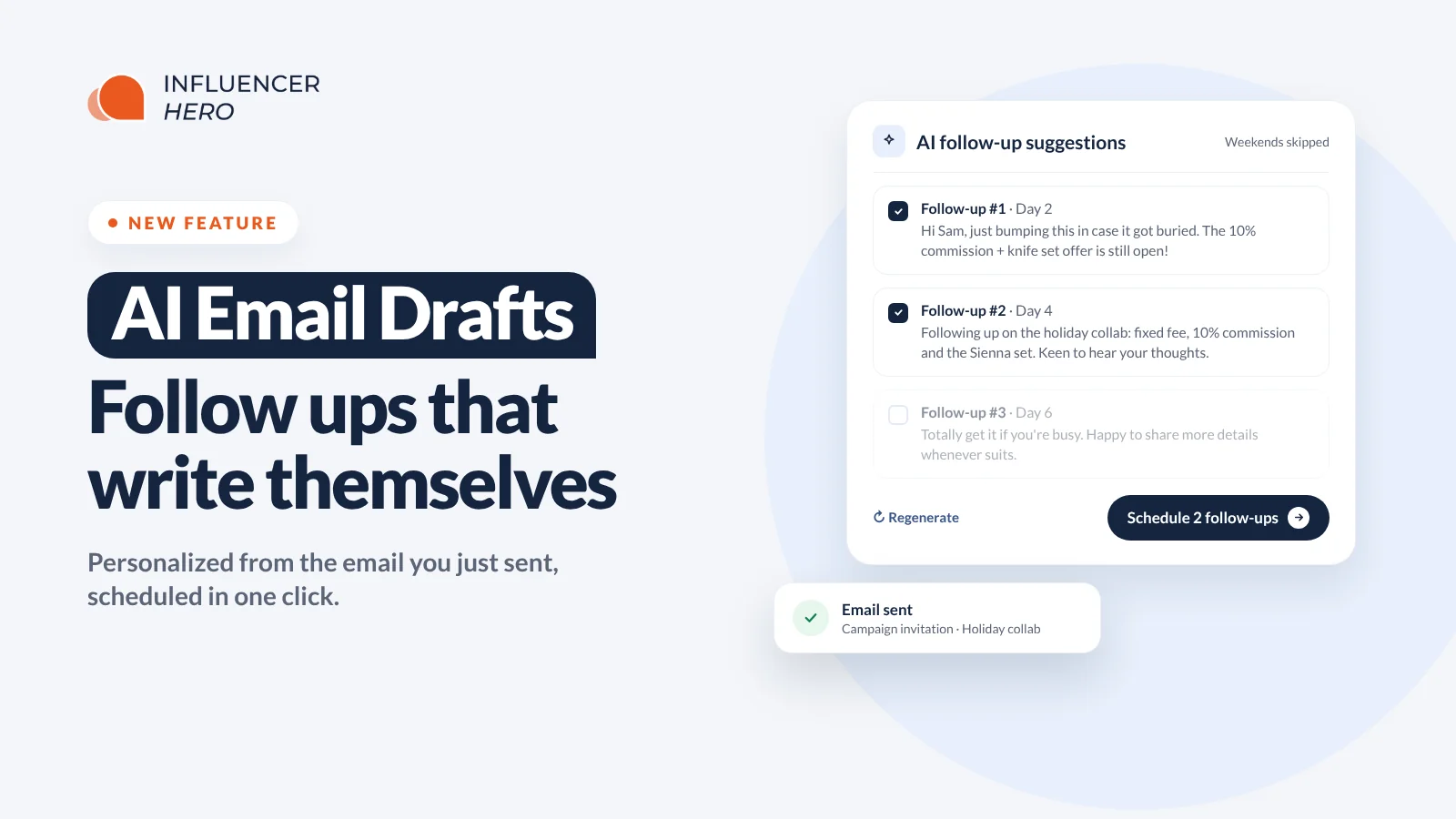
AI Email Drafts & Automated Follow Ups in Influencer Hero
AI email drafts and AI follow up suggestions are now live for all Influencer Hero users, after running with our agency team.
This release brings a redesigned AI Assistant into the email composer, adds AI instructions at both campaign and account level, and introduces AI follow up suggestions that actually reference what you offered in the first email.
If your team sends high email volume and runs process heavy campaigns, this is the release that matters.
What's New
- Rewrite any email before sending, with or without an AI draft open
- All AI email prompts unified behind one AI Assistant button
- AI instructions you can set per campaign board
- Account-wide AI rules in a new Advanced settings tab
- AI follow up suggestions personalized from your original email
- A drip schedule you control, with sends that skip weekends
- Exclusion rules so follow ups never fire on transactional emails
Everything sits inside the email composer, so it works alongside the campaign automations already running on your boards.
Rewrite Any Email, Not Just AI Drafts
Previously you could only use AI to rewrite an email if a draft had already been generated. If there was no draft, you were on your own.
Now the AI Assistant button works on anything in the composer. Type a reply from scratch and rewrite it. Take an existing thread and change the angle. Give it a plain English instruction and it rewrites in place, keeping your signature intact.
Real examples from the composer:
- "Reply, but say nicely that the campaign is on hold"
- "Translate to French"
- "Shorten this and make it friendlier"
- "Add more urgency while staying polite"
The old ChatGPT prompts that lived separately are now unified behind the same AI Assistant button. Fewer places to look, less confusion about which AI does what.
Campaign-Level AI Instructions
You can now customize AI replies per campaign, not just per account. In your campaign settings, find AI Assistant Instructions and give the AI the context for that specific program. The instructions apply to every campaign that shares that board.
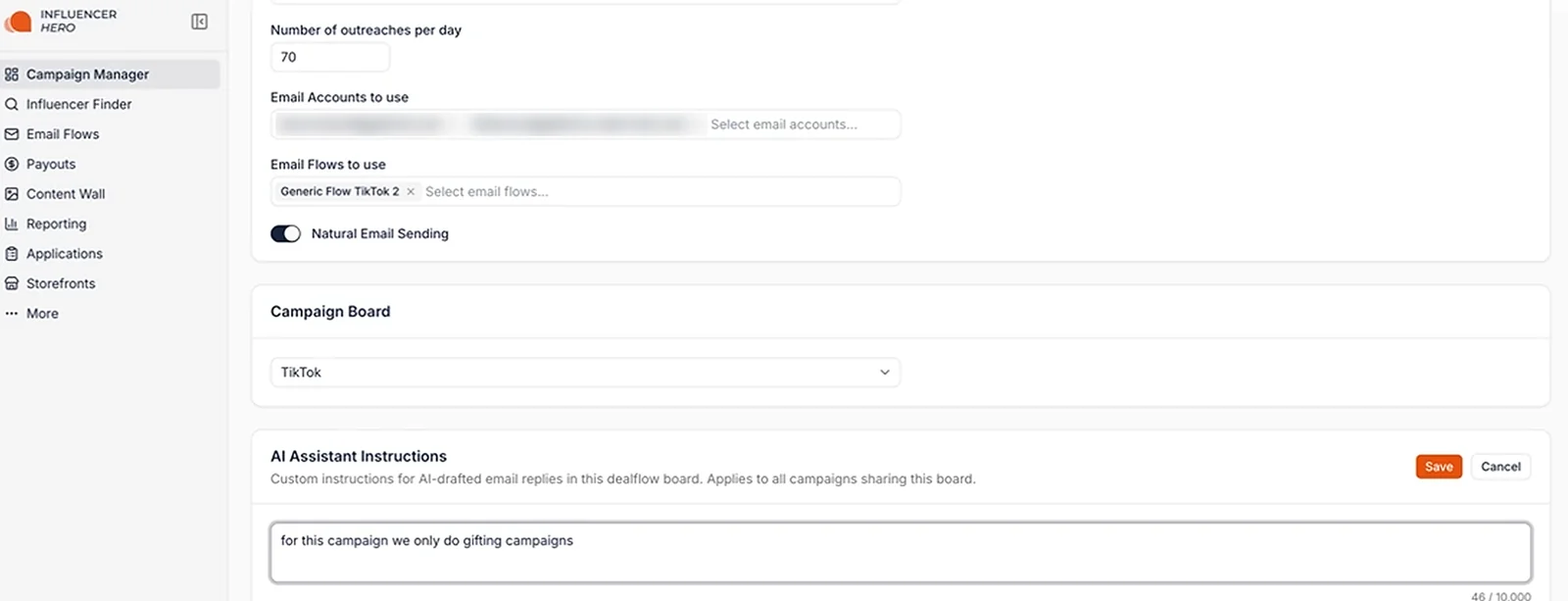
For example:
- "This campaign is gifting only, no paid collaborations"
- "We only send the Sienna knife set on this campaign"
- "This campaign runs for the Christmas holiday period only"
- Campaign dates, product restrictions and any offer terms
Good to know: campaign instructions apply to new drafts, not to ones already created. A draft is generated the moment an influencer email arrives, so update your instructions as soon as new campaign information comes in.
Account-Wide Rules in the New Advanced Tab
Some rules should apply everywhere, and you should not have to repeat them on every campaign.
Settings now has a new Advanced tab. It holds Task Deadlines, Custom Domains and API Settings, which previously sat behind a dropdown, plus the new AI Assistant section. Nothing about those existing settings changed, they just have a proper home now.
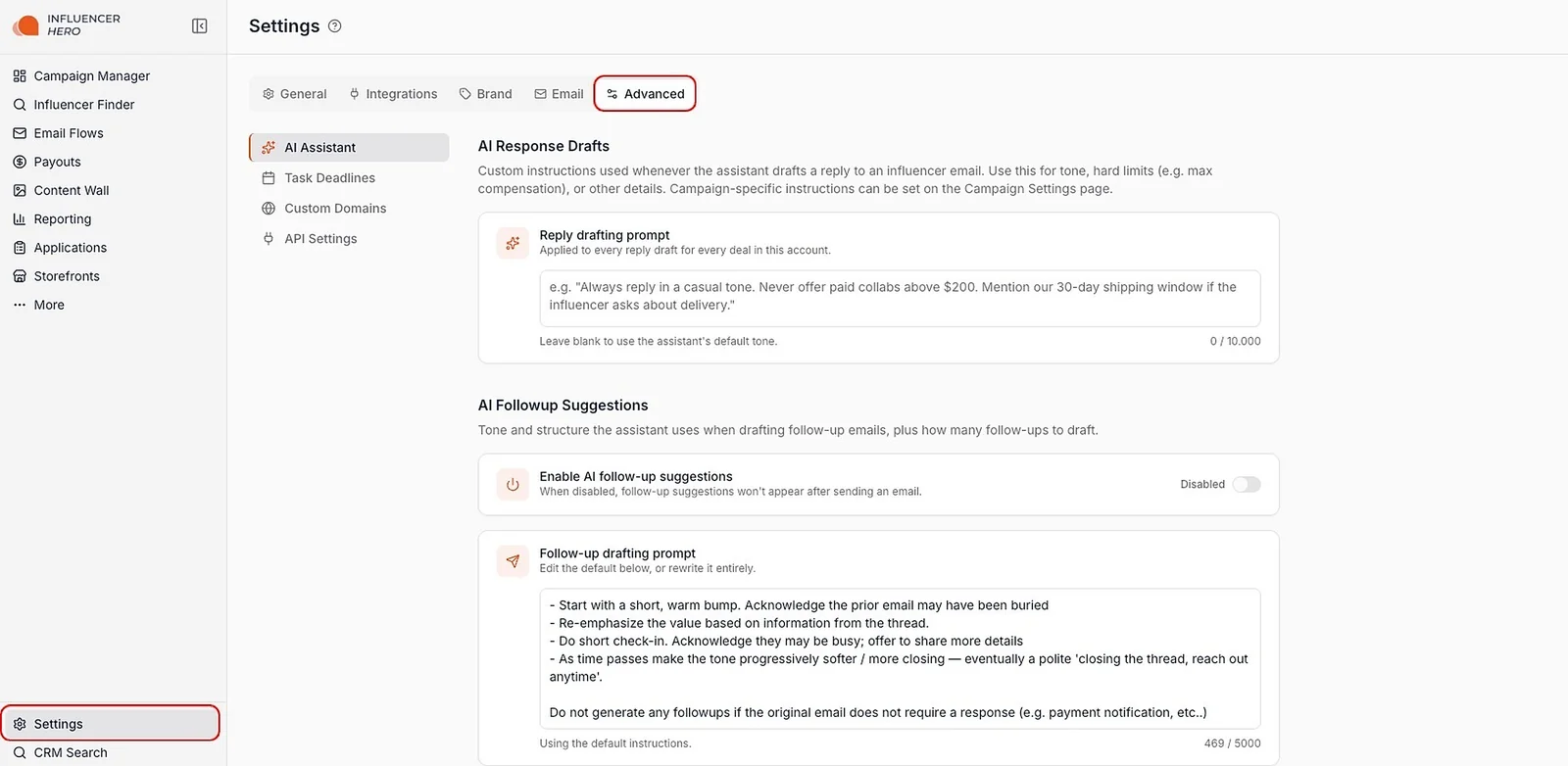
Under AI Response Drafts, the Reply drafting prompt applies to every reply draft for every deal in your account. Leave it blank to use the assistant's default tone, or add your own rules:
- "Always reply in a casual and friendly tone"
- "Use more emojis"
- "Never offer paid collaborations above $200"
- "Mention our 30 day shipping window if asked about delivery"
- Specific product advantages you want reflected in every email
Hard limits are the useful part here. Set your compensation ceiling once, and every AI draft follows it, no matter who on your team is sending. Combine that with the payout manager and your commercial terms stay consistent from first email to final payment.
AI Follow Up Suggestions
This is the bigger half of the release.
Standard follow up flows are static. Every creator gets the same message regardless of what you offered them, which is why they read like automation. AI follow up suggestions pull from the actual email you just sent.
Send a campaign invitation mentioning a fixed payment, 10% affiliate commission and a specific product, and the first follow up references those exact terms. Not "just bumping this up your inbox," but a message that reads like you wrote it yourself. Response rates follow from that, because creators can tell the difference.
After you hit send, a pop up appears with the suggested sequence and a proposed timeline. From there you can:
- Regenerate any follow up you do not like
- Edit the copy directly
- Unselect follow ups to send fewer than suggested
- Adjust the gap between each one, and the rest of the sequence shifts with it
- Schedule the whole sequence, or deschedule it later
The scheduler is weekend aware. If a follow up lands on a Sunday, it moves to Monday, which keeps the human impression intact. Unsent follow ups pause automatically, exactly like your normal email flows.
Set It Up Once in Settings
Go to Settings > Advanced > AI Assistant and find AI Followup Suggestions:
- Enable AI follow-up suggestions: turn the pop up on or off for your account.
- Follow-up drafting prompt: edit the default strategy or rewrite it entirely.
- Drip schedule: set how many follow ups to draft and how many days apart. The default is 5 follow ups, sent on days 2, 4, 6, 9 and 12 after the original email. Add or remove follow ups, or reset to default anytime.
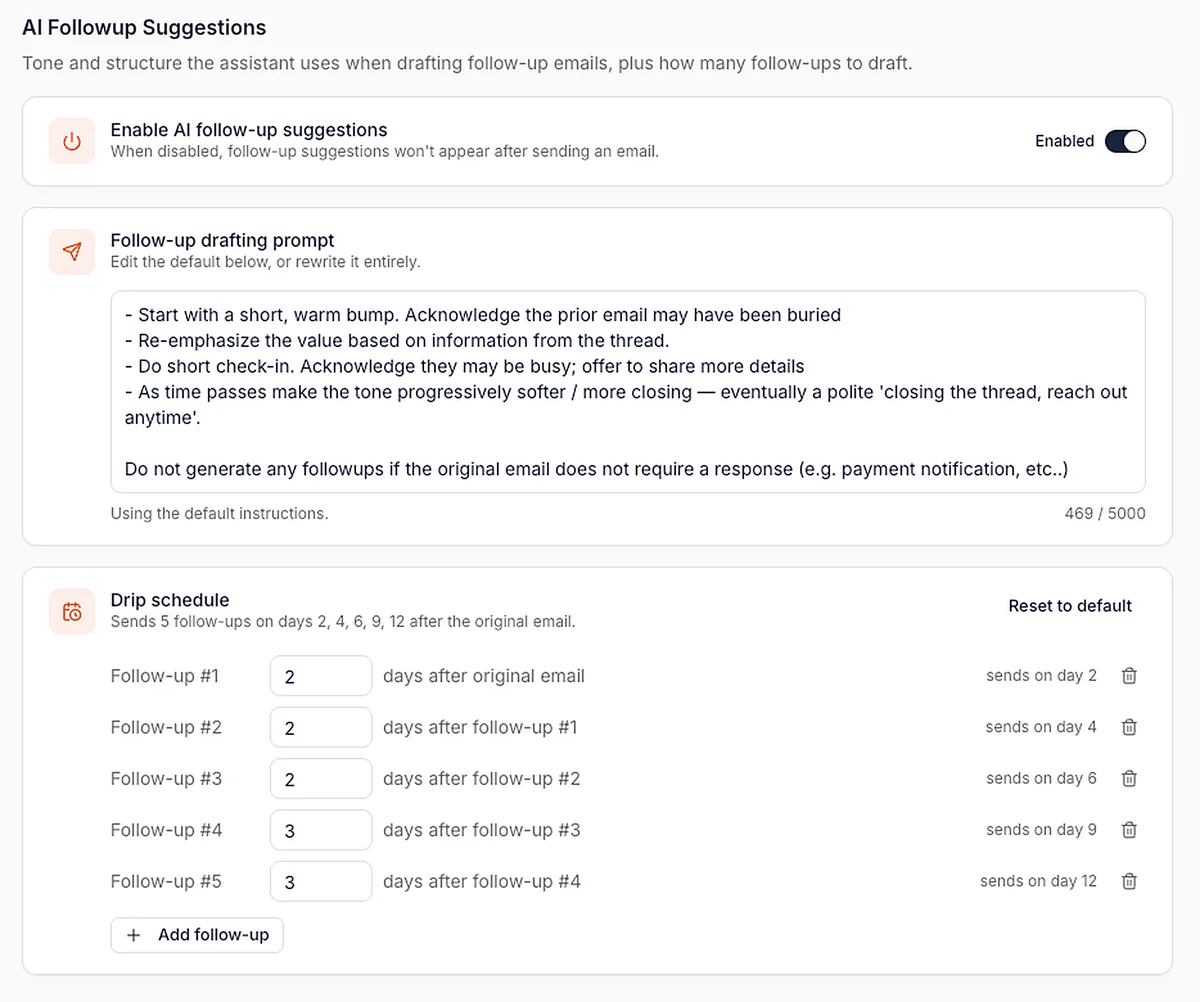
The drafting prompt is where strategy lives. The default already follows a proven sequence: a short, warm bump first, then re-emphasizing the value from the thread, then a quick check-in, with the tone getting progressively softer until a polite "closing the thread" message. You can change it to lead with social proof, keep things deliberately generic if brand safety matters more than impact, or build a completely different strategy.
The drafting prompt also handles exclusions. The default already skips emails that don't need a response, and you can add your own rules. For example: "Do not generate follow ups if the email is a payout confirmation or is a notification where we do not need a response from the influencer." For those emails, the pop up simply won't appear. Transactional messages stay clean, and suggestions only show up where a reply actually matters.
AI Assistant vs AI Draft: When to Use Which
Worth understanding, because they are not the same tool.
The AI Assistant only sees the current thread. You have to give it the context you want it to use, and it runs on a fast model built for speed. Great for quick rewrites, tone changes and translations.
The AI draft reads more than 50 similar deals across your account before writing a single line. It takes roughly 5 to 10 minutes of processing to look up relevant knowledge and patterns from your other collaborations. That is why the AI draft consistently produces the better email.
Use the AI draft when quality matters and you have time. Use the AI Assistant when you need to write or fix something now. The two work together rather than replacing each other, in the same way the Bulk Tool handles volume while individual profiles handle nuance.
Why This Matters
Response speed and follow up discipline move conversion more than almost anything else in outreach, and both break the moment a program scales past a few hundred creators.
AI email drafts and follow ups help you:
- Reply to anything without writing from scratch
- Keep campaign terms and tone consistent across the whole team
- Stop losing creators to follow ups nobody sent
- Send follow ups that reference the actual offer instead of generic bumps
- Set hard commercial limits for every AI draft
- Keep automation off the emails that should never trigger a chase
Automate Your Influencer Communication
Templates give you structure. AI drafts and follow ups give you personalization at volume. Together they produce outreach that scales without reading like a mail merge.
It runs alongside 45+ influencer marketing integrations, campaign automations and bulk actions, so creator communication stays in one system from first contact to payout.
Book a demo and see how AI email drafts and follow ups fit into your influencer program.
Summary
This is some text inside of a div block.
This is some text inside of a div block.
Pricing/Month
Shopify Reviews
This is some text inside of a div block.
This is some text inside of a div block.
This is some text inside of a div block.
This is some text inside of a div block.
This is some text inside of a div block.
This is some text inside of a div block.
This is some text inside of a div block.
This is some text inside of a div block.
This is some text inside of a div block.
This is some text inside of a div block.
This is some text inside of a div block.
This is some text inside of a div block.
This is some text inside of a div block.
This is some text inside of a div block.
This is some text inside of a div block.
This is some text inside of a div block.
This is some text inside of a div block.
This is some text inside of a div block.
This is some text inside of a div block.
This is some text inside of a div block.
This is some text inside of a div block.
Read More

FAQs



Most Popular Blogs


Drive ROI With Influencer Marketing
Join 1,200+ brands and 150+ agencies scaling creator programs with Influencer Hero.