
Let Influencers Choose Their Products: Automate Product Seeding/Gifting With Application Forms

October 15, 2026
|
Published

October 16, 2026
|
Updated

5 minutes
|
Reading

Influencer Performance Marketing Course | VOUCHER: IMC100

Lucrecia Dossat
I Author
Table of Contents
Drive ROI With Influencers

Global Influencer Database
ALL-IN-ONE platform
CRM, Affiliate, UGC & More
Let Influencers Choose Their Products: Automate Product Seeding/Gifting With Application Forms
Let your influencers pick their own gifted products — no guessing sizes, no chasing shipping addresses by email, and no risk of sending something that's already sold out.
With Influencer Hero's Application Forms, influencers don't just apply to work with you - they can shop for their own gifted product straight from your Shopify store, right inside the same form.
This article covers just that one part of Application Forms: letting influencers choose their own product(s) for seeding and gifting. It assumes you already have an application page set up - if not, start with Application Forms for Inbound first, then come back here for the product step.
How It Works
Step 1: Connect Shopify. Product selection only works with a connected Shopify store — that's where Influencer Hero pulls your product catalog, variants, and live stock levels from. Go to Settings > Integrations > Shopify > Connect(you'll need admin access to your Shopify store).
Step 2: Turn on "Add a product-selection step to the application form" and choose what's eligible. Allow specific products, or allow whole collections instead of listing every item one by one.
Step 3: Set the limits. Fill in Maximum number of items and/or Maximum total value (USD) — the picker stops influencers once they hit whichever limit you set.
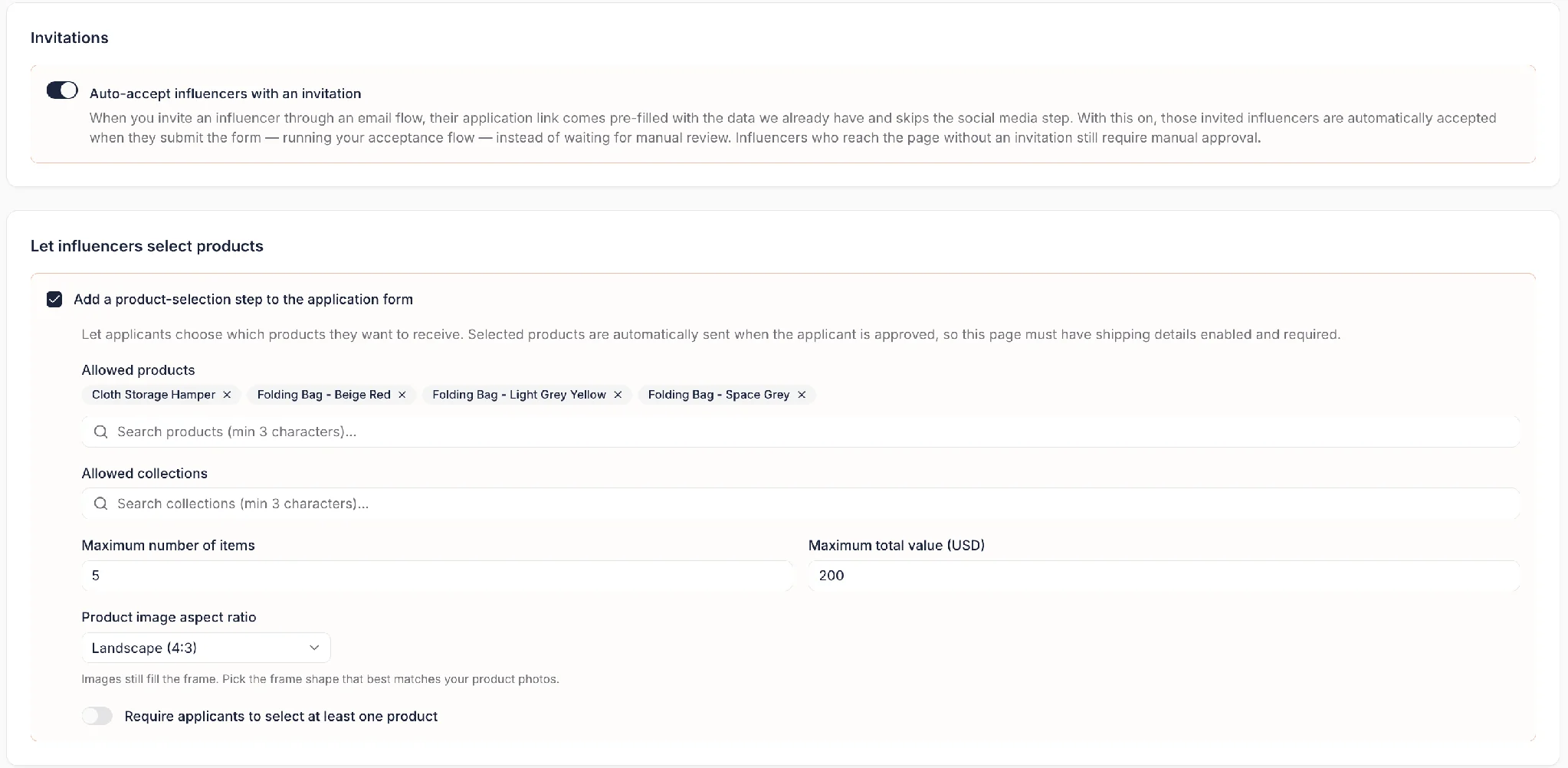
Step 4: Products with variants — size, colour, and so on — let influencers pick theirs right in the picker.
⚠️ Since the picker reads live from your connected Shopify store, anything out of stock (or any out-of-stock variant) won't be selectable. There's no toggle for this — it's automatic as long as Shopify is connected.
Here's what it looks like on the influencer's side:

Step 5: Turn on auto-accept for invited influencers (this setting lives right above the product picker in your settings, in the screenshot above). When you invite an influencer through an email flow, their application link arrives pre-filled with the data you already have, and skips the social media step.
With Auto-accept influencers with an invitation turned on, those invited influencers are automatically accepted the moment they submit the form — running your whole acceptance flow instantly, with no manual review needed. Influencers who reach the page without an invitation (a bio link, an open call) still require manual review, since you haven't vetted them yet.
Step 6: Add anything else you need before they can choose.
- Briefs / terms & conditions: add a brief or T&Cs influencers have to read and accept before moving forward — great for setting content expectations up front (e.g. "must post within 14 days of receiving the product").
- Custom questions: dropdowns, text inputs, and other field types for anything else you want to know.
- Shipping details: collected right in the form, so you never need a separate "what's your address?" email.
- Social media accounts: collected so you can review the influencer's profile as part of your decision.
Step 7: Set what happens when you accept or reject. Applications still need manual review — you'll see submissions land on your Applications page, ready to accept or decline:

But everything after your decision can run on its own. For accepted influencers, you can automatically:
- Send them an email letting them know they're in
- Add them to a specific campaign board
- Create their affiliate details — custom link, discount code, commission, and custom link target — the moment they're approved

💡 PRO TIP: Use {{influencer_handle}} or {{firstname}} to personalize each influencer's custom link or discount code (e.g. {{firstname}}-10). Repeated first names automatically get a number, like amy and amy-2.
For rejected influencers, you can automatically:
- Send them an email letting them know it's not a fit this time
- Add them to a separate campaign board, so they're kept on file for future campaigns instead of lost
Why You Should Be Using This
- No more manual matching. Influencers pick their own size and colour, so nothing gets sent wrong.
- Nothing ships that's out of stock. The picker only shows what's actually available in Shopify, live.
- One less email. Shipping details are collected on the form — never chase an address again.
- Budget stays under control. You set the value or item cap, so gifting stays self-serve and on-budget.
- The affiliate relationship starts immediately. The moment someone's accepted, they can walk away with a trackable link and code, no manual setup required.
Summary
This is some text inside of a div block.
This is some text inside of a div block.
Pricing/Month
Shopify Reviews
This is some text inside of a div block.
This is some text inside of a div block.
This is some text inside of a div block.
This is some text inside of a div block.
This is some text inside of a div block.
This is some text inside of a div block.
This is some text inside of a div block.
This is some text inside of a div block.
This is some text inside of a div block.
This is some text inside of a div block.
This is some text inside of a div block.
This is some text inside of a div block.
This is some text inside of a div block.
This is some text inside of a div block.
This is some text inside of a div block.
This is some text inside of a div block.
This is some text inside of a div block.
This is some text inside of a div block.
This is some text inside of a div block.
This is some text inside of a div block.
This is some text inside of a div block.
Read More

FAQs




Most Popular Blogs


Drive ROI With Influencer Marketing
Join 1,200+ brands and 150+ agencies scaling creator programs with Influencer Hero.