Creator Storefronts: Let Influencers Sell Your Products with Custom Shops

February 26, 2026
|
Published

June 16, 2026
|
Updated

13 Min
|
Reading

Influencer Performance Marketing Course | VOUCHER: IMC100

Malena Garcia
| Author

Drive ROI With Influencers

Global Influencer Database
ALL-IN-ONE platform
CRM, Affiliate, UGC & More
Creator Storefronts: Let Influencers Sell Your Products with Custom Shops
Creator Storefronts in Influencer Hero allow brands to distribute their product catalog through Creator Hero, where creators can discover, select, and curate products into their own customizable storefronts.
The feature connects your product catalog, affiliate tracking, CRM, and payouts into a single workflow. Products are synced into Creator Hero, where creators browse available brand offers, add products to their storefront, and promote them using commissionable links. All activity—including clicks, sales, and earnings—is tracked back inside Influencer Hero and tied to each creator’s deal page.
This article explains how Creator Storefronts work across both Influencer Hero and Creator Hero, how products move from your catalog into creator storefronts, and how performance is tracked and managed inside the platform.
How Influencer Gifting Works in Influencer Hero
Creator Storefronts operate as a connected system between Influencer Hero (brand-side CRM) and Creator Hero (creator-facing marketplace and storefront builder). Instead of manually assigning affiliate links, brands make their product catalog available through Creator Hero, where creators can discover, select, and promote products through their own storefront.
Below is how the feature works across both platforms
Step 1: Connect Your Store and Sync Your Product Catalog
To get started, brands connect their eCommerce store inside Influencer Hero.
- If you use Shopify, your product catalog syncs automatically.
- For other platforms, products can be uploaded manually or via bulk Excel import.
Once connected, your catalog becomes available inside Creator Hero. This is where creators can browse your products and decide what to include in their storefront.
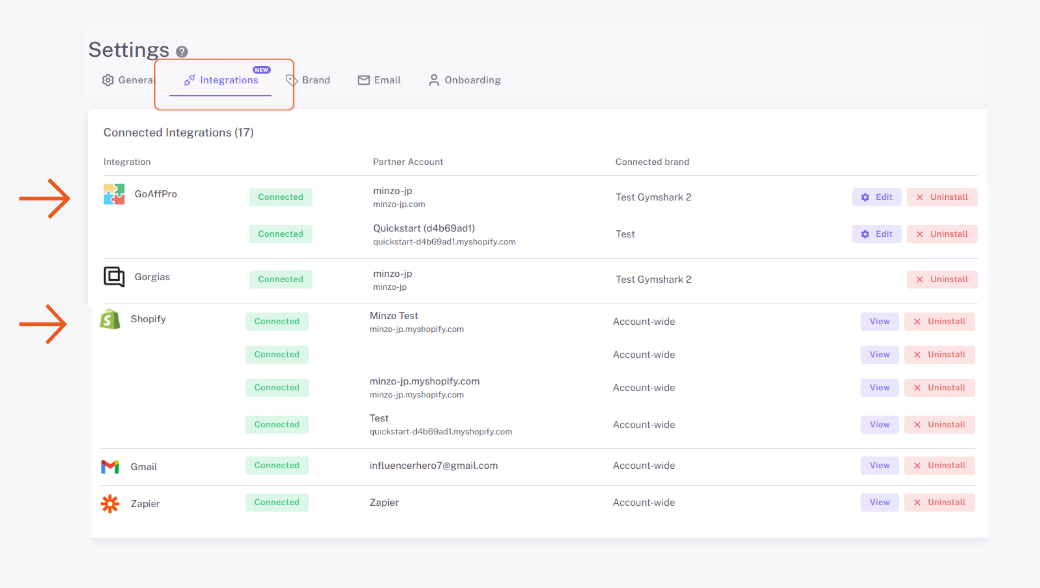
Once connected, product data, tracking assets, and commission reporting flow automatically into Influencer Hero. This ensures that every storefront action is tied to real performance data inside the CRM.
Step 2: Configure Commission and Tracking at the Deal Level
Storefront monetization is defined inside the influencer’s deal page.
From here, you:
- Set commission percentages
- Generate discount codes
- Create trackable affiliate links
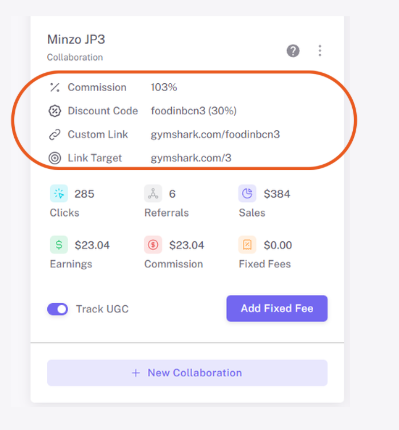
These settings are automatically tied to the creator’s storefront. This means that when a creator adds your product, all tracking and commission logic is already in place—no manual link distribution is required.
Step 3: Activate the Creator Dashboard and Storefront Access
After selecting products, creators use the Store Builder inside Creator Hero to design their storefront.
The storefront functions as a customizable CMS where creators can:
- Organize products into collections
- Edit product pages
- Personalize how products are presented
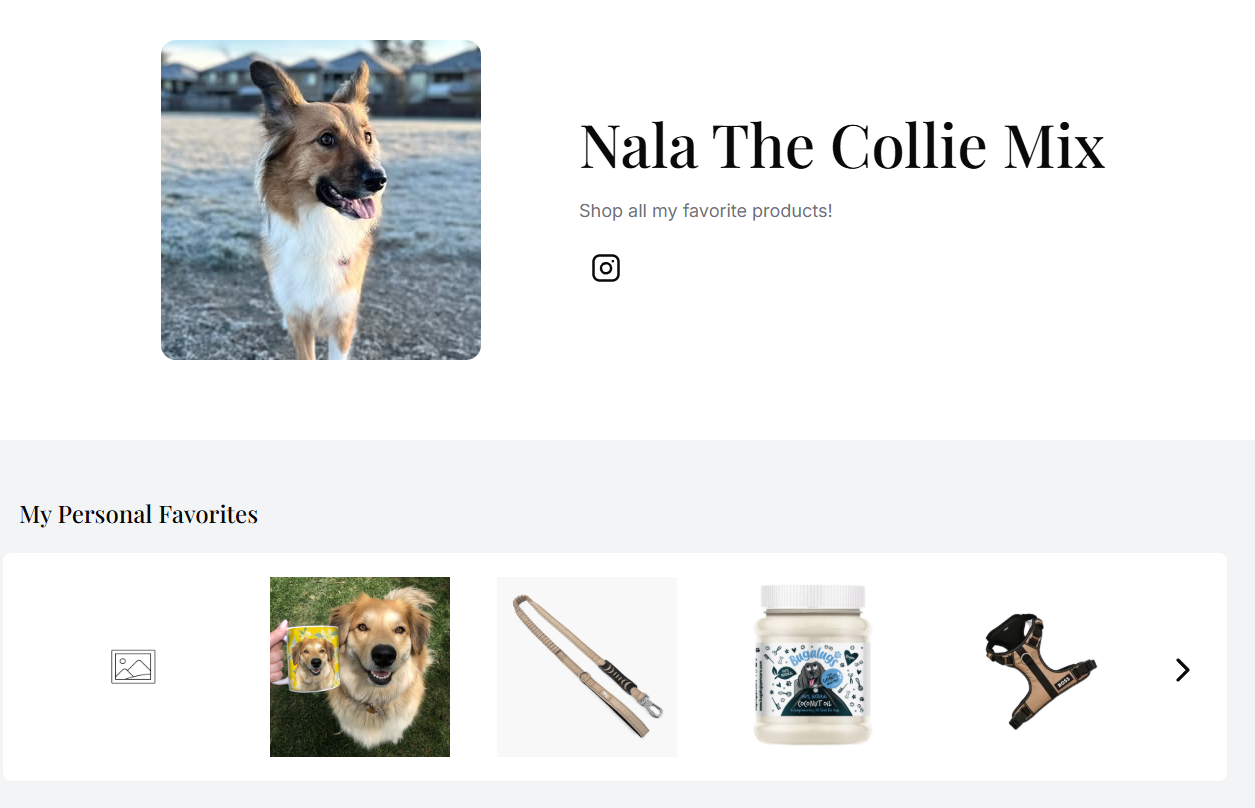
Each storefront is mobile-optimized and designed for conversion, allowing creators to promote a curated shop rather than individual links.
From the brand perspective, this means your products are being presented in a context that is tailored to each creator’s audience.
Step 4: Traffic, Sales, and Performance Sync Back to Influencer Hero
When creators share their storefront (via bio links, stories, or content), all activity is tracked automatically.
Influencer Hero captures:
- Clicks
- Referrals
- Sales
- Earnings and commissions
This data is synced directly to the creator’s deal page and visible inside the Collaboration section, allowing you to monitor storefront-driven performance without relying on external affiliate dashboards.
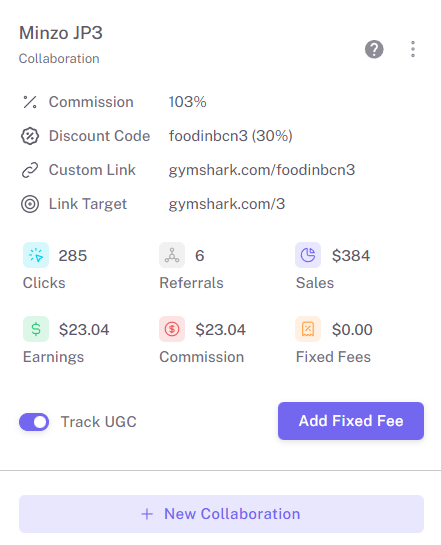
Because performance is tied directly to each collaboration, storefront revenue is visible alongside outreach history, content tracking, and campaign stages.
Step 5: Manage Earnings and Payouts Inside the Platform
On the creator side, earnings accumulate inside the Creator Dashboard, where they can track their performance and payout status.
On the brand side, payouts are handled directly from Influencer Hero:
- Commission balances are calculated automatically
- Payments can be issued via Stripe or marked as offline payouts
This closes the loop between product distribution, storefront promotion, performance tracking, and compensation.
What You Can Do With the Creator Storefronts Feature
Creator Storefronts allow you to distribute products, assign monetization, track performance, and connect storefront activity to your broader campaign workflows inside Influencer Hero. Below are the main actions you can take.
1. Enable a Custom Storefront for Each Creator
Once your store is connected through Shopify or GoAffPro, your product catalog becomes available inside Influencer Hero and is distributed to Creator Hero, where creators can browse brand offers and select the products they want to promote. From the deal page, you activate commission tracking, which gives the creator access to their storefront builder.
From there, creators can curate your products into their own customizable storefront, organize them into collections, and generate commissionable links automatically. Each storefront functions as a personalized shop, where creators can also customize product pages and present items in a way that fits their audience. Every product added is tied to the commission structure set in their deal, so there is no need to manually issue links.
2. Assign Products and Commissions at the Deal Level
From the deal page, you can define commission percentages, create discount codes, and generate custom affiliate links that feed directly into the creator’s storefront. These settings apply automatically, meaning once a creator is approved, their monetization structure is already in place. If you use Application Forms, affiliate details can be generated immediately upon approval, keeping the onboarding flow structured and consistent.
3. Track Storefront Performance in Real Time
All storefront activity flows back into Influencer Hero. As creators drive traffic to their storefront, clicks, referrals, sales, earnings, and commissions are automatically tracked and synced to the Collaboration section of the deal page.
This tracking is powered by your Shopify or GoAffPro integration, ensuring that every sale is accurately attributed and reported inside the CRM. As a result, performance can be reviewed alongside outreach, content, and campaign activity without relying on external affiliate dashboards.
4. Scale Storefronts Across Campaign Boards
For brands running larger influencer programs, storefront activation can be managed at the campaign level. You can organize creators inside Campaign Boards, apply standardized commission setups, and monitor recurring storefront-driven revenue per campaign. This keeps performance grouped by initiative rather than scattered across individual affiliate setups.
5. Connect Storefronts to the Creator Dashboard and Payouts
Once invited to the Creator Dashboard in Creator Hero, creators can track their storefront performance, including clicks, sales, and earnings, while also managing their payout details.
On the brand side, commissions are calculated automatically inside Influencer Hero based on tracked sales from Shopify or GoAffPro, and payouts can be processed directly from the deal page. This connects Creator Hero storefront activity, performance tracking, and payouts into a single workflow.
6. Keep Storefront Activity Connected to Outreach and Content
Storefront performance from Creator Hero is tied directly to each creator’s CRM record in Influencer Hero. This means storefront sales can be viewed alongside outreach history, contracts, gifting actions, post tracking, and campaign progression. This way, brands can understand how storefront promotion contributes to content performance, creator retention, and long-term revenue across campaigns.
Together, these capabilities allow teams to activate affiliate monetization, track recurring sales, and manage influencer storefronts as part of a connected system rather than as a separate affiliate tool.
When Teams Use Creator Storefronts
The Creator Storefront feature is used when teams want influencer promotion to continue generating sales beyond a single post or campaign. Below are common scenarios where storefronts become a core part of the workflow.
When Moving From One-Off Campaigns to Ongoing Revenue
Teams adopt storefronts when they want product promotion to continue beyond a single post or campaign. Instead of repeatedly negotiating new collaborations or sending new affiliate links, brands make their catalog available in Creator Hero, where creators can continuously feature products in their storefront.
Creators promote their storefront over time through content, link-in-bio, and recurring placements, while all activity is tracked inside Influencer Hero. This shifts the relationship from campaign-based execution to ongoing monetization without additional operational work.
When Scaling an Ambassador or Affiliate Program
As influencer programs grow (whether it is through affiliate or ambassador programs), managing affiliate links, codes, and payouts manually becomes difficult to maintain. Storefronts are introduced when teams need a consistent monetization structure across multiple creators.
Commission percentages are defined at the deal level, storefront performance syncs into Campaign Boards, and payouts are processed inside the same system. This allows ambassador programs to expand without adding operational complexity.
When Launching New Product Collections
In all sorts of influencer campaigns, during launches, brands often want products to remain visible over time rather than depend on a single sponsored post. With storefronts enabled, creators can immediately add new products into their curated shop.
Instead of coordinating separate launch waves, brands rely on their existing storefront network to integrate new collections organically into recurring content, keeping product visibility consistent across campaigns.
When Prioritizing Retention and Long-Term Partnerships
Teams focused on creator retention use storefronts to create an ongoing incentive structure. Since influencers earn commission from their storefront over time, they have a built-in reason to continue driving traffic and sales.
This reduces the need to constantly source new creators and strengthens long-term relationships, as the partnership evolves into a recurring revenue channel rather than a one-time collaboration.
How the Creator Storefronts Connects With Other Influencer Hero Features
Creator Storefronts are not a standalone feature. They operate as part of a connected system across Influencer Hero, Creator Hero, and your eCommerce integrations. This allows product distribution, creator collaboration, performance tracking, and payouts to run within a single workflow instead of across multiple tools.
Creator Storefronts + Campaign Boards
Campaign Boards structure how storefront activity is organized and scaled. Once creators are added to a board—whether for ambassador programs, product launches, or ongoing affiliate initiatives—their storefront performance remains tied to that campaign.
This allows you to monitor recurring revenue generated through Creator Hero storefronts at the campaign level, compare performance across different initiatives, and move creators between stages based on results. Instead of managing storefronts individually, performance is grouped by strategy.
Creator Storefronts + Outreach
Storefront activity is directly connected to outreach and collaboration history inside the CRM. From the moment a creator is contacted, all communication, negotiation, and activation steps are stored alongside their storefront performance.
This makes it possible to understand which outreach efforts lead to long-term storefront revenue, not just one-time posts. For example, you can identify creators who initially joined through gifting or affiliate outreach and later became consistent revenue drivers through their Creator Hero storefront.
Creator Storefronts + Affiliate Tracking Integrations
Storefronts connect directly to your e-commerce tools layer through the native Shopify app or GoAffPro integration. Referral links and discount codes are generated inside Influencer Hero, and clicks and sales sync back into the CRM automatically.
This integration ensures that storefront sales are reflected on the deal page, inside reporting, and within commission calculations—without manual reconciliation across systems.
Creator Storefronts + Reporting & Content Wall
Because storefront activity is tied to each collaboration, sales performance can be analyzed alongside posting behavior. Using reporting filters and the Content Wall, teams can identify which creators are not only driving sales but also producing high-performing content.
This makes it possible to move top storefront performers into ambassador programs, paid collaborations, or expanded commission structures—all within the same platform.
Creator Storefronts + Creator Dashboard & Payments
On the creator side, storefront earnings appear inside the Creator Dashboard, where influencers can track clicks, sales, balance, and payout history. On the brand side, payouts are processed directly from the deal page.
This closes the loop between promotion, tracking, and compensation. Storefront monetization, performance visibility, and payments operate inside one connected infrastructure.
Together, these connections show why Creator Storefronts exist as part of an all-in-one system. They link discovery, outreach, affiliate tracking, reporting, and payouts into a continuous workflow—allowing brands to manage influencer-driven revenue without switching between separate tools.
Final Thoughts
Creator Storefronts in Influencer Hero are built to turn influencer collaborations into an ongoing, trackable revenue channel. From enabling commission structures and syncing affiliate sales to tracking performance and processing payouts, everything operates inside one connected workflow—without relying on external affiliate dashboards or manual reconciliation.
If you want to see how Creator Storefronts fit into your broader influencer, affiliate, and campaign management workflows, you can explore the feature in a live walkthrough. Book a demo with Influencer Hero to see how storefronts connect with discovery, CRM tracking, reporting, and payouts in one system.
Summary
This is some text inside of a div block.
This is some text inside of a div block.
Pricing/Month
Shopify Reviews
This is some text inside of a div block.
This is some text inside of a div block.
This is some text inside of a div block.
This is some text inside of a div block.
This is some text inside of a div block.
This is some text inside of a div block.
This is some text inside of a div block.
This is some text inside of a div block.
This is some text inside of a div block.
This is some text inside of a div block.
This is some text inside of a div block.
This is some text inside of a div block.
This is some text inside of a div block.
This is some text inside of a div block.
This is some text inside of a div block.
This is some text inside of a div block.
This is some text inside of a div block.
This is some text inside of a div block.
This is some text inside of a div block.
This is some text inside of a div block.
This is some text inside of a div block.
Read More

FAQs
What is a Creator Storefront in Influencer Hero?

A Creator Storefront is a customizable, mobile-optimized shop page where influencers curate your products using commissionable links. All clicks, sales, and earnings are automatically tracked inside Influencer Hero’s CRM.
How are storefront sales tracked?
Sales are tracked through your connected affiliate integration, such as Shopify or GoAffPro. Referral links and discount codes sync performance data back into each creator’s deal page, where clicks, referrals, and commissions are visible in real time.
Do I need a separate affiliate platform to use storefronts?
No. If you use Shopify, Influencer Hero’s native integration handles tracking. For other eCommerce platforms, GoAffPro can be connected, and performance data will sync directly into the CRM.
Can storefronts be used for all influencer categories, including nano influencers?
Yes. Creator Storefronts can be activated for all influencers categories, including nano influencers. This allows brands to scale ambassador or affiliate programs across different tiers without changing the underlying tracking structure.
How do influencers get paid for storefront sales?
Influencers can track their earnings inside the Creator Dashboard, where they see clicks, sales, and commission balances. Brands can process payouts directly from the deal page, keeping monetization, tracking, and payments aligned inside the same system.









Most Popular Blogs


Drive ROI With Influencer Marketing
Join 1,200+ brands and 150+ agencies scaling creator programs with Influencer Hero.